New install help

james cullen

New member
Member
VIP
Local time
11:49 AM
Messages
102
Hello All,

This is my first post in this fantastic forum, what a wealth of info.

I have some questions in regard to installing Win 7 on a new drive inside my current machine which also has Win 7 on another drive, then I wish to delete my original Win 7.

I have looked at the sticky posts above but not quite sure what to do, or which ones apply to my problem.

I am looking at installing a OCZ RevoDrive x2 240GB PCIe in my machine, installing win 7 on it and using as my default OS. I would like to get the OS up and running well on the new drive and after a time when I think things are running well, delete the original OS.

I don't want to just clone the original OS to new drive but a clean install.

Can this be done, and if so is there somewhere on the site where I could look for direction?

Thanks for your help in advance
 

My Computer

Computer type
PC/Desktop
OS
Win pro 64bit
CPU
i7-980X
Motherboard
X58A-UD3R
Memory
Corsair Dominator CMP12GX3M3A1600C9 9-9-9-24 X2
Graphics Card(s)
Asus Geforce GTX 560 Ti
Sound Card
none
Monitor(s) Displays
Eizo x 2
Screen Resolution
1200x1600
Hard Drives
Revo 240gb,
Samsung 840 pro OS
Samsung 840 Scratch
WD 1TB x 3.
PSU
Siverstone
Case
Corsair 700d
Cooling
Noctua 140
Hello and welcome.
I would disconnect the cable on the old drive, and restart the computer.
Go into the bios and make your boot device the CD/DVD burner.
Restart the computer and install the OS.

After installation, you may have to reset the bios to boot from the HDD.
Try it out and let us know your progress.
 

My Computer

Computer type
PC/Desktop
Computer Manufacturer/Model Number
Custom Build
OS
Windows 7 Home Premium 64 bit
CPU
Intel Core i7-4790
Motherboard
GA-Z87X-D3H
Memory
G.SKILL 8GB (2 x 4GB) DDR3 F3-10666CL9D-8GBNT
Graphics Card(s)
AMD Radeon R7 250
Sound Card
Realtek ALC892
Monitor(s) Displays
Samsung UN32EH5000, Dell 1703FPT
Screen Resolution
1920 x 1080, 1280 x 1024
Hard Drives
WD5003AZEX
WD10EZEX
Samsung HD103SJ
Samsung 128 GB 840 PRO
PSU
SeaSonic M12II SS-500GM
Case
Fractal Design Define R4
Cooling
Zalman CNPS9900ALED
Keyboard
Logitech K800
Mouse
Logitech M705
Internet Speed
16 Mbps
Antivirus
Avast
Browser
Firefox
Other Info
Bose Companion 2 Multimedia Speakers
Hello james cullen, welcome to Seven Forums!


Have a look at this information at the link below.


   Information

The easiest way to do away with boot issues between separate Operating Systems (OS) is to use the BIOS one time boot menu to select which OS to boot at system startup, each motherboard has an individual hot-key to tap during system start-up to access this menu.

If you have 2 separate Hard Disk Drives (HDD) and have one OS installed to one HDD and you want to install another OS to the second HDD, disconnect the HDD with the first OS installed on it and leave only the HDD you want to install the second OS to connected.

Just be sure not to change where the original HDD SATA cable was connected, it has to be re-connected to the exact same port to avoid boot issues.

Install the second OS to the connected HDD and when complete and the system is booting good, power down and reconnect the first HDD with the first OS on it.

This way the OSs will boot independently of each other and there will be no boot conflicts between the 2 separate OSs to have to sort later.


Then set the BIOS to boot the HDD / OS you want as default and if you want to start the other (new) OS you use the BIOS one-time boot menu to select that HDD / OS to start when the PC is started.
  • Asus - F8
  • HP/Compaq - Esc
  • Sony - F2
  • Acer - F12
  • Gateway - F10
  • eMachnes - F10
  • Toshiba - F12
  • Dell - F12
  • IBM/Lenovo - the blue Thinkvantage button
 

My Computer

Computer Manufacturer/Model Number
* BFK Customs *
OS
W 7 64-bit Ultimate
CPU
Intel Q9550 Yorkfield
Motherboard
ASUS P5Q Pro
Memory
8GB Dominator 8500C5D
Graphics Card(s)
ATI : XFX 5870
Sound Card
Realtek HD Audio 7-1
Monitor(s) Displays
1x 47" LCD HDMI & 3x 26" LCD HDMI
Screen Resolution
1920x1080P & 1920x1200
Hard Drives
1x 80GB Intel X25-M G2 SSD : 1x 500GB & 1x 640GB WD Caviar Black(s)
PSU
Corsair 620HX
Case
Cooler Master RC-690
Cooling
Tuniq Tower 120, 2x 140mm and 3x 120mm case fans
Keyboard
Microsoft 500
Mouse
Razer Diamondback 3G
Internet Speed
14 Mb/s
Other Info
1x Koutech 3Gb/s SATA HDD Hot Swap Rack
Thanks so much guys, that's the info I need.

One question though. In the info BFK provided.

"Then set the BIOS to boot the HDD / OS you want as default and if you want to start the other (new) OS you use the BIOS one-time boot menu to select that HDD / OS to start when the PC is started."

How do I use the one-time boot menu? Is this in bios and accessed during start up by tapping hot key?

Thanks for your help


My Computer

Computer type
PC/Desktop
OS
Win pro 64bit
CPU
i7-980X
Motherboard
X58A-UD3R
Memory
Corsair Dominator CMP12GX3M3A1600C9 9-9-9-24 X2
Graphics Card(s)
Asus Geforce GTX 560 Ti
Sound Card
none
Monitor(s) Displays
Eizo x 2
Screen Resolution
1200x1600
Hard Drives
Revo 240gb,
Samsung 840 pro OS
Samsung 840 Scratch
WD 1TB x 3.
PSU
Siverstone
Case
Corsair 700d
Cooling
Noctua 140
Using BFK's method, when windows goes through the boot process, a screen will appear and you will see the OS twice. You'll have 30 seconds to select the newer or older OS. If you do nothing the newer OS will be picked automatically.

To speed up the boot process and perhaps change the boot OS.
Right click on my computer.
Select Properties.
Select Advanced system settings.
Select Advanced, Startup and Recovery, Settings.
Choose the Default operating system from the drop down tab.
Change the Time to display list of operating systems, to 3 to 5 five seconds.
Press OK twice.

Regards
 

My Computer

Computer type
PC/Desktop
Computer Manufacturer/Model Number
Custom Build
OS
Windows 7 Home Premium 64 bit
CPU
Intel Core i7-4790
Motherboard
GA-Z87X-D3H
Memory
G.SKILL 8GB (2 x 4GB) DDR3 F3-10666CL9D-8GBNT
Graphics Card(s)
AMD Radeon R7 250
Sound Card
Realtek ALC892
Monitor(s) Displays
Samsung UN32EH5000, Dell 1703FPT
Screen Resolution
1920 x 1080, 1280 x 1024
Hard Drives
WD5003AZEX
WD10EZEX
Samsung HD103SJ
Samsung 128 GB 840 PRO
PSU
SeaSonic M12II SS-500GM
Case
Fractal Design Define R4
Cooling
Zalman CNPS9900ALED
Keyboard
Logitech K800
Mouse
Logitech M705
Internet Speed
16 Mbps
Antivirus
Avast
Browser
Firefox
Other Info
Bose Companion 2 Multimedia Speakers
Ok, thanks, I may now be able to stumble through.

Thank you both for your help.

Cheers
 

My Computer

Computer type
PC/Desktop
OS
Win pro 64bit
CPU
i7-980X
Motherboard
X58A-UD3R
Memory
Corsair Dominator CMP12GX3M3A1600C9 9-9-9-24 X2
Graphics Card(s)
Asus Geforce GTX 560 Ti
Sound Card
none
Monitor(s) Displays
Eizo x 2
Screen Resolution
1200x1600
Hard Drives
Revo 240gb,
Samsung 840 pro OS
Samsung 840 Scratch
WD 1TB x 3.
PSU
Siverstone
Case
Corsair 700d
Cooling
Noctua 140
   Information

Acer - F2

Looks like you're using an older version of the BIOS Boot Menu keys I was posting. I have since edited it to include the correct Acer Fkey with is F12.

Here is the more up to date version:

Asus - F8
HP/Compaq - Esc
Sony - F2
Acer - F12
Gateway - F10
eMachnes - F10
Toshiba - F12
Dell - F12
IBM/Lenovo - the blue Thinkvantage button
 
Using BFK's method, when windows goes through the boot process, a screen will appear and you will see the OS twice. You'll have 30 seconds to select the newer or older OS. If you do nothing the newer OS will be picked automatically.

To speed up the boot process and perhaps change the boot OS.
Right click on my computer.
Select Properties.
Select Advanced system settings.
Select Advanced, Startup and Recovery, Settings.
Choose the Default operating system from the drop down tab.
Change the Time to display list of operating systems, to 3 to 5 five seconds.
Press OK twice.

Regards

No, everything you describe is the Windows managed dual boot.

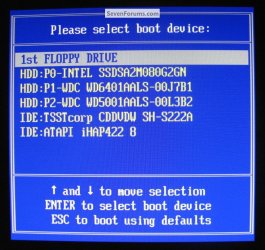
What I posted you will get a BIOS one-time boot menu particular to your motherboard, like for my ASUS board I tap the F8 hot-key at system startup to get to this one-time boot menu, the HDD I have set as default will auto-boot if I don't access this menu during PC startup to select another HDD/CD/DVD drive.

Thanks Greg, I'll correct that.

click to enlarge
BIOS One_Time Boot Menu.jpg


My Computer

Computer Manufacturer/Model Number
* BFK Customs *
OS
W 7 64-bit Ultimate
CPU
Intel Q9550 Yorkfield
Motherboard
ASUS P5Q Pro
Memory
8GB Dominator 8500C5D
Graphics Card(s)
ATI : XFX 5870
Sound Card
Realtek HD Audio 7-1
Monitor(s) Displays
1x 47" LCD HDMI & 3x 26" LCD HDMI
Screen Resolution
1920x1080P & 1920x1200
Hard Drives
1x 80GB Intel X25-M G2 SSD : 1x 500GB & 1x 640GB WD Caviar Black(s)
PSU
Corsair 620HX
Case
Cooler Master RC-690
Cooling
Tuniq Tower 120, 2x 140mm and 3x 120mm case fans
Keyboard
Microsoft 500
Mouse
Razer Diamondback 3G
Internet Speed
14 Mb/s
Other Info
1x Koutech 3Gb/s SATA HDD Hot Swap Rack
thanks BFK
 

My Computer

Computer type
PC/Desktop
OS
Win pro 64bit
CPU
i7-980X
Motherboard
X58A-UD3R
Memory
Corsair Dominator CMP12GX3M3A1600C9 9-9-9-24 X2
Graphics Card(s)
Asus Geforce GTX 560 Ti
Sound Card
none
Monitor(s) Displays
Eizo x 2
Screen Resolution
1200x1600
Hard Drives
Revo 240gb,
Samsung 840 pro OS
Samsung 840 Scratch
WD 1TB x 3.
PSU
Siverstone
Case
Corsair 700d
Cooling
Noctua 140
BFK
You're right.
I was in the Dual boot world.

Thanks
 

My Computer

Computer type
PC/Desktop
Computer Manufacturer/Model Number
Custom Build
OS
Windows 7 Home Premium 64 bit
CPU
Intel Core i7-4790
Motherboard
GA-Z87X-D3H
Memory
G.SKILL 8GB (2 x 4GB) DDR3 F3-10666CL9D-8GBNT
Graphics Card(s)
AMD Radeon R7 250
Sound Card
Realtek ALC892
Monitor(s) Displays
Samsung UN32EH5000, Dell 1703FPT
Screen Resolution
1920 x 1080, 1280 x 1024
Hard Drives
WD5003AZEX
WD10EZEX
Samsung HD103SJ
Samsung 128 GB 840 PRO
PSU
SeaSonic M12II SS-500GM
Case
Fractal Design Define R4
Cooling
Zalman CNPS9900ALED
Keyboard
Logitech K800
Mouse
Logitech M705
Internet Speed
16 Mbps
Antivirus
Avast
Browser
Firefox
Other Info
Bose Companion 2 Multimedia Speakers

My Computer

Computer Manufacturer/Model Number
* BFK Customs *
OS
W 7 64-bit Ultimate
CPU
Intel Q9550 Yorkfield
Motherboard
ASUS P5Q Pro
Memory
8GB Dominator 8500C5D
Graphics Card(s)
ATI : XFX 5870
Sound Card
Realtek HD Audio 7-1
Monitor(s) Displays
1x 47" LCD HDMI & 3x 26" LCD HDMI
Screen Resolution
1920x1080P & 1920x1200
Hard Drives
1x 80GB Intel X25-M G2 SSD : 1x 500GB & 1x 640GB WD Caviar Black(s)
PSU
Corsair 620HX
Case
Cooler Master RC-690
Cooling
Tuniq Tower 120, 2x 140mm and 3x 120mm case fans
Keyboard
Microsoft 500
Mouse
Razer Diamondback 3G
Internet Speed
14 Mb/s
Other Info
1x Koutech 3Gb/s SATA HDD Hot Swap Rack
Thanks for all your responses.

I thought I'd ask another question and add it to the original post as it's related.

My end goal is to upgrade my machine, I have the bits (new MB, CPU, Revodrive). What I'd like to do is, install the new drive in my old machine, install new OS and all the programs that I use and have it run stable. Then I would build the new machine and boot up with the Revo drive previously installed on the old machine.

Am I being a bit optimistic or just plain stupid? Would it work?

Thanks in advance

James
 

My Computer

Computer type
PC/Desktop
OS
Win pro 64bit
CPU
i7-980X
Motherboard
X58A-UD3R
Memory
Corsair Dominator CMP12GX3M3A1600C9 9-9-9-24 X2
Graphics Card(s)
Asus Geforce GTX 560 Ti
Sound Card
none
Monitor(s) Displays
Eizo x 2
Screen Resolution
1200x1600
Hard Drives
Revo 240gb,
Samsung 840 pro OS
Samsung 840 Scratch
WD 1TB x 3.
PSU
Siverstone
Case
Corsair 700d
Cooling
Noctua 140
I am no expert, if I am wrong certainly someone will correct me. IMO, no it would not work. When you install the os in your old machine, windows will load the drivers for the hardware in that machine. Once you change the drive to a new machine, you will not have the drivers for the new hardware, and windows may not be able to boot. This may be fixable, but by someone more knowledgeable than me.
 

My Computers

System One System Two

  • Computer type
    PC/Desktop
    Computer Manufacturer/Model Number
    ALWAYS UNDER CONSTRUCTION
    OS
    Windows 11 Pro
    CPU
    Ryzen 9 5900X
    Motherboard
    Asus X570 Crosshair Viii Hero
    Memory
    32GB G Skill DDR4-3600
    Graphics Card(s)
    EVGA RTX 3080 FTW 3 Ultra
    Sound Card
    On Board/Sennheiser PC37X Headset
    Monitor(s) Displays
    3 X Asus 27"
    Screen Resolution
    2560x1440
    Hard Drives
    2 X 1 TB NVME drives
    PSU
    EVGA 850
    Case
    Phanteks Eclipse P400A
    Cooling
    EVGA 280 AIO
    Keyboard
    Logitech G510s/ Logitech G13
    Mouse
    Logitech G502
    Internet Speed
    24/1
    Antivirus
    ESET/MBAM Pro/SAS Pro
    Browser
    Chrome/ Firefox/ Edge
  • Computer type
    Laptop
    System Manufacturer/Model Number
    Dell 16 Plus
    OS
    Windows 11 Pro
    CPU
    Intel Ultra 9 288V
    Memory
    32 GB LPDDR5X 8533
    Monitor(s) Displays
    16" Mini-LED HDR600 Touch 90 Hz
    Screen Resolution
    2560X1600
    Hard Drives
    1 TB NVME

My Computer

Computer Manufacturer/Model Number
* BFK Customs *
OS
W 7 64-bit Ultimate
CPU
Intel Q9550 Yorkfield
Motherboard
ASUS P5Q Pro
Memory
8GB Dominator 8500C5D
Graphics Card(s)
ATI : XFX 5870
Sound Card
Realtek HD Audio 7-1
Monitor(s) Displays
1x 47" LCD HDMI & 3x 26" LCD HDMI
Screen Resolution
1920x1080P & 1920x1200
Hard Drives
1x 80GB Intel X25-M G2 SSD : 1x 500GB & 1x 640GB WD Caviar Black(s)
PSU
Corsair 620HX
Case
Cooler Master RC-690
Cooling
Tuniq Tower 120, 2x 140mm and 3x 120mm case fans
Keyboard
Microsoft 500
Mouse
Razer Diamondback 3G
Internet Speed
14 Mb/s
Other Info
1x Koutech 3Gb/s SATA HDD Hot Swap Rack
Thanks

I thought I may have to jump through some hoops.

Thanks for the link BFK, it's amazing what sorts of things are available. I'll have to think about which way to go.

Cheers
 

My Computer

Computer type
PC/Desktop
OS
Win pro 64bit
CPU
i7-980X
Motherboard
X58A-UD3R
Memory
Corsair Dominator CMP12GX3M3A1600C9 9-9-9-24 X2
Graphics Card(s)
Asus Geforce GTX 560 Ti
Sound Card
none
Monitor(s) Displays
Eizo x 2
Screen Resolution
1200x1600
Hard Drives
Revo 240gb,
Samsung 840 pro OS
Samsung 840 Scratch
WD 1TB x 3.
PSU
Siverstone
Case
Corsair 700d
Cooling
Noctua 140
You're welcome.
 

My Computer

Computer Manufacturer/Model Number
* BFK Customs *
OS
W 7 64-bit Ultimate
CPU
Intel Q9550 Yorkfield
Motherboard
ASUS P5Q Pro
Memory
8GB Dominator 8500C5D
Graphics Card(s)
ATI : XFX 5870
Sound Card
Realtek HD Audio 7-1
Monitor(s) Displays
1x 47" LCD HDMI & 3x 26" LCD HDMI
Screen Resolution
1920x1080P & 1920x1200
Hard Drives
1x 80GB Intel X25-M G2 SSD : 1x 500GB & 1x 640GB WD Caviar Black(s)
PSU
Corsair 620HX
Case
Cooler Master RC-690
Cooling
Tuniq Tower 120, 2x 140mm and 3x 120mm case fans
Keyboard
Microsoft 500
Mouse
Razer Diamondback 3G
Internet Speed
14 Mb/s
Other Info
1x Koutech 3Gb/s SATA HDD Hot Swap Rack
Back
Top