Solved New install of Windows, completely different set of UAC rules?

AndarielHalo

New member
Member
Local time
9:21 PM
Messages
91
From 2009-2013 last May, I've had my Windows 7 Home Premium edition working fine and safe, with few, if any UAC shields on my icons.


Since my new Windows install (using same Windows 7 disc and same hardware components), virtually EVERY program now has that ****ing UAC shield icon on it.


I recognize that according to unhelpful nonanswers, it's impossible to remove the UAC shield from icons, but given that it's now pasted onto program icons that never had them before, what is going on here? It can't be just a random Windows update, because this conveniently only started once I reinstalled Windows.


EDIT: Worse, there are some programs that DON'T have the UAC shield icon on them, and they STILL bring up a UAC prompt when I try to open them; they just start off with a Security Warning pop-up first. My UAC setting is on the second-to-last setting---notify me only when programs try to change, without dimming desktop.
 

My Computer My Computer

At a glance

7Intel Core i7 3770 3.40 GHzCorsair 16GB total RAM 4x4GB sticksNvidia GeForce GTX 780
Computer type
PC/Desktop
Computer Manufacturer/Model Number
custom build
OS
7
CPU
Intel Core i7 3770 3.40 GHz
Motherboard
ASRock Z77 EXTREME4-M
Memory
Corsair 16GB total RAM 4x4GB sticks
Graphics Card(s)
Nvidia GeForce GTX 780
Monitor(s) Displays
ViewSonic LED 1080p Full HD
Screen Resolution
1920x1080
Hard Drives
Two
PSU
Corsair HX 750W
Case
Cooler Master
Cooling
A bunch of fans
Keyboard
Old and busty Dell, with some letters scratched off
Mouse
Logitech trackball
Internet Speed
Xfinity
andarielhalo

See if you could run this program

Click here DDS

:ar: Click on Download Now button

:ar: When the download is complete . Drag the DDS program from the Downloads folder to your Desktop

:ar: Double click the DDS icon on the Desktop then click the Run button to run the tool.

:ar: Place a check next to attact.txt and click Start . When done, DDS will open two logs
DDS.txt
Attach.txt

:ar: Save two logs onto your desktop and upload them with your reply
 

My Computer My Computer

At a glance

Windows 7 Ultimate 32-Bit & Windows 7 Ultimat...Intel Core i7 CPU 950 @ 3.07GHzOCZ 6GB (3 x 2GB) 240-Pin DDR3 SDRAM DDR3 160...ATI Radeon HD 5700 Series
Computer Manufacturer/Model Number
Custom Built
OS
Windows 7 Ultimate 32-Bit & Windows 7 Ultimate 64-Bit
CPU
Intel Core i7 CPU 950 @ 3.07GHz
Motherboard
ASUS P6T DELUXE V2
Memory
OCZ 6GB (3 x 2GB) 240-Pin DDR3 SDRAM DDR3 1600 OCZ3X1600R2
Graphics Card(s)
ATI Radeon HD 5700 Series
Sound Card
OnBoard
Hard Drives
WD6400AACS-00M3B0 (640GB SATA )
PSU
CORSAIR 850w
Case
NZXT LEXA
Cooling
Intel Stock Heatsink Fan
Keyboard
Microsoft Wireless Laser Keyboard 7000
Mouse
Microsoft Wireless Laser Mouse 7000
attached
 

Attachments

My Computer My Computer

At a glance

7Intel Core i7 3770 3.40 GHzCorsair 16GB total RAM 4x4GB sticksNvidia GeForce GTX 780
Computer type
PC/Desktop
Computer Manufacturer/Model Number
custom build
OS
7
CPU
Intel Core i7 3770 3.40 GHz
Motherboard
ASRock Z77 EXTREME4-M
Memory
Corsair 16GB total RAM 4x4GB sticks
Graphics Card(s)
Nvidia GeForce GTX 780
Monitor(s) Displays
ViewSonic LED 1080p Full HD
Screen Resolution
1920x1080
Hard Drives
Two
PSU
Corsair HX 750W
Case
Cooler Master
Cooling
A bunch of fans
Keyboard
Old and busty Dell, with some letters scratched off
Mouse
Logitech trackball
Internet Speed
Xfinity

My Computer My Computer

At a glance

64-bit Windows 11 Pro for WorkstationsIntel i7-8700K OC'd to 5 GHz64 GB (4x16GB) G.SKILL TridentZ RGB DDR4 3600...ASUS ROG-STRIX-GTX1080TI-O11G-GAMING
Computer type
PC/Desktop
Computer Manufacturer/Model Number
Self built custom
OS
64-bit Windows 11 Pro for Workstations
CPU
Intel i7-8700K OC'd to 5 GHz
Motherboard
ASUS ROG Maximus XI Formula Z390
Memory
64 GB (4x16GB) G.SKILL TridentZ RGB DDR4 3600 MHz
Graphics Card(s)
ASUS ROG-STRIX-GTX1080TI-O11G-GAMING
Sound Card
Integrated
Monitor(s) Displays
2 x Samsung Odyssey G7 27"
Screen Resolution
2560x1440
Hard Drives
1TB Samsung 990 PRO M.2,
4TB Samsung 990 PRO PRO M.2,
TerraMaster F8 SSD Plus NAS
PSU
Seasonic Prime Titanium 850W
Case
Thermaltake Core P3
Cooling
Corsair Hydro H115i
Keyboard
Logitech wireless K800
Mouse
Logitech MX Master 4
Internet Speed
2 Gb/s Download and 100 Mb/s Upload
Antivirus
Malwarebyte Anti-Malware Premium
Browser
Google Chrome
Other Info
Logitech Z625 speaker system,
Logitech BRIO 4K Pro webcam,
HP Color LaserJet Pro MFP M477fdn,
APC SMART-UPS RT 1000 XL - SURT1000XLI,
Galaxy S23 Plus phone
Not locating anything . Can you give us a screen shot of what you're referring to
 

My Computer My Computer

At a glance

Windows 7 Ultimate 32-Bit & Windows 7 Ultimat...Intel Core i7 CPU 950 @ 3.07GHzOCZ 6GB (3 x 2GB) 240-Pin DDR3 SDRAM DDR3 160...ATI Radeon HD 5700 Series
Computer Manufacturer/Model Number
Custom Built
OS
Windows 7 Ultimate 32-Bit & Windows 7 Ultimate 64-Bit
CPU
Intel Core i7 CPU 950 @ 3.07GHz
Motherboard
ASUS P6T DELUXE V2
Memory
OCZ 6GB (3 x 2GB) 240-Pin DDR3 SDRAM DDR3 1600 OCZ3X1600R2
Graphics Card(s)
ATI Radeon HD 5700 Series
Sound Card
OnBoard
Hard Drives
WD6400AACS-00M3B0 (640GB SATA )
PSU
CORSAIR 850w
Case
NZXT LEXA
Cooling
Intel Stock Heatsink Fan
Keyboard
Microsoft Wireless Laser Keyboard 7000
Mouse
Microsoft Wireless Laser Mouse 7000
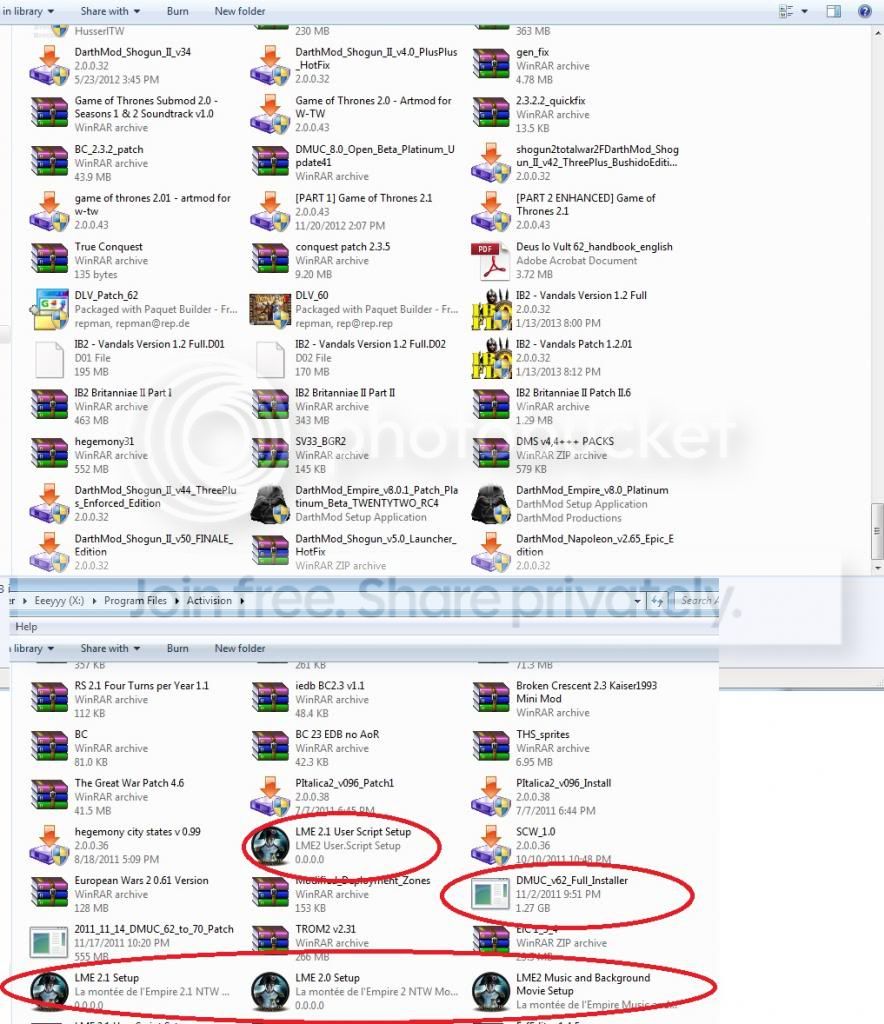
Not just shortcuts; programs and files directly. Will screenshot something for you.


Files.jpg


The files circled in red are ones that don't have the UAC shield on them, but still bring up the UAC prompt when I try to run them.
 

My Computer My Computer

At a glance

7Intel Core i7 3770 3.40 GHzCorsair 16GB total RAM 4x4GB sticksNvidia GeForce GTX 780
Computer type
PC/Desktop
Computer Manufacturer/Model Number
custom build
OS
7
CPU
Intel Core i7 3770 3.40 GHz
Motherboard
ASRock Z77 EXTREME4-M
Memory
Corsair 16GB total RAM 4x4GB sticks
Graphics Card(s)
Nvidia GeForce GTX 780
Monitor(s) Displays
ViewSonic LED 1080p Full HD
Screen Resolution
1920x1080
Hard Drives
Two
PSU
Corsair HX 750W
Case
Cooler Master
Cooling
A bunch of fans
Keyboard
Old and busty Dell, with some letters scratched off
Mouse
Logitech trackball
Internet Speed
Xfinity
What is your user access control settings ?
 

My Computer My Computer

At a glance

Windows 7 Ultimate 32-Bit & Windows 7 Ultimat...Intel Core i7 CPU 950 @ 3.07GHzOCZ 6GB (3 x 2GB) 240-Pin DDR3 SDRAM DDR3 160...ATI Radeon HD 5700 Series
Computer Manufacturer/Model Number
Custom Built
OS
Windows 7 Ultimate 32-Bit & Windows 7 Ultimate 64-Bit
CPU
Intel Core i7 CPU 950 @ 3.07GHz
Motherboard
ASUS P6T DELUXE V2
Memory
OCZ 6GB (3 x 2GB) 240-Pin DDR3 SDRAM DDR3 1600 OCZ3X1600R2
Graphics Card(s)
ATI Radeon HD 5700 Series
Sound Card
OnBoard
Hard Drives
WD6400AACS-00M3B0 (640GB SATA )
PSU
CORSAIR 850w
Case
NZXT LEXA
Cooling
Intel Stock Heatsink Fan
Keyboard
Microsoft Wireless Laser Keyboard 7000
Mouse
Microsoft Wireless Laser Mouse 7000
"Notify me only when programs try to make changes to my computer (do not dim my desktop) - Don't notify me when I make changes to Windows settings"
 

My Computer My Computer

At a glance

7Intel Core i7 3770 3.40 GHzCorsair 16GB total RAM 4x4GB sticksNvidia GeForce GTX 780
Computer type
PC/Desktop
Computer Manufacturer/Model Number
custom build
OS
7
CPU
Intel Core i7 3770 3.40 GHz
Motherboard
ASRock Z77 EXTREME4-M
Memory
Corsair 16GB total RAM 4x4GB sticks
Graphics Card(s)
Nvidia GeForce GTX 780
Monitor(s) Displays
ViewSonic LED 1080p Full HD
Screen Resolution
1920x1080
Hard Drives
Two
PSU
Corsair HX 750W
Case
Cooler Master
Cooling
A bunch of fans
Keyboard
Old and busty Dell, with some letters scratched off
Mouse
Logitech trackball
Internet Speed
Xfinity
Did you run malwarebytes ?

Download Link :ar: MalwareBytes

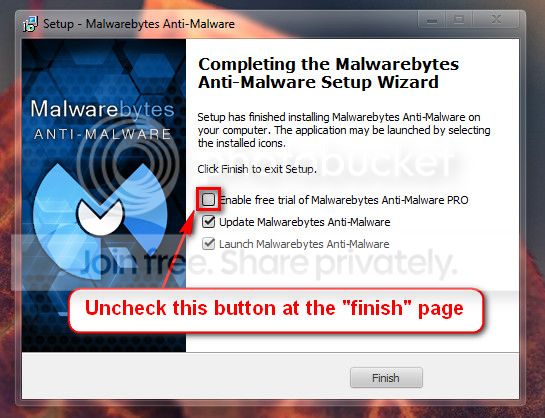
When the installation is done uncheck Enable free trial of Malwarebytes (see image below )

2013-03-09_224312_zps62dc7c23.jpg


Update the definitions and do a full scan
 

My Computer My Computer

At a glance

Windows 7 Ultimate 32-Bit & Windows 7 Ultimat...Intel Core i7 CPU 950 @ 3.07GHzOCZ 6GB (3 x 2GB) 240-Pin DDR3 SDRAM DDR3 160...ATI Radeon HD 5700 Series
Computer Manufacturer/Model Number
Custom Built
OS
Windows 7 Ultimate 32-Bit & Windows 7 Ultimate 64-Bit
CPU
Intel Core i7 CPU 950 @ 3.07GHz
Motherboard
ASUS P6T DELUXE V2
Memory
OCZ 6GB (3 x 2GB) 240-Pin DDR3 SDRAM DDR3 1600 OCZ3X1600R2
Graphics Card(s)
ATI Radeon HD 5700 Series
Sound Card
OnBoard
Hard Drives
WD6400AACS-00M3B0 (640GB SATA )
PSU
CORSAIR 850w
Case
NZXT LEXA
Cooling
Intel Stock Heatsink Fan
Keyboard
Microsoft Wireless Laser Keyboard 7000
Mouse
Microsoft Wireless Laser Mouse 7000
I've been running Malware Bytes on a fairly regular basis, and I did a full scan when I first installed. Why is that relevant?
 

My Computer My Computer

At a glance

7Intel Core i7 3770 3.40 GHzCorsair 16GB total RAM 4x4GB sticksNvidia GeForce GTX 780
Computer type
PC/Desktop
Computer Manufacturer/Model Number
custom build
OS
7
CPU
Intel Core i7 3770 3.40 GHz
Motherboard
ASRock Z77 EXTREME4-M
Memory
Corsair 16GB total RAM 4x4GB sticks
Graphics Card(s)
Nvidia GeForce GTX 780
Monitor(s) Displays
ViewSonic LED 1080p Full HD
Screen Resolution
1920x1080
Hard Drives
Two
PSU
Corsair HX 750W
Case
Cooler Master
Cooling
A bunch of fans
Keyboard
Old and busty Dell, with some letters scratched off
Mouse
Logitech trackball
Internet Speed
Xfinity
Just asking to see if you had any malware .
 

My Computer My Computer

At a glance

Windows 7 Ultimate 32-Bit & Windows 7 Ultimat...Intel Core i7 CPU 950 @ 3.07GHzOCZ 6GB (3 x 2GB) 240-Pin DDR3 SDRAM DDR3 160...ATI Radeon HD 5700 Series
Computer Manufacturer/Model Number
Custom Built
OS
Windows 7 Ultimate 32-Bit & Windows 7 Ultimate 64-Bit
CPU
Intel Core i7 CPU 950 @ 3.07GHz
Motherboard
ASUS P6T DELUXE V2
Memory
OCZ 6GB (3 x 2GB) 240-Pin DDR3 SDRAM DDR3 1600 OCZ3X1600R2
Graphics Card(s)
ATI Radeon HD 5700 Series
Sound Card
OnBoard
Hard Drives
WD6400AACS-00M3B0 (640GB SATA )
PSU
CORSAIR 850w
Case
NZXT LEXA
Cooling
Intel Stock Heatsink Fan
Keyboard
Microsoft Wireless Laser Keyboard 7000
Mouse
Microsoft Wireless Laser Mouse 7000
AndarielHalo,

Try the following...

:info: Pease create a Restore Point before proceeding:
System Restore Point - Create
Select: Option Two


:info: Type UAC in the Search box above Start
In the Control Panel window, click: Change User Account Control settings
In User Account Control (UAC) settings, disable UAC by moving its slider to the lowest position.


:info: Rebuild the icon cache

Do you still get the UAC shield icon?
 
Last edited by a moderator:

My Computer My Computer

At a glance

Windows 7 Home Premium
Computer type
PC/Desktop
Computer Manufacturer/Model Number
An ol' eMachines
OS
Windows 7 Home Premium
Internet Speed
Fine for me...I'm retired!
AndarielHalo,

Try the following...

:info: Pease create a Restore Point before proceeding:
System Restore Point - Create
Select: Option Two


:info: Type UAC in the Search box above Start
In the Control Panel window, click: Change User Account Control settings
In User Account Control (UAC) settings, disable UAC by moving its slider to the lowest position.


:info: Rebuild the icon cache

Do you still get the UAC shield icon?


This worked, thanks! It also did something to my cookies.


I haven't gotten a straight answer from google searching; is it safe to be without UAC on? Also, if I re-enable UAC, will it do the shield icons again, or will it start applying that only with newly installed programs?


EDIT: Wow, and whether it was a result of one of the commands, or deleting the IconCache, suddenly my Internet Explorer is remembering my tab positions when saving images---previously, as of IE 8 or 9, when I opened multiple tabs to save pictures or files, it would always direct me to My Documents or My Pictures default. Older versions remembered which folder I saved the first image or file to, and would prompt up that folder to save instead.


EDIEDIT: I re-enabled UAC, and the shield icons are still gone (for the most part), but I see some programs still have them; namely icons that didn't get to load up last time I scrolled through the folder.

Also, the IE tab thing I described above appears to be UAC related, since it's back to auto-redirecting to My Documents or My Pictures.


So again... is it safe to have UAC off? Considering that I have internet security, am pretty knowledgeable enough to use a special eraser program, and run MalwareBytes every day (or every other day) and that my track record is such that I've never gotten a virus ever, and never suffered any major data loss that wasn't at the hands of someone else's negligence.

Not meaning to push my luck, just mentioning that I tend to be very careful about my Internetting compared to the "casual" or average user, though I often end up on shady websites that tend to be pop-up-happy.


Also, iffin when some malware tries to install itself onto my comp, my Norton (insert jeers) automatically catches and quarantines it. Anything Norton misses, MalwareBytes gets ahold of. Anything both miss, I tend to catch manually, then delete myself, or erase it using Norton eraser thing, or a freeware. Would UAC really be anything extra in that process, or is it more like putting an extra sliding screen door between malware and my computer?
 
Last edited:

My Computer My Computer

At a glance

7Intel Core i7 3770 3.40 GHzCorsair 16GB total RAM 4x4GB sticksNvidia GeForce GTX 780
Computer type
PC/Desktop
Computer Manufacturer/Model Number
custom build
OS
7
CPU
Intel Core i7 3770 3.40 GHz
Motherboard
ASRock Z77 EXTREME4-M
Memory
Corsair 16GB total RAM 4x4GB sticks
Graphics Card(s)
Nvidia GeForce GTX 780
Monitor(s) Displays
ViewSonic LED 1080p Full HD
Screen Resolution
1920x1080
Hard Drives
Two
PSU
Corsair HX 750W
Case
Cooler Master
Cooling
A bunch of fans
Keyboard
Old and busty Dell, with some letters scratched off
Mouse
Logitech trackball
Internet Speed
Xfinity
Back
Top