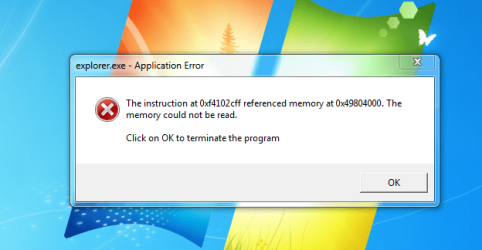
New install on SSD is giving me Explorer error messages

Tinsby

New member
Member
VIP
Local time
12:11 PM
Messages
176
I can't believe that I am getting error messages that cause the screen to refresh itself and lose my tooltray items.

Please see the attached file that has all the infomation on it.

Thank you all in advance!
 

Attachments

  • Capture.PNG
    Capture.PNG
    43.4 KB · Views: 26

My Computer My Computer

At a glance

Dual boot Win7 Pro 64 & Linux Mint 18.3Intel Core 2 Quad Core8GBNvidia GeForce GTX 750 Ti
Computer type
PC/Desktop
Computer Manufacturer/Model Number
Home/Custom built
OS
Dual boot Win7 Pro 64 & Linux Mint 18.3
CPU
Intel Core 2 Quad Core
Motherboard
Asus Rampage Extreme
Memory
8GB
Graphics Card(s)
Nvidia GeForce GTX 750 Ti
Sound Card
PCIe Supreme FX X-fi
Monitor(s) Displays
Viewsonic VX2450WM LED
Screen Resolution
1920x1080
Hard Drives
Intel SSD 240GB
WD 500GB HDD
PSU
Corsair 850 watt
Case
Lian Li
Cooling
Zalman
Keyboard
MS natural/ergonomic
Mouse
Intellimouse
Internet Speed
240 Mbps +/- Dnld, 12Mbps Upld via Xfinity Blast
Antivirus
Norton Security Suite by Xfinity
Browser
Firefox & Chrome
Other Info
4 slot memory card reader
Floppy drive
2 DVD burners
Brother MFCJ450dw AIO Printer/Scanner/Fax
eSATA connections

My Computer My Computer

At a glance

Microsoft Windows 7 Home Premium 64-bits 7601...Intel(R) Core(TM) i3 CPU M 370 @ 2.40GHz4,00 GBATI Mobility Radeon HD 5400 Series
Computer type
Laptop
Computer Manufacturer/Model Number
ACER ASPIRE 5742G
OS
Microsoft Windows 7 Home Premium 64-bits 7601 Multiprocessor Free Service Pack 1
CPU
Intel(R) Core(TM) i3 CPU M 370 @ 2.40GHz
Motherboard
Acer Aspire 5742G
Memory
4,00 GB
Graphics Card(s)
ATI Mobility Radeon HD 5400 Series
Sound Card
(1) AMD High Definition Audio Device (2) Realtek High Defi
Screen Resolution
1366 x 768 x 32 bits (4294967296 colors) @ 60 Hz
Hard Drives
WDC WD5000BEVT-22ZAT0
Please download and burn memtest86 MemTest86 - Download now! and boot from it. Test your memory for errors. Post results.
 

My Computer My Computer

At a glance

Microsoft Windows 7 Home Premium 64-bits 7601...Intel(R) Core(TM) i3 CPU M 370 @ 2.40GHz4,00 GBATI Mobility Radeon HD 5400 Series
Computer type
Laptop
Computer Manufacturer/Model Number
ACER ASPIRE 5742G
OS
Microsoft Windows 7 Home Premium 64-bits 7601 Multiprocessor Free Service Pack 1
CPU
Intel(R) Core(TM) i3 CPU M 370 @ 2.40GHz
Motherboard
Acer Aspire 5742G
Memory
4,00 GB
Graphics Card(s)
ATI Mobility Radeon HD 5400 Series
Sound Card
(1) AMD High Definition Audio Device (2) Realtek High Defi
Screen Resolution
1366 x 768 x 32 bits (4294967296 colors) @ 60 Hz
Hard Drives
WDC WD5000BEVT-22ZAT0
That is very normal if explorer.exe crashes and automatically restarts.
Please do in http://www.sevenforums.com/tutorials/783-elevated-command-prompt.html
Code:
sfc/scannow
Post results.


I agree..but a look at TASK MANAGER shows that with no programs running Explorer is using 1,067,994K of memory, the CPU is shows 25% +/- usage all the time and Physical memory shows 36%.

My system ran fine with a mechanical HD until I installed the SSD I never had this trouble IE: no Explorer crashes at all Win 7 was rock solid. I am betting if I switch back to my mechanical HD I won't have the trouble.... I didn't see an programs that I could shut down since none were running

I thought of running the scannow but since the OS and all patches were put in today I hardly think I am missing a file, but anything is possible.

Sure I can run Memtest but it's easier to prove my theory by changing the BIOS setting and reverting to the old HD that has run flawlessly for so long.

Thank you
 

My Computer My Computer

At a glance

Dual boot Win7 Pro 64 & Linux Mint 18.3Intel Core 2 Quad Core8GBNvidia GeForce GTX 750 Ti
Computer type
PC/Desktop
Computer Manufacturer/Model Number
Home/Custom built
OS
Dual boot Win7 Pro 64 & Linux Mint 18.3
CPU
Intel Core 2 Quad Core
Motherboard
Asus Rampage Extreme
Memory
8GB
Graphics Card(s)
Nvidia GeForce GTX 750 Ti
Sound Card
PCIe Supreme FX X-fi
Monitor(s) Displays
Viewsonic VX2450WM LED
Screen Resolution
1920x1080
Hard Drives
Intel SSD 240GB
WD 500GB HDD
PSU
Corsair 850 watt
Case
Lian Li
Cooling
Zalman
Keyboard
MS natural/ergonomic
Mouse
Intellimouse
Internet Speed
240 Mbps +/- Dnld, 12Mbps Upld via Xfinity Blast
Antivirus
Norton Security Suite by Xfinity
Browser
Firefox & Chrome
Other Info
4 slot memory card reader
Floppy drive
2 DVD burners
Brother MFCJ450dw AIO Printer/Scanner/Fax
eSATA connections
When you installed Win 7 on your SSD was your old hard drive still connected. If it was, it often causes trouble with the installation.
It also seems from what you say that you have exactly the same operating system on both drives.

Can you supply a screen shot of Disc Management, which is under Computer Management & please make sure all the info is included in the screen shot.
 

My Computer My Computer

At a glance

Windows 7 Home Premium 64 bit sp1Intel i5 3570 3.4Ghz Ivy Bridge SKT 1155 quad...G-Skill Rip Jaws 16Gb (8x2) DDR3 -1600 PC3 12...Gigabyte NVIDIA GT610 1Gb DDR3 810/1200 PCI-E...
Computer type
PC/Desktop
Computer Manufacturer/Model Number
Self built using existing case
OS
Windows 7 Home Premium 64 bit sp1
CPU
Intel i5 3570 3.4Ghz Ivy Bridge SKT 1155 quad core
Motherboard
Gigabyte Z77-HD3 SKT 1155 2xSata 3, 4x USB 3.0
Memory
G-Skill Rip Jaws 16Gb (8x2) DDR3 -1600 PC3 12800 CL 10 red
Graphics Card(s)
Gigabyte NVIDIA GT610 1Gb DDR3 810/1200 PCI-E 2.0 Silent
Sound Card
NVIDIA High Definition & Realtech High Definition Audio
Monitor(s) Displays
2 x Philips 226V4L 16:9 aspect ratio
Screen Resolution
1920 x 1080 HD
Hard Drives
Samsung 840 Pro 256gb SSD, SATA 3.
Hitachi Touro Portable 1tb, USB 3.0 HDD used for image b/ups.
PSU
Corsair VS450
Case
Codeng
Cooling
PSU fan & CPU fan
Keyboard
Logitech
Mouse
Logitech Wireless trackball M570
Internet Speed
Wireless 3G. 3mg down & 550kb up.
Antivirus
Bitdefender Internet Security 2020
Browser
Opera (Current Version) & Firefox
Other Info
MS Office 2013 Pro. Davis weather station software. MGE Nova 600 avr UPS.
Disk Management - Post a Screen Capture Image so we can see your configuration.

Did you check alignment and run drive diagnostics on the SSD? SSD Alignment - Windows 7 Forums

Do you remember what you had just installed or changed before the problem began. See if you have a System Restore point far enough back to get before it.

There's no harm in doing the SFC and Memtest since a program or other install could have corrupted system files and RAM is referenced in the error. Did you google the text to see how others resolved it?
 
Disk Management - Post a Screen Capture Image so we can see your configuration.

Did you check alignment and run drive diagnostics on the SSD? SSD Alignment - Windows 7 Forums

Do you remember what you had just installed or changed before the problem began. See if you have a System Restore point far enough back to get before it.

There's no harm in doing the SFC and Memtest since a program or other install could have corrupted system files and RAM is referenced in the error. Did you google the text to see how others resolved it?

Gregrocker and all,

I found that the Creative Audio Control Panel program was the source of all the CPU and explorer activity.
I removed and re-installed it, now the CPU usage is '0' and the memory usage by Explorer is minimal at
around 13,782K +/-. I know that when I installed it somehow it didn't install properly that's what lead me to look more closely at it.

I did run the sfc /scannow and it returned a 'no problem' (paraphrasing here) then I started to look at installed programs and found the trouble.

Thank you all its fine now.

Or I thought it was... changed to my mechanical drive and now I am getting the "Explorer has stopped" messages on that drive. So I guess I'll run memtest for a few days and see what I get.

I did NOT have 2 drives connected at the same time when I did the install to the new SSD fwiw. I have no restore points because the machine is triple boot XPired, Win 7, Ubuntu. I made no changes to the mechanical drive, no added programs etc. It never did this before I opened the box and put in the new SSD. I will try re-seating the memory cards, may as well keep it simple...

Uho-oh another error message... btw they all have a different number they are no identical and my Creative Audio is not running and I still get the error message.. so much for that 'solution.'

J T

 
Last edited:

My Computer My Computer

At a glance

Dual boot Win7 Pro 64 & Linux Mint 18.3Intel Core 2 Quad Core8GBNvidia GeForce GTX 750 Ti
Computer type
PC/Desktop
Computer Manufacturer/Model Number
Home/Custom built
OS
Dual boot Win7 Pro 64 & Linux Mint 18.3
CPU
Intel Core 2 Quad Core
Motherboard
Asus Rampage Extreme
Memory
8GB
Graphics Card(s)
Nvidia GeForce GTX 750 Ti
Sound Card
PCIe Supreme FX X-fi
Monitor(s) Displays
Viewsonic VX2450WM LED
Screen Resolution
1920x1080
Hard Drives
Intel SSD 240GB
WD 500GB HDD
PSU
Corsair 850 watt
Case
Lian Li
Cooling
Zalman
Keyboard
MS natural/ergonomic
Mouse
Intellimouse
Internet Speed
240 Mbps +/- Dnld, 12Mbps Upld via Xfinity Blast
Antivirus
Norton Security Suite by Xfinity
Browser
Firefox & Chrome
Other Info
4 slot memory card reader
Floppy drive
2 DVD burners
Brother MFCJ450dw AIO Printer/Scanner/Fax
eSATA connections
I have completed one pass with memtest it reported no errors. Thje test was still running, albeit slowly when I hit ESC I didn't realize that would restart everything! Can I let the test continue to run after it says ' PASS COMPLETE ' ?

I am now running the same default test over again as I am unsure what other test, if any I should choose.

Prior to running the test I took out all 4 memory sticks and re-seated them, none appeared loose.

Please advise if I should choose another more thorough test in the menu.

Thank you,

J T
 

My Computer My Computer

At a glance

Dual boot Win7 Pro 64 & Linux Mint 18.3Intel Core 2 Quad Core8GBNvidia GeForce GTX 750 Ti
Computer type
PC/Desktop
Computer Manufacturer/Model Number
Home/Custom built
OS
Dual boot Win7 Pro 64 & Linux Mint 18.3
CPU
Intel Core 2 Quad Core
Motherboard
Asus Rampage Extreme
Memory
8GB
Graphics Card(s)
Nvidia GeForce GTX 750 Ti
Sound Card
PCIe Supreme FX X-fi
Monitor(s) Displays
Viewsonic VX2450WM LED
Screen Resolution
1920x1080
Hard Drives
Intel SSD 240GB
WD 500GB HDD
PSU
Corsair 850 watt
Case
Lian Li
Cooling
Zalman
Keyboard
MS natural/ergonomic
Mouse
Intellimouse
Internet Speed
240 Mbps +/- Dnld, 12Mbps Upld via Xfinity Blast
Antivirus
Norton Security Suite by Xfinity
Browser
Firefox & Chrome
Other Info
4 slot memory card reader
Floppy drive
2 DVD burners
Brother MFCJ450dw AIO Printer/Scanner/Fax
eSATA connections
Seems all right now fwiw....

It explains how to run memtest in Troubleshooting Steps for Windows 7.

I would work through the other steps too in order to go over your install thoroughly.

Thanks, I will say that after almost 15 hours of running I have found no errors using memtest. Since the errors appeared on both the SSD and the mechanical HD, I have to conclude that there is something common to both of them IE: The 'box' itself and all its components. Right now it's running fine, not to say it's fixed but if it was going to act up I'd have seen it by now.

I will slog through all those troubleshooting tips you offered.

Regards,

J T
 

My Computer My Computer

At a glance

Dual boot Win7 Pro 64 & Linux Mint 18.3Intel Core 2 Quad Core8GBNvidia GeForce GTX 750 Ti
Computer type
PC/Desktop
Computer Manufacturer/Model Number
Home/Custom built
OS
Dual boot Win7 Pro 64 & Linux Mint 18.3
CPU
Intel Core 2 Quad Core
Motherboard
Asus Rampage Extreme
Memory
8GB
Graphics Card(s)
Nvidia GeForce GTX 750 Ti
Sound Card
PCIe Supreme FX X-fi
Monitor(s) Displays
Viewsonic VX2450WM LED
Screen Resolution
1920x1080
Hard Drives
Intel SSD 240GB
WD 500GB HDD
PSU
Corsair 850 watt
Case
Lian Li
Cooling
Zalman
Keyboard
MS natural/ergonomic
Mouse
Intellimouse
Internet Speed
240 Mbps +/- Dnld, 12Mbps Upld via Xfinity Blast
Antivirus
Norton Security Suite by Xfinity
Browser
Firefox & Chrome
Other Info
4 slot memory card reader
Floppy drive
2 DVD burners
Brother MFCJ450dw AIO Printer/Scanner/Fax
eSATA connections
Also try another driver for the audio. What else does Win7 offer when you enable Automatically deliver drivers via Windows Update (Step 3) to Check for Updates? Install all of those now.


There are none that will work with the X-Fi sound card. I need the Creative launcher to have access to all the sound effects it allows me to use, I do a lot of sound editing.

As it is right now the problem has not reoccurred for whatever reason and it's working fine. Don't know if re-seating the memory did the trick but it hasn't done it since.

Keeping my fingers and all parts crossed!

Thanks again
 

My Computer My Computer

At a glance

Dual boot Win7 Pro 64 & Linux Mint 18.3Intel Core 2 Quad Core8GBNvidia GeForce GTX 750 Ti
Computer type
PC/Desktop
Computer Manufacturer/Model Number
Home/Custom built
OS
Dual boot Win7 Pro 64 & Linux Mint 18.3
CPU
Intel Core 2 Quad Core
Motherboard
Asus Rampage Extreme
Memory
8GB
Graphics Card(s)
Nvidia GeForce GTX 750 Ti
Sound Card
PCIe Supreme FX X-fi
Monitor(s) Displays
Viewsonic VX2450WM LED
Screen Resolution
1920x1080
Hard Drives
Intel SSD 240GB
WD 500GB HDD
PSU
Corsair 850 watt
Case
Lian Li
Cooling
Zalman
Keyboard
MS natural/ergonomic
Mouse
Intellimouse
Internet Speed
240 Mbps +/- Dnld, 12Mbps Upld via Xfinity Blast
Antivirus
Norton Security Suite by Xfinity
Browser
Firefox & Chrome
Other Info
4 slot memory card reader
Floppy drive
2 DVD burners
Brother MFCJ450dw AIO Printer/Scanner/Fax
eSATA connections
Back
Top