
You are using an out of date browser. It may not display this or other websites correctly.
You should upgrade or use an alternative browser.
You should upgrade or use an alternative browser.
Solved New Install
- Thread starter w7runner
- Start date

I upgraded to W7 Home from XP. I am having problems with W7 and want to reinstall it. Is it possible to only uninstall/delete the W7 partition and keep the XP patition then reinstall W7?
Just to be sure we are on the same page, you have your Win 7 on one partition and your XP on a different partition, right? If so, just take insert your Win 7 disk in the CD drive and follow this tutorial. It will format the Win 7 drive (erase everything) and install Win 7. Be sure you have backed up all of your data. http://www.sevenforums.com/tutorials/31402-clean-install-upgrade-windows-7-version.html
My Computer
- Computer type
- PC/Desktop
- Computer Manufacturer/Model Number
- Custom Build
- OS
- Windows 7 Home Premium 32-Bit - Build 7600 SP1
- CPU
- Intel Core i3-2120 3.30Ghz
- Motherboard
- Asus P8Z68-V LX Intel Z68 Socket H2 ATX
- Memory
- Kingston 4 GB DDR3 1333 mhz
- Graphics Card(s)
- AMD Radeon HD6670
- Sound Card
- Sound Blaster Audigy SE 24-Bit
- Monitor(s) Displays
- Asus VE228
- Screen Resolution
- 1440 X 900
- Hard Drives
- OCZ Vertex 3 120 GB Sata 3 SSD ==
Kingston SH103/S3 120 G Hyper X 120 GB SSD ==
Western Digital 500 GB Caviar Green 7200 RPM ==
- PSU
- Corsair CX600M == 600 Watt
- Case
- NZXT Apollo - Silver with Clear Side Panel
- Cooling
- Three 120 mm Fans
- Keyboard
- Microsoft Natural 4000
- Mouse
- Microsoft Custom Optical 3000
- Internet Speed
- AT&T Fiber Optic Wireless Network
- Antivirus
- Microsoft Security Essentials
- Browser
- Chrome
- Other Info
- 120 mm Blue LED Fan -- Three Blue LED Lazer Light Sticks
Yes, we're one the same page. Thanks for the info, it sounds like it won't be that difficult and save some time.
Let us know how it went.
My Computer
- Computer type
- PC/Desktop
- Computer Manufacturer/Model Number
- Custom Build
- OS
- Windows 7 Home Premium 32-Bit - Build 7600 SP1
- CPU
- Intel Core i3-2120 3.30Ghz
- Motherboard
- Asus P8Z68-V LX Intel Z68 Socket H2 ATX
- Memory
- Kingston 4 GB DDR3 1333 mhz
- Graphics Card(s)
- AMD Radeon HD6670
- Sound Card
- Sound Blaster Audigy SE 24-Bit
- Monitor(s) Displays
- Asus VE228
- Screen Resolution
- 1440 X 900
- Hard Drives
- OCZ Vertex 3 120 GB Sata 3 SSD ==
Kingston SH103/S3 120 G Hyper X 120 GB SSD ==
Western Digital 500 GB Caviar Green 7200 RPM ==
- PSU
- Corsair CX600M == 600 Watt
- Case
- NZXT Apollo - Silver with Clear Side Panel
- Cooling
- Three 120 mm Fans
- Keyboard
- Microsoft Natural 4000
- Mouse
- Microsoft Custom Optical 3000
- Internet Speed
- AT&T Fiber Optic Wireless Network
- Antivirus
- Microsoft Security Essentials
- Browser
- Chrome
- Other Info
- 120 mm Blue LED Fan -- Three Blue LED Lazer Light Sticks
bigmck, I went to the site you listed and it says....
"Remember that you need a valid qualifying previous version of Windows to use a Upgrade Windows 7, and to stop using (or uninstall) the qualifying OS while you have the upgrade installed. Microsoft only made doing a clean install from a upgrade Windows 7 possible to make it more convenient so you do not have to reinstall both the old Windows version (ex: Vista) and upgrade to Windows 7 everytime you needed or wanted to reinstall."
I have never heard that your're supposed to uninstall the OS that you installed from before. Does this cause a conflict or am I missunderstanding some thing? It would be easier and faster in the startup if the computer didn't have to choose between two operating systems.
You can have both XP and Win 7 on your PC with no problem. You are not upgrading, you are doing a Clean Install. I would not worry about that. You are perfectly legal. == Do you want to have both on your PC or do you want only Win 7? You can have only Win 7 if that is what you want. == One other question, why do you want both XP and Win 7?
My Computer
- Computer type
- PC/Desktop
- Computer Manufacturer/Model Number
- Custom Build
- OS
- Windows 7 Home Premium 32-Bit - Build 7600 SP1
- CPU
- Intel Core i3-2120 3.30Ghz
- Motherboard
- Asus P8Z68-V LX Intel Z68 Socket H2 ATX
- Memory
- Kingston 4 GB DDR3 1333 mhz
- Graphics Card(s)
- AMD Radeon HD6670
- Sound Card
- Sound Blaster Audigy SE 24-Bit
- Monitor(s) Displays
- Asus VE228
- Screen Resolution
- 1440 X 900
- Hard Drives
- OCZ Vertex 3 120 GB Sata 3 SSD ==
Kingston SH103/S3 120 G Hyper X 120 GB SSD ==
Western Digital 500 GB Caviar Green 7200 RPM ==
- PSU
- Corsair CX600M == 600 Watt
- Case
- NZXT Apollo - Silver with Clear Side Panel
- Cooling
- Three 120 mm Fans
- Keyboard
- Microsoft Natural 4000
- Mouse
- Microsoft Custom Optical 3000
- Internet Speed
- AT&T Fiber Optic Wireless Network
- Antivirus
- Microsoft Security Essentials
- Browser
- Chrome
- Other Info
- 120 mm Blue LED Fan -- Three Blue LED Lazer Light Sticks
"== One other question, why do you want both XP and Win 7?"
Except for the fact that it has come in handy while I'm having problems with W7 I don't want both on my pc. I thought it had to stay there for the W7 install but since it's it's own partition it makes sence that you could delete it after you installed W7. I don't think I'll delete it until I know for sure that I have W7 running right.
I had XP. When I heard Win 7 was coming out, I came on this site for about a month or two and asked questions. I got the CD and installed over my XP. The tutorial I showed before is really through and you just need to follow it, screen by screen and it will work. If you feel more comfortable with leaving XP until Win 7 is installed, that is fine. == What I might suggest is put on one partition your Win 7 and your programs and put your Docs (letters, Pictures, Music, etc) on another partition. This is the suggested want to set it up. == One other thing, when you install Win 7, don't put the activation key in until you have it working OK. You have 30 days before you need to do that.
My Computer
- Computer type
- PC/Desktop
- Computer Manufacturer/Model Number
- Custom Build
- OS
- Windows 7 Home Premium 32-Bit - Build 7600 SP1
- CPU
- Intel Core i3-2120 3.30Ghz
- Motherboard
- Asus P8Z68-V LX Intel Z68 Socket H2 ATX
- Memory
- Kingston 4 GB DDR3 1333 mhz
- Graphics Card(s)
- AMD Radeon HD6670
- Sound Card
- Sound Blaster Audigy SE 24-Bit
- Monitor(s) Displays
- Asus VE228
- Screen Resolution
- 1440 X 900
- Hard Drives
- OCZ Vertex 3 120 GB Sata 3 SSD ==
Kingston SH103/S3 120 G Hyper X 120 GB SSD ==
Western Digital 500 GB Caviar Green 7200 RPM ==
- PSU
- Corsair CX600M == 600 Watt
- Case
- NZXT Apollo - Silver with Clear Side Panel
- Cooling
- Three 120 mm Fans
- Keyboard
- Microsoft Natural 4000
- Mouse
- Microsoft Custom Optical 3000
- Internet Speed
- AT&T Fiber Optic Wireless Network
- Antivirus
- Microsoft Security Essentials
- Browser
- Chrome
- Other Info
- 120 mm Blue LED Fan -- Three Blue LED Lazer Light Sticks
I have one more question (I hope), do you have to install XP first say on a clean hard drive or can do like an XP upgrade and just put an older version of Windows cd in when it asks?
It won't ask you to put in a previous version. Just put your Win 7 Upgrade disk in the CD Drive. It will ask you if you want a Custom (clean) Install or an Upgrade. Select Custom and it will start installing. According to the Microsoft License, your HD could be blank and your XP disk in a drawer and you would be legal to use the Win 7 Upgrade disk.
My Computer
- Computer type
- PC/Desktop
- Computer Manufacturer/Model Number
- Custom Build
- OS
- Windows 7 Home Premium 32-Bit - Build 7600 SP1
- CPU
- Intel Core i3-2120 3.30Ghz
- Motherboard
- Asus P8Z68-V LX Intel Z68 Socket H2 ATX
- Memory
- Kingston 4 GB DDR3 1333 mhz
- Graphics Card(s)
- AMD Radeon HD6670
- Sound Card
- Sound Blaster Audigy SE 24-Bit
- Monitor(s) Displays
- Asus VE228
- Screen Resolution
- 1440 X 900
- Hard Drives
- OCZ Vertex 3 120 GB Sata 3 SSD ==
Kingston SH103/S3 120 G Hyper X 120 GB SSD ==
Western Digital 500 GB Caviar Green 7200 RPM ==
- PSU
- Corsair CX600M == 600 Watt
- Case
- NZXT Apollo - Silver with Clear Side Panel
- Cooling
- Three 120 mm Fans
- Keyboard
- Microsoft Natural 4000
- Mouse
- Microsoft Custom Optical 3000
- Internet Speed
- AT&T Fiber Optic Wireless Network
- Antivirus
- Microsoft Security Essentials
- Browser
- Chrome
- Other Info
- 120 mm Blue LED Fan -- Three Blue LED Lazer Light Sticks

Hello w7runner.
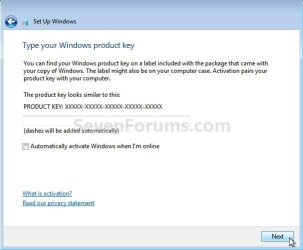
Just remember not to enter an activation key on the first install, leave the box blank.
Just remember not to enter an activation key on the first install, leave the box blank.
click to enlarge
My Computer
- Computer Manufacturer/Model Number
- * BFK Customs *
- OS
- W 7 64-bit Ultimate
- CPU
- Intel Q9550 Yorkfield
- Motherboard
- ASUS P5Q Pro
- Memory
- 8GB Dominator 8500C5D
- Graphics Card(s)
- ATI : XFX 5870
- Sound Card
- Realtek HD Audio 7-1
- Monitor(s) Displays
- 1x 47" LCD HDMI & 3x 26" LCD HDMI
- Screen Resolution
- 1920x1080P & 1920x1200
- Hard Drives
- 1x 80GB Intel X25-M G2 SSD : 1x 500GB & 1x 640GB WD Caviar Black(s)
- PSU
- Corsair 620HX
- Case
- Cooler Master RC-690
- Cooling
- Tuniq Tower 120, 2x 140mm and 3x 120mm case fans
- Keyboard
- Microsoft 500
- Mouse
- Razer Diamondback 3G
- Internet Speed
- 14 Mb/s
- Other Info
- 1x Koutech 3Gb/s SATA HDD Hot Swap Rack
Just be sure to post back with any further questions you may have and to keep us informed.
My Computer
- Computer Manufacturer/Model Number
- * BFK Customs *
- OS
- W 7 64-bit Ultimate
- CPU
- Intel Q9550 Yorkfield
- Motherboard
- ASUS P5Q Pro
- Memory
- 8GB Dominator 8500C5D
- Graphics Card(s)
- ATI : XFX 5870
- Sound Card
- Realtek HD Audio 7-1
- Monitor(s) Displays
- 1x 47" LCD HDMI & 3x 26" LCD HDMI
- Screen Resolution
- 1920x1080P & 1920x1200
- Hard Drives
- 1x 80GB Intel X25-M G2 SSD : 1x 500GB & 1x 640GB WD Caviar Black(s)
- PSU
- Corsair 620HX
- Case
- Cooler Master RC-690
- Cooling
- Tuniq Tower 120, 2x 140mm and 3x 120mm case fans
- Keyboard
- Microsoft 500
- Mouse
- Razer Diamondback 3G
- Internet Speed
- 14 Mb/s
- Other Info
- 1x Koutech 3Gb/s SATA HDD Hot Swap Rack
Thanks Bare Foot Kid. I also see in the box you put a picture up "Automatically activate Windows when I'm on line". Do I leave that unchecked also?
That is correct, leave it unchecked.
My Computer
- Computer type
- PC/Desktop
- Computer Manufacturer/Model Number
- Custom Build
- OS
- Windows 7 Home Premium 32-Bit - Build 7600 SP1
- CPU
- Intel Core i3-2120 3.30Ghz
- Motherboard
- Asus P8Z68-V LX Intel Z68 Socket H2 ATX
- Memory
- Kingston 4 GB DDR3 1333 mhz
- Graphics Card(s)
- AMD Radeon HD6670
- Sound Card
- Sound Blaster Audigy SE 24-Bit
- Monitor(s) Displays
- Asus VE228
- Screen Resolution
- 1440 X 900
- Hard Drives
- OCZ Vertex 3 120 GB Sata 3 SSD ==
Kingston SH103/S3 120 G Hyper X 120 GB SSD ==
Western Digital 500 GB Caviar Green 7200 RPM ==
- PSU
- Corsair CX600M == 600 Watt
- Case
- NZXT Apollo - Silver with Clear Side Panel
- Cooling
- Three 120 mm Fans
- Keyboard
- Microsoft Natural 4000
- Mouse
- Microsoft Custom Optical 3000
- Internet Speed
- AT&T Fiber Optic Wireless Network
- Antivirus
- Microsoft Security Essentials
- Browser
- Chrome
- Other Info
- 120 mm Blue LED Fan -- Three Blue LED Lazer Light Sticks
Thanks Bare Foot Kid. I also see in the box you put a picture up "Automatically activate Windows when I'm on line". Do I leave that unchecked also?
Yes, remove the check/tic that is there by default, do not enter an activation key and click "next".
My Computer
- Computer Manufacturer/Model Number
- * BFK Customs *
- OS
- W 7 64-bit Ultimate
- CPU
- Intel Q9550 Yorkfield
- Motherboard
- ASUS P5Q Pro
- Memory
- 8GB Dominator 8500C5D
- Graphics Card(s)
- ATI : XFX 5870
- Sound Card
- Realtek HD Audio 7-1
- Monitor(s) Displays
- 1x 47" LCD HDMI & 3x 26" LCD HDMI
- Screen Resolution
- 1920x1080P & 1920x1200
- Hard Drives
- 1x 80GB Intel X25-M G2 SSD : 1x 500GB & 1x 640GB WD Caviar Black(s)
- PSU
- Corsair 620HX
- Case
- Cooler Master RC-690
- Cooling
- Tuniq Tower 120, 2x 140mm and 3x 120mm case fans
- Keyboard
- Microsoft 500
- Mouse
- Razer Diamondback 3G
- Internet Speed
- 14 Mb/s
- Other Info
- 1x Koutech 3Gb/s SATA HDD Hot Swap Rack

- Local time
- 11:12 PM
- Messages
- 50,634
If you've decided not to Dual Boot with XP, boot the Win7 DVD, select Custom install then use Drive Options (shown in red box below) to Delete all partitions, create New one(s) as you wish, then Format each before installing to first partition.
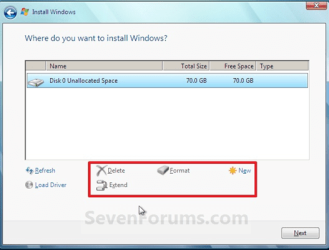
The Win7 installer will scan the HD during bootup to see XP and allow use of the Upgrade version key upfront or later as you wish.
You are correct that you are supposed to stop using the OS (XP in your case) which qualifies you for Upgrade version. So it is best to either delete XP now so Win7 doesn't configure the Dual boot, or if you choose to Dual boot make it temporary until you get adjusted to Win7.
Be aware that if you choose to Dual Boot with XP and do not delete it using Custom>Drive Options, Win7 will place its boot files on the XP partition to create the Dual Boot. This makes it more complicated to remove XP later, which is another reason I would strongly consider deleting XP now during Win7 upgrade clean install.
Any XP programs can be installed if necessary in http://www.sevenforums.com/tutorials/316-compatibility-mode.html
The Win7 installer will scan the HD during bootup to see XP and allow use of the Upgrade version key upfront or later as you wish.
You are correct that you are supposed to stop using the OS (XP in your case) which qualifies you for Upgrade version. So it is best to either delete XP now so Win7 doesn't configure the Dual boot, or if you choose to Dual boot make it temporary until you get adjusted to Win7.
Be aware that if you choose to Dual Boot with XP and do not delete it using Custom>Drive Options, Win7 will place its boot files on the XP partition to create the Dual Boot. This makes it more complicated to remove XP later, which is another reason I would strongly consider deleting XP now during Win7 upgrade clean install.
Any XP programs can be installed if necessary in http://www.sevenforums.com/tutorials/316-compatibility-mode.html
- Local time
- 11:12 PM
- Messages
- 50,634
Then follow those steps. Let us know how it goes or if you have any further questions.