New internal components, WD Hard Drive Wont install Windows 7

Kadart

New member
Local time
4:13 AM
Messages
5
Good Evening,

I've run out of options as I am only fairly tech savvy, I can put stuff together but if I run into issues with my hardware that seems bios related im at a bit of a loss, so I apologize if this ends up being simple but ive been tweaking stuff for hours.

NEW HARDWARE:
AMD FX-6350 Vishera 3.9GHz Socket AM3+ 125W Desktop Processor FD6350FRHKBOX

EVGA 04G-P4-2768-KR GeForce GTX 760 4GB 256-Bit GDDR5 PCI Express 3.0 SLI Support SC 4GB w/ EVGA ACX Cooler Video Card

G.SKILL Ripjaws X Series 16GB (2 x 8GB) 240-Pin DDR3 SDRAM DDR3 1600 (PC3 12800) Desktop Memory Model F3-1600C9D-16GXM

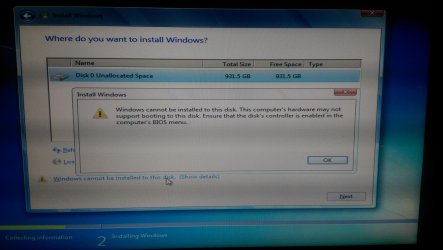
I kept my existing Western Digital 1TB SATA Hard Drive and my 730W Power Supply from my old set up. Everything powers on great, but my windows file seemed corrupted as I could not load, and no repairs seemed successful. I had nothing worth savings so that's okay, I popped in an install disc of Windows 7 PRO 64Bit and when I attempt to install on my petition I formatted I get the error of "Windows cannot be installed to this disk. This computer's hardware may not suport booting to this disk. Ensure that the disk's controller is enabled in the computer's BIOS menu." I researched that and I find that most people say try having BIOS in AHCI mode. I have tried that, RAID, and my other option, and all fail to give me anything different.

If anyone has any clues as to what I can tweak or why I cant see to get this sucker to install, that would be amazing, I was so excited to get my desktop back up and running with new parts and so far I have nothing bu frustration. Thanks for any advice in advance!
 

My Computer My Computer

At a glance

Windows 7 Pro 64 Bit
Computer type
PC/Desktop
OS
Windows 7 Pro 64 Bit
Hello Kadart. Welcome to the forum.

I assume you are using the same motherboard?
When you change the processor on a motherboard it is necessary to perform a Clear CMOS procedure to refresh the checksum.

Clear CMOS (CLRTC) Procedure

  • Note all your current BIOS settings
  • Shut down the computer > remove the power cord.
  • Remove the 3v battery.
  • Move the CLRTC jumper from pins 1-2 to 2-3.
  • Touch a metal part of the case and Press and Hold the reset button for approx. 30 seconds to discharge all power from the board.
  • Put the CLRTC jumper back on pins 1-2.
  • Replace the 3v battery > replace the power cord > boot.
  • Immediately go back into BIOS and reset all your preferred settings. If the CLRTC worked you will need to reset the date and time in BIOS.
 

My Computer My Computer

At a glance

Windows 7 64 Bit Home Premium SP1i7-3820GSkill F3-14900CL9Q - 16GBEVGA GeForce GTX660 - Driver 352.86
Computer type
PC/Desktop
Computer Manufacturer/Model Number
Home Built - Jan 2013
OS
Windows 7 64 Bit Home Premium SP1
CPU
i7-3820
Motherboard
Asus P9X79-PRO - Bios 4608
Memory
GSkill F3-14900CL9Q - 16GB
Graphics Card(s)
EVGA GeForce GTX660 - Driver 352.86
Sound Card
On board Realtek ALC898
Monitor(s) Displays
Acer S271HL
Screen Resolution
1920 x 1080
Hard Drives
#1- Samsung 840 Pro Series
#2- Western Digital WD1002FAEX Sata3 Black
#3- Western Digital WD1002FAEX Sata3 Black
PSU
Corsair CMPSU-850TX-V2 - 850 watt (by Seasonic)
Case
Corsair Obsidian 550D
Cooling
Standard 3 120mm case fans, Cooler Master Hyper 212 EVO
Keyboard
MS KC-0405
Mouse
Intellimouse 5-button
Internet Speed
56 Mbits/Sec (on a good day)
Antivirus
Avast & Malwarebytes
Browser
Firefox
Other Info
Asus DVD - DRW-24B1ST 24X
TVeblen,

This is also a new motherboard as well. My only "old parts" are the HDD and the power supply, would your suggestion still be worth trying? im up for anything at this point :)

UPDATE: I went ahead and tried it anyways, I figured it was worth trying. Unfortunately it didn't do a thing, still wont allow me to install windows on my existing HDD or any partitions I create.
 
Last edited:

My Computer My Computer

At a glance

Windows 7 Pro 64 Bit
Computer type
PC/Desktop
OS
Windows 7 Pro 64 Bit
Here are some things to try:

First, go into the UEFI BIOS settings and reset the defaults. Especially if you've been playing with various settings.

Then make sure the SATA controller is set to AHCI mode. And set your boot order. If you are installing W7 from a DVD, set the DVD as the first boot device.
Is the DVD drive a SATA drive?

Then save and exit the BIOS and turn off the PC

Now check your SATA connections. Consult your manual to locate the SATA ports by number. On many new motherboards there is a secondary SATA controller (Marvel or other). You want your primary hard drive on one of the primary AMD SATA ports, preferably Port 0.

Disconnect any and all extra hard drives while setting up and installing W7.

Then be sure the optical (SATA) drive is also connected to one of the primary SATA ports. If your board has 6GB and 3GB ports then connect the optical to a 3GB port.

Once you are sure the connections are correct and extra hard drives disconnected then try installing Windows again.
 

My Computer My Computer

At a glance

Windows 7 64 Bit Home Premium SP1i7-3820GSkill F3-14900CL9Q - 16GBEVGA GeForce GTX660 - Driver 352.86
Computer type
PC/Desktop
Computer Manufacturer/Model Number
Home Built - Jan 2013
OS
Windows 7 64 Bit Home Premium SP1
CPU
i7-3820
Motherboard
Asus P9X79-PRO - Bios 4608
Memory
GSkill F3-14900CL9Q - 16GB
Graphics Card(s)
EVGA GeForce GTX660 - Driver 352.86
Sound Card
On board Realtek ALC898
Monitor(s) Displays
Acer S271HL
Screen Resolution
1920 x 1080
Hard Drives
#1- Samsung 840 Pro Series
#2- Western Digital WD1002FAEX Sata3 Black
#3- Western Digital WD1002FAEX Sata3 Black
PSU
Corsair CMPSU-850TX-V2 - 850 watt (by Seasonic)
Case
Corsair Obsidian 550D
Cooling
Standard 3 120mm case fans, Cooler Master Hyper 212 EVO
Keyboard
MS KC-0405
Mouse
Intellimouse 5-button
Internet Speed
56 Mbits/Sec (on a good day)
Antivirus
Avast & Malwarebytes
Browser
Firefox
Other Info
Asus DVD - DRW-24B1ST 24X
Hi

Can you please take a snapshot of the partitioning screen and post it with next reply ? ( use a digital cam or smart phone ).
 

My Computer My Computer

At a glance

Windows 7 Ultimate x64
Computer type
PC/Desktop
OS
Windows 7 Ultimate x64
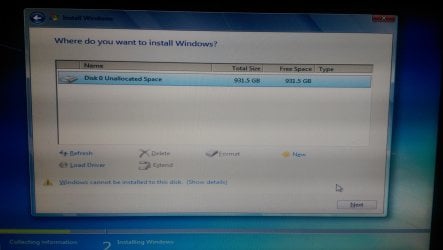
Attached is how my HDD looks when I try to install Windows per your request!
 

Attachments

  • IMAG0053.jpg
    IMAG0053.jpg
    367 KB · Views: 2
  • IMAG0052.jpg
    IMAG0052.jpg
    326.5 KB · Views: 1

My Computer My Computer

At a glance

Windows 7 Pro 64 Bit
Computer type
PC/Desktop
OS
Windows 7 Pro 64 Bit
TVeblen,

I did double check everything last night when I opened it up, and I also confirmed I was in AHCI mode. The cables are correct and in Port 0. I kept all external HD's disconnected during this process as well. As of right now I have only the disk drive attempting to boot, so it doesnt try to confuse itself with anything. I wonder if somehow even being formatted my HDD is just "bad"? Which seems so strange considering it reads and I can create seperate partitions(not that it helps anything).

I wonder if just buying a new SATA HD would solve my problem, I hate to drop another $60...but at this point im starting to wonder.
 

My Computer My Computer

At a glance

Windows 7 Pro 64 Bit
Computer type
PC/Desktop
OS
Windows 7 Pro 64 Bit

My Computer My Computer

At a glance

Windows 7 Ultimate x64
Computer type
PC/Desktop
OS
Windows 7 Ultimate x64
Anshad,

I have attempted to create multiple partitions already, and every partition I create, it doesnt seem to matter the size, does not allow me to install the OS. I will continue to get the "Windows cannot be installed to this disk. This computer's hardware may not suport booting to this disk".

I will try again this evening just to make sure though.
 

My Computer My Computer

At a glance

Windows 7 Pro 64 Bit
Computer type
PC/Desktop
OS
Windows 7 Pro 64 Bit
Make sure to read the below guide ( specifically about partitioning ) - http://www.sevenforums.com/tutorials/52291-partition-hard-drive-windows-7-install.html

Also i would recommend diagnosing your hard drive with manufacturer's diagnostic tool. For "Western Digital" it is "WD Data Lifeguard Diagnostic". The tool is DOS based but "Western Digital" doesn't seems to offer a bootable disc. You can either download "UBCD" which contains a set of diagnostic tools including WD diagnostics or use Seagate Seatool instead.

Ultimate Boot CD - Overview


Make sure to set SATA mode to IDE before booting from the CD ( AHCI mode is not supported ). What you need to run is the "Extended" test which will do a full surface scan and perform other sub tests.

DataLifeguard_med.gif
 

My Computer My Computer

At a glance

Windows 7 Ultimate x64
Computer type
PC/Desktop
OS
Windows 7 Ultimate x64
Back
Top