New KB4536952 Servicing stack update for Windows 7 - Jan. 14

Brink

Administrator
Staff member
Local time
10:32 PM
Messages
74,855
Location
Oklahoma
Servicing stack update for Windows 7 SP1 and Server 2008 R2 SP1: January 14, 2020

Applies to: Windows 7 Service Pack 1, Windows Server 2008 R2 Service Pack 1

Summary

This update makes quality improvements to the servicing stack, which is the component that installs Windows updates. Servicing stack updates (SSU) makes sure that you have a robust and reliable servicing stack so that your devices can receive and install Microsoft updates.

How to get this update

Method 1: Windows Update

This update is available through Windows Update. It will be downloaded and installed automatically. 

Method 2: Microsoft Update Catalog

To get the stand-alone package for this update, go to the Microsoft Update Catalog website.

Method 3: Windows Server Update Services

This update is also available through Windows Server Update Services (WSUS).

Prerequisites

We strongly recommend that you install the following updates before you apply this update:

Restart information

You don't have to restart your computer after you apply this update.

Update replacement information

This update replaces the previously released update KB4531786.


Source: https://support.microsoft.com/en-us...date-for-windows-7-sp1-and-server-2008-r2-sp1


Direct download links for KB4536952 MSU file from Microsoft Update Catalog:

:ar: Download KB4536952 MSU for Windows 7 32-bit (x86) - 4.0 MB

:ar: Download KB4536952 MSU for Windows 7 64-bit (x64) - 9.1 MB
 

My Computer My Computer

At a glance

64-bit Windows 11 Pro for WorkstationsIntel i7-8700K OC'd to 5 GHz64 GB (4x16GB) G.SKILL TridentZ RGB DDR4 3600...ASUS ROG-STRIX-GTX1080TI-O11G-GAMING
Computer type
PC/Desktop
Computer Manufacturer/Model Number
Self built custom
OS
64-bit Windows 11 Pro for Workstations
CPU
Intel i7-8700K OC'd to 5 GHz
Motherboard
ASUS ROG Maximus XI Formula Z390
Memory
64 GB (4x16GB) G.SKILL TridentZ RGB DDR4 3600 MHz
Graphics Card(s)
ASUS ROG-STRIX-GTX1080TI-O11G-GAMING
Sound Card
Integrated
Monitor(s) Displays
2 x Samsung Odyssey G7 27"
Screen Resolution
2560x1440
Hard Drives
1TB Samsung 990 PRO M.2,
4TB Samsung 990 PRO PRO M.2,
TerraMaster F8 SSD Plus NAS
PSU
Seasonic Prime Titanium 850W
Case
Thermaltake Core P3
Cooling
Corsair Hydro H115i
Keyboard
Logitech wireless K800
Mouse
Logitech MX Master 4
Internet Speed
2 Gb/s Download and 100 Mb/s Upload
Antivirus
Malwarebyte Anti-Malware Premium
Browser
Google Chrome
Other Info
Logitech Z625 speaker system,
Logitech BRIO 4K Pro webcam,
HP Color LaserJet Pro MFP M477fdn,
APC SMART-UPS RT 1000 XL - SURT1000XLI,
Galaxy S23 Plus phone
Why do we need this update? Since today's updates are the last we will get, why do we need an update to make Windows Update work better?
 

My Computer My Computer

At a glance

Windows 7 x64 SP1AMD Athlon 64 X2 6000+ / 3.0 GHz6 GB
Computer type
PC/Desktop
Computer Manufacturer/Model Number
Gateway GT5656
OS
Windows 7 x64 SP1
CPU
AMD Athlon 64 X2 6000+ / 3.0 GHz
Motherboard
NVIDIA GeForce 6150 SE
Memory
6 GB
Monitor(s) Displays
Lenovo LED
Screen Resolution
1920 X 1080
Hard Drives
Windows on 500 GB spinner; Ubuntu 16 on Sandisk 250GB SSD; Bodhi5 on Samsung 250GB SSD; another old spinner for fooling around.
PSU
Original that came with computer
Keyboard
Logitech wireless
Mouse
Logitech wireless
Antivirus
Microsoft Sec Essentials
Browser
Vivaldi

My Computer My Computer

At a glance

64-bit Windows 11 Pro for WorkstationsIntel i7-8700K OC'd to 5 GHz64 GB (4x16GB) G.SKILL TridentZ RGB DDR4 3600...ASUS ROG-STRIX-GTX1080TI-O11G-GAMING
Computer type
PC/Desktop
Computer Manufacturer/Model Number
Self built custom
OS
64-bit Windows 11 Pro for Workstations
CPU
Intel i7-8700K OC'd to 5 GHz
Motherboard
ASUS ROG Maximus XI Formula Z390
Memory
64 GB (4x16GB) G.SKILL TridentZ RGB DDR4 3600 MHz
Graphics Card(s)
ASUS ROG-STRIX-GTX1080TI-O11G-GAMING
Sound Card
Integrated
Monitor(s) Displays
2 x Samsung Odyssey G7 27"
Screen Resolution
2560x1440
Hard Drives
1TB Samsung 990 PRO M.2,
4TB Samsung 990 PRO PRO M.2,
TerraMaster F8 SSD Plus NAS
PSU
Seasonic Prime Titanium 850W
Case
Thermaltake Core P3
Cooling
Corsair Hydro H115i
Keyboard
Logitech wireless K800
Mouse
Logitech MX Master 4
Internet Speed
2 Gb/s Download and 100 Mb/s Upload
Antivirus
Malwarebyte Anti-Malware Premium
Browser
Google Chrome
Other Info
Logitech Z625 speaker system,
Logitech BRIO 4K Pro webcam,
HP Color LaserJet Pro MFP M477fdn,
APC SMART-UPS RT 1000 XL - SURT1000XLI,
Galaxy S23 Plus phone

I understand that Brink, but it appeared after I installed the latest quality update. Perhaps it failed the first time? In any case, the quality update succeeded without it. I actually did not intend to install the quality rollup, did it by accident. but since it succeeded, and my computer still works, it's all good as now I have it updated completely (except for that servicing stack one).
 

My Computer My Computer

At a glance

Windows 7 x64 SP1AMD Athlon 64 X2 6000+ / 3.0 GHz6 GB
Computer type
PC/Desktop
Computer Manufacturer/Model Number
Gateway GT5656
OS
Windows 7 x64 SP1
CPU
AMD Athlon 64 X2 6000+ / 3.0 GHz
Motherboard
NVIDIA GeForce 6150 SE
Memory
6 GB
Monitor(s) Displays
Lenovo LED
Screen Resolution
1920 X 1080
Hard Drives
Windows on 500 GB spinner; Ubuntu 16 on Sandisk 250GB SSD; Bodhi5 on Samsung 250GB SSD; another old spinner for fooling around.
PSU
Original that came with computer
Keyboard
Logitech wireless
Mouse
Logitech wireless
Antivirus
Microsoft Sec Essentials
Browser
Vivaldi
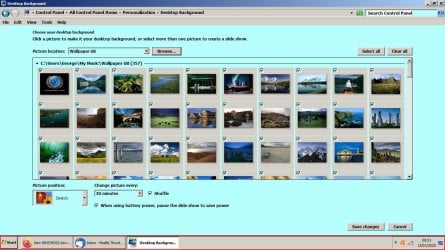
Hi Folks, before installing the win7 updates on 14 01 2020 I had 2 variations of Windows Classic Theme. One called Green other called White. My Desktop background on both was 'Slide Show' to change every thirty minutes, now sttuck on 'Solid Colour'. Now I have an unsaved theme that I can't delete when one of the others is selected.
My desktop picture is all white and I'm unable to set any picture as background.

RR.jpg

RR2.jpg
 

My Computer My Computer

At a glance

Win7 H.Prem. 32bit+SP1
Computer Manufacturer/Model Number
Look in my Signature.
OS
Win7 H.Prem. 32bit+SP1
I understand that Brink, but it appeared after I installed the latest quality update. Perhaps it failed the first time? In any case, the quality update succeeded without it. I actually did not intend to install the quality rollup, did it by accident. but since it succeeded, and my computer still works, it's all good as now I have it updated completely (except for that servicing stack one).
This is exactly what happens with me with the last several monthly updates.
The Servicing Stack Update does no even show up until AFTER the current updates are successfully installed. Then and only then does the Servicing Stack update show up, so this goes back to your question, why have the final Servicing Stack Update AFTER the final update?
 

My Computer My Computer

At a glance

win 7
OS
win 7

My Computer My Computer

At a glance

Windows 7 Ultimate x86
Computer type
PC/Desktop
OS
Windows 7 Ultimate x86
i guess for those who will pay for support continuation like enterprises and such.
 

My Computer My Computer

At a glance

Windows 7 Professional x64
OS
Windows 7 Professional x64
The wallpaper issue is happening for my company too. All pcs ,laptops or desktops, that were running windows 7 were affected. All are joined to a domain and we also have the extended support. They also all have a GPO put in place to change the wallpaper to a company logo. It changes the registry Computer\HKEY_CURRENT_USER\Control Panel\Desktop\Wallpaper to be C:\company.jpg.

I messed with what patch was doing it and KB4534314 was the culprit. Uninstall that patch and it will go back to normal. However due to the severity of the vulnerabilities it patches we can not just roll back that update. We looked into it a little more and removing the GPO does put the default wallpaper back into place but applying the GPO again sets it to black. Also when the GPO is taken off users can change the background and i tested the file we use on the C drive and it works fine so nothing is messed up with the file.

Has anyone else also experienced this in a work environment?
 

My Computer My Computer

At a glance

Windows 7 Professional 32 and64NANANA
Computer type
PC/Desktop
Computer Manufacturer/Model Number
Dell and HPs
OS
Windows 7 Professional 32 and64
CPU
NA
Motherboard
NA
Memory
NA
Graphics Card(s)
NA
Hard Drives
NA
Antivirus
SENTINAL ONE
Browser
IE AND CHROME
Wallpaper problems

I have the same problem with the wallpapers. The update block the wallpaper added by GPO.
 

My Computer My Computer

At a glance

PR
Computer type
PC/Desktop
OS
PR
I had the same desktop background issue as well where I got a black background. This is on a personal pc. None of my custom saved themes worked except for the preinstalled aero themes, and some slide show options were not working either, like the Picture Positioning didn't allow me to select the Stretch option. I had just installed KB4536952 Jan 2020 Servicing Stack and KB534310 Jan 2020 Monthly Rollup. For some reason, Windows didn't allow me to uninstall KB4536952, so I uninstalled KB534310 instead and rebooted, and thank goodness everything was back to normal.
 

My Computer My Computer

At a glance

Windows 7 Pro
Computer type
PC/Desktop
OS
Windows 7 Pro
Hi cici, KB534310 is not installed on my pc or showing as available in WU
 

My Computer My Computer

At a glance

Win7 H.Prem. 32bit+SP1
Computer Manufacturer/Model Number
Look in my Signature.
OS
Win7 H.Prem. 32bit+SP1
Hmm, I'm on Win 7 Pro. Perhaps we have different windows update #'s. Have you looked for a Jan 2020 Monthly Rollup or something similar? If so, try uninstalling that. Otherwise, I would try uninstalling each update from the most recent and work backwards. But uninstall one at a time, reboot, check desktop backgrounds, repeat.


Just to make sure we're on the same page, you're going to the windows update section of the Control Panel to view the installed updates, right? It's not the same as the Programs and Features page.
 

My Computer My Computer

At a glance

Windows 7 Pro
Computer type
PC/Desktop
OS
Windows 7 Pro
I'm on Win7 Home Premium 32bit on both my computers.
 

My Computer My Computer

At a glance

Win7 H.Prem. 32bit+SP1
Computer Manufacturer/Model Number
Look in my Signature.
OS
Win7 H.Prem. 32bit+SP1
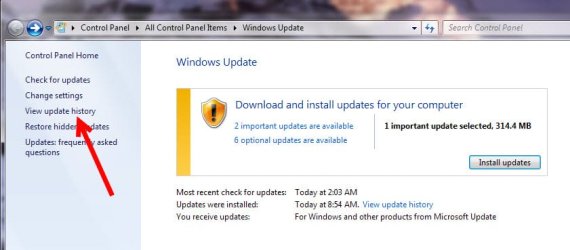
So, when you're in Control Panel - Windows Update, click on "View update history",
image1.jpg


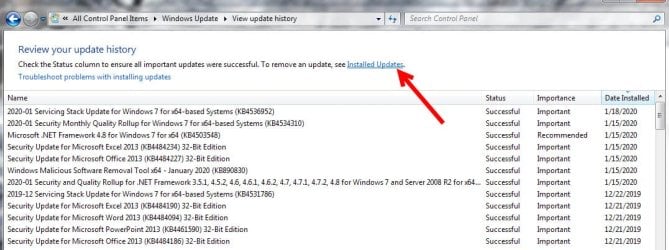
then "Installed Updates" and look for the KB in question.
image2.jpg
 

My Computer My Computer

At a glance

Windows 7 Pro
Computer type
PC/Desktop
OS
Windows 7 Pro
Hi cici, I uninstallec KB4534310 and that fixed my problem.
WU did try to reinstall it but I hid it.
Thanks for your help.
 

My Computer My Computer

At a glance

Win7 H.Prem. 32bit+SP1
Computer Manufacturer/Model Number
Look in my Signature.
OS
Win7 H.Prem. 32bit+SP1
I've had several issues on my computer since the last update, the desktop display settings being one of them. I uninstalled the kb4534310 update, restarted, and happily everything works now and is back to normal. :D


Mike
 

My Computer My Computer

At a glance

win7 pro 64
Computer type
PC/Desktop
Computer Manufacturer/Model Number
Dell
OS
win7 pro 64
More updates in the pipeline?;)
On second thought, perhaps real purpose is to prevent one from receiving future updates?:huh:
 

My Computer My Computer

At a glance

Windows 7 Ultimate x86
Computer type
PC/Desktop
OS
Windows 7 Ultimate x86
Glad it worked out :-)
 

My Computer My Computer

At a glance

Windows 7 Pro
Computer type
PC/Desktop
OS
Windows 7 Pro

My Computer My Computer

At a glance

Windows 7 Ultimate x64Intel Core i7-2600K (3.40GHz)16GB DDR3ATI Radeon 5850
Computer type
PC/Desktop
Computer Manufacturer/Model Number
custom built
OS
Windows 7 Ultimate x64
CPU
Intel Core i7-2600K (3.40GHz)
Motherboard
Asus P8Z68-V-LE
Memory
16GB DDR3
Graphics Card(s)
ATI Radeon 5850
Hard Drives
Seagate Barracuda 7200.3 (500GB)
Antivirus
Avast Free Antivirus
Browser
Firefox 68.0
Back
Top