New laptop error on first startup

Juliancant

New member
Local time
4:29 AM
Messages
4
Hi all,

First time on here, so please be kind....

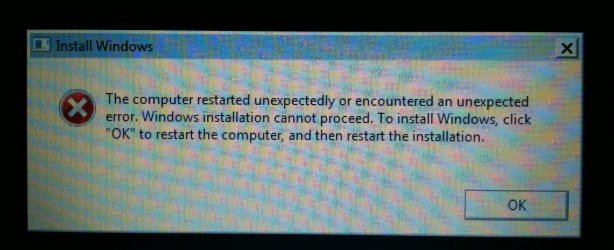
I have just purchased a new Fujitsu Siemens AH530 laptop and it won't go past the first screen on startup, it just keeps coming up with the attached error over and over again.

Please help, as it is very frustrating to have a shiny new laptop but can't use it. I was thinking of putting in the recovery cd but I am a little scared of loosing all of the drivers if it puts it back to windows original settings. I suppose my next step is to send it back :-(
 

Attachments
  • photo.JPG
    photo.JPG
    366.3 KB · Views: 12

My Computer My Computer

OS
Win 7 home 64bit
Keep in mind that you have a a full warranty and included tech support for the first year, so they can walk you through the steps needed since this may be a known issue.

To see if onboard Repair can solve the problem boot into System Recovery Options following the steps in the blue link to run Startup Repair repeatedly with reboots. Then report back what it finds.
 
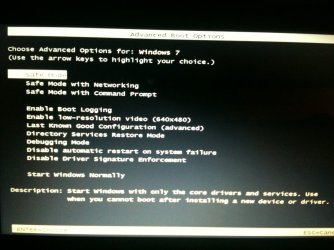
Thanks gregrocker. I have tried and it doesn't seem to give me the 'repair your computer' option, again - see attached.
 

Attachments

  • photo (1).JPG
    photo (1).JPG
    102.6 KB · Views: 8

My Computer My Computer

OS
Win 7 home 64bit
In that case you need the Win7 DVD or Repair CD to proceed with Option Two.

I'll provide you with the official Win7 with SP1 installer ISO to burn to DVD or write to flash stick so you have it for repairs and also possible clean reinstall which gives a much cleaner and superior install of just the OS:
Win7 Home Premium x64 SP1 English Official ISO download
Windows 7 USB-DVD Download Tool

I would first boot it to run Startup Repair 3 Separate Times with reboots, report back findings.

Also look over these Clean Reinstall steps.
 
You are an absolute gent for your reply! I am not hugely confident in doing this and if I mess it up there will probably be something invalidating my warranty, so perhaps I should be patient and return it and hope for a replacement. What do you think?

I am glad you have clarified that it is not just me doing something silly!
 

My Computer My Computer

OS
Win 7 home 64bit
It won't hurt anything to try booting the DVD to run Startup Repair, and might get it running.

But if you want the manufacturer's help the way to do it is call Tech Support and have them help you as they can very possibly fix it since this may be a known issue. If not they will issue a Return Merchandise Authorization to pay for the shipping and help track your laptop's repair progress.

It sounds like you had the computer shipped from manufacturer, but if you bought it from a retailer they may also have a return policy to cover replacement within a certain time period - after which you have the manufacturer's warranty and tech support for at least a year unless you extend it.
 
Last edited:
Excellent. thank you for all of your help. I will give this a go tomorrow as it is bed time now. Thanks again!
 

My Computer My Computer

OS
Win 7 home 64bit
Back
Top