New message notification and autostart

Shayx

Nom nom nom nom
Power User
VIP
Local time
11:23 AM
Messages
238
Location
Hadera
two things i would like to know about the new office 2010.
i have the professional plus version, but I've seen in in all versions.

1. there is no new mail notification, not in the pinned icon in the taskbar and not in the system tray.

2. i would like outlook to be opened when my computer start, but don't want it to open the window, just open in the background. how?:party:
 

My Computer My Computer

Computer type
PC/Desktop
OS
Windows 8.1 Enterprise
CPU
Core 2 Extreme QX9650 3.0Ghz 12MB
Motherboard
DFI LanParty DK P45-T2RS+ABS
Memory
G.Skill DDR2 2GBx3 1066MHZ CL5
Graphics Card(s)
Sapphire RADEON HD 4870 512MB DDR5
Sound Card
Asus XONAR D1
Monitor(s) Displays
Samsung 2243WM Plus
Screen Resolution
1680X1050
Hard Drives
Hitachi 320GB SATA2 7200RPM 16MB

Segate Barracuda 750GB SATA2 7200RPM 32MB
PSU
SilverStone Olympia 750W
Case
CoolerMaster 690
Cooling
OCZ Vendetta 2
Internet Speed
12D/1U
two things i would like to know about the new office 2010.
i have the professional plus version, but I've seen in in all versions.

1. there is no new mail notification, not in the pinned icon in the taskbar and not in the system tray.

2. i would like outlook to be opened when my computer start, but don't want it to open the window, just open in the background. how?:party:

I wouldn't understand your first need..

Abt the second one ..yes you can do that...

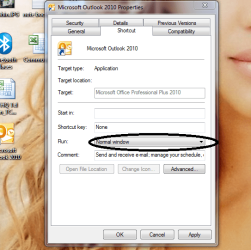
Put a shortcut for outlook in desktop... Right click on the shortcut and click on properties..
Change run to minimized...

Outlook.PNG

Copy the shortcut and paste it to C:\ProgramData\Microsoft\Windows\Start Menu\Programs\Startup folder. Log off and login post back the results..
 

My Computer My Computer

Computer Manufacturer/Model Number
wipro
OS
windows 7
CPU
wipro
Motherboard
intel
Memory
8 gb
Hard Drives
580 gb
thanks...solved the 2nd issue.
about the first, I've notices a lot of users are experiencing the problem.

when you get a new message in outlook you should see a envelope icon, but that's not the case in outlook 2010. quite disappointing.
 

My Computer My Computer

Computer type
PC/Desktop
OS
Windows 8.1 Enterprise
CPU
Core 2 Extreme QX9650 3.0Ghz 12MB
Motherboard
DFI LanParty DK P45-T2RS+ABS
Memory
G.Skill DDR2 2GBx3 1066MHZ CL5
Graphics Card(s)
Sapphire RADEON HD 4870 512MB DDR5
Sound Card
Asus XONAR D1
Monitor(s) Displays
Samsung 2243WM Plus
Screen Resolution
1680X1050
Hard Drives
Hitachi 320GB SATA2 7200RPM 16MB

Segate Barracuda 750GB SATA2 7200RPM 32MB
PSU
SilverStone Olympia 750W
Case
CoolerMaster 690
Cooling
OCZ Vendetta 2
Internet Speed
12D/1U
First, make sure that you have it enabled in settings, also, it wont work if you have the taskbar set to use small icons... ;)
 

My Computer My Computer

Computer type
PC/Desktop
Computer Manufacturer/Model Number
LENOVO K450 @3.0GHZ
OS
64-bit Windows 8.1 Pro
CPU
Core(TM) i5 CPU 4330 Haswell @ 3.20GHz
Motherboard
LENOVO
Memory
12.00 GB
Graphics Card(s)
Intel(R) HD Graphics
Sound Card
Intel HD integtrated
Monitor(s) Displays
HP 25' ISP Monitor
Screen Resolution
1900/1020
Hard Drives
(1) ST1000DM003-1CH162 (2) Generic STORAGE DEVICE USB Device (3) Generic STORAGE DEVICE USB Device
Internet Speed
100mb down/10mb up
configuration OK.
i use large icons, i don't get a notification not on the desktop, not in the tray icon and not in the task bar icon.
this is a common issue with 2010 version of outlook according to Google search but for now MS is not addressing the issue.
 

My Computer My Computer

Computer type
PC/Desktop
OS
Windows 8.1 Enterprise
CPU
Core 2 Extreme QX9650 3.0Ghz 12MB
Motherboard
DFI LanParty DK P45-T2RS+ABS
Memory
G.Skill DDR2 2GBx3 1066MHZ CL5
Graphics Card(s)
Sapphire RADEON HD 4870 512MB DDR5
Sound Card
Asus XONAR D1
Monitor(s) Displays
Samsung 2243WM Plus
Screen Resolution
1680X1050
Hard Drives
Hitachi 320GB SATA2 7200RPM 16MB

Segate Barracuda 750GB SATA2 7200RPM 32MB
PSU
SilverStone Olympia 750W
Case
CoolerMaster 690
Cooling
OCZ Vendetta 2
Internet Speed
12D/1U
i found a partially working solution.
apparently office don't interact that well with imap accounts.

what you need to do is, mark one of you messages, click Rules>create rule>display in the new item alert windows

go to advanced options
choose:
on this computer only
and through a specified account (you'll need to click the specified account link below and choose your account)
click next.
choose
play a sound (if you like)
and show desktop alert

then finish.
what you'll get when a new message arrive is a sound and a notification, but still no envelope icon.
hope I'll found a solution to that also, for now it will do.
 

My Computer My Computer

Computer type
PC/Desktop
OS
Windows 8.1 Enterprise
CPU
Core 2 Extreme QX9650 3.0Ghz 12MB
Motherboard
DFI LanParty DK P45-T2RS+ABS
Memory
G.Skill DDR2 2GBx3 1066MHZ CL5
Graphics Card(s)
Sapphire RADEON HD 4870 512MB DDR5
Sound Card
Asus XONAR D1
Monitor(s) Displays
Samsung 2243WM Plus
Screen Resolution
1680X1050
Hard Drives
Hitachi 320GB SATA2 7200RPM 16MB

Segate Barracuda 750GB SATA2 7200RPM 32MB
PSU
SilverStone Olympia 750W
Case
CoolerMaster 690
Cooling
OCZ Vendetta 2
Internet Speed
12D/1U
Back
Top