
New Mobo, pre-exisintg raid 0 drives did work, now says "Initialize"
Hello,
I had a mobo go bad so I replaced it (Asus P8Z68-V Pro/Gen 3 replaced by Asrock Extreme 4 Z67). All went well at first but my raid drive switched drive letters from E to D. I changed it to E in disk management and all my programs worked fine as did the raid drive. NOTE: Win 7 stayed on my ssd (drive C).
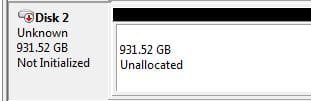
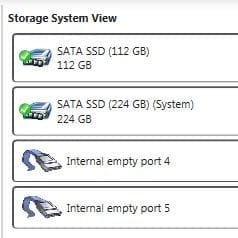
All of a sudden the raid drive was gone today. In device manager it shows both disks as being in good health. In Computer Management it shows as a single drive but it says it has to be initialized. My current bios setting is AHCI. Intel RST does not show Raid drives individually or as a single drive. Maybe I have them connected to the wrong SATA ports? Note: I have two ssd's, drive C with OS, etc and Drive G with games.
I need to get the raid 0 working. I hope I do not need to recover info and can just get it functioning again?
Thank you for the help.
Hello,
I had a mobo go bad so I replaced it (Asus P8Z68-V Pro/Gen 3 replaced by Asrock Extreme 4 Z67). All went well at first but my raid drive switched drive letters from E to D. I changed it to E in disk management and all my programs worked fine as did the raid drive. NOTE: Win 7 stayed on my ssd (drive C).
All of a sudden the raid drive was gone today. In device manager it shows both disks as being in good health. In Computer Management it shows as a single drive but it says it has to be initialized. My current bios setting is AHCI. Intel RST does not show Raid drives individually or as a single drive. Maybe I have them connected to the wrong SATA ports? Note: I have two ssd's, drive C with OS, etc and Drive G with games.
I need to get the raid 0 working. I hope I do not need to recover info and can just get it functioning again?
Thank you for the help.
Attachments
My Computer
At a glance
Windows 7 Premium 64 bitI7 2600kGSkill RipJaws DDR3 1600EVGA GTX480 w/ Accelero Xtreme Plus III
- Computer Manufacturer/Model Number
- DIY
- OS
- Windows 7 Premium 64 bit
- CPU
- I7 2600k
- Motherboard
- ASUS P8Z68-Pro Gen 3
- Memory
- GSkill RipJaws DDR3 1600
- Graphics Card(s)
- EVGA GTX480 w/ Accelero Xtreme Plus III
- Sound Card
- Recon 3d Pro
- Monitor(s) Displays
- ASUS 21"
- Hard Drives
- Mushkin Chronos Deluxe 120 GB
2 TB Western Digital
- PSU
- Corsair AX860I
- Case
- Corsair 500R
- Cooling
- Corsair H60
- Keyboard
- Logitech G11
- Mouse
- MS
- Internet Speed
- 15 Mb/sec

