
It was a dark and stormy night...
I had someone build this system for me years ago.
He set it up as raid 0 with 2 identical wd 500gb hdds.
the mobo is an nforce 690i lt sli.
i partitioned the 1tb into 2 partitions. one for c:\windows7 and the other for d:\data.
i take weekly backup snapshots using acronis to an external 1tb hdd.
in the past i have successfully restored the backup image to the c:\ drive, keeping my d:\data drive in tact.
i always thought i was safe with my backups. i don't understand raid too well.
all of a sudden my system won't boot up.
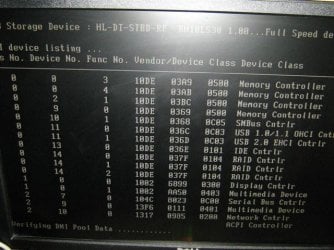
it gets stuck at 'verifying dmi pool data'.
no prob i think. i'll just restore an image from a coupla days back. like i've done before.
no can do. acronis recovery can only detect the d:\data drive. it has no c:\ drive partition to restore to.
in acronis i can see the d:\data drive with it's dirs and data. i cannot see any c:\ drive.
i try an run win7 repair dvd. i boot from it and it loads windows files and then hangs. eventually it lets me try a repair but then says 'a hard disk could not be found'
i unhook all peripherals. same thing.
i think maybe one of the hdds has gone bad. i go out and buy another identical hdd. then i unplug one of the original hdds and plug in the new one. i boot up and get raid errors. i run acronis and it still sees the data drive, so i assume that i guessed right and unplugged the bad drive.
then i think to switch the drives and try again just to make sure. i plug the original hd back in to where it was, unplug the 2nd original hd, and replace it with the new hd. then boot. raid error again. then try acronis and STILL see the data drive but still no c:\drive. confused.
i hook the 2 original hdds back in and unplug the new hdd.
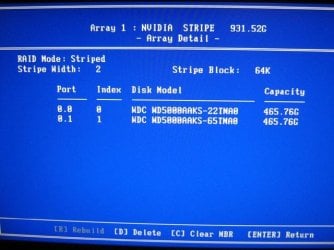
then i boot to the raid config menu. it shows up as healthy.
i see this tempting item called 'clear mbr' but i don't try it.
i thought i'd post my story here 1st to see if anyone can help.
my objective is to keep my data partition in tact. i would also like to restore my windows partition from my backup acronis image, or re-enable the existing one before the 'verifying dmi pool data' freeze.
I don't care if i maintain the raid0. in fact i'd prefer to get rid of it and simplify.
any feedback would be greatly appreciated.
I had someone build this system for me years ago.
He set it up as raid 0 with 2 identical wd 500gb hdds.
the mobo is an nforce 690i lt sli.
i partitioned the 1tb into 2 partitions. one for c:\windows7 and the other for d:\data.
i take weekly backup snapshots using acronis to an external 1tb hdd.
in the past i have successfully restored the backup image to the c:\ drive, keeping my d:\data drive in tact.
i always thought i was safe with my backups. i don't understand raid too well.
all of a sudden my system won't boot up.
it gets stuck at 'verifying dmi pool data'.
no prob i think. i'll just restore an image from a coupla days back. like i've done before.
no can do. acronis recovery can only detect the d:\data drive. it has no c:\ drive partition to restore to.
in acronis i can see the d:\data drive with it's dirs and data. i cannot see any c:\ drive.
i try an run win7 repair dvd. i boot from it and it loads windows files and then hangs. eventually it lets me try a repair but then says 'a hard disk could not be found'
i unhook all peripherals. same thing.
i think maybe one of the hdds has gone bad. i go out and buy another identical hdd. then i unplug one of the original hdds and plug in the new one. i boot up and get raid errors. i run acronis and it still sees the data drive, so i assume that i guessed right and unplugged the bad drive.
then i think to switch the drives and try again just to make sure. i plug the original hd back in to where it was, unplug the 2nd original hd, and replace it with the new hd. then boot. raid error again. then try acronis and STILL see the data drive but still no c:\drive. confused.
i hook the 2 original hdds back in and unplug the new hdd.
then i boot to the raid config menu. it shows up as healthy.
i see this tempting item called 'clear mbr' but i don't try it.
i thought i'd post my story here 1st to see if anyone can help.
my objective is to keep my data partition in tact. i would also like to restore my windows partition from my backup acronis image, or re-enable the existing one before the 'verifying dmi pool data' freeze.
I don't care if i maintain the raid0. in fact i'd prefer to get rid of it and simplify.
any feedback would be greatly appreciated.
Attachments

My Computer
At a glance
win7 ult 64
- OS
- win7 ult 64


