New monitor (Dual Setup) FPS issues

prizna

New member
Member
Local time
11:13 PM
Messages
51
Sorry if this is in the wrong place, wasn't sure if it should be in the forum for GPUs or Hardware or not.

I have 2 monitors (1920 x 1080) connected to my Nvidia GTX 770:

BenQ XL2430T (Primary)
BenQ E2420HD (Secondary)

I currently have my XL2430T (Primary) set to 120hz and my E2420HD (Secondary) set to 60hz both connected by DVI.

This is the first time I have had more than a single monitor so sorry if this is a stupid question.
I have noticed that if I have a game running on my secondary monitor (60hz) while I have anything else on my primary monitor (120hz), I get FPS drops for that game.
If I play the game on my primary monitor (120hz) while having anything else on my secondary monitor (60hz) there are no FPS drops.
I also get no FPS drops if I play a game on my secondary monitor if I lower my primary monitor from 120hz to 60hz and have both monitors running at 60hz, and I know that it seems stupid to be playing a game on the secondary monitor but I am still curious.

So in short it seems I only get FPS drops with games on my secondary monitor (60hz) when my primary monitor is set above 60hz.

I guess my main question is, should this be happening? Is this just the limit of my GPU or is there something else possibly at play here?

extra specs incase you need them:

Processor: i7 2600 3.40GHz 3.70Ghz
RAM: 8 GB
OS: Win7 Home Premium 64 bit

Currently the only real game I have tested this with is Shovel Knight and being that it isn't really a graphic intensive game, I figure that this shouldn't be a problem.

thanks,
 

My Computer My Computer

At a glance

Windows 7 Home Premium 64bitIntel(R) Core(TM) i7-2600 CPU @ 3.40GHz8.00gbNVIDIA GeForce GTX 770
Computer type
PC/Desktop
Computer Manufacturer/Model Number
Custom Build
OS
Windows 7 Home Premium 64bit
CPU
Intel(R) Core(TM) i7-2600 CPU @ 3.40GHz
Motherboard
Gigabyte Technology Co., Ltd. Z68A-D3H-B3
Memory
8.00gb
Graphics Card(s)
NVIDIA GeForce GTX 770
Sound Card
NVIDIA High Definition Audio
Monitor(s) Displays
BenQ E2420HD
Screen Resolution
1920x1080
Hard Drives
Samsung SSD 840 PRO Seri
ST32000641AS
Seagate Expansion Desk USB Device
Antivirus
Kaspersky Internet Security 2013
Browser
Google Chrome
My guess would be that the graphics card has to work harder when the refresh rate is set to 120 Hz. Two different refresh rates probably causes the GPU to work even harder, resulting in lower frame rates. Also, the secondary monitor is most likely not given priority by the system, again leading to lower frame rates.

Is there a specific reason that you need to run your primary monitor at 120 Hz? Does your frame rate on the primary monitor increase if you run it at 60 Hz? Myself, I would run the monitors at the same refresh rate to avoid potential stability problems, and situations like the one you are describing. But that's just me.
 

My Computer My Computer

At a glance

Win 7 Pro x64/Win 10 Pro x64 dual bootAMD FX 8350 Vishera @ 420016 GB Mushkin Blackline DDR3-2400 @ 1866 (9-1...XFX Radeon R9 280 Double D Black Edition
Computer type
PC/Desktop
Computer Manufacturer/Model Number
Mellon Labs (custom build)
OS
Win 7 Pro x64/Win 10 Pro x64 dual boot
CPU
AMD FX 8350 Vishera @ 4200
Motherboard
ASUS M5A97 R2.0
Memory
16 GB Mushkin Blackline DDR3-2400 @ 1866 (9-10-10-10-31)
Graphics Card(s)
XFX Radeon R9 280 Double D Black Edition
Sound Card
Realtek HD Audio on MB. Sounds great.
Monitor(s) Displays
Acer 24", Acer 22"
Screen Resolution
3840 x 1080
Hard Drives
1 x Mushkin Chronos 120 GB SSD (Win 10)
1 x Samsung 850 EVO 250 GB SSD (Win 7)
1 x WD 1TB SATA Blue
1 x WD 1TB SATA Green
PSU
Corsair TX-750
Case
CoolerMaster HAF 912+
Cooling
Coolermaster Seidon 240M Liquid AIO. 6 case fans
Keyboard
Logitech G710+
Mouse
Logitech G500s
Internet Speed
Much better since I got fiber, but still way overpriced.
Antivirus
MSE, Malware Bytes for scanning
Browser
Firefox
Other Info
Corsair VOID USB headphones.

A Mellon Labs X-1 - LCD Smartie driven system status display.

Brought to you by the letter E
Id like to run my primary monitor at 120hz because I bought it so I could have an improved refresh rate, my secondary monitor has a max refresh rate of 60hz.

Another thing I have noticed is, if I try to play a 60fps video on youtube through google chrome I get large frame drops on which ever monitor the video is playing on, I will get dropped frames if it is played on my primary or on my secondary monitor, If i unplug one of my monitors so I only have one connected I don't get these dropped frame, any idea on what may be causing this?

I feel that both these issues are caused by the same thing, do I require more RAM for a 2nd monitor at 120hz?


thanks,
 
Last edited:

My Computer My Computer

At a glance

Windows 7 Home Premium 64bitIntel(R) Core(TM) i7-2600 CPU @ 3.40GHz8.00gbNVIDIA GeForce GTX 770
Computer type
PC/Desktop
Computer Manufacturer/Model Number
Custom Build
OS
Windows 7 Home Premium 64bit
CPU
Intel(R) Core(TM) i7-2600 CPU @ 3.40GHz
Motherboard
Gigabyte Technology Co., Ltd. Z68A-D3H-B3
Memory
8.00gb
Graphics Card(s)
NVIDIA GeForce GTX 770
Sound Card
NVIDIA High Definition Audio
Monitor(s) Displays
BenQ E2420HD
Screen Resolution
1920x1080
Hard Drives
Samsung SSD 840 PRO Seri
ST32000641AS
Seagate Expansion Desk USB Device
Antivirus
Kaspersky Internet Security 2013
Browser
Google Chrome
You need to run both at 60 Hz.

If you are gaming on 1 monitor, why do you have anything on the other ? And what for example ?

You don`t say how much RAM is on the 770 or what make and model it is.

I`ve never even monitored fps on a youtube video, never had to. Either the video runs or it times out for a few seconds because I try to run it at 720 or 1080p when possible, remember this is coming over a server many others may be trying to watch and then there`s your download speed to consider.

How do YOU monitor FPS on a youtube video ?

I use Fraps for gaming, movies should always show up at a constant 24 fps.

The only thing you should be concerned about is fps on your primary monitor during gaming, and fps during a game fluctuate all the time, they don`t stay constant.

I would consult the card manufacturer, not forgetting to mention the different refresh rates.
 
Last edited:

My Computer My Computer

At a glance

Windows 10 Pro x64Intel Core i7 6700KGSkill TridentZ RGB 16GB 3600 16-16-16-36EVGA GTX 980 Ti SC x2
Computer type
PC/Desktop
Computer Manufacturer/Model Number
Skylake Special #666
OS
Windows 10 Pro x64
CPU
Intel Core i7 6700K
Motherboard
Asus Sabertooth Z170 Mark 1
Memory
GSkill TridentZ RGB 16GB 3600 16-16-16-36
Graphics Card(s)
EVGA GTX 980 Ti SC x2
Sound Card
Realtek High Definition
Monitor(s) Displays
AOC G2460PG
Screen Resolution
1920 x 1080 144Hz
Hard Drives
Samsung 860 Pro 256GB, Seagate Barracuda 4TB x2
PSU
EVGA 1000 P2, EVGA White Custom Braided Cables
Case
Corsair Vengeance C70 Gunmetal Black
Cooling
Corsair H100i v2, Corsair ML120 x2, Thermal Grizzly Kryonaut
Keyboard
Logitech G910 Orion Spectrum
Mouse
Logitech G700s
Internet Speed
Verizon Fios Quantum Gateway 75/75
Antivirus
Windows Defender, Malwarebytes Free 3.8.3
Browser
Chrome
Other Info
Corsair SP120 x4, LG Blu-ray Drive, Durabrand HT-395 100 Watt Dolby Digital Amp, Corsair H2100 Wireless 7.1 Headset
My GTX 770 an Gigabyte and has 2GB of RAM.

After a bit more of a look around I have found many more people that have the same issue (FPS/Lag issues after connecting a 2nd monitor). Unfortunately there has been no real fixes in any of the threads I have found and most have been abandoned.

From reading these it seems that both my issues Youtube FPS drops (which I monitor by right clicking and selecting 'Stats for nerds' and watching the 'Dropped Frames' information) and games on my second monitor having FPS drops (Monitored thru Dxtory) are caused by the same problem.

A few things that I have found to 'fix' these issues are:

  • Disabling Windows Aero (which I would prefer not to do as I like the look of it)
  • Setting my 60hz monitor as my primary and my 120hz as my secondary (this tells me that this is not an issue with my GPU power/memory as both monitors are still running at the same refresh rate and resolution, only the priorities have been swapped)

Unfortunately these are only compromises and not really fixes, I would like to find a true solution to these if possible, I have also monitored my CPU and RAM usage as these FPS drops occur and I am in no way putting strain on my CPU/RAM usage.

In short this seems to be an issue that occurs when more than 1 monitor is connected with Windows Aero enabled
 

My Computer My Computer

At a glance

Windows 7 Home Premium 64bitIntel(R) Core(TM) i7-2600 CPU @ 3.40GHz8.00gbNVIDIA GeForce GTX 770
Computer type
PC/Desktop
Computer Manufacturer/Model Number
Custom Build
OS
Windows 7 Home Premium 64bit
CPU
Intel(R) Core(TM) i7-2600 CPU @ 3.40GHz
Motherboard
Gigabyte Technology Co., Ltd. Z68A-D3H-B3
Memory
8.00gb
Graphics Card(s)
NVIDIA GeForce GTX 770
Sound Card
NVIDIA High Definition Audio
Monitor(s) Displays
BenQ E2420HD
Screen Resolution
1920x1080
Hard Drives
Samsung SSD 840 PRO Seri
ST32000641AS
Seagate Expansion Desk USB Device
Antivirus
Kaspersky Internet Security 2013
Browser
Google Chrome
I have none of these issues, youtube videos run at 720p 1080p fine or just time out for a few seconds ( but I explained why it will do that)

Connecting a second monitor should have no affect with fps or lag on your primary monitor. It should be turned off during gaming anyway.

Set both monitors at 60 Hz, the eye can`t perceive the difference.

It should correct the problem and that will be that.

I`m sorry you thought a 120 Hz monitor would be noticable to you.

I`m still perplexed as to why you even care about fps during a youtube video, either they run or they don`t.

Totally on a side note but.... I have a 60 Hz Sony Bravia and a 120 Hz Insignia,, guess what, there is no difference because no company broadcasts in 120 Hz.
That has nothing to do with 720p or 1080i which is all that companies broadcast at.

60Hz vs 120Hz on a gaming computer, noticeable difference? [Solved] - Flat Panel Monitors - Computer Peripherals
 
Last edited:

My Computer My Computer

At a glance

Windows 10 Pro x64Intel Core i7 6700KGSkill TridentZ RGB 16GB 3600 16-16-16-36EVGA GTX 980 Ti SC x2
Computer type
PC/Desktop
Computer Manufacturer/Model Number
Skylake Special #666
OS
Windows 10 Pro x64
CPU
Intel Core i7 6700K
Motherboard
Asus Sabertooth Z170 Mark 1
Memory
GSkill TridentZ RGB 16GB 3600 16-16-16-36
Graphics Card(s)
EVGA GTX 980 Ti SC x2
Sound Card
Realtek High Definition
Monitor(s) Displays
AOC G2460PG
Screen Resolution
1920 x 1080 144Hz
Hard Drives
Samsung 860 Pro 256GB, Seagate Barracuda 4TB x2
PSU
EVGA 1000 P2, EVGA White Custom Braided Cables
Case
Corsair Vengeance C70 Gunmetal Black
Cooling
Corsair H100i v2, Corsair ML120 x2, Thermal Grizzly Kryonaut
Keyboard
Logitech G910 Orion Spectrum
Mouse
Logitech G700s
Internet Speed
Verizon Fios Quantum Gateway 75/75
Antivirus
Windows Defender, Malwarebytes Free 3.8.3
Browser
Chrome
Other Info
Corsair SP120 x4, LG Blu-ray Drive, Durabrand HT-395 100 Watt Dolby Digital Amp, Corsair H2100 Wireless 7.1 Headset
I understand what you mean by not being able to perceive the difference, but the extra refresh rate will also prevent screen tearing without the need of vsync, also saying that a youtube video either plays or it doesn't is simply not the case in this situation, when I mention dropped frames I mean the video itself will freeze while the audio keeps going, meaning i am essentially looking at a still image as the audio plays, the video will then catch up to the audio but will freeze again, this keeps on happening.

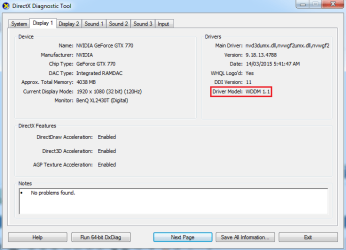
What I have found online seems to mention that this is a problem with most Nvidia cards using multiple monitors as a result of WDDM 1.1, posts I have found mention that turning off windows aero will fix this issue and it does, even when my monitors have a separate refresh rate.

If you search 'multiple monitors windows 7 aero lag' you will find many posts on many sites mentioning this issue.

Out of curiosity, is it a definite thing that I will get this lag if I have 2 different refresh rates on my monitors or is it just something that could cause the issue? If not is there anything else besides changing my refresh rate that could help with this issue?
 

My Computer My Computer

At a glance

Windows 7 Home Premium 64bitIntel(R) Core(TM) i7-2600 CPU @ 3.40GHz8.00gbNVIDIA GeForce GTX 770
Computer type
PC/Desktop
Computer Manufacturer/Model Number
Custom Build
OS
Windows 7 Home Premium 64bit
CPU
Intel(R) Core(TM) i7-2600 CPU @ 3.40GHz
Motherboard
Gigabyte Technology Co., Ltd. Z68A-D3H-B3
Memory
8.00gb
Graphics Card(s)
NVIDIA GeForce GTX 770
Sound Card
NVIDIA High Definition Audio
Monitor(s) Displays
BenQ E2420HD
Screen Resolution
1920x1080
Hard Drives
Samsung SSD 840 PRO Seri
ST32000641AS
Seagate Expansion Desk USB Device
Antivirus
Kaspersky Internet Security 2013
Browser
Google Chrome
Why are you using WDDM, use the latest drivers from nvidia.

Once again, when a video stops running it`s the download, it has nothing to do with the pc itself, it`s all about how many people are watching it and your download speeds etc.

There is no reason to turn off Aero, like I`ve already said I run 3 monitors and never have any issues with any of your problems.

You have a 770 which should run flawless. Do a custom clean install of the latest nvidia drivers. 347.88

Drivers | GeForce
 

My Computer My Computer

At a glance

Windows 10 Pro x64Intel Core i7 6700KGSkill TridentZ RGB 16GB 3600 16-16-16-36EVGA GTX 980 Ti SC x2
Computer type
PC/Desktop
Computer Manufacturer/Model Number
Skylake Special #666
OS
Windows 10 Pro x64
CPU
Intel Core i7 6700K
Motherboard
Asus Sabertooth Z170 Mark 1
Memory
GSkill TridentZ RGB 16GB 3600 16-16-16-36
Graphics Card(s)
EVGA GTX 980 Ti SC x2
Sound Card
Realtek High Definition
Monitor(s) Displays
AOC G2460PG
Screen Resolution
1920 x 1080 144Hz
Hard Drives
Samsung 860 Pro 256GB, Seagate Barracuda 4TB x2
PSU
EVGA 1000 P2, EVGA White Custom Braided Cables
Case
Corsair Vengeance C70 Gunmetal Black
Cooling
Corsair H100i v2, Corsair ML120 x2, Thermal Grizzly Kryonaut
Keyboard
Logitech G910 Orion Spectrum
Mouse
Logitech G700s
Internet Speed
Verizon Fios Quantum Gateway 75/75
Antivirus
Windows Defender, Malwarebytes Free 3.8.3
Browser
Chrome
Other Info
Corsair SP120 x4, LG Blu-ray Drive, Durabrand HT-395 100 Watt Dolby Digital Amp, Corsair H2100 Wireless 7.1 Headset
I am not all that familiar with WDDM but I was under the impression that it is required, and that NVidia cards and Windows applications use it, when I say that I am using WDDM I mean that it is listed as the driver model in dxdiag (I attached an image of what dxdiag shows). Is there a way to actually disable WDDM?

I have done a clean install of the latest Nvidia drivers and the problem remains.
 

Attachments

  • WDDM.png
    WDDM.png
    15.5 KB · Views: 1

My Computer My Computer

At a glance

Windows 7 Home Premium 64bitIntel(R) Core(TM) i7-2600 CPU @ 3.40GHz8.00gbNVIDIA GeForce GTX 770
Computer type
PC/Desktop
Computer Manufacturer/Model Number
Custom Build
OS
Windows 7 Home Premium 64bit
CPU
Intel(R) Core(TM) i7-2600 CPU @ 3.40GHz
Motherboard
Gigabyte Technology Co., Ltd. Z68A-D3H-B3
Memory
8.00gb
Graphics Card(s)
NVIDIA GeForce GTX 770
Sound Card
NVIDIA High Definition Audio
Monitor(s) Displays
BenQ E2420HD
Screen Resolution
1920x1080
Hard Drives
Samsung SSD 840 PRO Seri
ST32000641AS
Seagate Expansion Desk USB Device
Antivirus
Kaspersky Internet Security 2013
Browser
Google Chrome
Mine says the same thing for all my displays, so that is not an issue.

Have you set both monitors to 60 Hz yet ?

Also, please post a manufacturers link to your video card ( the exact make and model )

example of mine.

EVGA | Products
 

My Computer My Computer

At a glance

Windows 10 Pro x64Intel Core i7 6700KGSkill TridentZ RGB 16GB 3600 16-16-16-36EVGA GTX 980 Ti SC x2
Computer type
PC/Desktop
Computer Manufacturer/Model Number
Skylake Special #666
OS
Windows 10 Pro x64
CPU
Intel Core i7 6700K
Motherboard
Asus Sabertooth Z170 Mark 1
Memory
GSkill TridentZ RGB 16GB 3600 16-16-16-36
Graphics Card(s)
EVGA GTX 980 Ti SC x2
Sound Card
Realtek High Definition
Monitor(s) Displays
AOC G2460PG
Screen Resolution
1920 x 1080 144Hz
Hard Drives
Samsung 860 Pro 256GB, Seagate Barracuda 4TB x2
PSU
EVGA 1000 P2, EVGA White Custom Braided Cables
Case
Corsair Vengeance C70 Gunmetal Black
Cooling
Corsair H100i v2, Corsair ML120 x2, Thermal Grizzly Kryonaut
Keyboard
Logitech G910 Orion Spectrum
Mouse
Logitech G700s
Internet Speed
Verizon Fios Quantum Gateway 75/75
Antivirus
Windows Defender, Malwarebytes Free 3.8.3
Browser
Chrome
Other Info
Corsair SP120 x4, LG Blu-ray Drive, Durabrand HT-395 100 Watt Dolby Digital Amp, Corsair H2100 Wireless 7.1 Headset
I have tried yes, and while the issue is smaller, the FPS drops still remain.
 

My Computer My Computer

At a glance

Windows 7 Home Premium 64bitIntel(R) Core(TM) i7-2600 CPU @ 3.40GHz8.00gbNVIDIA GeForce GTX 770
Computer type
PC/Desktop
Computer Manufacturer/Model Number
Custom Build
OS
Windows 7 Home Premium 64bit
CPU
Intel(R) Core(TM) i7-2600 CPU @ 3.40GHz
Motherboard
Gigabyte Technology Co., Ltd. Z68A-D3H-B3
Memory
8.00gb
Graphics Card(s)
NVIDIA GeForce GTX 770
Sound Card
NVIDIA High Definition Audio
Monitor(s) Displays
BenQ E2420HD
Screen Resolution
1920x1080
Hard Drives
Samsung SSD 840 PRO Seri
ST32000641AS
Seagate Expansion Desk USB Device
Antivirus
Kaspersky Internet Security 2013
Browser
Google Chrome
FPS drop in what ?
Still waiting on the link.

You`ve already figured out how to get things working properly in your 1st post. You need to set it up like that and use it like that if you want to use the Primary monitor at 120 Hz, and there is no reason to game on the 2nd monitor if you just bought a 120 Hz monitor, that makes no sense at all to me.

Seems to me, in your particular case, with your particular PC, everything has to be equal, same cables same monitor refresh rates (possibly even alike monitors) and that`s it.

If the 120 Hz monitor just won`t work out, then just return it and be done with it, before it`s too late.
 

My Computer My Computer

At a glance

Windows 10 Pro x64Intel Core i7 6700KGSkill TridentZ RGB 16GB 3600 16-16-16-36EVGA GTX 980 Ti SC x2
Computer type
PC/Desktop
Computer Manufacturer/Model Number
Skylake Special #666
OS
Windows 10 Pro x64
CPU
Intel Core i7 6700K
Motherboard
Asus Sabertooth Z170 Mark 1
Memory
GSkill TridentZ RGB 16GB 3600 16-16-16-36
Graphics Card(s)
EVGA GTX 980 Ti SC x2
Sound Card
Realtek High Definition
Monitor(s) Displays
AOC G2460PG
Screen Resolution
1920 x 1080 144Hz
Hard Drives
Samsung 860 Pro 256GB, Seagate Barracuda 4TB x2
PSU
EVGA 1000 P2, EVGA White Custom Braided Cables
Case
Corsair Vengeance C70 Gunmetal Black
Cooling
Corsair H100i v2, Corsair ML120 x2, Thermal Grizzly Kryonaut
Keyboard
Logitech G910 Orion Spectrum
Mouse
Logitech G700s
Internet Speed
Verizon Fios Quantum Gateway 75/75
Antivirus
Windows Defender, Malwarebytes Free 3.8.3
Browser
Chrome
Other Info
Corsair SP120 x4, LG Blu-ray Drive, Durabrand HT-395 100 Watt Dolby Digital Amp, Corsair H2100 Wireless 7.1 Headset
The FPS drop that I receive while watching 60FPS youtube videos (I didn't feel a link was needed as these are quite easy to find), I have confirmed that this is not due to my internet speed, and that it is instead to do with Google Chrome not maintaining a solid FPS, using the Chrome FPS counter I can see that the drops only occur when the Chrome FPS drop below 60.

I have found that this has something to do with the window being maximised and it seems that while maximised, the window is somehow running or is being seen as running on both monitors at once.

If the Chrome window is not maximized but is windowed and stretched to full screen size (make sure that the window border does not cross into the second monitor) the FPS will be as they should be, if any part of the window crosses into the second monitor, the same FPS drops will be observed so It seems that there is a problem with maximised windows where they are kind of on both monitors at the same time resulting in these FPS drops.
 

My Computer My Computer

At a glance

Windows 7 Home Premium 64bitIntel(R) Core(TM) i7-2600 CPU @ 3.40GHz8.00gbNVIDIA GeForce GTX 770
Computer type
PC/Desktop
Computer Manufacturer/Model Number
Custom Build
OS
Windows 7 Home Premium 64bit
CPU
Intel(R) Core(TM) i7-2600 CPU @ 3.40GHz
Motherboard
Gigabyte Technology Co., Ltd. Z68A-D3H-B3
Memory
8.00gb
Graphics Card(s)
NVIDIA GeForce GTX 770
Sound Card
NVIDIA High Definition Audio
Monitor(s) Displays
BenQ E2420HD
Screen Resolution
1920x1080
Hard Drives
Samsung SSD 840 PRO Seri
ST32000641AS
Seagate Expansion Desk USB Device
Antivirus
Kaspersky Internet Security 2013
Browser
Google Chrome
I never asked for a youtube link, I asked for your video card link, from the manufacturer.

Stlll waiting on that, this is the 3rd request.

Why would ever have your Chrome browser cross 2 monitors ?

Why are you bringing on all these self inflicted problems ?
 

My Computer My Computer

At a glance

Windows 10 Pro x64Intel Core i7 6700KGSkill TridentZ RGB 16GB 3600 16-16-16-36EVGA GTX 980 Ti SC x2
Computer type
PC/Desktop
Computer Manufacturer/Model Number
Skylake Special #666
OS
Windows 10 Pro x64
CPU
Intel Core i7 6700K
Motherboard
Asus Sabertooth Z170 Mark 1
Memory
GSkill TridentZ RGB 16GB 3600 16-16-16-36
Graphics Card(s)
EVGA GTX 980 Ti SC x2
Sound Card
Realtek High Definition
Monitor(s) Displays
AOC G2460PG
Screen Resolution
1920 x 1080 144Hz
Hard Drives
Samsung 860 Pro 256GB, Seagate Barracuda 4TB x2
PSU
EVGA 1000 P2, EVGA White Custom Braided Cables
Case
Corsair Vengeance C70 Gunmetal Black
Cooling
Corsair H100i v2, Corsair ML120 x2, Thermal Grizzly Kryonaut
Keyboard
Logitech G910 Orion Spectrum
Mouse
Logitech G700s
Internet Speed
Verizon Fios Quantum Gateway 75/75
Antivirus
Windows Defender, Malwarebytes Free 3.8.3
Browser
Chrome
Other Info
Corsair SP120 x4, LG Blu-ray Drive, Durabrand HT-395 100 Watt Dolby Digital Amp, Corsair H2100 Wireless 7.1 Headset

My Computer My Computer

At a glance

Windows 7 Home Premium 64bitIntel(R) Core(TM) i7-2600 CPU @ 3.40GHz8.00gbNVIDIA GeForce GTX 770
Computer type
PC/Desktop
Computer Manufacturer/Model Number
Custom Build
OS
Windows 7 Home Premium 64bit
CPU
Intel(R) Core(TM) i7-2600 CPU @ 3.40GHz
Motherboard
Gigabyte Technology Co., Ltd. Z68A-D3H-B3
Memory
8.00gb
Graphics Card(s)
NVIDIA GeForce GTX 770
Sound Card
NVIDIA High Definition Audio
Monitor(s) Displays
BenQ E2420HD
Screen Resolution
1920x1080
Hard Drives
Samsung SSD 840 PRO Seri
ST32000641AS
Seagate Expansion Desk USB Device
Antivirus
Kaspersky Internet Security 2013
Browser
Google Chrome
There is no reason that card won`t do everything you ask it to, the problem extends from the Hz difference.

Fix it or live with it.

I`d return the monitor.

Or stick with the single 120 Hz monitor :) if you have no issues with it by itself.
 

My Computer My Computer

At a glance

Windows 10 Pro x64Intel Core i7 6700KGSkill TridentZ RGB 16GB 3600 16-16-16-36EVGA GTX 980 Ti SC x2
Computer type
PC/Desktop
Computer Manufacturer/Model Number
Skylake Special #666
OS
Windows 10 Pro x64
CPU
Intel Core i7 6700K
Motherboard
Asus Sabertooth Z170 Mark 1
Memory
GSkill TridentZ RGB 16GB 3600 16-16-16-36
Graphics Card(s)
EVGA GTX 980 Ti SC x2
Sound Card
Realtek High Definition
Monitor(s) Displays
AOC G2460PG
Screen Resolution
1920 x 1080 144Hz
Hard Drives
Samsung 860 Pro 256GB, Seagate Barracuda 4TB x2
PSU
EVGA 1000 P2, EVGA White Custom Braided Cables
Case
Corsair Vengeance C70 Gunmetal Black
Cooling
Corsair H100i v2, Corsair ML120 x2, Thermal Grizzly Kryonaut
Keyboard
Logitech G910 Orion Spectrum
Mouse
Logitech G700s
Internet Speed
Verizon Fios Quantum Gateway 75/75
Antivirus
Windows Defender, Malwarebytes Free 3.8.3
Browser
Chrome
Other Info
Corsair SP120 x4, LG Blu-ray Drive, Durabrand HT-395 100 Watt Dolby Digital Amp, Corsair H2100 Wireless 7.1 Headset
Back
Top