
Solved New motherboard and CPU

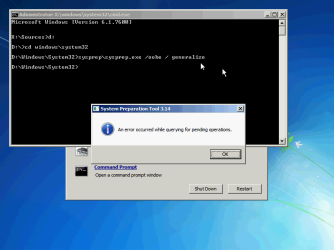
I do not believe so. I have tried to find a way to use sysprep like a repair tool, when booting to Startup Repair. It's a no go.

Kari
 

Attachments

  • Sysprep_from_Startup_repair.png
    Sysprep_from_Startup_repair.png
    34.7 KB · Views: 97

My Computer My Computer

At a glance

Windows 10 Pro x64 EN-GB1.6 GHz Intel Core i7-720QM Processor6 GBATI Mobility Radeon HD 5850 Graphics
Computer type
Laptop
Computer Manufacturer/Model Number
HP ENVY 17-1150eg
OS
Windows 10 Pro x64 EN-GB
CPU
1.6 GHz Intel Core i7-720QM Processor
Memory
6 GB
Graphics Card(s)
ATI Mobility Radeon HD 5850 Graphics
Sound Card
Beats sound system with integrated subwoofer
Monitor(s) Displays
17" laptop display, 22" LED and 32" Full HD TV through HDMI
Screen Resolution
1600*900 (1), 1920*1080 (2&3)
Hard Drives
Internal: 2 x 500 GB SATA Hard Disk Drive 7200 rpm
External: 2TB for backups, 3TB USB3 network drive for media
Cooling
As Envy runs a bit warm, I have it on a Cooler Master pad
Keyboard
Logitech diNovo Media Desktop Laser (bluetooth)
Mouse
Logitech Performance Mouse MX
Internet Speed
50/10 Mbps VDSL
Antivirus
Windows Defender 4.3.9431.0
Browser
Maxthon 3.5.2., IE11
In that case without the ability to start Win7 again your options are to:

- see if the HD will start up on its own with new mobo.

- after installing the new mobo, boot Paragon Adaptive Restore CD to remove all drivers and prepare Win7 to boot on new hardware.

- Boot Acronis 10+ with Universal Restore to save an image of Win7 that will do the same thing, then reimage it to the HD.

- clean reinstall. http://www.sevenforums.com/tutorials/1649-clean-install-windows-7-a.html
 
This is getting a little over my head:(:( but it's a good opportunity to learn:confused::confused:

How/where do I get these software program's and do I understand correctly that only one of the two is needed.?

In that case without the ability to start Win7 again your options are to:

- see if the HD will start up on its own with new mobo.

- after installing the new mobo, boot Paragon Adaptive Restore CD to remove all drivers and prepare Win7 to boot on new hardware.

- Boot Acronis 10+ with Universal Restore to save an image of Win7 that will do the same thing, then reimage it to the HD.

- clean reinstall. http://www.sevenforums.com/tutorials/1649-clean-install-windows-7-a.html
 

My Computer My Computer

At a glance

Windows 7 32 bit
OS
Windows 7 32 bit
The Paragon and Acronis software is paid software you can buy by googling the name given.

Do you have Recovery Disks, or a Win7 installation DVD available to clean reinstall?
 
OK Greg, I will do some searching, do I need both packages?

I have the OEM cd that I purchased but no Recovery Disks. Can I make those from my wife's installation or do they have to be made from mine?

Incidentally, I'm very grateful to you and the other guys for all this guidance and support:D:D
 

My Computer My Computer

At a glance

Windows 7 32 bit
OS
Windows 7 32 bit
You could use your OEM DVD to clean reinstall after you install the new hardware, then try the activation before adding all the programs and files to see if MS is going to give you a break (as they have others).

As I said, the HD might start up on the new hardware although I wouldn't count on it.

If not your best paid option would be Paragon Adaptive Restore CD which might still be available for trial, since it only requires being booted to adapt the HD to start on the new hardware - no imaging needed.
 
Using the booted Win7 installation DVD you can Sysprep your HD in another machine to remove all drivers, activation and other changes so it will start up on new hardware: http://www.sevenforums.com/tutorial...lation-transfer-new-computer.html#post1161038

But first I would see if it will start on its own.


I did and it did:D:D:D

I tried to get one more boot out of the old system but, no joy so I went ahead and installed the new mobo/chip and memory. I booted the new system and got through to a message that proper boot record (or words to that effect) was needed. I used the Asus boot manager to select the second sata drive and Windows booted with all my settings in place. I then installed all the new drivers, re-booted, and it's still working.

The only problem I'm experiencing is that the BIOS discovers both my SATA drives but will not offer the second one, which contains Windows, as a boot option. I have to keep selecting it in the Asus start up boot manager. Any ideas out there as to how I go about resolving this glitch??
 

My Computer My Computer

At a glance

Windows 7 32 bit
OS
Windows 7 32 bit
Update:
I just activated 7 over the internet. The system said I had two days before it was required so I thought I would give it a try.

I think tomorrow I will buy a lottery ticket???
 

My Computer My Computer

At a glance

Windows 7 32 bit
OS
Windows 7 32 bit
Nice work! :party: You cleared two of the toughest hurdles we encounter here.

Make sure Win7 is set as first HD to boot in BIOS setup Boot Order listings.

It also helps sometimes to make sure Win7 HD is plugged into DISK0 port.

If any further problems post back a screenshot of your full Disk Management drive map with listings, using Snipping Tool in Start Menu.
 
Last edited:
Thanks again Greg, I swapped the SATA cables over on the mobo to put the boot disk on #1 and it solved the problem.
 

My Computer My Computer

At a glance

Windows 7 32 bit
OS
Windows 7 32 bit
Back
Top