New Motorola SB6120 Modem

IggyAZ

A Sr. Senior Member
Guru
VIP
Local time
1:21 PM
Messages
846
Location
Desert SW
Well I just upgraded to a new Motorola SB6120 modem.
My local provider supports channel bonding.
My normal speed prior was 20 MBps Down and 5 MBps Upload.

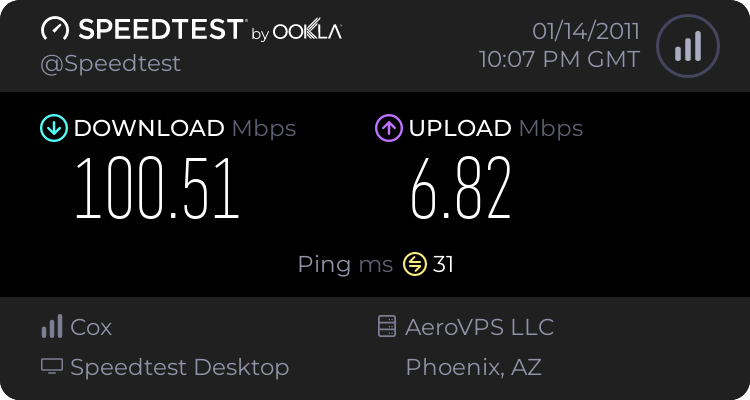
Here is what I'm now getting.
All I can say is WOW!
 

Attachments

  • Motorola_SB6120.JPG
    Motorola_SB6120.JPG
    42 KB · Views: 25

My Computer My Computer

At a glance

Windows 10 ProIntel i5I'm old and lost a few chipsYup
Computer type
PC/Desktop
Computer Manufacturer/Model Number
Self Built
OS
Windows 10 Pro
CPU
Intel i5
Motherboard
I have a fatherboard
Memory
I'm old and lost a few chips
Graphics Card(s)
Yup
Sound Card
Yup
Monitor(s) Displays
Samsung 32" UHD
Screen Resolution
3840 x 2160
Hard Drives
Samsung 860 EVO drives
PSU
450 Watt and some fans that blow
Case
Small tower
Cooling
Yes I am cool. lol
Keyboard
Who needs a keyboard?
Mouse
Logitech Laser G7 wireless
Internet Speed
Zippy fast UP and DOWN
Antivirus
I got a shot
Browser
The new Improved EDGE 2020
try speedtest.net , Omg o_O
 

My Computer My Computer

At a glance

Windows 7 pro 64 bitIntel Core i7-870 Lynnfield 2.93GHzGskill 8 gig, 4x2gigASUS EAH5850
OS
Windows 7 pro 64 bit
CPU
Intel Core i7-870 Lynnfield 2.93GHz
Motherboard
MSI P55-GD80 LGA 1156
Memory
Gskill 8 gig, 4x2gig
Graphics Card(s)
ASUS EAH5850
Sound Card
built in HD
Monitor(s) Displays
HP 23 inch
Hard Drives
1tbHDD,500HDD,500HDD,30SSD no RAID...
Case
Cooler master HAF 932
Cooling
4 case fans, v6 cpu cooler
Keyboard
Logitech G110
Mouse
Razer Death Adder
Internet Speed
never fast enough
Well I just upgraded to a new Motorola SB6120 modem.
My local provider supports channel bonding.
My normal speed prior was 20 MBps Down and 5 MBps Upload.

Here is what I'm now getting.
All I can say is WOW!

Iggy:

I'm on Cox in AZ and normally get 2 to 4 up and 13 to 17 down.

A few questions:

How do I take advantage of "channel bonding"?

Do you have Cox's highest priced Internet package? I don't. I think I am one step down from the top (Preferred rather than Premier or something like that)

Are you saying channel bonding and those high speeds are unattainable without a 6120? I have a 5120 and I also have 2 year old Linksys that I have never used.

I'd like to get as much speed as possible.

I can currently download near 5 GB per hour using 24 threads in my newsreader.

Any details or advice appreciated.
 

My Computer My Computer

At a glance

Windows 7 Home Premium SP1, 64-bitIntel Skylake i5-6600K, not overclocked8 GB HyperX DDR4-2666 (2 x 4 GB)none; graphics are integrated on CPU
Computer type
PC/Desktop
Computer Manufacturer/Model Number
Ignatz Special; 4 speed manual gearbox; factory air conditioning; one of one
OS
Windows 7 Home Premium SP1, 64-bit
CPU
Intel Skylake i5-6600K, not overclocked
Motherboard
AsRock Z170M Extreme 4, micro ATX
Memory
8 GB HyperX DDR4-2666 (2 x 4 GB)
Graphics Card(s)
none; graphics are integrated on CPU
Sound Card
onboard: Realtek ALC1150; external: USB Behringer UF0-202
Monitor(s) Displays
Dell S2340M 23 inch IPS
Screen Resolution
1600 x 900
Hard Drives
System: Crucial MX100 series SSD, 128 GB;
Data: Samsung Spinpoint 103SJ, 1 TB;
Backup: WD Caviar Green WD30EZRX-00D8PB0, 3 TB
PSU
Rosewill SilentNight 500 watt fanless, semi-modular
Case
Antec Solo II
Cooling
Noctua NH-U12S; Noctua F12 intake, Noctua S12A exhaust
Keyboard
Microsoft 200 6JH-00001 USB
Mouse
Dell or Microsoft optical wired; USB
Antivirus
Microsoft Security Essentials and Malwarebytes Premium
Browser
Pale Moon
Other Info
All fans PWM; speeds at idle: CPU circa 500 rpm; intake circa 600 rpm; exhaust circa 600 rpm; CPU temps 27 idle and 47 C load in a warm room (27 C/81 F) when running Intel Extreme Tuning Utility stress test.
Well I just upgraded to a new Motorola SB6120 modem.
My local provider supports channel bonding.
My normal speed prior was 20 MBps Down and 5 MBps Upload.

Here is what I'm now getting.
All I can say is WOW!

Iggy:

I'm on Cox in AZ and normally get 2 to 4 up and 13 to 17 down.

A few questions:

How do I take advantage of "channel bonding"?

Do you have Cox's highest priced Internet package? I don't. I think I am one step down from the top (Preferred rather than Premier or something like that)

Are you saying channel bonding and those high speeds are unattainable without a 6120? I have a 5120 and I also have 2 year old Linksys that I have never used.

I'd like to get as much speed as possible.

I can currently download near 5 GB per hour using 24 threads in my newsreader.

Any details or advice appreciated.


I have Premier Tier package 25/5 with Powerboost .
Without Power Boost 20/4
Your SB5120 is only a single channel modem and you will only get what you get from a single channel.
The SB6120 has 4 channel and links 4 seperate channels together and send and receives on the best of the 4. ( Ithink that's how it works)
Anyway my reading above is a total of the 4 channels togther.

I also have a great line to my house and my normal readings are
SNR Signal to Noise Ratio 36 DBmv
Download Power Levels of -4 to -3
UPload power level of 46 dbmv

I just upgraded the modem because it was due and I'm looking into the future of Cox.
Soon they may have upload using Channel Bonding.
 

My Computer My Computer

At a glance

Windows 10 ProIntel i5I'm old and lost a few chipsYup
Computer type
PC/Desktop
Computer Manufacturer/Model Number
Self Built
OS
Windows 10 Pro
CPU
Intel i5
Motherboard
I have a fatherboard
Memory
I'm old and lost a few chips
Graphics Card(s)
Yup
Sound Card
Yup
Monitor(s) Displays
Samsung 32" UHD
Screen Resolution
3840 x 2160
Hard Drives
Samsung 860 EVO drives
PSU
450 Watt and some fans that blow
Case
Small tower
Cooling
Yes I am cool. lol
Keyboard
Who needs a keyboard?
Mouse
Logitech Laser G7 wireless
Internet Speed
Zippy fast UP and DOWN
Antivirus
I got a shot
Browser
The new Improved EDGE 2020

My Computer My Computer

At a glance

Windows 10 ProIntel i5I'm old and lost a few chipsYup
Computer type
PC/Desktop
Computer Manufacturer/Model Number
Self Built
OS
Windows 10 Pro
CPU
Intel i5
Motherboard
I have a fatherboard
Memory
I'm old and lost a few chips
Graphics Card(s)
Yup
Sound Card
Yup
Monitor(s) Displays
Samsung 32" UHD
Screen Resolution
3840 x 2160
Hard Drives
Samsung 860 EVO drives
PSU
450 Watt and some fans that blow
Case
Small tower
Cooling
Yes I am cool. lol
Keyboard
Who needs a keyboard?
Mouse
Logitech Laser G7 wireless
Internet Speed
Zippy fast UP and DOWN
Antivirus
I got a shot
Browser
The new Improved EDGE 2020
Heh, don't get used to it. I did the same thing in CT last year and was getting 75+Mbps for a good 3 months after installing my Motorola 6120 Docsis 3 modem. I was suddenly throttled down to my base of 30-32Mbps with an upload of 7Mbps (premier plan 60/month) which is exactly the specs for my plan and it has stayed this way from then on.
You WILL eventually be throttled to whatever plan you have signed up for. BTW, in real world testing, I found that the this high raw speed did not make that much of a difference so don't worry about specs alone... The premier plan does me great and I get 3.0-3.5 MB/sec sustained downloads on a regular basis.
The upgrade to a Motorola 6120 Docsis 3.0 modem for Cox is a no brainer. Just make sure that your area supports Docsis 3.0. Buy the thing on Amazon and call Cox to enable it. It only took 20 minutes before I was up and running (really, really fast according to speedtest!). Don't expect speeds faster than your plan permits and then you will not be disappointed. If you are temporarily speed bumped,enjoy it and take lots of screenshots!
 

My Computer My Computer

At a glance

Windows 8 64 bit developers Preview
OS
Windows 8 64 bit developers Preview
That's a powerboost score. Try running it a couple of times. I have the same SB6120 moto, and I also have Cox in Omaha, NE. Here is my score from my iPhone 4....
202974920.png


Unless your on the Ultimate Package, cox only channel bonds on the 4 downstream channels. And the last I checked, they only channel bond on the upstream on 2-3channels.
 

My Computer My Computer

At a glance

Windows 7 Home Premium 64bit SP2Intel Core i5-2500kG.Skill Sniper 16GB (4x4GB) DDR3-1600EVGA Nvidia GTX 560Ti
Computer type
PC/Desktop
Computer Manufacturer/Model Number
Home Built
OS
Windows 7 Home Premium 64bit SP2
CPU
Intel Core i5-2500k
Motherboard
ASRock Z68 Extreme3 Gen3
Memory
G.Skill Sniper 16GB (4x4GB) DDR3-1600
Graphics Card(s)
EVGA Nvidia GTX 560Ti
Sound Card
OnBoard HD Audio
Monitor(s) Displays
LG 37" 720p HDTV
Hard Drives
Corsair Force Series 3 120GB SSD
Western Digital Caviar Blue 500GB
Western Digital Caviar Black 1TB
PSU
OCZ ModXStream Pro 700w Modular
Case
Thermaltake Commander MS-I ID ATX Mid Tower
Cooling
Corsair Hydro H60
Internet Speed
Cox HSI Preferred 25Mbt
Antivirus
Kaspersky Internet Security 2013
Browser
Waterfox 64Bit 18.1
Nope, NOT a powerboost score. I can actually watch my powerboost kick in and turn off while running a large download but it only throttles down a bit when that happens.
I will attempt to post the two WILDLY different speed results to show that there was a real drop between when I first hooked up my new Docsis 3 cable modem and when Cox began throttling it.Oops, just the new one shows up as I have the old one as a .jpg. The speedtest result was 71.70 and 5.83 going to the same server. Notice that my NEW speed is right in line with what I am paying for (Premium Service 30Mbps with power boost)
1745592219.png
 

My Computer My Computer

At a glance

Windows 8 64 bit developers Preview
OS
Windows 8 64 bit developers Preview
Back
Top