New OS but connectivity issues?

jonesnewton

New member
Member
VIP
Local time
2:06 PM
Messages
211
Location
Prague, Czech Rep
Hi all,

I have re installed my OS and all was going ok until yest morning, when I had problems with connecting to the internet again, previous issues was with Svchost.exe but this is not showing in task manager as it did before, now what I can only assume was after I installed latest MS updates it happened then. This morning was the same so I have done a restore to yest update date and it seems ok now, but will try it during the day?

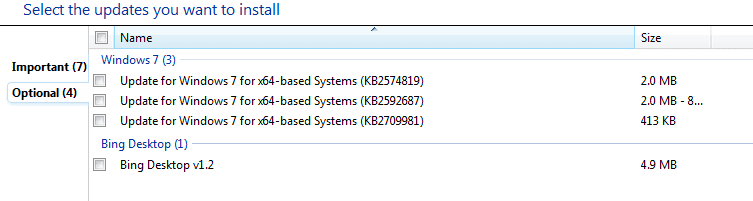
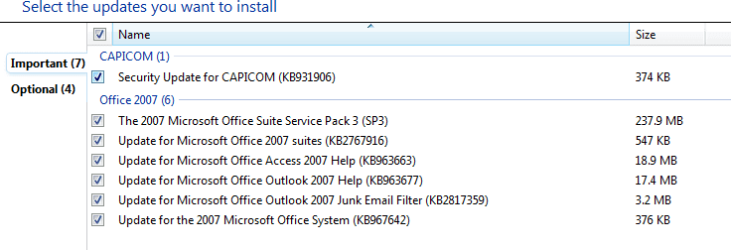
These updates are now ready again to download, can anyone tell if these could cause the issues I mentioned above?
Is there any way to run tests to see if they actually did cause the issue?
I could try to install one at a time and see results?
 

Attachments
  • Capture Update.PNG
    Capture Update.PNG
    7.9 KB · Views: 5
  • Capture Update 2.PNG
    Capture Update 2.PNG
    5.7 KB · Views: 5

My Computer

Computer type
Laptop
Computer Manufacturer/Model Number
Acer 7738G
OS
Acer Aspire 7738G Win 7 X64 bit Home Premium
The updates should not impact your connectivity.

Are you connecting via Wi-Fi or a LAN cable?
 

My Computer

Computer type
Laptop
Computer Manufacturer/Model Number
Employer provided Dell Latitude
OS
W7 Pro SP1 64bit
CPU
i7
Memory
8GB
Graphics Card(s)
Intel HD Graphics
Hard Drives
crappy SSD
Antivirus
Employer mandated Symantec Endpoint Protection
Browser
Pale Moon 64bit, IE11 64bit & Chrome 64bit
The updates should not impact your connectivity.

Are you connecting via Wi-Fi or a LAN cable?

Hi,
WiFi on this laptop >> Win 7 Home Premium 64 bit and also Wifi on a smaller netbook >> Win 7 PRO 32 bit next to it, but the netbook works ok.

I just switch on the troubled one, out from hibernation and no connectivity issues, so this is why I assumed it was connected to updates??

I am now running Acer updater and no updates required?

What do I do with the MS updates? Load one at a time?
 

My Computer

Computer type
Laptop
Computer Manufacturer/Model Number
Acer 7738G
OS
Acer Aspire 7738G Win 7 X64 bit Home Premium
Open up device manager and see if there are any problems with your network connections.

You don`t really need any of those Office help updates, just hide them.
Do you use outlook? Is it installed ? If not you don`t need those updates.
 

My Computer

Computer type
PC/Desktop
Computer Manufacturer/Model Number
Skylake Special #666
OS
Windows 10 Pro x64
CPU
Intel Core i7 6700K
Motherboard
Asus Sabertooth Z170 Mark 1
Memory
GSkill TridentZ RGB 16GB 3600 16-16-16-36
Graphics Card(s)
EVGA GTX 980 Ti SC x2
Sound Card
Realtek High Definition
Monitor(s) Displays
AOC G2460PG
Screen Resolution
1920 x 1080 144Hz
Hard Drives
Samsung 860 Pro 256GB, Seagate Barracuda 4TB x2
PSU
EVGA 1000 P2, EVGA White Custom Braided Cables
Case
Corsair Vengeance C70 Gunmetal Black
Cooling
Corsair H100i v2, Corsair ML120 x2, Thermal Grizzly Kryonaut
Keyboard
Logitech G910 Orion Spectrum
Mouse
Logitech G700s
Internet Speed
Verizon Fios Quantum Gateway 75/75
Antivirus
Windows Defender, Malwarebytes Free 3.8.3
Browser
Chrome
Other Info
Corsair SP120 x4, LG Blu-ray Drive, Durabrand HT-395 100 Watt Dolby Digital Amp, Corsair H2100 Wireless 7.1 Headset
~~~
What do I do with the MS updates? Load one at a time?
Sure, go ahead and do that.

Write down the KB number as you install each one...
...and if you find a problem with an update, just uninstall that one update:

Start > View installed updates
 

My Computer

Computer type
Laptop
Computer Manufacturer/Model Number
Employer provided Dell Latitude
OS
W7 Pro SP1 64bit
CPU
i7
Memory
8GB
Graphics Card(s)
Intel HD Graphics
Hard Drives
crappy SSD
Antivirus
Employer mandated Symantec Endpoint Protection
Browser
Pale Moon 64bit, IE11 64bit & Chrome 64bit
Run all Important and Optional Windows Updates with reboots until exhausted, after enabling Automatically get recommended drivers and updates for your hardware (Step 3).

Do not import any drivers besides these updates until you see how they perform and if any are missing.

If problems arise import the wireless driver from the Acer Support Downloads webpage. Power cycle your router.

If you've varied much from these steps and the other tips to get a perfect Clean Reinstall - Factory OEM Windows 7 then I would start over.
 
If you've varied much from these steps and the other tips to get a perfect Clean Reinstall - Factory OEM Windows 7 then I would start over.

Hi I have tried the restore of updates, but does not help.

I did the Acer restore of OS not this clean install, so I am now guessing that this could be the issue-s?

OR can it be with >

The orange WiFi button - light is now and was before reinstall flashing, not constant, also its rate of flash depends on what the laptop is doing?

If I download the new OS should I do it on another laptop or is it ok on this one?
 
Last edited:

My Computer

Computer type
Laptop
Computer Manufacturer/Model Number
Acer 7738G
OS
Acer Aspire 7738G Win 7 X64 bit Home Premium
I did an edit on my post, not sure if you saw this? >>
The orange WiFi button - light is now and was before reinstall flashing, not constant, also its rate of flash depends on what the laptop is doing?
Is this the issue?
 

My Computer

Computer type
Laptop
Computer Manufacturer/Model Number
Acer 7738G
OS
Acer Aspire 7738G Win 7 X64 bit Home Premium
Is the internet connection stable now?

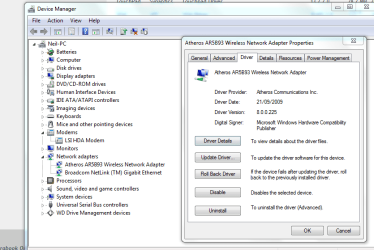
Type Device Manager in the Start Search box, click on Network Adapters, then Wireless Adapter. On Driver tab what is the exact Device make/model, driver version and date?

Now look on the Acer Support Downloads webpage for your model PC and compare the latest driver version and date for that wireless driver. We can help you do this if needed.
 
Thanks.
See attachmants, Acer states 1 type (HB93-HB95) and installed is AR5B93. I have downloaded and installed the Acer listed one(HB93-HB95), but the AR5B93 still shows in Device Manager? But the version number is the same.. 8.0.0225
 

Attachments

  • Capture Acer WIFI list.PNG
    Capture Acer WIFI list.PNG
    12 KB · Views: 4
  • Capture Acer WIFI list 2.PNG
    Capture Acer WIFI list 2.PNG
    35.9 KB · Views: 4

My Computer

Computer type
Laptop
Computer Manufacturer/Model Number
Acer 7738G
OS
Acer Aspire 7738G Win 7 X64 bit Home Premium
I can't read Czech or I could look for the download on the Acer Downloads site. Are all of the drivers for your exact wireless model in the screenshot you posted?

Do you know for sure it's an Atheros Device? Was that what was loaded before the reinstall? Did you have any wireless issues before reinstall?

Try uninstalling the driver using the button shown, including software, and then reinstalling the driver from the web page download after a reboot.
 
I can't read Czech or I could look for the download on the Acer Downloads site. Are all of the drivers for your exact wireless model in the screenshot you posted?

Do you know for sure it's an Atheros Device? Was that what was loaded before the reinstall? Did you have any wireless issues before reinstall?

Try uninstalling the driver using the button shown, including software, and then reinstalling the driver from the web page download after a reboot.

Hi

I am pretty sure it was installed in first OS..Yes it was similar, but I had the Svchost exe issue and the flashing wifi light too.

Ok will try it
 

My Computer

Computer type
Laptop
Computer Manufacturer/Model Number
Acer 7738G
OS
Acer Aspire 7738G Win 7 X64 bit Home Premium
Thanks again. Looks like this could be the issue? :(

I have tried one last time to uninstall network adapter and reinstall, but this time after I troubleshoot with admin rights, it worked straight away, so I see if this cured it?

Q? The battery is dead and I run it on mains, could this have issues with laptop? I read somewhere it can have effects??
 

My Computer

Computer type
Laptop
Computer Manufacturer/Model Number
Acer 7738G
OS
Acer Aspire 7738G Win 7 X64 bit Home Premium
Running with a dead battery still installed can cause heat problems, but it should not impact your wireless connection.

A for the orange light flashing - that could just be indicating network traffic. Find the manual online and see what it says about what the light indicates.
 

My Computer

Computer type
Laptop
Computer Manufacturer/Model Number
Employer provided Dell Latitude
OS
W7 Pro SP1 64bit
CPU
i7
Memory
8GB
Graphics Card(s)
Intel HD Graphics
Hard Drives
crappy SSD
Antivirus
Employer mandated Symantec Endpoint Protection
Browser
Pale Moon 64bit, IE11 64bit & Chrome 64bit
OK I checked their manual but no mention of this issue, not many issues at all. so I sent an email to them..
 

My Computer

Computer type
Laptop
Computer Manufacturer/Model Number
Acer 7738G
OS
Acer Aspire 7738G Win 7 X64 bit Home Premium
Do you see a correlation between the light flashing and downloading a file. Once the download completes, does the flashing slow or stop?
 

My Computer

Computer type
Laptop
Computer Manufacturer/Model Number
Employer provided Dell Latitude
OS
W7 Pro SP1 64bit
CPU
i7
Memory
8GB
Graphics Card(s)
Intel HD Graphics
Hard Drives
crappy SSD
Antivirus
Employer mandated Symantec Endpoint Protection
Browser
Pale Moon 64bit, IE11 64bit & Chrome 64bit
Do you see a correlation between the light flashing and downloading a file. Once the download completes, does the flashing slow or stop?

Hi Yes it does adjust speed according to downloading.. But it never did it before??:confused:
 

My Computer

Computer type
Laptop
Computer Manufacturer/Model Number
Acer 7738G
OS
Acer Aspire 7738G Win 7 X64 bit Home Premium
Back
Top