New OS in Virtual PC

v0id

Counter-Strike
Power User
VIP
Local time
12:54 AM
Messages
291
Location
Steam
Hi all,

I have one problem! I installed Virtual PC and XP Mode and now i don't know how to install new OS! :o I want Linux to install and there is no options for new Virtual PC or OS! :(

Anyone? :huh:
 

My Computer

Computer Manufacturer/Model Number
IBM
OS
Windows 3.11
CPU
Pentium 386
Memory
12 MB
Graphics Card(s)
2 MB
Monitor(s) Displays
12"
Screen Resolution
640X480
Hard Drives
100 MB
Internet Speed
1 kb/s
Other Info
I Love my PC!
Go to Start, All Programs, Windows Virtual PC and click Windows Virtual PC

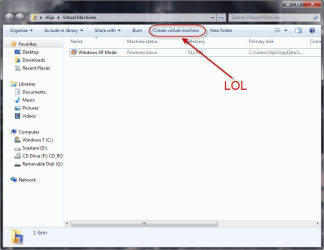
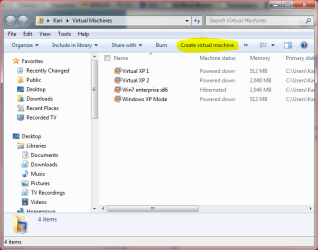
At top of window should be button for "Create virtual machine".

Rather than it's own stand-alone GUI window....they integrated the functionality into the Windows Explorer shell. Personally I don't like it...but I guess they are shooting for consistency.
 

My Computer

Computer Manufacturer/Model Number
Self-Built in July 2009
OS
Windows 7 Ultimate x64
CPU
Intel Q9550 2.83Ghz OC'd to 3.40Ghz
Motherboard
Gigabyte GA-EP45-UD3R rev. 1.1, F12 BIOS
Memory
8GB G.Skill PI DDR2-800, 4-4-4-12 timings
Graphics Card(s)
EVGA 1280MB Nvidia GeForce GTX570
Sound Card
Realtek ALC899A 8 channel onboard audio
Monitor(s) Displays
23" Acer x233H
Screen Resolution
1920x1080
Hard Drives
Intel X25-M 80GB Gen 2 SSD
Western Digital 1TB Caviar Black, 32MB cache. WD1001FALS
PSU
Corsair 620HX modular
Case
Antec P182
Cooling
stock
Keyboard
ABS M1 Mechanical
Mouse
Logitech G9 Laser Mouse
Internet Speed
15/2 cable modem
Other Info
Windows and Linux enthusiast. Logitech G35 Headset.
LOL! I never looked there! :p Thanks! ;)
 

Attachments

  • lol.png
    lol.png
    35.7 KB · Views: 40

My Computer

Computer Manufacturer/Model Number
IBM
OS
Windows 3.11
CPU
Pentium 386
Memory
12 MB
Graphics Card(s)
2 MB
Monitor(s) Displays
12"
Screen Resolution
640X480
Hard Drives
100 MB
Internet Speed
1 kb/s
Other Info
I Love my PC!
Follow these steps:

  • Open C:\your_username\Virtual Machines
  • Click Create virtual machine
    vpc1.PNG
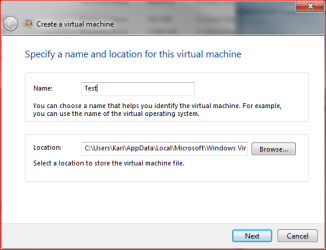
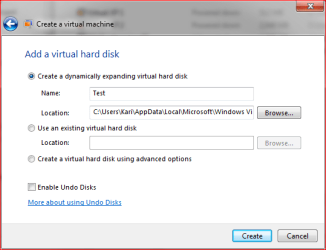
  • Give the new vm a name and location where it is to be saved
    vpc2.PNG
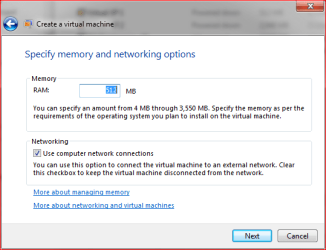
  • Decide how much RAM you want to allocate this vm
    vpc3.PNG
  • As default, the new vm is dynamical. If that's OK to you, click Create
    vpc4.PNG
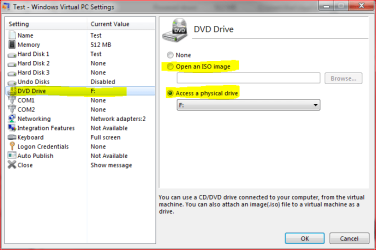
  • Go back to Virtual Machines windows, click the vm you created and choose Settings
    vpc5.PNG
  • Click DVD drive on the left pane, on the right pane choose an ISO image if you want to install from your HD, or choose a CD / DVD drive if you want to install from a disc.
    vpc6.PNG
  • Double click the new vm to run it
Kari
 

My Computer

Computer type
Laptop
Computer Manufacturer/Model Number
HP ENVY 17-1150eg
OS
Windows 10 Pro x64 EN-GB
CPU
1.6 GHz Intel Core i7-720QM Processor
Memory
6 GB
Graphics Card(s)
ATI Mobility Radeon HD 5850 Graphics
Sound Card
Beats sound system with integrated subwoofer
Monitor(s) Displays
17" laptop display, 22" LED and 32" Full HD TV through HDMI
Screen Resolution
1600*900 (1), 1920*1080 (2&3)
Hard Drives
Internal: 2 x 500 GB SATA Hard Disk Drive 7200 rpm
External: 2TB for backups, 3TB USB3 network drive for media
Cooling
As Envy runs a bit warm, I have it on a Cooler Master pad
Keyboard
Logitech diNovo Media Desktop Laser (bluetooth)
Mouse
Logitech Performance Mouse MX
Internet Speed
50/10 Mbps VDSL
Antivirus
Windows Defender 4.3.9431.0
Browser
Maxthon 3.5.2., IE11
Thanks Kari!
 

My Computer

Computer Manufacturer/Model Number
IBM
OS
Windows 3.11
CPU
Pentium 386
Memory
12 MB
Graphics Card(s)
2 MB
Monitor(s) Displays
12"
Screen Resolution
640X480
Hard Drives
100 MB
Internet Speed
1 kb/s
Other Info
I Love my PC!
You are welcome.:D
 

My Computer

Computer type
Laptop
Computer Manufacturer/Model Number
HP ENVY 17-1150eg
OS
Windows 10 Pro x64 EN-GB
CPU
1.6 GHz Intel Core i7-720QM Processor
Memory
6 GB
Graphics Card(s)
ATI Mobility Radeon HD 5850 Graphics
Sound Card
Beats sound system with integrated subwoofer
Monitor(s) Displays
17" laptop display, 22" LED and 32" Full HD TV through HDMI
Screen Resolution
1600*900 (1), 1920*1080 (2&3)
Hard Drives
Internal: 2 x 500 GB SATA Hard Disk Drive 7200 rpm
External: 2TB for backups, 3TB USB3 network drive for media
Cooling
As Envy runs a bit warm, I have it on a Cooler Master pad
Keyboard
Logitech diNovo Media Desktop Laser (bluetooth)
Mouse
Logitech Performance Mouse MX
Internet Speed
50/10 Mbps VDSL
Antivirus
Windows Defender 4.3.9431.0
Browser
Maxthon 3.5.2., IE11

My Computer

Computer type
PC/Desktop
Computer Manufacturer/Model Number
Airbot 2.0
OS
Windows 7 Ultimate x64 SP1
CPU
Core i7 920 (D0) @ 4Ghz, *26c idle *65c full load on air
Motherboard
Asus P6X58D Premium - Sata 6Gb/s - USB 3.0
Memory
12GB DDR3 Corsair Dominator -CMD12GX3M6A1600C8 at 1600MHz
Graphics Card(s)
Zotac Geforce GTX 770
Sound Card
ASUS Xonar D2X
Monitor(s) Displays
1 LG 24" Flatron W2453V-PF 1 Samsung 24" P2450H both 2ms RT
Screen Resolution
1920x1080@60hz
Hard Drives
1 Samsung 250GB 840 Evo SSD
1 OCZ Vertex2 180GB SSD
1 TB Samsung Spinpoint F1 7200RPM 32MB cache
2 500GB WD Caviar Blacks 7200RPM 32MB cache (WD5001AALS)

Pioneer DVD Burner DVR-S18M
PSU
Corsair HX1000W
Case
Cooler Master HAF 932
Cooling
Case Fans *3 230mm, *1 140mm/CPU - *Tuniq Tower 120 Extreme
Keyboard
Logitech Wireless MK700
Mouse
Logitech Wireless MK700
Internet Speed
DL 15 Mbps UL 0.98 Mbps
Antivirus
None
Browser
Firefox Nightly
Other Info
Processor-7.7 *RAM- 7.9 *Graphics-7.9 *Gaming Graphics- 7.9 *SSD- 7.8 W.E.I final score= 7.7
*Phone- LG Nexus 5

My Computer

Computer type
Laptop
Computer Manufacturer/Model Number
HP ENVY 17-1150eg
OS
Windows 10 Pro x64 EN-GB
CPU
1.6 GHz Intel Core i7-720QM Processor
Memory
6 GB
Graphics Card(s)
ATI Mobility Radeon HD 5850 Graphics
Sound Card
Beats sound system with integrated subwoofer
Monitor(s) Displays
17" laptop display, 22" LED and 32" Full HD TV through HDMI
Screen Resolution
1600*900 (1), 1920*1080 (2&3)
Hard Drives
Internal: 2 x 500 GB SATA Hard Disk Drive 7200 rpm
External: 2TB for backups, 3TB USB3 network drive for media
Cooling
As Envy runs a bit warm, I have it on a Cooler Master pad
Keyboard
Logitech diNovo Media Desktop Laser (bluetooth)
Mouse
Logitech Performance Mouse MX
Internet Speed
50/10 Mbps VDSL
Antivirus
Windows Defender 4.3.9431.0
Browser
Maxthon 3.5.2., IE11
lol
 

My Computer

Computer Manufacturer/Model Number
IBM
OS
Windows 3.11
CPU
Pentium 386
Memory
12 MB
Graphics Card(s)
2 MB
Monitor(s) Displays
12"
Screen Resolution
640X480
Hard Drives
100 MB
Internet Speed
1 kb/s
Other Info
I Love my PC!
Back
Top