
You are using an out of date browser. It may not display this or other websites correctly.
You should upgrade or use an alternative browser.
You should upgrade or use an alternative browser.
New pc case and mobo p5b-vm do green light on board
- Thread starter fspsyco
- Start date

Check your connections. Make sure the 24 pin is completely seated in the correct orientation. If you feel the slot, one side will have a slight ridge. The plug has a retaining clip on one side. The clip goes over the ridge on the plug, just to make sure it is oriented correctly. All the plugs have to be absolutely completely seated. The same with the ATX 4/8 Pin connection usually above the CPU as well as the power connections that go to the Graphics card.
Typically with most motherboard lights, green is good. An error will be a red light. Most boards have a green light that will be on just to show the computer has standby power. Also if your PSU is modular, make sure the plugs going into the PSU are fully seated.
The standoffs that Derekimo showed you screw into the case and have to align exactly with the screw holes in the motherboard. The motherboard screws into the standoffs (gold screws as you say). Make sure there are no extra standoffs. There should be 1 that lines up exactly with each hole in the motherboard, but there can be no extra standoffs.
Typically with most motherboard lights, green is good. An error will be a red light. Most boards have a green light that will be on just to show the computer has standby power. Also if your PSU is modular, make sure the plugs going into the PSU are fully seated.
The standoffs that Derekimo showed you screw into the case and have to align exactly with the screw holes in the motherboard. The motherboard screws into the standoffs (gold screws as you say). Make sure there are no extra standoffs. There should be 1 that lines up exactly with each hole in the motherboard, but there can be no extra standoffs.
My Computers
-
At a glance
Windows 11 ProRyzen 9 5900X32GB G Skill DDR4-3600EVGA RTX 3080 FTW 3 Ultra- Computer type
- PC/Desktop
- Computer Manufacturer/Model Number
- ALWAYS UNDER CONSTRUCTION
- OS
- Windows 11 Pro
- CPU
- Ryzen 9 5900X
- Motherboard
- Asus X570 Crosshair Viii Hero
- Memory
- 32GB G Skill DDR4-3600
- Graphics Card(s)
- EVGA RTX 3080 FTW 3 Ultra
- Sound Card
- On Board/Sennheiser PC37X Headset
- Monitor(s) Displays
- 3 X Asus 27"
- Screen Resolution
- 2560x1440
- Hard Drives
- 2 X 1 TB NVME drives
- PSU
- EVGA 850
- Case
- Phanteks Eclipse P400A
- Cooling
- EVGA 280 AIO
- Keyboard
- Logitech G510s/ Logitech G13
- Mouse
- Logitech G502
- Internet Speed
- 24/1
- Antivirus
- ESET/MBAM Pro/SAS Pro
- Browser
- Chrome/ Firefox/ Edge
-
At a glance
Windows 11 ProIntel Ultra 9 288V32 GB LPDDR5X 8533- Computer type
- Laptop
- System Manufacturer/Model Number
- Dell 16 Plus
- OS
- Windows 11 Pro
- CPU
- Intel Ultra 9 288V
- Memory
- 32 GB LPDDR5X 8533
- Monitor(s) Displays
- 16" Mini-LED HDR600 Touch 90 Hz
- Screen Resolution
- 2560X1600
- Hard Drives
- 1 TB NVME
I think it's almost impossible to see anything like that, you got a pretty crowded case.
I know I would just probably pull it all out and start over, check things as I go to make sure.
Maybe someone else has some suggestions you can try.
Is this your case?
Rosewill FBM-01 Dual Fans MicroATX Mini Tower Computer Case-Newegg.com
Just posting it for others in case they want to know.
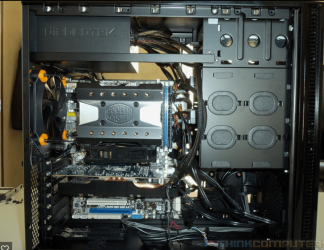
Derekimo is correct. A top mounted PSU is very difficult to wire neatly. You just have to find somewhere to hide the wires not being used and route the wires you are using some way to make them more orderly and neat. This is important. First, we can't see what is connected and what isn't. Plus, you have to allow for proper airflow through the case. As th wires are right now, there is no way you could get any airflow through the case. Heat is the biggest killer of computer components. Proper airflow is a must. Any unused hole in the case, such as the top 5.25" bays can be used to put unused wires. You have wires on top of the CPU cooler,which will make it difficult for the fan to turn plus it has to draw air from somewhere to cool your CPU. Organize the rest of the wires to run through the same general part of the case where possible. Tie them together with wire ties.
Remember, wire ties are your friend and they are very cheap. Use a lot of them. Tie wires together and tie them out of the way and to the case somewhere. If you have access holes and space between the motherboard tray and the back panel, it is good to run them between the motherboard and the back panel of the case. I don't know if your case has that. Again, top mounted Power supplies are difficult, but this will give you and idea of what you are looking to do.
Last edited:
My Computers
-
At a glance
Windows 11 ProRyzen 9 5900X32GB G Skill DDR4-3600EVGA RTX 3080 FTW 3 Ultra- Computer type
- PC/Desktop
- Computer Manufacturer/Model Number
- ALWAYS UNDER CONSTRUCTION
- OS
- Windows 11 Pro
- CPU
- Ryzen 9 5900X
- Motherboard
- Asus X570 Crosshair Viii Hero
- Memory
- 32GB G Skill DDR4-3600
- Graphics Card(s)
- EVGA RTX 3080 FTW 3 Ultra
- Sound Card
- On Board/Sennheiser PC37X Headset
- Monitor(s) Displays
- 3 X Asus 27"
- Screen Resolution
- 2560x1440
- Hard Drives
- 2 X 1 TB NVME drives
- PSU
- EVGA 850
- Case
- Phanteks Eclipse P400A
- Cooling
- EVGA 280 AIO
- Keyboard
- Logitech G510s/ Logitech G13
- Mouse
- Logitech G502
- Internet Speed
- 24/1
- Antivirus
- ESET/MBAM Pro/SAS Pro
- Browser
- Chrome/ Firefox/ Edge
-
At a glance
Windows 11 ProIntel Ultra 9 288V32 GB LPDDR5X 8533- Computer type
- Laptop
- System Manufacturer/Model Number
- Dell 16 Plus
- OS
- Windows 11 Pro
- CPU
- Intel Ultra 9 288V
- Memory
- 32 GB LPDDR5X 8533
- Monitor(s) Displays
- 16" Mini-LED HDR600 Touch 90 Hz
- Screen Resolution
- 2560X1600
- Hard Drives
- 1 TB NVME
ok i have everything together and all i did was change the hd sata to the one close to the back ports which was called raid1 on the manual it started for 5 sec then i went and turned it off and tryed to tie some of the cords together and when i tried again it wont start i checked all the cords 3 times
My Computer
At a glance
windows 7 home premium 64 bit
- Computer Manufacturer/Model Number
- hp
- OS
- windows 7 home premium 64 bit

- Local time
- 9:47 AM
- Messages
- 204
Do you have a different PSU you could try?
What does the blinking look like? e.g. 1 second on 1 second off, 1 second off, fast blink, or maybe irregular blinking?
What does the blinking look like? e.g. 1 second on 1 second off, 1 second off, fast blink, or maybe irregular blinking?
My Computer
At a glance
Windows 7 x64
- OS
- Windows 7 x64
i figured that out already (had forgotten the standoffs) have different issueDo you have a different PSU you could try?
What does the blinking look like? e.g. 1 second on 1 second off, 1 second off, fast blink, or maybe irregular blinking?
My Computer
At a glance
windows 7 home premium 64 bit
- Computer Manufacturer/Model Number
- hp
- OS
- windows 7 home premium 64 bit
ok so i disconnected the power for the cd drive and it powered on (showed bios) a couple times but the moment i switched outlets it stopped
the sata cable for the disk drive is too short to reach the connectors near the system panel
the sata cable for the disk drive is too short to reach the connectors near the system panel
My Computer
At a glance
windows 7 home premium 64 bit
- Computer Manufacturer/Model Number
- hp
- OS
- windows 7 home premium 64 bit
If you disconnect the sata and power cables to the CD drive and all hard drives, it should boot, and allow you to go into BIOS. Set bios to optimized defaults, usually F5 save and exit. See if that works. If it does, connect 1 hard drive at a time and try to boot. The computer should POST with no hard drives connected.
My Computers
-
At a glance
Windows 11 ProRyzen 9 5900X32GB G Skill DDR4-3600EVGA RTX 3080 FTW 3 Ultra- Computer type
- PC/Desktop
- Computer Manufacturer/Model Number
- ALWAYS UNDER CONSTRUCTION
- OS
- Windows 11 Pro
- CPU
- Ryzen 9 5900X
- Motherboard
- Asus X570 Crosshair Viii Hero
- Memory
- 32GB G Skill DDR4-3600
- Graphics Card(s)
- EVGA RTX 3080 FTW 3 Ultra
- Sound Card
- On Board/Sennheiser PC37X Headset
- Monitor(s) Displays
- 3 X Asus 27"
- Screen Resolution
- 2560x1440
- Hard Drives
- 2 X 1 TB NVME drives
- PSU
- EVGA 850
- Case
- Phanteks Eclipse P400A
- Cooling
- EVGA 280 AIO
- Keyboard
- Logitech G510s/ Logitech G13
- Mouse
- Logitech G502
- Internet Speed
- 24/1
- Antivirus
- ESET/MBAM Pro/SAS Pro
- Browser
- Chrome/ Firefox/ Edge
-
At a glance
Windows 11 ProIntel Ultra 9 288V32 GB LPDDR5X 8533- Computer type
- Laptop
- System Manufacturer/Model Number
- Dell 16 Plus
- OS
- Windows 11 Pro
- CPU
- Intel Ultra 9 288V
- Memory
- 32 GB LPDDR5X 8533
- Monitor(s) Displays
- 16" Mini-LED HDR600 Touch 90 Hz
- Screen Resolution
- 2560X1600
- Hard Drives
- 1 TB NVME
If you get into BIOS, it will tell you the BIOS version you have, let us know what it is. It will also tell you what the values are for your +12V, +5V and +3.3V. Tell us what those are too.
My Computers
-
At a glance
Windows 11 ProRyzen 9 5900X32GB G Skill DDR4-3600EVGA RTX 3080 FTW 3 Ultra- Computer type
- PC/Desktop
- Computer Manufacturer/Model Number
- ALWAYS UNDER CONSTRUCTION
- OS
- Windows 11 Pro
- CPU
- Ryzen 9 5900X
- Motherboard
- Asus X570 Crosshair Viii Hero
- Memory
- 32GB G Skill DDR4-3600
- Graphics Card(s)
- EVGA RTX 3080 FTW 3 Ultra
- Sound Card
- On Board/Sennheiser PC37X Headset
- Monitor(s) Displays
- 3 X Asus 27"
- Screen Resolution
- 2560x1440
- Hard Drives
- 2 X 1 TB NVME drives
- PSU
- EVGA 850
- Case
- Phanteks Eclipse P400A
- Cooling
- EVGA 280 AIO
- Keyboard
- Logitech G510s/ Logitech G13
- Mouse
- Logitech G502
- Internet Speed
- 24/1
- Antivirus
- ESET/MBAM Pro/SAS Pro
- Browser
- Chrome/ Firefox/ Edge
-
At a glance
Windows 11 ProIntel Ultra 9 288V32 GB LPDDR5X 8533- Computer type
- Laptop
- System Manufacturer/Model Number
- Dell 16 Plus
- OS
- Windows 11 Pro
- CPU
- Intel Ultra 9 288V
- Memory
- 32 GB LPDDR5X 8533
- Monitor(s) Displays
- 16" Mini-LED HDR600 Touch 90 Hz
- Screen Resolution
- 2560X1600
- Hard Drives
- 1 TB NVME
Disconnected the hd and cd drive won't power on I might have to tear it down a bit again see if that helps
My Computer
At a glance
windows 7 home premium 64 bit
- Computer Manufacturer/Model Number
- hp
- OS
- windows 7 home premium 64 bit
I couldn't tell. Do you have a graphics card installed on the motherboard? What else do you have connected to the motherboard?
Disconnect everything from the board. Nothing plugged in the back except mouse and keyboard. Disconnect all hard drives and CD drives. If you have a graphics card installed, completely remove it from the board. You should have nothing connected except the CPU, and ram. Make sure of your connections and make sure the ram is installed and completely seated.
When you put it together, did you use thermal paste under the CPU cooler? Also disconnect all the front panel connections except the power button. If it starts, go straight into bios and give us the information I asked for above and set the bios to defaults as above. Let us also know the motherboard temp and the CPU temp. If you did not use thermal paste, don't try to start it. Get some thermal paste first. I will give you instructions on how to apply it. Make sure there are no extra standoffs and all standoffs are lined up with the mounting holes in the motherboard and all are screwed in. Try to move some of those cables out of the way and take some pictures so we can see what is going on.
If you have any questions, just ask.
Disconnect everything from the board. Nothing plugged in the back except mouse and keyboard. Disconnect all hard drives and CD drives. If you have a graphics card installed, completely remove it from the board. You should have nothing connected except the CPU, and ram. Make sure of your connections and make sure the ram is installed and completely seated.
When you put it together, did you use thermal paste under the CPU cooler? Also disconnect all the front panel connections except the power button. If it starts, go straight into bios and give us the information I asked for above and set the bios to defaults as above. Let us also know the motherboard temp and the CPU temp. If you did not use thermal paste, don't try to start it. Get some thermal paste first. I will give you instructions on how to apply it. Make sure there are no extra standoffs and all standoffs are lined up with the mounting holes in the motherboard and all are screwed in. Try to move some of those cables out of the way and take some pictures so we can see what is going on.
If you have any questions, just ask.
My Computers
-
At a glance
Windows 11 ProRyzen 9 5900X32GB G Skill DDR4-3600EVGA RTX 3080 FTW 3 Ultra- Computer type
- PC/Desktop
- Computer Manufacturer/Model Number
- ALWAYS UNDER CONSTRUCTION
- OS
- Windows 11 Pro
- CPU
- Ryzen 9 5900X
- Motherboard
- Asus X570 Crosshair Viii Hero
- Memory
- 32GB G Skill DDR4-3600
- Graphics Card(s)
- EVGA RTX 3080 FTW 3 Ultra
- Sound Card
- On Board/Sennheiser PC37X Headset
- Monitor(s) Displays
- 3 X Asus 27"
- Screen Resolution
- 2560x1440
- Hard Drives
- 2 X 1 TB NVME drives
- PSU
- EVGA 850
- Case
- Phanteks Eclipse P400A
- Cooling
- EVGA 280 AIO
- Keyboard
- Logitech G510s/ Logitech G13
- Mouse
- Logitech G502
- Internet Speed
- 24/1
- Antivirus
- ESET/MBAM Pro/SAS Pro
- Browser
- Chrome/ Firefox/ Edge
-
At a glance
Windows 11 ProIntel Ultra 9 288V32 GB LPDDR5X 8533- Computer type
- Laptop
- System Manufacturer/Model Number
- Dell 16 Plus
- OS
- Windows 11 Pro
- CPU
- Intel Ultra 9 288V
- Memory
- 32 GB LPDDR5X 8533
- Monitor(s) Displays
- 16" Mini-LED HDR600 Touch 90 Hz
- Screen Resolution
- 2560X1600
- Hard Drives
- 1 TB NVME
Just to let you know I listed all the parts on the first page of this thread, so the things I have connected to the board now are both 3 pin fans, the 4 pin cpu fan, the 2/4 connector, the 24 pin atx, the power button on the system panel, cpu and dimms and yes I did the thermal paste
My Computer
At a glance
windows 7 home premium 64 bit
- Computer Manufacturer/Model Number
- hp
- OS
- windows 7 home premium 64 bit
OK, thanks.
My Computers
-
At a glance
Windows 11 ProRyzen 9 5900X32GB G Skill DDR4-3600EVGA RTX 3080 FTW 3 Ultra- Computer type
- PC/Desktop
- Computer Manufacturer/Model Number
- ALWAYS UNDER CONSTRUCTION
- OS
- Windows 11 Pro
- CPU
- Ryzen 9 5900X
- Motherboard
- Asus X570 Crosshair Viii Hero
- Memory
- 32GB G Skill DDR4-3600
- Graphics Card(s)
- EVGA RTX 3080 FTW 3 Ultra
- Sound Card
- On Board/Sennheiser PC37X Headset
- Monitor(s) Displays
- 3 X Asus 27"
- Screen Resolution
- 2560x1440
- Hard Drives
- 2 X 1 TB NVME drives
- PSU
- EVGA 850
- Case
- Phanteks Eclipse P400A
- Cooling
- EVGA 280 AIO
- Keyboard
- Logitech G510s/ Logitech G13
- Mouse
- Logitech G502
- Internet Speed
- 24/1
- Antivirus
- ESET/MBAM Pro/SAS Pro
- Browser
- Chrome/ Firefox/ Edge
-
At a glance
Windows 11 ProIntel Ultra 9 288V32 GB LPDDR5X 8533- Computer type
- Laptop
- System Manufacturer/Model Number
- Dell 16 Plus
- OS
- Windows 11 Pro
- CPU
- Intel Ultra 9 288V
- Memory
- 32 GB LPDDR5X 8533
- Monitor(s) Displays
- 16" Mini-LED HDR600 Touch 90 Hz
- Screen Resolution
- 2560X1600
- Hard Drives
- 1 TB NVME
So it started shows the bios screen when you first start it but no matter what keys I hit no menu comes up
My Computer
At a glance
windows 7 home premium 64 bit
- Computer Manufacturer/Model Number
- hp
- OS
- windows 7 home premium 64 bit
You can download drivers and the manual here https://www.asus.com/Motherboards/P5BVM_DO/HelpDesk_Download/
If I understand correctly, you have an e7500 CPU. I cannot find that CPU listed in the Asus CPU Support list https://www.asus.com/us/Motherboards/P5BVM_DO/HelpDesk_CPU/
If I understand correctly, you have an e7500 CPU. I cannot find that CPU listed in the Asus CPU Support list https://www.asus.com/us/Motherboards/P5BVM_DO/HelpDesk_CPU/
My Computers
-
At a glance
Windows 11 ProRyzen 9 5900X32GB G Skill DDR4-3600EVGA RTX 3080 FTW 3 Ultra- Computer type
- PC/Desktop
- Computer Manufacturer/Model Number
- ALWAYS UNDER CONSTRUCTION
- OS
- Windows 11 Pro
- CPU
- Ryzen 9 5900X
- Motherboard
- Asus X570 Crosshair Viii Hero
- Memory
- 32GB G Skill DDR4-3600
- Graphics Card(s)
- EVGA RTX 3080 FTW 3 Ultra
- Sound Card
- On Board/Sennheiser PC37X Headset
- Monitor(s) Displays
- 3 X Asus 27"
- Screen Resolution
- 2560x1440
- Hard Drives
- 2 X 1 TB NVME drives
- PSU
- EVGA 850
- Case
- Phanteks Eclipse P400A
- Cooling
- EVGA 280 AIO
- Keyboard
- Logitech G510s/ Logitech G13
- Mouse
- Logitech G502
- Internet Speed
- 24/1
- Antivirus
- ESET/MBAM Pro/SAS Pro
- Browser
- Chrome/ Firefox/ Edge
-
At a glance
Windows 11 ProIntel Ultra 9 288V32 GB LPDDR5X 8533- Computer type
- Laptop
- System Manufacturer/Model Number
- Dell 16 Plus
- OS
- Windows 11 Pro
- CPU
- Intel Ultra 9 288V
- Memory
- 32 GB LPDDR5X 8533
- Monitor(s) Displays
- 16" Mini-LED HDR600 Touch 90 Hz
- Screen Resolution
- 2560X1600
- Hard Drives
- 1 TB NVME
Huh... Well I actually have a e6700 on hand too I bought it for the last board as a supplement should I change it?
My Computer
At a glance
windows 7 home premium 64 bit
- Computer Manufacturer/Model Number
- hp
- OS
- windows 7 home premium 64 bit
Did you look at the list and find the e7500? I couldn't find it, but the e6700 is there. It won't take much time to replace the CPU to see if that is what the problem is. I would give it a try.
My Computers
-
At a glance
Windows 11 ProRyzen 9 5900X32GB G Skill DDR4-3600EVGA RTX 3080 FTW 3 Ultra- Computer type
- PC/Desktop
- Computer Manufacturer/Model Number
- ALWAYS UNDER CONSTRUCTION
- OS
- Windows 11 Pro
- CPU
- Ryzen 9 5900X
- Motherboard
- Asus X570 Crosshair Viii Hero
- Memory
- 32GB G Skill DDR4-3600
- Graphics Card(s)
- EVGA RTX 3080 FTW 3 Ultra
- Sound Card
- On Board/Sennheiser PC37X Headset
- Monitor(s) Displays
- 3 X Asus 27"
- Screen Resolution
- 2560x1440
- Hard Drives
- 2 X 1 TB NVME drives
- PSU
- EVGA 850
- Case
- Phanteks Eclipse P400A
- Cooling
- EVGA 280 AIO
- Keyboard
- Logitech G510s/ Logitech G13
- Mouse
- Logitech G502
- Internet Speed
- 24/1
- Antivirus
- ESET/MBAM Pro/SAS Pro
- Browser
- Chrome/ Firefox/ Edge
-
At a glance
Windows 11 ProIntel Ultra 9 288V32 GB LPDDR5X 8533- Computer type
- Laptop
- System Manufacturer/Model Number
- Dell 16 Plus
- OS
- Windows 11 Pro
- CPU
- Intel Ultra 9 288V
- Memory
- 32 GB LPDDR5X 8533
- Monitor(s) Displays
- 16" Mini-LED HDR600 Touch 90 Hz
- Screen Resolution
- 2560X1600
- Hard Drives
- 1 TB NVME
This should be a picture of your Motherboard. Make sure of the connections marked. Make sure they are fully seated. Please put 1 stick of ram in the top yellow slot. Only put 1 stick in. Unplug/turn off the power supply. Press the power button until the led lights go off or for 30 seconds to drain all power from the board. Remove the battery marked with a green circle. Take not of how it was installed. I may even go so far as to buy a new one. It is usually a model CR2032 and can easily be found at any computer store or watchmakers shop. They are really cheap. If you buy a new one, take the old one out before you leave to go get it. Remove the battery and leave it out for at least 20 minutes. Then replace it and turn on the power again.
With nothing connected other than the connections shown, 1 stick of ram and the CPU, keyboard and mouse. Try to start the computer. If you go into bios, please set optimized defaults, set the correct date and time, find all the info I asked about before, save and exit.
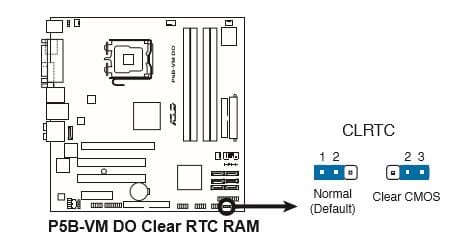
The second image is of the CLR RTC connection. Make sure this is in the normal position before starting any of this.
If you have any questions, please ask.
With nothing connected other than the connections shown, 1 stick of ram and the CPU, keyboard and mouse. Try to start the computer. If you go into bios, please set optimized defaults, set the correct date and time, find all the info I asked about before, save and exit.
The second image is of the CLR RTC connection. Make sure this is in the normal position before starting any of this.
If you have any questions, please ask.
Attachments

Last edited:
My Computers
-
At a glance
Windows 11 ProRyzen 9 5900X32GB G Skill DDR4-3600EVGA RTX 3080 FTW 3 Ultra- Computer type
- PC/Desktop
- Computer Manufacturer/Model Number
- ALWAYS UNDER CONSTRUCTION
- OS
- Windows 11 Pro
- CPU
- Ryzen 9 5900X
- Motherboard
- Asus X570 Crosshair Viii Hero
- Memory
- 32GB G Skill DDR4-3600
- Graphics Card(s)
- EVGA RTX 3080 FTW 3 Ultra
- Sound Card
- On Board/Sennheiser PC37X Headset
- Monitor(s) Displays
- 3 X Asus 27"
- Screen Resolution
- 2560x1440
- Hard Drives
- 2 X 1 TB NVME drives
- PSU
- EVGA 850
- Case
- Phanteks Eclipse P400A
- Cooling
- EVGA 280 AIO
- Keyboard
- Logitech G510s/ Logitech G13
- Mouse
- Logitech G502
- Internet Speed
- 24/1
- Antivirus
- ESET/MBAM Pro/SAS Pro
- Browser
- Chrome/ Firefox/ Edge
-
At a glance
Windows 11 ProIntel Ultra 9 288V32 GB LPDDR5X 8533- Computer type
- Laptop
- System Manufacturer/Model Number
- Dell 16 Plus
- OS
- Windows 11 Pro
- CPU
- Intel Ultra 9 288V
- Memory
- 32 GB LPDDR5X 8533
- Monitor(s) Displays
- 16" Mini-LED HDR600 Touch 90 Hz
- Screen Resolution
- 2560X1600
- Hard Drives
- 1 TB NVME
If it does boot into bios, when you save and exit, it will try to restart. You'll have to hold the power button down for a few seconds to get it to shut off.
My Computers
-
At a glance
Windows 11 ProRyzen 9 5900X32GB G Skill DDR4-3600EVGA RTX 3080 FTW 3 Ultra- Computer type
- PC/Desktop
- Computer Manufacturer/Model Number
- ALWAYS UNDER CONSTRUCTION
- OS
- Windows 11 Pro
- CPU
- Ryzen 9 5900X
- Motherboard
- Asus X570 Crosshair Viii Hero
- Memory
- 32GB G Skill DDR4-3600
- Graphics Card(s)
- EVGA RTX 3080 FTW 3 Ultra
- Sound Card
- On Board/Sennheiser PC37X Headset
- Monitor(s) Displays
- 3 X Asus 27"
- Screen Resolution
- 2560x1440
- Hard Drives
- 2 X 1 TB NVME drives
- PSU
- EVGA 850
- Case
- Phanteks Eclipse P400A
- Cooling
- EVGA 280 AIO
- Keyboard
- Logitech G510s/ Logitech G13
- Mouse
- Logitech G502
- Internet Speed
- 24/1
- Antivirus
- ESET/MBAM Pro/SAS Pro
- Browser
- Chrome/ Firefox/ Edge
-
At a glance
Windows 11 ProIntel Ultra 9 288V32 GB LPDDR5X 8533- Computer type
- Laptop
- System Manufacturer/Model Number
- Dell 16 Plus
- OS
- Windows 11 Pro
- CPU
- Intel Ultra 9 288V
- Memory
- 32 GB LPDDR5X 8533
- Monitor(s) Displays
- 16" Mini-LED HDR600 Touch 90 Hz
- Screen Resolution
- 2560X1600
- Hard Drives
- 1 TB NVME
Similar threads
- Replies
- 5
- Views
- 7K
