New PC not accept network password

Anderson2

New member
Power User
Local time
2:42 AM
Messages
188
I have a new Windows 7 64 bit laptop which I have successfully connected to my home wlan and it can access the web just fine.
The home wlan is wpa protected and behind a router.

The new laptop can see the other Windows 7 PC (old_pc) in the home wlan and when I double click on the "old_pc" icon in Network it opens it and asks for a username and network password.

Problem:
When I enter the name of a user on the other PC and its logon password I get an error message saying the the user or password is wrong. But, it is how I logon the other PC!

I checked and the "old_pc" does have its printers shared (and that is what I am trying to access from the new PC) so that is not the problem.

What do I do? What am doing wrong?

Thanks.
 

My Computer

OS
Windows 7
Homegroup?

That is a strange one isn't it? What happens when you try to join the Homegroup?
 

My Computer

OS
MS Windows 7 Ultimate 64-bit SP1
CPU
AMD Phenom II X4 965 Deneb 45nm
Motherboard
ASUS M4A78 PRO AM2
Memory
Corsair 8.00 GB Dual-Channel DDR2 @ 1705MHz (5-5-5-18)
Graphics Card(s)
AMD Radeon HD 6700 Series (XFX Pine Group)
Sound Card
VIA1708S onboard, Sony HT-CT150 3D
Monitor(s) Displays
Dell M770 Standard VGA, Samsung UN 32D 5500
Hard Drives
112GB OCZ OCZ-VERTEX3 ATA Device (SSD)
2 TB Seagate ST2000DM001-9YN164 ATA Device (SATA)
3 TB Seagate ST3000DM001-1CH166 ATA Device (SATA)
PSU
Rosewill Hive 650 Watt
Case
Rosewill Blackhawk
Cooling
Antec Kuhler 620
Other Info
Burners=ATAPI iHBS312 BlueRay + ATAPI iHAS424 Cd Dvd,
Modem=Arris TM 722,
Router=Asus RT N56U,
Switch=24 Port - Dell PowerConnect 5324,
Coax Signal Amp=Motorola BDA S4.
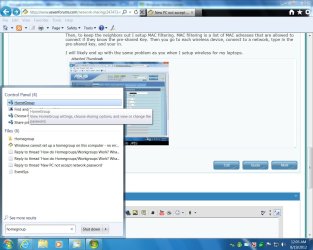
I recall I was welcomed into the homegroup, but just to check it, how do I join the homegroup?
 

My Computer

OS
Windows 7
Wlan?

As I recall, and it was a few months ago, when I built my 1st Win 7 box. The 1st box asked me if I wanted to setup a Homegroup during the install or first boot. I said OK, lets do it. That box was named Sony. Sony asked me if I wanted to setup a local user or a roaming user. As it was the 1st box there was nowhere to roam at the time, so I setup a local user named Ken with a password.

When I built the 2nd and subsequent boxes, shortly after I had added them to the same WORKGROUP, they asked me if I wanted to join the HOMEGROUP created by Ken on Sony. When I said OK, the box told me to go ask Ken what the password is.

All this might be irrelevent to you, I see that you have a wlan. That means wireless doesn't it? I have a couple wired laptops on the network, however I have not setup wireless for them as of yet. I just use them to stream movies and television to small rooms that don't have room for a desktop.

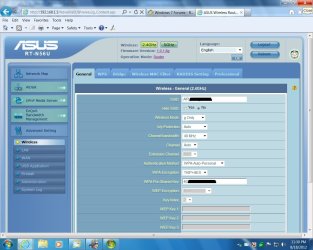
My only experience with wireless here is for all the phones. The wireless network is setup in the router. I used the ssid AIR_XXX_XXXX, authentication WPA, encription TKIP+AES, then setup a pre-shared Key 403XXXXXXXXXX. Then, to keep the neighbors out I setup MAC filtering. MAC filtering is a list of MAC adresses that are allowed to connect if they know the pre-shared Key. Then you go to each wireless device, connect to a network, type in the pre-shared key, and your in.

I will likely end up with the same problem as you when I setup wireless for my laptops. However I beleive everything should fall into place after setting up the workgroup and homegroup.

Have you looked around in here yet?
 

Attachments

  • WIRELESS002.jpg
    WIRELESS002.jpg
    133.3 KB · Views: 6
  • HOMEGROUP001.jpg
    HOMEGROUP001.jpg
    126.3 KB · Views: 7
Last edited:

My Computer

OS
MS Windows 7 Ultimate 64-bit SP1
CPU
AMD Phenom II X4 965 Deneb 45nm
Motherboard
ASUS M4A78 PRO AM2
Memory
Corsair 8.00 GB Dual-Channel DDR2 @ 1705MHz (5-5-5-18)
Graphics Card(s)
AMD Radeon HD 6700 Series (XFX Pine Group)
Sound Card
VIA1708S onboard, Sony HT-CT150 3D
Monitor(s) Displays
Dell M770 Standard VGA, Samsung UN 32D 5500
Hard Drives
112GB OCZ OCZ-VERTEX3 ATA Device (SSD)
2 TB Seagate ST2000DM001-9YN164 ATA Device (SATA)
3 TB Seagate ST3000DM001-1CH166 ATA Device (SATA)
PSU
Rosewill Hive 650 Watt
Case
Rosewill Blackhawk
Cooling
Antec Kuhler 620
Other Info
Burners=ATAPI iHBS312 BlueRay + ATAPI iHAS424 Cd Dvd,
Modem=Arris TM 722,
Router=Asus RT N56U,
Switch=24 Port - Dell PowerConnect 5324,
Coax Signal Amp=Motorola BDA S4.
Back
Top