New PC

Sean1082

New member
Local time
6:04 PM
Messages
49
So, I purchased a new PC and it's running great except for a couple of things. For reference, and to cut down on the size of this post, these are the parts I used for my build.

Problem 1 - When I press the power button to start the PC from being completely powered off, it shuts off briefly about 5 seconds later. Shortly after shutting off, it boots back up again and Windows boots normally. Anyone experience anything like this and have found solutions?

Problem 2 - I am using Intel Smart Response for SSD caching. Every time I start my PC from being completely powered off and log in, Intel Smart Response does not automatically enable. Does anyone have any information for how to get this to auto-enable? I see the system tray icon, however it says it is not running.

Any information would be greatly appreciated.


Thanks!
Sean
 

My Computer

Computer Manufacturer/Model Number
Acer/EG43M
OS
Windows 7 Home Premium (64-bit)
CPU
Intel Core 2 Quad Q8200 @ 2.33 GHz
Motherboard
Acer
Memory
8 GB DDR3
Graphics Card(s)
ATI Radeon HD 4670
Sound Card
C-Media Audio Controller / Realtek HD Audio
Monitor(s) Displays
Samsung SyncMaster 2053BW
Hard Drives
1TB
So, I purchased a new PC and it's running great except for a couple of things. For reference, and to cut down on the size of this post, these are the parts I used for my build.

Problem 1 - When I press the power button to start the PC from being completely powered off, it shuts off briefly about 5 seconds later. Shortly after shutting off, it boots back up again and Windows boots normally. Anyone experience anything like this and have found solutions?

Problem 2 - I am using Intel Smart Response for SSD caching. Every time I start my PC from being completely powered off and log in, Intel Smart Response does not automatically enable. Does anyone have any information for how to get this to auto-enable? I see the system tray icon, however it says it is not running.

Any information would be greatly appreciated.


Thanks!
Sean
Hello Sean this is new ground for me. I have done some reading and the only answer I have at the moment is to ensure that you have the latest Intel drivers for the Smart response as the earlier drivers seemed to be quite buggy.
You should be able to get them here; http://us.acer.com/ac/en/US/content/drivers
 

My Computer

Computer Manufacturer/Model Number
Something I threw together
OS
Windows 7 Ultimate x64
CPU
Intel Core i7-2600K
Motherboard
Asus P8P67
Memory
16 GB G Skill F3-10666 CL9D-4GBRL
Graphics Card(s)
ATI Radeon HD 6870
Sound Card
ATI Radeon HDMI / Realtek ALC892
Monitor(s) Displays
2 x 22" standard monitors / LG32LC56v TV to watch films
Screen Resolution
1920 x1080
Hard Drives
2 x OCZ Vertex2 111.79GB
3 x Samsung103SJ
1 x Samsung103UJ
1 x WD3200BEVT
1 x Hitachi5K320-160
PSU
Thermaltake Toughpower Cable Management 750W
Case
Antec 300
Cooling
Noctua NH-U12P SE2 and 5 120mm Case fans
Keyboard
Microsoft Comfort Curve Keyboard 2000
Mouse
Hama M3110 / Logitech M305
Internet Speed
16000
Other Info
I have also used Fedora, Suse, Ubuntu Linux
And all other Windows from 95 to date except ME
I am not familar with the smart response function of the board. However, with the startup problem you are having, boot into bios and load optimized defaults, save and exit - see if that solves your problem. If it does and you want to alter the bios, change things 1 at a time and retry startup each change. By doing it that way, if some setting you are using causes the same problem you will know which one it is.
 

My Computers

System One System Two

  • Computer type
    PC/Desktop
    Computer Manufacturer/Model Number
    ALWAYS UNDER CONSTRUCTION
    OS
    Windows 11 Pro
    CPU
    Ryzen 9 5900X
    Motherboard
    Asus X570 Crosshair Viii Hero
    Memory
    32GB G Skill DDR4-3600
    Graphics Card(s)
    EVGA RTX 3080 FTW 3 Ultra
    Sound Card
    On Board/Sennheiser PC37X Headset
    Monitor(s) Displays
    3 X Asus 27"
    Screen Resolution
    2560x1440
    Hard Drives
    2 X 1 TB NVME drives
    PSU
    EVGA 850
    Case
    Phanteks Eclipse P400A
    Cooling
    EVGA 280 AIO
    Keyboard
    Logitech G510s/ Logitech G13
    Mouse
    Logitech G502
    Internet Speed
    24/1
    Antivirus
    ESET/MBAM Pro/SAS Pro
    Browser
    Chrome/ Firefox/ Edge
  • Computer type
    Laptop
    System Manufacturer/Model Number
    Dell 16 Plus
    OS
    Windows 11 Pro
    CPU
    Intel Ultra 9 288V
    Memory
    32 GB LPDDR5X 8533
    Monitor(s) Displays
    16" Mini-LED HDR600 Touch 90 Hz
    Screen Resolution
    2560X1600
    Hard Drives
    1 TB NVME
I am not familar with the smart response function of the board. However, with the startup problem you are having, boot into bios and load optimized defaults, save and exit - see if that solves your problem. If it does and you want to alter the bios, change things 1 at a time and retry startup each change. By doing it that way, if some setting you are using causes the same problem you will know which one it is.

Or if sll else fails, you'll need to doa bios update if there is one for your board.

I had the exact same problem except mine would not boot, press the case button or the start button on my board and it would imediatly shut off as soon as i let go, not to mention the 100's of ram errors.

But after a BIOS update, they all disapeared and, touch wood, have not had a problem.

As i said though, as a last resort update the BIOS.

Lucky
 

My Computer

Computer Manufacturer/Model Number
The HAFmeister (Custom)
OS
Windows 7 Ultimate x64 RTM + SP1
CPU
Intel Core i7 950 3.06GHZ (OC'd to 3.99Ghz)
Motherboard
Asus Rampage III Extreme x58 SATA 6GB & USB 3.0
Memory
6GB OCZ Reaper HPC Edition PC3-16000 (set 1606Mhz 8-8-8-26)
Graphics Card(s)
EVGA Nvidia Geforce GTX 570
Sound Card
Creative SB X-Fi Titanium Fatal1ty Professional Series
Monitor(s) Displays
Samsung SM2433BW 24" Widescreen Monitor
Screen Resolution
1920x1200
Hard Drives
Western Digital Caviar Black 500GB 32Mb Buffer SATA II
Western Digital Caviar Black 750GB 32Mb Buffer SATA II
Western Digital Caviar Blue 500GB 16Mb Buffer SATA II
Western Digital My Book Essential Edition 750GB USB
Samsung Spinpoint 2TB SATA II
PSU
Thermaltake Toughpower 1200w (Modular)
Case
CoolerMaster HAF-932
Cooling
Zalman Reserator XT and ZM-WB5 Plus - GPU uses Stock coolers
Keyboard
Logitech G510
Mouse
Logitech G9 Gaming Mouse
Internet Speed
3MB Profile - 350-400kbs (Real-Speed)
Other Info
IcyBox Hot-Swap Bay,
Logitech G27 Steering Wheel,
Xbox 360 Wirless Elite Controller with Microsoft Reciever and
Play & Charge Kit,
Belkin USB Wireless Adaptor,
GAME Generic Controller (Playstation Looky-Likey),
Epson SX125 All-in-One.
Thanks for the replies!

As for reverting BIOS to factory defaults, I haven't changed any settings. Any small changes I have made to SATA configuration etc., I have already tried to change back. No luck.

As for BIOS update and any other drivers, I'm almost certain I have them all, however, it wouldn't hurt to check again.
 

My Computer

Computer Manufacturer/Model Number
Acer/EG43M
OS
Windows 7 Home Premium (64-bit)
CPU
Intel Core 2 Quad Q8200 @ 2.33 GHz
Motherboard
Acer
Memory
8 GB DDR3
Graphics Card(s)
ATI Radeon HD 4670
Sound Card
C-Media Audio Controller / Realtek HD Audio
Monitor(s) Displays
Samsung SyncMaster 2053BW
Hard Drives
1TB
Asus has a feature where instead of a full boot up it will do a partial boot that will allow internet access and a few other simple features....ie mine from a cold boot a row of text about starting express gate/ black screen/green Asus splash screen/black screen with flashing line/Windows startup swirl/password screen
 

My Computer

Computer type
PC/Desktop
Computer Manufacturer/Model Number
Custom
OS
windows 10 pro 64 bit
CPU
i5 4690K@4500 COOLER MASTER Seidon 120M water cooler
Motherboard
ASUS SABERTOOTH Z87 LGA 1150 Intel
Memory
16gb Kingston HyperX DDR3 1600
Graphics Card(s)
EVGA GTX 1070 sc
Monitor(s) Displays
BenQ GL2760H Black 27" 2ms HDMI Widescreen LED 1920X1080
Screen Resolution
DSR 2103X1183
Hard Drives
ADATA 256 gig SSD + 4 junk
PSU
EVGA supernova 750
Case
coolermaster
Cooling
many...
Keyboard
z merc
Mouse
Logitech wireless G602
Internet Speed
2.5mbs cable
Mine was doing the same in startup as his. I went back into bios an pushed optimized defaults and solved the problem. Usually it is a case where some setting is wrong, the computer starts realizes the wrong setting, shuts down and readjusts, and boots back up. That's what was wrong in my case.
 

My Computers

System One System Two

  • Computer type
    PC/Desktop
    Computer Manufacturer/Model Number
    ALWAYS UNDER CONSTRUCTION
    OS
    Windows 11 Pro
    CPU
    Ryzen 9 5900X
    Motherboard
    Asus X570 Crosshair Viii Hero
    Memory
    32GB G Skill DDR4-3600
    Graphics Card(s)
    EVGA RTX 3080 FTW 3 Ultra
    Sound Card
    On Board/Sennheiser PC37X Headset
    Monitor(s) Displays
    3 X Asus 27"
    Screen Resolution
    2560x1440
    Hard Drives
    2 X 1 TB NVME drives
    PSU
    EVGA 850
    Case
    Phanteks Eclipse P400A
    Cooling
    EVGA 280 AIO
    Keyboard
    Logitech G510s/ Logitech G13
    Mouse
    Logitech G502
    Internet Speed
    24/1
    Antivirus
    ESET/MBAM Pro/SAS Pro
    Browser
    Chrome/ Firefox/ Edge
  • Computer type
    Laptop
    System Manufacturer/Model Number
    Dell 16 Plus
    OS
    Windows 11 Pro
    CPU
    Intel Ultra 9 288V
    Memory
    32 GB LPDDR5X 8533
    Monitor(s) Displays
    16" Mini-LED HDR600 Touch 90 Hz
    Screen Resolution
    2560X1600
    Hard Drives
    1 TB NVME
Problem 1: My Asus board does the "Partial boot, then goes quiet. Then full boot" Even without Express Gate enabled. But i know mine does it because it's got a dual Bios. So i pressume it is checking both bios's on the boot to make sure everything is ok and then selects the correct one to load off of.

Nothing in the actual bios changes this behaviour on my board. It's meant to do it from what i've read on their forums because i was the same at first and thought it strange. Has for your board i'm not sure...

Problem 2: Sorry, don't know.
 

My Computer

Computer type
PC/Desktop
Computer Manufacturer/Model Number
Self Built
OS
Windows 10 Pro x64
CPU
Intel i7 2600K @ 4.4GHz
Motherboard
Asus P8Z77-V LX2
Memory
16GB Corsair Vengeance Pro DDR3 1600 MHz
Graphics Card(s)
ZOTAC GTX 1070 AMP Edition
Sound Card
Asus Xonar D2
Monitor(s) Displays
Viewsonic 24" VX2439WM LCD/LG 22" W2261VP LCD
Screen Resolution
1920x1080 DVI 1080p 16:9 on both screens
Hard Drives
1x SanDisk Extreme 120GB SSD SATA III (OS), 1x Samsung EVO 250GB SSD SATA III (Games), 1x Seagate Barracuda 1TB SATA III (Storage)
PSU
Corsair TX850W
Case
Corsair Carbide 200R
Cooling
3x 120mm Fans (Front, Bottom and Rear)
Keyboard
Roccat Isku
Mouse
Corsair M65 RGB
Internet Speed
Virgin Media 100Mb
Antivirus
Windows Defender
Browser
Firefox
Other Info
Logitech Z640 5.1 Speakers. Kingston HyperX Cloud Headset. M-Audio Oxygen 25/88 Keystation ES Midi Keyboard's
Problem number two confuses me, I don't see why you would need to run caching software for an ssd. That's the whole point of a ssd is the read speed is so much better Than a hdd you shouldn't need it. I think there would be a minimal improvement from running ssd caching software. Especially if it doesn't like to run right
Sent from my Droid Incredible
 

My Computer

OS
Windows 7 Ultimate x86
Motherboard
Asus P5N-D
Memory
8 Gig(4 x 2 Gig)
Graphics Card(s)
2 x GeForce 9500 GT (SLI)
Monitor(s) Displays
2 x 25" VGA, 1 37" DVI-D
Hard Drives
1x 5400 RPM 100 gig
4 x 5400 RPM 250 gig RAID 0+1
1 TB USB 3.0 external hard drive
500 gig external
Problem number two confuses me, I don't see why you would need to run caching software for an ssd. That's the whole point of a ssd is the read speed is so much better Than a hdd you shouldn't need it. I think there would be a minimal improvement from running ssd caching software. Especially if it doesn't like to run right
Sent from my Droid Incredible

Cache onto SSD, then read off SSD is around 50% faster. For the OP, problem 1, did you plug in the headers on the board properly? Everything else plugged in tightly?
 

My Computer

OS
Debian Squeeze Stable 64-bit
Thanks for the replies!

As for reverting BIOS to factory defaults, I haven't changed any settings. Any small changes I have made to SATA configuration etc., I have already tried to change back. No luck.

have you loaded optimised defaults? you may not have changed any settings but a bios isn't usually set right without some user input.

usually a double boot means the bios can not perform an action that has been set in the bios and loads default settings to get around it usually an overclock for example but could be something else.

did you make the sata configuration changes after you loaded windows or before? if you made the changes after then your bios is reverting those changes it's self to load the os.
 

My Computer

Computer Manufacturer/Model Number
.
OS
.
CPU
.
Motherboard
.
Memory
.
Graphics Card(s)
.
Monitor(s) Displays
.
Screen Resolution
.
Hard Drives
.
PSU
.
Case
.
Cooling
.
Keyboard
.
Mouse
.
Internet Speed
.
Other Info
.
So, I purchased a new PC and it's running great except for a couple of things. For reference, and to cut down on the size of this post, these are the parts I used for my build.

Problem 1 - When I press the power button to start the PC from being completely powered off, it shuts off briefly about 5 seconds later. Shortly after shutting off, it boots back up again and Windows boots normally. Anyone experience anything like this and have found solutions?

Problem 2 - I am using Intel Smart Response for SSD caching. Every time I start my PC from being completely powered off and log in, Intel Smart Response does not automatically enable. Does anyone have any information for how to get this to auto-enable? I see the system tray icon, however it says it is not running.

Any information would be greatly appreciated.


Thanks!
Sean
Problem 2 Try this click on start orb :orb: type services click on it when it appears in the list, scroll down the list to Intel Rapid Storage Technology, double click on it and ensure it is set to start Automatically.
As an after thought you may have a second Intel service that I do not have, (something like Intel Smart Response) it would be wise to check that this is also set to auto

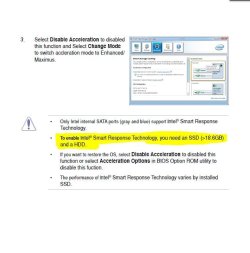
Problem 1 I think this may have something to do with Intel Smart Response and suspect it may be normal behaviour, the easy way to find out is to Disable acceleration. as it should then no longer happen

I am guessing so I hope this helps

PS ignore the highlighted part of the pic my thoughts were somewhere else :)
 

Attachments

  • Capture.JPG
    Capture.JPG
    84.2 KB · Views: 7
  • Capture1.JPG
    Capture1.JPG
    48.1 KB · Views: 7
Last edited:

My Computer

Computer Manufacturer/Model Number
Something I threw together
OS
Windows 7 Ultimate x64
CPU
Intel Core i7-2600K
Motherboard
Asus P8P67
Memory
16 GB G Skill F3-10666 CL9D-4GBRL
Graphics Card(s)
ATI Radeon HD 6870
Sound Card
ATI Radeon HDMI / Realtek ALC892
Monitor(s) Displays
2 x 22" standard monitors / LG32LC56v TV to watch films
Screen Resolution
1920 x1080
Hard Drives
2 x OCZ Vertex2 111.79GB
3 x Samsung103SJ
1 x Samsung103UJ
1 x WD3200BEVT
1 x Hitachi5K320-160
PSU
Thermaltake Toughpower Cable Management 750W
Case
Antec 300
Cooling
Noctua NH-U12P SE2 and 5 120mm Case fans
Keyboard
Microsoft Comfort Curve Keyboard 2000
Mouse
Hama M3110 / Logitech M305
Internet Speed
16000
Other Info
I have also used Fedora, Suse, Ubuntu Linux
And all other Windows from 95 to date except ME
Back
Top