New Radeon Card, where does the audio go?

eightysicks86

New member
Local time
4:07 AM
Messages
10
I just picked up a SAPPHIRE Vapor-X 100283VX-2L Radeon HD 5770. It has a Display port, HDMI, & 2 DVI. I will be running a triple monitor with the HDMI going to my TV. Where do I hook up the spdif cable from my motherboard? Do gpu cards not require this? What if I want to use my Audio card with an spdif out?

Will the audio just come out through the hdmi port automatically?
 

My Computer My Computer

At a glance

Windows 7 Ultimate x64AMD Phenom II X6 1090T 3.2GHzG.SKILL Ripjaws 8GB DDR3 1333Sapphire Radeon HD 5770
OS
Windows 7 Ultimate x64
CPU
AMD Phenom II X6 1090T 3.2GHz
Motherboard
GIGABYTE GA-890FXA-UD5
Memory
G.SKILL Ripjaws 8GB DDR3 1333
Graphics Card(s)
Sapphire Radeon HD 5770
Hard Drives
Crucial m4 ssd 64g
10TB Western Digitals for movie storage
PSU
Corsair 750TX PSU
Case
Antec 1200 V3 Case
Cooling
Arctic Cooling Freezer 64 Pro
The hdmi contains it's own audio signal.
You need to make sure you use the custom option on the catalyst installer when installing the driver so you can make sure the hdmi audio driver is applied to the card.

This is the setup I currently use, it's great just having one wire for it.
 

My Computer My Computer

At a glance

Windows 7 x64Intel i7 2600kG.skill Ripjaw 16gigs @ 1866Nvidia gtx580 (evga)
Computer Manufacturer/Model Number
Insane hobo technologies. ;-)
OS
Windows 7 x64
CPU
Intel i7 2600k
Motherboard
Asrock z68 extreme 4 gen 3
Memory
G.skill Ripjaw 16gigs @ 1866
Graphics Card(s)
Nvidia gtx580 (evga)
Sound Card
Integrated HD audio + hdmi
Monitor(s) Displays
24" ASUS widescreen + 42" insignia
Screen Resolution
1080p (1920x1080)
Hard Drives
128 Samsung 830
256 Samsung 840
3 x 1tb storage drive (various)
1 western digital 1tb (eSATA)
1 Seagate 1tb (eSATA)
PSU
1 kilowatt SLI/Crossfire rated Silverstone modular
Case
NZXT Phantom + additional 220 fan
Cooling
Zalmann
Keyboard
Microsoft wireless 3000 (v2)
Mouse
MS - wireless 5000 (bluetrack)
Internet Speed
depends on if you ask me or my provider.
Other Info
The above information is provided as is, and the author assumes no responsibility for issues it may cause with your sanity or fanboyism.
Where do I hook up the spdif cable from my motherboard?

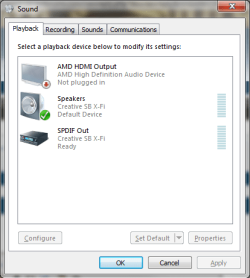
You don't. All ATI cards from the HD 2xxx series and up all have the audio built in to the video card (Realtek), and do not require the SPDIF connection like Nvidia cards do/did until recently. It's just a matter of setting the ATI HDMI audio as the default playback device in the Windows audio properties.
 

My Computer My Computer

At a glance

Win 7 Ultimate x64FX-8350 @ 4.6 GHz so farADATA XPG V1 Series Black 8GB DDR3 1600Sapphire R9 270x Dual-X

Computer type
PC/Desktop
Computer Manufacturer/Model Number
Me
OS
Win 7 Ultimate x64
CPU
FX-8350 @ 4.6 GHz so far
Motherboard
Asus M5A97 EVO
Memory
ADATA XPG V1 Series Black 8GB DDR3 1600
Graphics Card(s)
Sapphire R9 270x Dual-X
Sound Card
Xonar DGX w/ Corsair Vengence 1300
Monitor(s) Displays
Acer S232HL Abid
Screen Resolution
1920x1080
Hard Drives
120 GB OCZ Vertex 3
500 GB Seagate 7200.12
PSU
Antec Earthwatts 650W Green
Case
Antec Three Hundred
Cooling
Cooler Master 212 EVO
Keyboard
Logitech G510
Mouse
Logitech G500s
Internet Speed
35000/3000
oh thats great. As far as switching back and forth between my pc speakers and my home theater speakers, I would do this in the CCC every time?

Thanks.

BTW, any suggestions with optimizing for Window Media Center? (Playing VOB files)
 

My Computer My Computer

At a glance

Windows 7 Ultimate x64AMD Phenom II X6 1090T 3.2GHzG.SKILL Ripjaws 8GB DDR3 1333Sapphire Radeon HD 5770
OS
Windows 7 Ultimate x64
CPU
AMD Phenom II X6 1090T 3.2GHz
Motherboard
GIGABYTE GA-890FXA-UD5
Memory
G.SKILL Ripjaws 8GB DDR3 1333
Graphics Card(s)
Sapphire Radeon HD 5770
Hard Drives
Crucial m4 ssd 64g
10TB Western Digitals for movie storage
PSU
Corsair 750TX PSU
Case
Antec 1200 V3 Case
Cooling
Arctic Cooling Freezer 64 Pro
No you make the change here,

atihdmi.png

As for optimizing for Media Player/Center you'll have to wait for someone that uses that combination for tips.

One thing I have seen but not tried as I don't use the HDMI on my card is to install the latest driver from Realtek (ATI HDMI Audio Device R2.55),

Realtek

Hopefully someone here can confirm it, but I have seen elsewhere that when installing the driver from Realtek over the one included with the ATI driver you get the Realtek control panel which allows for more options for the HDMI audio.
 

My Computer My Computer

At a glance

Win 7 Ultimate x64FX-8350 @ 4.6 GHz so farADATA XPG V1 Series Black 8GB DDR3 1600Sapphire R9 270x Dual-X
Computer type
PC/Desktop
Computer Manufacturer/Model Number
Me
OS
Win 7 Ultimate x64
CPU
FX-8350 @ 4.6 GHz so far
Motherboard
Asus M5A97 EVO
Memory
ADATA XPG V1 Series Black 8GB DDR3 1600
Graphics Card(s)
Sapphire R9 270x Dual-X
Sound Card
Xonar DGX w/ Corsair Vengence 1300
Monitor(s) Displays
Acer S232HL Abid
Screen Resolution
1920x1080
Hard Drives
120 GB OCZ Vertex 3
500 GB Seagate 7200.12
PSU
Antec Earthwatts 650W Green
Case
Antec Three Hundred
Cooling
Cooler Master 212 EVO
Keyboard
Logitech G510
Mouse
Logitech G500s
Internet Speed
35000/3000
Back
Top