New set of 9 Microsoft Updates Crash Windows 7 64 Bit Desktop

sparkyuiop

New member
Member
Local time
10:54 PM
Messages
26
Location
Dorset
Hi All.

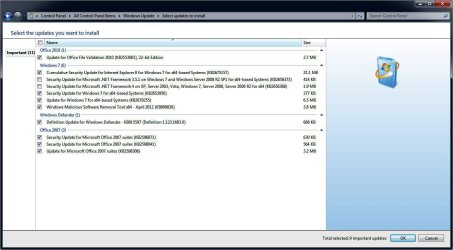
My computer had all of the MS updates avaliable last week and then today alerted me to a new set of 9 to install. If I click OK and install them my computer will not boot and the recovery console will not fix it.
The only way I am able to get my computer to work again is to restore it prior to updating these files.
I have took a screenshot of the update alert and wondered if anyone can suggest which of these might be causing the problem or if their are any known problems with them or in fact weather I need them at all.

Thanks in advance.

updates
 

Attachments

  • snap073.jpg
    snap073.jpg
    83.5 KB · Views: 112

My Computer My Computer

At a glance

Windows 7 UltimateAMD Phenom Quad 2.30GHz2 x 2GB of OCZ Reaper PC2 800MHzNvidia GeForce GTS 250 with 1GB Onboard
Computer Manufacturer/Model Number
Built it myself
OS
Windows 7 Ultimate
CPU
AMD Phenom Quad 2.30GHz
Motherboard
GF8100VM-M5
Memory
2 x 2GB of OCZ Reaper PC2 800MHz
Graphics Card(s)
Nvidia GeForce GTS 250 with 1GB Onboard
Sound Card
Onboard
Monitor(s) Displays
Acer V243W
Hard Drives
ST3200827 AS (200GB)
Maxtor STM3250310 AS (250GB)
ExelStor J9250S (250GB)
PSU
500 Watt Premium Unit
Case
One with some sexy blue neon!
Cooling
Bog standard
Mouse
Tesco optical mouse!
Internet Speed
7.2 mbps
Other Info
Sexily built with not a loose cable or screw missing anywhere. So neat it requires an illness to perform!
Your best bet is to deselect them all first.

When you've done that highlight them one at a time and check the description on the right-hand side of the screen.

If you feel you don't want any of them just right-click the appropriate one then choose Hide. You won't get offered it again.

If there are any you feel you do need install them one at a time rather than all at once. Doing this should highlight which one is causing you problems.

If you can pin it down it's best to let Microsoft know as well so that they can do something about it too.

You might also want to download and run the System Updates Readiness Tool (SURT): http://www.microsoft.com/download/en/details.aspx?id=3132

You haven't said whether you're using 32-bit Windows or 64-bit, so you'll need to download either the 32-bit version of SURT or the 64-bit version depending which is applicable to your system.
 

My Computer My Computer

At a glance

Windows 7 Ultimate SP1 64-BitIntel Core i7 870 @ 2.93GHz8Gb Dual-Channel DDR3 @ 664MHznVidia GeForce GTX 460 1024MB dedicated RAM
Computer Manufacturer/Model Number
HP Pavilion Elite 495UK
OS
Windows 7 Ultimate SP1 64-Bit
CPU
Intel Core i7 870 @ 2.93GHz
Motherboard
MSI 2A9C (CPU1)
Memory
8Gb Dual-Channel DDR3 @ 664MHz
Graphics Card(s)
nVidia GeForce GTX 460 1024MB dedicated RAM
Sound Card
Realtek HD Audio
Monitor(s) Displays
HP2310i
Screen Resolution
1920 x 1080
Hard Drives
1x1954GB Hitachi HDS22020ALA 330 (RAID), 1x1954GB Hitachi External for backup and storage
PSU
460W
Case
HP Elite
Cooling
Air cooled
Keyboard
Logitech K750 solar-powered keyboard
Mouse
Logitech Wireless M180 mouse
Internet Speed
2Mb
Other Info
Pure Avanti Flow Internet Radio with iPod Dock, 64Gb iPod, HP USB Speakers, Sony MDR-V500 Headphones, Sony Vaio F-Series Laptop
Well I could select them one at a time if I wanted to spend hours trying to find out which one it is but frankly I don't which is why I asked if anyone has had an issue with any before.

I have already hidden them untill I find an answer.

I'm not going to ask Microsoft; the company that keeps trying to update my Nvidia video card with their naff modified version of the latest Nvidia one just so their operating system is less likely to be put under as much stress and BSOD. No matter that my games run like crap though!

I say in the title that I'm running Windows 7 64 bit.

Thanks for your input though.
 

My Computer My Computer

At a glance

Windows 7 UltimateAMD Phenom Quad 2.30GHz2 x 2GB of OCZ Reaper PC2 800MHzNvidia GeForce GTS 250 with 1GB Onboard
Computer Manufacturer/Model Number
Built it myself
OS
Windows 7 Ultimate
CPU
AMD Phenom Quad 2.30GHz
Motherboard
GF8100VM-M5
Memory
2 x 2GB of OCZ Reaper PC2 800MHz
Graphics Card(s)
Nvidia GeForce GTS 250 with 1GB Onboard
Sound Card
Onboard
Monitor(s) Displays
Acer V243W
Hard Drives
ST3200827 AS (200GB)
Maxtor STM3250310 AS (250GB)
ExelStor J9250S (250GB)
PSU
500 Watt Premium Unit
Case
One with some sexy blue neon!
Cooling
Bog standard
Mouse
Tesco optical mouse!
Internet Speed
7.2 mbps
Other Info
Sexily built with not a loose cable or screw missing anywhere. So neat it requires an illness to perform!
Yes, we have experienced these before, but with different updates. It usually occurs because the user's system is not configured properly, and the only way to determine which update causes it is to install one by one. If you would rather hide them, that is your choice. However, hiding the update causing you problems is just going to prolong the problem with high likelihood of it occurring again in the future with a different set of updates. I would recommend heeding seavixen32's excellent advice.

As I said, it is your choice; the above is just my strong recommendation.
 

My Computer My Computer

At a glance

Windows 7 Home Premium 64 BitIntel(R) Core(TM)2 Quad CPU Q9550 @ 2.83GHz6.00 GB Hundai HMT125U6BFR8C-H9ATI Radeon HD 4850
Computer Manufacturer/Model Number
HP Pavilion e9110t
OS
Windows 7 Home Premium 64 Bit
CPU
Intel(R) Core(TM)2 Quad CPU Q9550 @ 2.83GHz
Motherboard
Pegatron IPIEL-LA3
Memory
6.00 GB Hundai HMT125U6BFR8C-H9
Graphics Card(s)
ATI Radeon HD 4850
Sound Card
Realtek High Definition Audio/ATI High Definition Audio
Monitor(s) Displays
Acer AL2216W
Screen Resolution
1680x1050
Hard Drives
Hitachi HDP725050GLA360 ATA Device 500 GB
PSU
Unknown/installed by HP
Case
HP generic case
Cooling
Intel Stock Cooling
Keyboard
HP Keyboard
Mouse
HP Mouse
Internet Speed
Download: 19.15 Mbps Upload: 1.67 Mbps
Other Info
Network Adapter Realtek RTL8168D/8111D Family PCI-E Gigabit Ethernet NIC (NDIS 6.20)
Network Adapter 802.11n Wireless PCI Express Card LAN Adapter
It seems a bit pointless to ask for advice, and then not heed it.

I can understand your frustration, but if you don't want to spend any more time researching the problem, don't want Microsoft to help you and are content to keep the updates hidden I fail to see what else we can do to help you.

As for not seeing the information in the thread title I hold my hand up there, but at my age, the sight ain't what it used to be, so I'll apologise on that one.

Have a nice day.
 

My Computer My Computer

At a glance

Windows 7 Ultimate SP1 64-BitIntel Core i7 870 @ 2.93GHz8Gb Dual-Channel DDR3 @ 664MHznVidia GeForce GTX 460 1024MB dedicated RAM
Computer Manufacturer/Model Number
HP Pavilion Elite 495UK
OS
Windows 7 Ultimate SP1 64-Bit
CPU
Intel Core i7 870 @ 2.93GHz
Motherboard
MSI 2A9C (CPU1)
Memory
8Gb Dual-Channel DDR3 @ 664MHz
Graphics Card(s)
nVidia GeForce GTX 460 1024MB dedicated RAM
Sound Card
Realtek HD Audio
Monitor(s) Displays
HP2310i
Screen Resolution
1920 x 1080
Hard Drives
1x1954GB Hitachi HDS22020ALA 330 (RAID), 1x1954GB Hitachi External for backup and storage
PSU
460W
Case
HP Elite
Cooling
Air cooled
Keyboard
Logitech K750 solar-powered keyboard
Mouse
Logitech Wireless M180 mouse
Internet Speed
2Mb
Other Info
Pure Avanti Flow Internet Radio with iPod Dock, 64Gb iPod, HP USB Speakers, Sony MDR-V500 Headphones, Sony Vaio F-Series Laptop
Sparky,

Now I'm not going to make you happy, but here is how we get at the root of this problem.

First, have you installed all Critical updates.

Always install ALL critical updates first.

After, and only after, all critical updates are installed, then start on that list of important updates.


Uncheck ALL of them EXCEPT for the very bottom one.

Install that one.

Repeat this procedure going up the list, one update at a time.

Never Hide a critical update. Never Hide an important update. That word important is an understatement.

If you find that an update appears to be hung, do not panic.

Use the CTRL+SHIFT+ESC key combo | Application tab | Windows Update will show as running--meaning all is ok.

Some .NET updates, some Windows Defender updates, some Malicious software updates can take an eternity.
 

My Computer My Computer

At a glance

MS Windows 7 Ultimate SP1 64-bitAMD A10-4600M6.00 GB Dual-Channel DDR3 @ 798MHz (11-11-12-28)AMD Radeon HD 7660G
Computer Manufacturer/Model Number
Toshiba Satellite S875D-S7239 laptop
OS
MS Windows 7 Ultimate SP1 64-bit
CPU
AMD A10-4600M
Motherboard
AMD Pumori (Socket FT1)
Memory
6.00 GB Dual-Channel DDR3 @ 798MHz (11-11-12-28)
Graphics Card(s)
AMD Radeon HD 7660G
Sound Card
High Definition Audio Device
Monitor(s) Displays
Generic PnP Monitor (1600x900@60Hz)
Screen Resolution
1600x900@60Hz
Hard Drives
SSD 119GB Corsair CSSD-V128GB2 ATA Device
Keyboard
Standard PS/2 Keyboard
Mouse
HP Wireless Optical Mobile Mouse Model FHA-3410
Internet Speed
What the local pub, local coffee shop offers.
Other Info
Optical Drive:MATSHITA BD-CMB UJ160B ATA Device


Also have an Asus ha1002xp netbook with Win 7 Ultimate installed.
Great advice as usual Karl.

How's the best way to deal with optional updates, some of which such as graphics updates can make things worse rather than better?
 

My Computer My Computer

At a glance

Windows 7 Ultimate SP1 64-BitIntel Core i7 870 @ 2.93GHz8Gb Dual-Channel DDR3 @ 664MHznVidia GeForce GTX 460 1024MB dedicated RAM
Computer Manufacturer/Model Number
HP Pavilion Elite 495UK
OS
Windows 7 Ultimate SP1 64-Bit
CPU
Intel Core i7 870 @ 2.93GHz
Motherboard
MSI 2A9C (CPU1)
Memory
8Gb Dual-Channel DDR3 @ 664MHz
Graphics Card(s)
nVidia GeForce GTX 460 1024MB dedicated RAM
Sound Card
Realtek HD Audio
Monitor(s) Displays
HP2310i
Screen Resolution
1920 x 1080
Hard Drives
1x1954GB Hitachi HDS22020ALA 330 (RAID), 1x1954GB Hitachi External for backup and storage
PSU
460W
Case
HP Elite
Cooling
Air cooled
Keyboard
Logitech K750 solar-powered keyboard
Mouse
Logitech Wireless M180 mouse
Internet Speed
2Mb
Other Info
Pure Avanti Flow Internet Radio with iPod Dock, 64Gb iPod, HP USB Speakers, Sony MDR-V500 Headphones, Sony Vaio F-Series Laptop
Great advice as usual Karl.

How's the best way to deal with optional updates, some of which such as graphics updates can make things worse rather than better?

I usually avoid any optional driver "updates" through Windows updates(note the quotes: I have a graphics card that Microsoft thinks the driver from a year ago is better than the most recent). I only install optional updates if it has the words "improves security" or "improves stability" or something of that nature. I do not know why security or stability updates are optional sometimes, but it seems to happen at least once every couple months.

To answer your question, the best method for installing optional updates is to do some research and find out what the update is supposed to fix. I throw the update title in Google and find any Microsoft support sites related to it. Sometimes the update titles and descriptions even show up on these forums. :)
 

My Computer My Computer

At a glance

Windows 7 Home Premium 64 BitIntel(R) Core(TM)2 Quad CPU Q9550 @ 2.83GHz6.00 GB Hundai HMT125U6BFR8C-H9ATI Radeon HD 4850
Computer Manufacturer/Model Number
HP Pavilion e9110t
OS
Windows 7 Home Premium 64 Bit
CPU
Intel(R) Core(TM)2 Quad CPU Q9550 @ 2.83GHz
Motherboard
Pegatron IPIEL-LA3
Memory
6.00 GB Hundai HMT125U6BFR8C-H9
Graphics Card(s)
ATI Radeon HD 4850
Sound Card
Realtek High Definition Audio/ATI High Definition Audio
Monitor(s) Displays
Acer AL2216W
Screen Resolution
1680x1050
Hard Drives
Hitachi HDP725050GLA360 ATA Device 500 GB
PSU
Unknown/installed by HP
Case
HP generic case
Cooling
Intel Stock Cooling
Keyboard
HP Keyboard
Mouse
HP Mouse
Internet Speed
Download: 19.15 Mbps Upload: 1.67 Mbps
Other Info
Network Adapter Realtek RTL8168D/8111D Family PCI-E Gigabit Ethernet NIC (NDIS 6.20)
Network Adapter 802.11n Wireless PCI Express Card LAN Adapter
What you say makes sense, particularly with reference to graphics drivers. I recently updated my NVIDIA driver to version 296.10, and yet Microsoft was offering an earlier version than my original one.

As ever, Google is nearly the best place to go sometimes. I say nearly because we all know the best place, don't we? :)
 

My Computer My Computer

At a glance

Windows 7 Ultimate SP1 64-BitIntel Core i7 870 @ 2.93GHz8Gb Dual-Channel DDR3 @ 664MHznVidia GeForce GTX 460 1024MB dedicated RAM
Computer Manufacturer/Model Number
HP Pavilion Elite 495UK
OS
Windows 7 Ultimate SP1 64-Bit
CPU
Intel Core i7 870 @ 2.93GHz
Motherboard
MSI 2A9C (CPU1)
Memory
8Gb Dual-Channel DDR3 @ 664MHz
Graphics Card(s)
nVidia GeForce GTX 460 1024MB dedicated RAM
Sound Card
Realtek HD Audio
Monitor(s) Displays
HP2310i
Screen Resolution
1920 x 1080
Hard Drives
1x1954GB Hitachi HDS22020ALA 330 (RAID), 1x1954GB Hitachi External for backup and storage
PSU
460W
Case
HP Elite
Cooling
Air cooled
Keyboard
Logitech K750 solar-powered keyboard
Mouse
Logitech Wireless M180 mouse
Internet Speed
2Mb
Other Info
Pure Avanti Flow Internet Radio with iPod Dock, 64Gb iPod, HP USB Speakers, Sony MDR-V500 Headphones, Sony Vaio F-Series Laptop
Sparky,

Now I'm not going to make you happy, but here is how we get at the root of this problem.

First, have you installed all Critical updates.

Always install ALL critical updates first.

After, and only after, all critical updates are installed, then start on that list of important updates.


Uncheck ALL of them EXCEPT for the very bottom one.

Install that one.

Repeat this procedure going up the list, one update at a time.

Never Hide a critical update. Never Hide an important update. That word important is an understatement.

If you find that an update appears to be hung, do not panic.

Use the CTRL+SHIFT+ESC key combo | Application tab | Windows Update will show as running--meaning all is ok.

Some .NET updates, some Windows Defender updates, some Malicious software updates can take an eternity.

[FONT=&quot]So, basically, we can't update Win 7 64 in the manner normally presented by Windows Update (letting Windows Update run and just hitting the install button to install Critical and Important Updates), but must override the automatic selection and choose to install Updates one at a time? That's fine, but Microsoft should (a) design the Windows Updates application to work that way, and (b) if Microsoft can't manage to do that, at least warn users to ignore the default and install updates one at a time. I've just wasted over 6 hours trying to get to the bottom of "failed" updates. [/FONT][FONT=&quot]

Additionally, applications keep closing with pop-ups to the effect that "Microsoft needs more information to try to solve X problems", followed by assorted variations on "Microsoft can not solve X because of Y". [/FONT]
[FONT=&quot]
I've used XP Pro, which was stable and allowed me to customize much of it to fit the way in which I use my computers, since it first came out. XP Pro was a stable and fairly easily customizable OS. Win 7 pro seems to be unduly rigid and not at all flexible to meet individual users needs/preferences. This does not make sense to me. It feels like 20 steps backwards to ME land (which appeared to have grown out of the incompetent 95 & 98 chain of OS’, rather than out of the NT chain).

Sorry to go on, but I'm very disappointed with Win 7. After Win 7 turned out to be such a mess, I bought XP Pro 64 bit to install on my new x64 build in lieu of Win 7, but am reticent to install it because I understand support for XP Pro is being phased out in less than 2 years.

Is there realistic hope that Win 7 will be brought up to the stability, functionality and customizability levels of XP Pro? Or, should I just install the 64 bit XP Pro for now and hope whatever Microsoft comes out with next (after Win 8, which I understand is an even greater disaster than Win 7) will actually be a workable OS? Or, should I just give up on Microsoft and learn all about Linux and/or Ubuntu:cry::mad:?[/FONT]
 

My Computer My Computer

At a glance

Windows 7 Pro 64 bitAMD Phenom II X3 7208GB Corsair DDR3 RAMUsing native on Mobo
Computer Manufacturer/Model Number
Home Build
OS
Windows 7 Pro 64 bit
CPU
AMD Phenom II X3 720
Motherboard
ASUS M4A89GTD PRO/USB3
Memory
8GB Corsair DDR3 RAM
Graphics Card(s)
Using native on Mobo
Sound Card
Using native on Mobo
Monitor(s) Displays
Sceptre X24WG-NAGA
Hard Drives
INTEL SSDA2CW080G3; SAMSUNG HD103SJ, WDC WD7502AAEX-00Y9A0; With identically sized, and otherwise of same specs, but different brand, drives in hardware RAID
PSU
Cooler Master GX 650W (RS-650-ACAA)
Case
COOLMASTER HAF 932 Advanced
Cooling
Hyper 212 cpu cooler & Fans native to HAF 932 Advanced
So, basically, we can't update Win 7 64 in the manner normally presented by Windows Update (letting Windows Update run and just hitting the install button to install Critical and Important Updates), but must override the automatic selection and choose to install Updates one at a time? That's fine, but Microsoft should (a) design the Windows Updates application to work that way, and (b) if Microsoft can't manage to do that, at least warn users to ignore the default and install updates one at a time. I've just wasted over 6 hours trying to get to the bottom of "failed" updates.
It is designed to work that way, although not the default. I always set it for manual installs on my main machines. Even during all of the XP years. If you keep up with what's going on with security issues I think it's perfectly fine to do the updates yourself. Every once in a while there will be an update that causes some sort of problem. But update problems go back to early XP days, too. An update might break some feature that you use with a particular app, or it might have caused a problem with the OS itself that wasn't forseen, etc. There've even been updates that MS has pulled from distribution right after pushing them out. I think the problem is much more rare than it used to be (even throughout the years of XP). I have never used auto updates because of the potential, but rare, problems. I just keep up as best I can with the security world and update when I'm good and ready (when I know there are no mass reported issues). I'm not the typical update guinea pig. There's really no real reason for me to be that way anymore though. Since around 2005, I've been making images at least once a month, and always between the first of the month and patch Tuesday, so it really would be easy enough just to roll it back.

That said, when I repair other folks' machines I usually set it to full auto. That's because it's much easier to correct any rare issue resulting from updates rather than fixing a machine that's been totally crippled because it hasn't been updated in the last year.
Additionally, applications keep closing with pop-ups to the effect that "Microsoft needs more information to try to solve X problems", followed by assorted variations on "Microsoft can not solve X because of Y".
If you get that a lot you've got some kind of conflict occuring, an install problem, something's going on. But, I think you're right, it's not yet a very well refined all-around "troubleshooter". When it does have a legitimate answer it always seems to be something that would've been easy to find anyway just by doing a little poking around the system yourself.
I've used XP Pro, which was stable and allowed me to customize much of it to fit the way in which I use my computers, since it first came out. XP Pro was a stable and fairly easily customizable OS. Win 7 pro seems to be unduly rigid and not at all flexible to meet individual users needs/preferences. This does not make sense to me. It feels like 20 steps backwards to ME land (which appeared to have grown out of the incompetent 95 & 98 chain of OS’, rather than out of the NT chain).
Stick with w7 for a while. I think after a while you may find that it's much more stable, secure and customizable than XP. I think I can agree on WinME being considered a disaster, but I've always thought the 95/98 versions were revolutionary, considering how bad I thought 3.1 was. I think developers had a rough time developing to the new standards imposed by 95. But it seemed to me to be just as revolutionary as the ME to XP leap. I had such a good time with 95/98, that if XP hadn't been built on the NT model, I probably would've held on to the 95/98 machines much longer than I did. I used NT4 client and server at home on a few machines for a number of years, and used them at work. And while I loved it, I think MS had a lot of work to do before introducing NT into the consumer world.
Sorry to go on, but I'm very disappointed with Win 7. After Win 7 turned out to be such a mess, I bought XP Pro 64 bit to install on my new x64 build in lieu of Win 7, but am reticent to install it because I understand support for XP Pro is being phased out in less than 2 years.
Is there realistic hope that Win 7 will be brought up to the stability, functionality and customizability levels of XP Pro? Or, should I just install the 64 bit XP Pro for now and hope whatever Microsoft comes out with next (after Win 8, which I understand is an even greater disaster than Win 7) will actually be a workable OS? Or, should I just give up on Microsoft and learn all about Linux and/or Ubuntu?
Well, most of the Linux flavors are free to try (I think most are). But I don't consider w7 a disaster at all, quite the opposite actually. I'd stick with it for awhile (of course I've no idea how long you've already stuck with it). And even though XP will be updated until April 2014, you've got to think about how patched up it is. It'll never be as secure as w7.

Also realize that because of security issues that MS, as well as many other software firms, are trying to push more and more towards auto updates. If I remember correctly w8 was originally going to be designed as auto only. Don't know if it made that way by the time of the preview; I haven't tried it yet but I think it's now an option.

 
Last edited:

My Computer My Computer

At a glance

Windows 7 Ultimate x64
OS
Windows 7 Ultimate x64
I'm not going to ask Microsoft; the company that keeps trying to update my Nvidia video card with their naff modified version of the latest Nvidia........

MS do not write drivers. Drivers on WU are upplied by the manifacturer concerned, and may be cut-down versions.

If you are getting a driver from WU, then it must be because there's an element of the installed drivers that's older than the one available at WU (which is usually at least one version behind that available at the manufacturer's site).
I'd check out your nVidia suite and see what's there that's causing it.
 

My Computer My Computer

At a glance

Win 7 x64 Home Premium (and x86 VirtualBox VM...i3 370M/i7 6500U8GB - finally :)/8GBit's an i3, dude!/dual Intel&nVidia
Computer type
Laptop
Computer Manufacturer/Model Number
Asus K52F or Lenovo B51-80
OS
Win 7 x64 Home Premium (and x86 VirtualBox VM)/Win10
CPU
i3 370M/i7 6500U
Motherboard
Asus/Lenovo
Memory
8GB - finally :)/8GB
Graphics Card(s)
it's an i3, dude!/dual Intel&nVidia
Sound Card
onboard
Monitor(s) Displays
15.6" built-in
Screen Resolution
1366x768/1920x1080
Hard Drives
750GB Seagate internal
Sundry external drives attached to other computers on the local network
1TB SSD on the Lenovo
PSU
n/a
Internet Speed
as much as I can get - usually on a dongle/phone, so <1MB/s
Antivirus
MSE/Defender
Browser
IE11/12/Edge/Chrome/FF(if I must)
Win 7 "Troubleshooter"

q.gif
Quote: Originally Posted by sibble
If you get that a lot you've got some kind of conflict occuring, an install problem, something's going on. But, I think you're right, it's not yet a very well refined all-around "troubleshooter". When it does have a legitimate answer it always seems to be something that would've been easy to find anyway just by doing a little poking around the system yourself.

{sorry for the incorrect quotation style - for some reason I can't get it to work this morning....}

Is there a way to turn the troubleshooter off? I'm used to doing my own trouble shooting and the info provided in the application is not useful, so the troubleshooter's more of a distraction than anything else.

I'm with you on NT 4.0 - used NT 4.0 Server for quite a while, with both NT based 2000 Pro and NT based XP Pro, as those OS came on line. I've always had more faith in an OS which comes out of the NT line.

Thank you for all of your time, thought and expertise in responding to my many questions and issues. I'll take your advice and persevere with win 7 Pro a bit longer.
 

My Computer My Computer

At a glance

Windows 7 Pro 64 bitAMD Phenom II X3 7208GB Corsair DDR3 RAMUsing native on Mobo
Computer Manufacturer/Model Number
Home Build
OS
Windows 7 Pro 64 bit
CPU
AMD Phenom II X3 720
Motherboard
ASUS M4A89GTD PRO/USB3
Memory
8GB Corsair DDR3 RAM
Graphics Card(s)
Using native on Mobo
Sound Card
Using native on Mobo
Monitor(s) Displays
Sceptre X24WG-NAGA
Hard Drives
INTEL SSDA2CW080G3; SAMSUNG HD103SJ, WDC WD7502AAEX-00Y9A0; With identically sized, and otherwise of same specs, but different brand, drives in hardware RAID
PSU
Cooler Master GX 650W (RS-650-ACAA)
Case
COOLMASTER HAF 932 Advanced
Cooling
Hyper 212 cpu cooler & Fans native to HAF 932 Advanced
Is there a way to turn the troubleshooter off? I'm used to doing my own trouble shooting and the info provided in the application is not useful, so the troubleshooter's more of a distraction than anything else.

I really don't know. I so rarely see it that I've not been bothered by it. It's probably been two or three months since it last popped up. On top of that, I never thought to disable it as I'd like to see if its performance improves over time to determine if I can ever truly recommend it as a worthwhile tool for the typical user.

There was a two week or so period of time where I was getting it quite often. It was always with the 32bit version of either IE8 or IE9 (can't remember which), but oddly enough, only when I was viewing a list of search results from MS's own Bing. And almost never occuring on the first search, it was typically when I would navigate forward or back to the webpage that contained an existing Bing search listing, or after attempting a new Bing search on top of the last search. Never happened with other search engines.

So obviously I was getting it often enough to be able to recognize exactly how it was occuring, but it was really the problem itself that was bothering me, rather than the troubleshooter never knowing how to fix it. But in the end I never figured out what the true cause was either; the issue had just gone away. I know there were IE updates applied, but I really couldn't say for sure that updates solved the problem. For all I know it could've been that IE was simply having problems rendering faulty Bing pages that were subsequently fixed.

I'll look around to see if there's a way to turn off the troubleshooter and post here if I find it. In the meantime I'm sure others will see this thread too, and if there is a way to do it, I'm pretty sure you'll see a post soon with the answer.
 

My Computer My Computer

At a glance

Windows 7 Ultimate x64
OS
Windows 7 Ultimate x64
Back
Top