
I had a RAID card on my PC. When i tried to upgrade to windows 10, installation crashed because of the card drivers.
On my PC i had double boot. The raid or a single backup system in one HDD.
I made a clone of the Raid boot drive and removed the card and the two HDD (which are empty and no data or partition)
I tried to boot from the backup single drive and the clone drive. When i selected the clone drive, did not boot. If i select the backup drive it boot OK. The issue is that all my work it is on the clone drive. I installed the emergency repair disk i made before on windows 7 and selected repair my computer. The windows left the backup drive on the menu and wrote Windows recovered on the second option.
Now, when i boot on the recovered drive, i get Prepare your desktop, and in the end, a bank screen with the mouse cursor and a message that windows it is not genuine. I tried task manager , new task, explorer, and i get the same blank screen with few shortcuts, but none of them works. I tried start menu all programs, but nothing works.
I load again in the backup windows and look at the other drive under users.
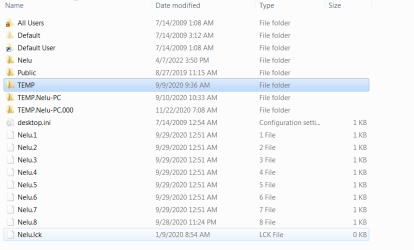
I see : Nelu, which was my original user name, PLUS 3 others
TEMP
TEMP.Nelu-PC
TEMP.Nelu-PC.000
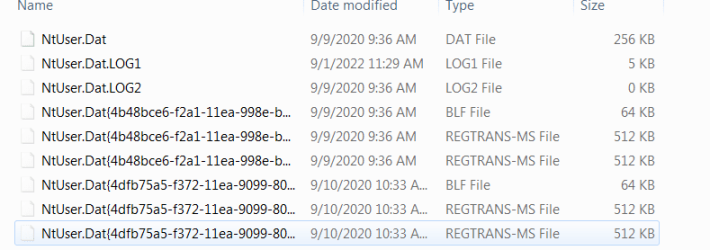
All of them just have few NT files (9) and nothing else.
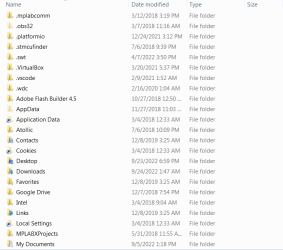
If i go to User Nelu (original one) i have everithing there.
Can i just delete the TEMP users and it will log on the remaining one - NELU ?
Please Help because i am desperate.
Thank you
On my PC i had double boot. The raid or a single backup system in one HDD.
I made a clone of the Raid boot drive and removed the card and the two HDD (which are empty and no data or partition)
I tried to boot from the backup single drive and the clone drive. When i selected the clone drive, did not boot. If i select the backup drive it boot OK. The issue is that all my work it is on the clone drive. I installed the emergency repair disk i made before on windows 7 and selected repair my computer. The windows left the backup drive on the menu and wrote Windows recovered on the second option.
Now, when i boot on the recovered drive, i get Prepare your desktop, and in the end, a bank screen with the mouse cursor and a message that windows it is not genuine. I tried task manager , new task, explorer, and i get the same blank screen with few shortcuts, but none of them works. I tried start menu all programs, but nothing works.
I load again in the backup windows and look at the other drive under users.
I see : Nelu, which was my original user name, PLUS 3 others
TEMP
TEMP.Nelu-PC
TEMP.Nelu-PC.000
All of them just have few NT files (9) and nothing else.
If i go to User Nelu (original one) i have everithing there.
Can i just delete the TEMP users and it will log on the remaining one - NELU ?
Please Help because i am desperate.
Thank you
Attachments
My Computer
At a glance
xp , vista
- OS
- xp , vista

