Solved New SSD C drive but what is accessing 3 old HDD's in turn every second

pme2

New member
Member
Local time
5:21 PM
Messages
26
Location
Lincolnshire, UK
Upgraded & re built my PC from 7 32bit to 7 64bit with new, Mobo, CPU, Ram, & Intel 520 SSD C drive.
I kept the old HDD's in the case attached via sata, but now when working only on the new SSD something is accessing each of the old HDD's in turn every second. When I first started up the new configuration at first the old drives were silent ie no read/write activity, but now they are on continuously although I never access them. I would like them to spin down to stop when not needed. Indexing is only active for the C drive, also I have Iolo System Mechanic Pro installed c/w it's Anti V & Anti Malware. Win 7 32bit is still installed on one of the old HD's in a dual boot type senario, from the Bios screen.
I've got Process Hacker 2, & Process monitor loaded and looked at the results but failed to identify the process accessing the 3 HDD's every second.
Anyone got any good ideas, as to where I go next?
Thanks,
pme2
 

My Computer My Computer

At a glance

Windows Seven Home Premium 64bitIntel i7-3770k LGA 115516GB G.Skill DDR3-1600Intergrated on MoBo
Computer Manufacturer/Model Number
Self Build
OS
Windows Seven Home Premium 64bit
CPU
Intel i7-3770k LGA 1155
Motherboard
Asus P8 Z77-V Pro
Memory
16GB G.Skill DDR3-1600
Graphics Card(s)
Intergrated on MoBo
Sound Card
Intergrated on MoBo
Monitor(s) Displays
Dell 2407WFP & LG1710B
Screen Resolution
1920x1200
Hard Drives
Intel 520 SSD 180GB (C Drive)
2x Seagate 200GB
1x Seagate 750GB
PSU
OCZ ZT 650W
Case
Antec P160
Cooling
2x Ultra Quiet 120mm
Keyboard
Logitech Di-Novo Edge
Mouse
Logitech MX Laser 1000
Internet Speed
DL 2800Kbps UL 430Kbps
Hi

1stly, it is most likely that boot manager and other hidden files have been installed to one of the mechanical drives which in turn is making them spin up occasionally (this happened because you had the other drives attached while you installed windows on to C:\)
2ndly System Mechanic Pro will spin up the drives and IMO does more harm than good, i suggest you ditch such software that claim to be all singing and all dancing...9/10 they don't do anything good

the above said though i have a similar issue because i left in the other drives (i don't care much to do anything about it until i need a full clean install still going strong for over a year now) though i was given the solution but never acted upon i suggest you await a more experienced member in this department to come to you aid
 

My Computer My Computer

At a glance

Windows 7 Home Premium x64 SP1Core 2 Quad Q66008 GB OCZ PC2-6400 nVIDIA SLI-Ready Edition (4...AMP! GeForce GTX 260² 896MB 448-bit GDDR3 (65...
Computer Manufacturer/Model Number
Me :P
OS
Windows 7 Home Premium x64 SP1
CPU
Core 2 Quad Q6600
Motherboard
Abit IN9 32X MAX
Memory
8 GB OCZ PC2-6400 nVIDIA SLI-Ready Edition (4X2GB)
Graphics Card(s)
AMP! GeForce GTX 260² 896MB 448-bit GDDR3 (650MHz/2100MHz)
Sound Card
Realtek 7.1 CH HD Audio
Monitor(s) Displays
37" LG 1080p HD LCD TV
Screen Resolution
1280x1024 + 1360x768
Hard Drives
40GB Mushkin SSD
60GB Intel 520 SSD
150GB Raptor HDD
500GB Caviar HDD
PSU
Thermaltake W0133RB 1200W PSU
Case
Antec 900
Cooling
OCZ Vendetta 2 + Antec 900 case fans
Keyboard
Logitech G15 (full layout)
Mouse
R.A.T.9
Internet Speed
Not fast enough!
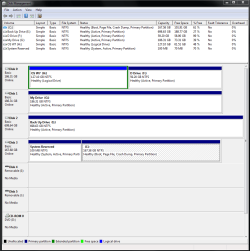
Ripbox had some good suggestions. -- When you installed Windows on the SSD, did you only have the SSD connected to your mother board or did you have the HD's connected also? If you could use your Snipping Tool to give us a screen shot of your Disk Management expanded, that would let us look at how your PC is set up. Thanks,
 

My Computer My Computer

At a glance

Windows 7 Home Premium 32-Bit - Build 7600 SP1Intel Core i3-2120 3.30GhzKingston 4 GB DDR3 1333 mhzAMD Radeon HD6670
Computer type
PC/Desktop
Computer Manufacturer/Model Number
Custom Build
OS
Windows 7 Home Premium 32-Bit - Build 7600 SP1
CPU
Intel Core i3-2120 3.30Ghz
Motherboard
Asus P8Z68-V LX Intel Z68 Socket H2 ATX
Memory
Kingston 4 GB DDR3 1333 mhz
Graphics Card(s)
AMD Radeon HD6670
Sound Card
Sound Blaster Audigy SE 24-Bit
Monitor(s) Displays
Asus VE228
Screen Resolution
1440 X 900
Hard Drives
OCZ Vertex 3 120 GB Sata 3 SSD ==
Kingston SH103/S3 120 G Hyper X 120 GB SSD ==
Western Digital 500 GB Caviar Green 7200 RPM ==
PSU
Corsair CX600M == 600 Watt
Case
NZXT Apollo - Silver with Clear Side Panel
Cooling
Three 120 mm Fans
Keyboard
Microsoft Natural 4000
Mouse
Microsoft Custom Optical 3000
Internet Speed
AT&T Fiber Optic Wireless Network
Antivirus
Microsoft Security Essentials
Browser
Chrome
Other Info
120 mm Blue LED Fan -- Three Blue LED Lazer Light Sticks
Reply

Thanks Guys,
The "other Drive's" were not connected when installing the new Win 7 64.
Disk Management snip attached.
Regards
pme2

PS-Ripbox, what do mean by "IMO"?
I'm awhere that many people frown upon the all singing all dancing fix it all apps like Iolo System Machanic Pro, I've had it for many years ...but I'm open to education re this issue, are they really that bad? Perhaps a different thread...
 

Attachments

  • Disk Mngmnt.PNG
    Disk Mngmnt.PNG
    29.6 KB · Views: 56

My Computer My Computer

At a glance

Windows Seven Home Premium 64bitIntel i7-3770k LGA 115516GB G.Skill DDR3-1600Intergrated on MoBo
Computer Manufacturer/Model Number
Self Build
OS
Windows Seven Home Premium 64bit
CPU
Intel i7-3770k LGA 1155
Motherboard
Asus P8 Z77-V Pro
Memory
16GB G.Skill DDR3-1600
Graphics Card(s)
Intergrated on MoBo
Sound Card
Intergrated on MoBo
Monitor(s) Displays
Dell 2407WFP & LG1710B
Screen Resolution
1920x1200
Hard Drives
Intel 520 SSD 180GB (C Drive)
2x Seagate 200GB
1x Seagate 750GB
PSU
OCZ ZT 650W
Case
Antec P160
Cooling
2x Ultra Quiet 120mm
Keyboard
Logitech Di-Novo Edge
Mouse
Logitech MX Laser 1000
Internet Speed
DL 2800Kbps UL 430Kbps
My PC Snip.

Thanks Guys,
The "other Drive's" were not connected when installing the new Win 7 64.
Disk Management snip attached.
Regards
pme2

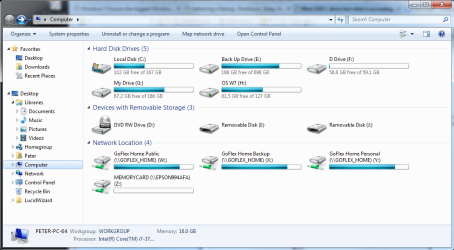
Also here's a snip of "My Computer", showing my Goflex back up External HD unit.
 

Attachments

  • My Computer.PNG
    My Computer.PNG
    52.4 KB · Views: 28

My Computer My Computer

At a glance

Windows Seven Home Premium 64bitIntel i7-3770k LGA 115516GB G.Skill DDR3-1600Intergrated on MoBo
Computer Manufacturer/Model Number
Self Build
OS
Windows Seven Home Premium 64bit
CPU
Intel i7-3770k LGA 1155
Motherboard
Asus P8 Z77-V Pro
Memory
16GB G.Skill DDR3-1600
Graphics Card(s)
Intergrated on MoBo
Sound Card
Intergrated on MoBo
Monitor(s) Displays
Dell 2407WFP & LG1710B
Screen Resolution
1920x1200
Hard Drives
Intel 520 SSD 180GB (C Drive)
2x Seagate 200GB
1x Seagate 750GB
PSU
OCZ ZT 650W
Case
Antec P160
Cooling
2x Ultra Quiet 120mm
Keyboard
Logitech Di-Novo Edge
Mouse
Logitech MX Laser 1000
Internet Speed
DL 2800Kbps UL 430Kbps
IMO - In my opinion (as with 90% of techsperts) system mechanic is known to be deadly to your system
Products like those tend to be over zealous, sometime deleting important system files and registry keys, giving false positives and making the user panic.... mostly in order to keep your custom (£$)
As i stated above this kind of software can also become a huge resource hog thus my suggestion that this could also be the reason for your discs spinning up as system mechanic is over reacting and unnecessarily scanning your inactive drives and free space
Most techsperts will only recommend a limited number of free software that will keep you safe as safe can be
i.e Spybot search and destroy, Malwarebytes and Avats being ample, and for the paranoid/OCD people Ccleaner
Nothing much more than that is needed and they are all free and consistently come highly recommended by any critic

I took a look at your Images and cant see anything a miss though im tired so excuse me if i have (seem cleaner than mine) but i am leaning more toward the system mechanic

Edit: it could be worth making a shot of your task manger list to see if we can see anything else
 

My Computer My Computer

At a glance

Windows 7 Home Premium x64 SP1Core 2 Quad Q66008 GB OCZ PC2-6400 nVIDIA SLI-Ready Edition (4...AMP! GeForce GTX 260² 896MB 448-bit GDDR3 (65...
Computer Manufacturer/Model Number
Me :P
OS
Windows 7 Home Premium x64 SP1
CPU
Core 2 Quad Q6600
Motherboard
Abit IN9 32X MAX
Memory
8 GB OCZ PC2-6400 nVIDIA SLI-Ready Edition (4X2GB)
Graphics Card(s)
AMP! GeForce GTX 260² 896MB 448-bit GDDR3 (650MHz/2100MHz)
Sound Card
Realtek 7.1 CH HD Audio
Monitor(s) Displays
37" LG 1080p HD LCD TV
Screen Resolution
1280x1024 + 1360x768
Hard Drives
40GB Mushkin SSD
60GB Intel 520 SSD
150GB Raptor HDD
500GB Caviar HDD
PSU
Thermaltake W0133RB 1200W PSU
Case
Antec 900
Cooling
OCZ Vendetta 2 + Antec 900 case fans
Keyboard
Logitech G15 (full layout)
Mouse
R.A.T.9
Internet Speed
Not fast enough!
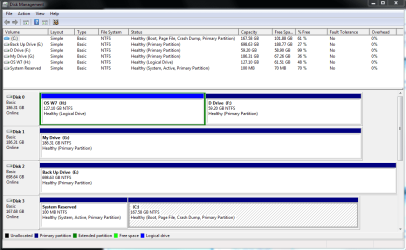
Your D:, G: and E: drives are all marked Active. You can use the Diskpart command to make them inactive. http://www.sevenforums.com/tutorials/197157-partition-mark-inactive.html == H: is marked as OS, but that is your old one is that correct? The SSD is your C: drive and that is where Win 7 is, right? Did you go into your Bios and change the boot order so that your DVD is the first to boot and the SSD is the second to boot? Let us know. == I don't know if this will be the answer to your problems, but this is a place to start and see how your PC operates after those three are marked inactive. Your 100 MB System Reserved should be Active.
 

My Computer My Computer

At a glance

Windows 7 Home Premium 32-Bit - Build 7600 SP1Intel Core i3-2120 3.30GhzKingston 4 GB DDR3 1333 mhzAMD Radeon HD6670
Computer type
PC/Desktop
Computer Manufacturer/Model Number
Custom Build
OS
Windows 7 Home Premium 32-Bit - Build 7600 SP1
CPU
Intel Core i3-2120 3.30Ghz
Motherboard
Asus P8Z68-V LX Intel Z68 Socket H2 ATX
Memory
Kingston 4 GB DDR3 1333 mhz
Graphics Card(s)
AMD Radeon HD6670
Sound Card
Sound Blaster Audigy SE 24-Bit
Monitor(s) Displays
Asus VE228
Screen Resolution
1440 X 900
Hard Drives
OCZ Vertex 3 120 GB Sata 3 SSD ==
Kingston SH103/S3 120 G Hyper X 120 GB SSD ==
Western Digital 500 GB Caviar Green 7200 RPM ==
PSU
Corsair CX600M == 600 Watt
Case
NZXT Apollo - Silver with Clear Side Panel
Cooling
Three 120 mm Fans
Keyboard
Microsoft Natural 4000
Mouse
Microsoft Custom Optical 3000
Internet Speed
AT&T Fiber Optic Wireless Network
Antivirus
Microsoft Security Essentials
Browser
Chrome
Other Info
120 mm Blue LED Fan -- Three Blue LED Lazer Light Sticks
Your D:, G: and E: drives are all marked Active. You can use the Diskpart command to make them inactive. Done D, G, & E now inactive.
http://www.sevenforums.com/tutorials/197157-partition-mark-inactive.html ==
H: is marked as OS, but that is your old one is that correct? Correct.
The SSD is your C: drive and that is where Win 7 is, right? Win 7 64 Correct.
Did you go into your Bios and change the boot order so that your DVD is the first to boot and the SSD is the second to boot? Yes that is the boot sequence.

Let us know. == I don't know if this will be the answer to your problems, but this is a place to start and see how your PC operates after those three are marked inactive. Your 100 MB System Reserved should be Active.

I'll reboot & see how that works...
 

My Computer My Computer

At a glance

Windows Seven Home Premium 64bitIntel i7-3770k LGA 115516GB G.Skill DDR3-1600Intergrated on MoBo
Computer Manufacturer/Model Number
Self Build
OS
Windows Seven Home Premium 64bit
CPU
Intel i7-3770k LGA 1155
Motherboard
Asus P8 Z77-V Pro
Memory
16GB G.Skill DDR3-1600
Graphics Card(s)
Intergrated on MoBo
Sound Card
Intergrated on MoBo
Monitor(s) Displays
Dell 2407WFP & LG1710B
Screen Resolution
1920x1200
Hard Drives
Intel 520 SSD 180GB (C Drive)
2x Seagate 200GB
1x Seagate 750GB
PSU
OCZ ZT 650W
Case
Antec P160
Cooling
2x Ultra Quiet 120mm
Keyboard
Logitech Di-Novo Edge
Mouse
Logitech MX Laser 1000
Internet Speed
DL 2800Kbps UL 430Kbps
Oh dear no, still accessing every second, in this order H, G/F, E, milliseconds between them. I can can hear them, and feel them vibrate when they do, I've got the side cover off.
What do you think?
 

My Computer My Computer

At a glance

Windows Seven Home Premium 64bitIntel i7-3770k LGA 115516GB G.Skill DDR3-1600Intergrated on MoBo
Computer Manufacturer/Model Number
Self Build
OS
Windows Seven Home Premium 64bit
CPU
Intel i7-3770k LGA 1155
Motherboard
Asus P8 Z77-V Pro
Memory
16GB G.Skill DDR3-1600
Graphics Card(s)
Intergrated on MoBo
Sound Card
Intergrated on MoBo
Monitor(s) Displays
Dell 2407WFP & LG1710B
Screen Resolution
1920x1200
Hard Drives
Intel 520 SSD 180GB (C Drive)
2x Seagate 200GB
1x Seagate 750GB
PSU
OCZ ZT 650W
Case
Antec P160
Cooling
2x Ultra Quiet 120mm
Keyboard
Logitech Di-Novo Edge
Mouse
Logitech MX Laser 1000
Internet Speed
DL 2800Kbps UL 430Kbps
Oh dear no, still accessing every second, in this order H, G/F, E, milliseconds between them. I can can hear them, and feel them vibrate when they do, I've got the side cover off.
What do you think?

Could you do another Disk Management screen shot. Maybe I can see something else. Thanks,
 

My Computer My Computer

At a glance

Windows 7 Home Premium 32-Bit - Build 7600 SP1Intel Core i3-2120 3.30GhzKingston 4 GB DDR3 1333 mhzAMD Radeon HD6670
Computer type
PC/Desktop
Computer Manufacturer/Model Number
Custom Build
OS
Windows 7 Home Premium 32-Bit - Build 7600 SP1
CPU
Intel Core i3-2120 3.30Ghz
Motherboard
Asus P8Z68-V LX Intel Z68 Socket H2 ATX
Memory
Kingston 4 GB DDR3 1333 mhz
Graphics Card(s)
AMD Radeon HD6670
Sound Card
Sound Blaster Audigy SE 24-Bit
Monitor(s) Displays
Asus VE228
Screen Resolution
1440 X 900
Hard Drives
OCZ Vertex 3 120 GB Sata 3 SSD ==
Kingston SH103/S3 120 G Hyper X 120 GB SSD ==
Western Digital 500 GB Caviar Green 7200 RPM ==
PSU
Corsair CX600M == 600 Watt
Case
NZXT Apollo - Silver with Clear Side Panel
Cooling
Three 120 mm Fans
Keyboard
Microsoft Natural 4000
Mouse
Microsoft Custom Optical 3000
Internet Speed
AT&T Fiber Optic Wireless Network
Antivirus
Microsoft Security Essentials
Browser
Chrome
Other Info
120 mm Blue LED Fan -- Three Blue LED Lazer Light Sticks
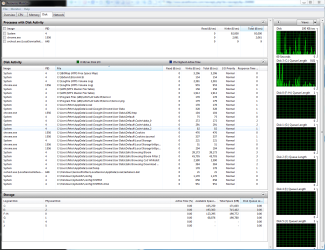
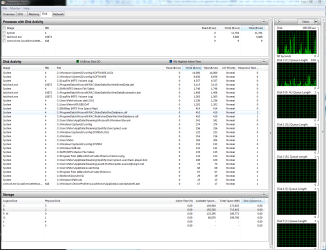
Look in Resource Monitor > Disk tab. That may give you more insight of what is happening - both from the graphs on the right as from the list items above.
 

My Computer My Computer

At a glance

Vista, Windows7, Mint Mate, Zorin, Windows 8from 1.6GHz Duo to i7
Computer Manufacturer/Model Number
HP, Dell, Gateway, Toshiba - 4 laptops and 2 desktops
OS
Vista, Windows7, Mint Mate, Zorin, Windows 8
CPU
from 1.6GHz Duo to i7
Monitor(s) Displays
2x HP w2207
Hard Drives
5x HDD, 7x SSD, 12x Externals
Keyboard
with trackball - no mices
Mouse
Trackball mice
Internet Speed
DSL 6000
Could you do another Disk Management screen shot. Maybe I can see something else. Thanks,[/QUOTE]

My pleasure...
 

Attachments

  • Disk Man Snip.PNG
    Disk Man Snip.PNG
    28.6 KB · Views: 23

My Computer My Computer

At a glance

Windows Seven Home Premium 64bitIntel i7-3770k LGA 115516GB G.Skill DDR3-1600Intergrated on MoBo
Computer Manufacturer/Model Number
Self Build
OS
Windows Seven Home Premium 64bit
CPU
Intel i7-3770k LGA 1155
Motherboard
Asus P8 Z77-V Pro
Memory
16GB G.Skill DDR3-1600
Graphics Card(s)
Intergrated on MoBo
Sound Card
Intergrated on MoBo
Monitor(s) Displays
Dell 2407WFP & LG1710B
Screen Resolution
1920x1200
Hard Drives
Intel 520 SSD 180GB (C Drive)
2x Seagate 200GB
1x Seagate 750GB
PSU
OCZ ZT 650W
Case
Antec P160
Cooling
2x Ultra Quiet 120mm
Keyboard
Logitech Di-Novo Edge
Mouse
Logitech MX Laser 1000
Internet Speed
DL 2800Kbps UL 430Kbps
If that Win7 on Disk0 is still active then it is booting off of the System Reserved partition on Disk 3, since it has no System partition and can't otherwise be booted from it's Logical partition. But I thought you said you unplugged all other HD's when you installed to C. Is H still bootable from BIOS?

I would want the OS HD in Disk0 if possible, set to boot first in BIOS setup.

I'd then wipe each HD with Diskpart Clean Command after moving it's data off temporarily, repartition it as a Logical data drive. This wipes the boot sector so that no code can interfere until the next time it is made bootable. We know this is a problem because it solves install failures about half the time.
 
Look in Resource Monitor > Disk tab. That may give you more insight of what is happening - both from the graphs on the right as from the list items above.
Hi WHS, yeah had a look at that, it's kciking off there, but not entirely sure what I'm looking at or for. It's all happening son fast difficult to make out whats going on. Disk activity is all C: drive...system and a svchost. see snip.
pme2
 

Attachments

  • Resource Mon.PNG
    Resource Mon.PNG
    56.4 KB · Views: 12

My Computer My Computer

At a glance

Windows Seven Home Premium 64bitIntel i7-3770k LGA 115516GB G.Skill DDR3-1600Intergrated on MoBo
Computer Manufacturer/Model Number
Self Build
OS
Windows Seven Home Premium 64bit
CPU
Intel i7-3770k LGA 1155
Motherboard
Asus P8 Z77-V Pro
Memory
16GB G.Skill DDR3-1600
Graphics Card(s)
Intergrated on MoBo
Sound Card
Intergrated on MoBo
Monitor(s) Displays
Dell 2407WFP & LG1710B
Screen Resolution
1920x1200
Hard Drives
Intel 520 SSD 180GB (C Drive)
2x Seagate 200GB
1x Seagate 750GB
PSU
OCZ ZT 650W
Case
Antec P160
Cooling
2x Ultra Quiet 120mm
Keyboard
Logitech Di-Novo Edge
Mouse
Logitech MX Laser 1000
Internet Speed
DL 2800Kbps UL 430Kbps
If that Win7 on Disk0 is still active then it is booting off of the System Reserved partition on Disk 3, since it has no System partition and can't otherwise be booted from it's Logical partition. But I thought you said you unplugged all other HD's when you installed to C. I could be wrong, but 99% sure they were unplugged so they didn't effect the new win 7 64 install, is there any way of checking?
Is H still bootable from BIOS? Yes it is, I just need to click on it when on the boot page.

I would want the OS HD in Disk0 if possible, not sure how to do that, set to boot first in BIOS setup. OK will do, it's second at the moment behind the DVD drive, no others are set in the boot order.

I'd then wipe each HD with Diskpart Clean Command after moving it's data off temporarily, repartition it as a Logical data drive, is this just called a Logical drive when formatting?. This wipes the boot sector so that no code can interfere until the next time it is made bootable. We know this is a problem because it solves install failures about half the time. Gonna have to be tomorrow night for this bit, as I'm running out of time tonight.
Thanks for you help,
pme2
 
Last edited:

My Computer My Computer

At a glance

Windows Seven Home Premium 64bitIntel i7-3770k LGA 115516GB G.Skill DDR3-1600Intergrated on MoBo
Computer Manufacturer/Model Number
Self Build
OS
Windows Seven Home Premium 64bit
CPU
Intel i7-3770k LGA 1155
Motherboard
Asus P8 Z77-V Pro
Memory
16GB G.Skill DDR3-1600
Graphics Card(s)
Intergrated on MoBo
Sound Card
Intergrated on MoBo
Monitor(s) Displays
Dell 2407WFP & LG1710B
Screen Resolution
1920x1200
Hard Drives
Intel 520 SSD 180GB (C Drive)
2x Seagate 200GB
1x Seagate 750GB
PSU
OCZ ZT 650W
Case
Antec P160
Cooling
2x Ultra Quiet 120mm
Keyboard
Logitech Di-Novo Edge
Mouse
Logitech MX Laser 1000
Internet Speed
DL 2800Kbps UL 430Kbps
The Resource Monitor window would be more telling if it were ordered in the 'write' column. From what I see, most activity is coming from Chrome. And you are right - all the action is on C:.
 

My Computer My Computer

At a glance

Vista, Windows7, Mint Mate, Zorin, Windows 8from 1.6GHz Duo to i7
Computer Manufacturer/Model Number
HP, Dell, Gateway, Toshiba - 4 laptops and 2 desktops
OS
Vista, Windows7, Mint Mate, Zorin, Windows 8
CPU
from 1.6GHz Duo to i7
Monitor(s) Displays
2x HP w2207
Hard Drives
5x HDD, 7x SSD, 12x Externals
Keyboard
with trackball - no mices
Mouse
Trackball mice
Internet Speed
DSL 6000
The Resource Monitor window would be more telling if it were ordered in the 'write' column. From what I see, most activity is coming from Chrome. And you are right - all the action is on C:.
Hows that?
 

Attachments

  • resmon write snip.PNG
    resmon write snip.PNG
    61.9 KB · Views: 10

My Computer My Computer

At a glance

Windows Seven Home Premium 64bitIntel i7-3770k LGA 115516GB G.Skill DDR3-1600Intergrated on MoBo
Computer Manufacturer/Model Number
Self Build
OS
Windows Seven Home Premium 64bit
CPU
Intel i7-3770k LGA 1155
Motherboard
Asus P8 Z77-V Pro
Memory
16GB G.Skill DDR3-1600
Graphics Card(s)
Intergrated on MoBo
Sound Card
Intergrated on MoBo
Monitor(s) Displays
Dell 2407WFP & LG1710B
Screen Resolution
1920x1200
Hard Drives
Intel 520 SSD 180GB (C Drive)
2x Seagate 200GB
1x Seagate 750GB
PSU
OCZ ZT 650W
Case
Antec P160
Cooling
2x Ultra Quiet 120mm
Keyboard
Logitech Di-Novo Edge
Mouse
Logitech MX Laser 1000
Internet Speed
DL 2800Kbps UL 430Kbps
reply

Stupid page keeps saying I've got to put more than 3 characters in, when I've wrtten all this;-


Then H is booting off of System Reserved since it can't boot itself on a Logical partition.
How do you know that H is booting? I'll just unplug it from the pwr & mobo & see what happens...
Strange, possibly problematic.

Are you sure you're not getting a Windows Boot Menu instead of using BIOS Boot menu which would rely on boot files on the HD HD which aren't there?

Asus boot menu is mouse compatable, yes deffo boot menu "delete" at boot...
The other drives are mostly dated back up stuff, I'll just delete it all as it's backed up as well to my GoFlex extnl drive. Except for the H drive which has some docs & stuff on it, My drive has all my computer based stuff on it since 1998, so carefully does it.
 

My Computer My Computer

At a glance

Windows Seven Home Premium 64bitIntel i7-3770k LGA 115516GB G.Skill DDR3-1600Intergrated on MoBo
Computer Manufacturer/Model Number
Self Build
OS
Windows Seven Home Premium 64bit
CPU
Intel i7-3770k LGA 1155
Motherboard
Asus P8 Z77-V Pro
Memory
16GB G.Skill DDR3-1600
Graphics Card(s)
Intergrated on MoBo
Sound Card
Intergrated on MoBo
Monitor(s) Displays
Dell 2407WFP & LG1710B
Screen Resolution
1920x1200
Hard Drives
Intel 520 SSD 180GB (C Drive)
2x Seagate 200GB
1x Seagate 750GB
PSU
OCZ ZT 650W
Case
Antec P160
Cooling
2x Ultra Quiet 120mm
Keyboard
Logitech Di-Novo Edge
Mouse
Logitech MX Laser 1000
Internet Speed
DL 2800Kbps UL 430Kbps
I asked you if H is still bootable and you said you only need to click on it from BIOS. Is this the BIOS Boot menu accessed at boot? If H boots that way then it should have Boot files onboard but cannot with a Logical partition. This makes me think you are actually booting it with the Windows Boot manager menu which comes up after BIOS post and would have been configured if H was plugged in when you installed the new Win7.

Can you post up a pic of this boot menu you're referring to?

Do you want to delete H now, or can you move it's files off of it so you can delete it in Disk mgmt. which is the correct way to uninstall an OS? Partition or Volume - Delete

It's even better to wipe the other HD's with Diskpart Clean Command to overwrite any conflicting boot code from prior OS installs.
 
Last edited:
Back
Top