
New SSD, Problem with User folder on spinning drive.

Mellon Head

Electron Wrangler
Guru
Gold Member
VIP
Local time
9:33 PM
Messages
3,255
Location
Canada
I gotta say, I love the new SSD. Everything is working great, except for one strange thing.

I have my User folder on a secondary spinning drive, and it's working well, except for my Downloads folder. Every time I click on the Downloads folder in Explorer, there is a huge lag while Windows figures out what's in the folder. You can see the green bar moving to the right like it's searching, then the contents will appear.

My Documents folder doesn't do this. The contents load right away, but the difference is that folder is in a library. I've turned on all of the indexing functions I can think of, but still there is a big lag when opening that folder. This didn't happen when my User folder was on the system drive, even when that one was a spinning drive.

Any ideas? Thanks in advance.
 

My Computer

Computer type
PC/Desktop
Computer Manufacturer/Model Number
Mellon Labs (custom build)
OS
Win 7 Pro x64/Win 10 Pro x64 dual boot
CPU
AMD FX 8350 Vishera @ 4200
Motherboard
ASUS M5A97 R2.0
Memory
16 GB Mushkin Blackline DDR3-2400 @ 1866 (9-10-10-10-31)
Graphics Card(s)
XFX Radeon R9 280 Double D Black Edition
Sound Card
Realtek HD Audio on MB. Sounds great.
Monitor(s) Displays
Acer 24", Acer 22"
Screen Resolution
3840 x 1080
Hard Drives
1 x Mushkin Chronos 120 GB SSD (Win 10)
1 x Samsung 850 EVO 250 GB SSD (Win 7)
1 x WD 1TB SATA Blue
1 x WD 1TB SATA Green
PSU
Corsair TX-750
Case
CoolerMaster HAF 912+
Cooling
Coolermaster Seidon 240M Liquid AIO. 6 case fans
Keyboard
Logitech G710+
Mouse
Logitech G500s
Internet Speed
Much better since I got fiber, but still way overpriced.
Antivirus
MSE, Malware Bytes for scanning
Browser
Firefox
Other Info
Corsair VOID USB headphones.

A Mellon Labs X-1 - LCD Smartie driven system status display.

Brought to you by the letter E
If you have a load of crap in the folder it takes a while for the icons to render it does that on mine. Am not sure why it suddenly lags unlike your old one. Delete everything in it or move the downloads location.
 

My Computer

Computer type
PC/Desktop
Computer Manufacturer/Model Number
GIGABYTE Rig (Custom)
OS
Windows 7 Professional (x64/SP1) /Linux Mint 16
CPU
Intel i5-3570k 3.40 GHz @ 4.6 GHz
Motherboard
GIGABYTE Z77X-D3H
Memory
8GB (2133MHz) DDR3
Graphics Card(s)
Asus GTX560 Ti (Nvidia)
Monitor(s) Displays
HP 23", Acer 19" and a Dell 17"
Screen Resolution
1080p, 1440x900 and 1280x1024
Hard Drives
Sandisk Extreme 120GB (SSD), WD 2TB green and 4 other HDDs
PSU
Antec 620w High Current Gamer
Case
Corsair Obsidian 600D
Cooling
CPU - Antec KÜHLER H₂O 920
Keyboard
Steelseries 6Gv2
Mouse
Roccat LUA
Internet Speed
4 - 6mb/s
Antivirus
ESET NOD32
Browser
Chrome/Firefox
Other Info
Intel Gigabit CT (PCIE NIC) and Thinkpad T61p,
There isn't a whole lot of stuff in the folder, so it shouldn't take very long. It used to be instantaneous before the re-install.

I just tried an experiment, and I put the Downloads folder in a library. The library loads right away, but the Downloads folder in Favorites still takes forever.

Bizarre...
 

My Computer

Computer type
PC/Desktop
Computer Manufacturer/Model Number
Mellon Labs (custom build)
OS
Win 7 Pro x64/Win 10 Pro x64 dual boot
CPU
AMD FX 8350 Vishera @ 4200
Motherboard
ASUS M5A97 R2.0
Memory
16 GB Mushkin Blackline DDR3-2400 @ 1866 (9-10-10-10-31)
Graphics Card(s)
XFX Radeon R9 280 Double D Black Edition
Sound Card
Realtek HD Audio on MB. Sounds great.
Monitor(s) Displays
Acer 24", Acer 22"
Screen Resolution
3840 x 1080
Hard Drives
1 x Mushkin Chronos 120 GB SSD (Win 10)
1 x Samsung 850 EVO 250 GB SSD (Win 7)
1 x WD 1TB SATA Blue
1 x WD 1TB SATA Green
PSU
Corsair TX-750
Case
CoolerMaster HAF 912+
Cooling
Coolermaster Seidon 240M Liquid AIO. 6 case fans
Keyboard
Logitech G710+
Mouse
Logitech G500s
Internet Speed
Much better since I got fiber, but still way overpriced.
Antivirus
MSE, Malware Bytes for scanning
Browser
Firefox
Other Info
Corsair VOID USB headphones.

A Mellon Labs X-1 - LCD Smartie driven system status display.

Brought to you by the letter E
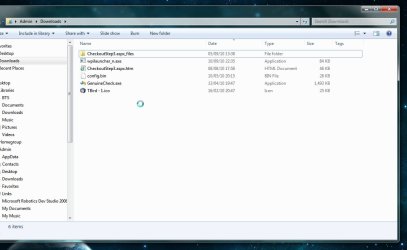
if your view is set to icons and u have a large video file it can take awhile to preview. can u screenshot the folder?
 

My Computer

Computer type
PC/Desktop
Computer Manufacturer/Model Number
Several custom builds
OS
Windows 7 Ultimate x64, Win 8.1, Win 10 preview, ubuntu14
CPU
AMD 710 X3, E8400, E5500, Athlon 64 2800, Q6600
Graphics Card(s)
IGP
Monitor(s) Displays
3 x S2309 23" 1920x1080
Not much there, like I said, but very slow to open.

ScreenShot002.jpg
 

My Computer

Computer type
PC/Desktop
Computer Manufacturer/Model Number
Mellon Labs (custom build)
OS
Win 7 Pro x64/Win 10 Pro x64 dual boot
CPU
AMD FX 8350 Vishera @ 4200
Motherboard
ASUS M5A97 R2.0
Memory
16 GB Mushkin Blackline DDR3-2400 @ 1866 (9-10-10-10-31)
Graphics Card(s)
XFX Radeon R9 280 Double D Black Edition
Sound Card
Realtek HD Audio on MB. Sounds great.
Monitor(s) Displays
Acer 24", Acer 22"
Screen Resolution
3840 x 1080
Hard Drives
1 x Mushkin Chronos 120 GB SSD (Win 10)
1 x Samsung 850 EVO 250 GB SSD (Win 7)
1 x WD 1TB SATA Blue
1 x WD 1TB SATA Green
PSU
Corsair TX-750
Case
CoolerMaster HAF 912+
Cooling
Coolermaster Seidon 240M Liquid AIO. 6 case fans
Keyboard
Logitech G710+
Mouse
Logitech G500s
Internet Speed
Much better since I got fiber, but still way overpriced.
Antivirus
MSE, Malware Bytes for scanning
Browser
Firefox
Other Info
Corsair VOID USB headphones.

A Mellon Labs X-1 - LCD Smartie driven system status display.

Brought to you by the letter E
have you tried creating a new user or enabling the administrator account?


Sent from my Nexus One using Tapatalk
 

My Computer

Computer type
PC/Desktop
Computer Manufacturer/Model Number
GIGABYTE Rig (Custom)
OS
Windows 7 Professional (x64/SP1) /Linux Mint 16
CPU
Intel i5-3570k 3.40 GHz @ 4.6 GHz
Motherboard
GIGABYTE Z77X-D3H
Memory
8GB (2133MHz) DDR3
Graphics Card(s)
Asus GTX560 Ti (Nvidia)
Monitor(s) Displays
HP 23", Acer 19" and a Dell 17"
Screen Resolution
1080p, 1440x900 and 1280x1024
Hard Drives
Sandisk Extreme 120GB (SSD), WD 2TB green and 4 other HDDs
PSU
Antec 620w High Current Gamer
Case
Corsair Obsidian 600D
Cooling
CPU - Antec KÜHLER H₂O 920
Keyboard
Steelseries 6Gv2
Mouse
Roccat LUA
Internet Speed
4 - 6mb/s
Antivirus
ESET NOD32
Browser
Chrome/Firefox
Other Info
Intel Gigabit CT (PCIE NIC) and Thinkpad T61p,
move all those files to a diff folder, then see if you can open it quickly. if not remove 1 by 1 ...
 

My Computer

Computer type
PC/Desktop
Computer Manufacturer/Model Number
Several custom builds
OS
Windows 7 Ultimate x64, Win 8.1, Win 10 preview, ubuntu14
CPU
AMD 710 X3, E8400, E5500, Athlon 64 2800, Q6600
Graphics Card(s)
IGP
Monitor(s) Displays
3 x S2309 23" 1920x1080
have you tried creating a new user or enabling the administrator account?
That wouldn't do much, since I am the administrator account, and it is enabled. I have a standard user account for my SQL development server apart from my main one.

The reason I moved the User account off the SSD was to save room, since the User folder does nothing but expand and chew up room on the disk. Everything works properly, it's just a 5 to 10 second lag on this, and only this folder, and I can't figure out why this one would be different than the others.
 

My Computer

Computer type
PC/Desktop
Computer Manufacturer/Model Number
Mellon Labs (custom build)
OS
Win 7 Pro x64/Win 10 Pro x64 dual boot
CPU
AMD FX 8350 Vishera @ 4200
Motherboard
ASUS M5A97 R2.0
Memory
16 GB Mushkin Blackline DDR3-2400 @ 1866 (9-10-10-10-31)
Graphics Card(s)
XFX Radeon R9 280 Double D Black Edition
Sound Card
Realtek HD Audio on MB. Sounds great.
Monitor(s) Displays
Acer 24", Acer 22"
Screen Resolution
3840 x 1080
Hard Drives
1 x Mushkin Chronos 120 GB SSD (Win 10)
1 x Samsung 850 EVO 250 GB SSD (Win 7)
1 x WD 1TB SATA Blue
1 x WD 1TB SATA Green
PSU
Corsair TX-750
Case
CoolerMaster HAF 912+
Cooling
Coolermaster Seidon 240M Liquid AIO. 6 case fans
Keyboard
Logitech G710+
Mouse
Logitech G500s
Internet Speed
Much better since I got fiber, but still way overpriced.
Antivirus
MSE, Malware Bytes for scanning
Browser
Firefox
Other Info
Corsair VOID USB headphones.

A Mellon Labs X-1 - LCD Smartie driven system status display.

Brought to you by the letter E
Update: This seems to be a systemic problem in Win 7. It happens with 4 machines at work.

No solution it seems, but I'm having this one marked as solved.
 

My Computer

Computer type
PC/Desktop
Computer Manufacturer/Model Number
Mellon Labs (custom build)
OS
Win 7 Pro x64/Win 10 Pro x64 dual boot
CPU
AMD FX 8350 Vishera @ 4200
Motherboard
ASUS M5A97 R2.0
Memory
16 GB Mushkin Blackline DDR3-2400 @ 1866 (9-10-10-10-31)
Graphics Card(s)
XFX Radeon R9 280 Double D Black Edition
Sound Card
Realtek HD Audio on MB. Sounds great.
Monitor(s) Displays
Acer 24", Acer 22"
Screen Resolution
3840 x 1080
Hard Drives
1 x Mushkin Chronos 120 GB SSD (Win 10)
1 x Samsung 850 EVO 250 GB SSD (Win 7)
1 x WD 1TB SATA Blue
1 x WD 1TB SATA Green
PSU
Corsair TX-750
Case
CoolerMaster HAF 912+
Cooling
Coolermaster Seidon 240M Liquid AIO. 6 case fans
Keyboard
Logitech G710+
Mouse
Logitech G500s
Internet Speed
Much better since I got fiber, but still way overpriced.
Antivirus
MSE, Malware Bytes for scanning
Browser
Firefox
Other Info
Corsair VOID USB headphones.

A Mellon Labs X-1 - LCD Smartie driven system status display.

Brought to you by the letter E
Back
Top