Solved New SSD,wonky boot up

Dj3Dub

New member
Local time
8:55 PM
Messages
8
Location
Chicago
Greetings,
I just installed my new SSD(Vertex4) and cloned with using Clonezilla. I performed disk to disk image and also moved the MBR over as well to the SSD. After following the instructions listed by HTG(How To Migrate Windows 7 to a Solid State Drive - How-To Geek)I'm finding that I'm having issues with booting. I performed a couple of restarts after a successful completion to verify everything was in working order(and check out those new sweet boot up times); everything was working fine. I shut down,and came back,now I'm getting Missing OS and MBR not found issues. Also,since my HDD is 500GB and the SSD is 512, I seem to have an 11GB partition thats just sitting around doing nothing. How to resolve this?

Thanks in advance.
 

My Computer My Computer

At a glance

Windows 7 Professional x64i7-3770KCorsair Vengenance DDR3 8GBXFX HD 7850
Computer Manufacturer/Model Number
Homebrew
OS
Windows 7 Professional x64
CPU
i7-3770K
Motherboard
ASUS P8Z77-V-LK
Memory
Corsair Vengenance DDR3 8GB
Graphics Card(s)
XFX HD 7850
Monitor(s) Displays
Samsung SyncMaster731B
Screen Resolution
1280x1024
Hard Drives
SSD-Vertex4-WD 500 GB Blue x 2,WD Black 1TB
PSU
Corsair TX650
Case
Antec 300
Cooling
Corsair H80
Keyboard
G19
Internet Speed
12/1.5

My Computer My Computer

At a glance

Windows 10 Pro X64Intel Quad Core i7-4770 @ 3.4Ghz16.0GB PC3-12800 DDR3 SDRAM 1600 MHzIntel Integrated HD Graphics
Computer type
PC/Desktop
Computer Manufacturer/Model Number
Lenovo IdeaCenter 450
OS
Windows 10 Pro X64
CPU
Intel Quad Core i7-4770 @ 3.4Ghz
Memory
16.0GB PC3-12800 DDR3 SDRAM 1600 MHz
Graphics Card(s)
Intel Integrated HD Graphics
Sound Card
Realtek HD Audio
Monitor(s) Displays
HP 22" LCD
Screen Resolution
1680 x 1050
Hard Drives
250GB Samsung EVO SATA-3 SSD
2TB Seagate ST2000DM001 SATA-2
1.5TB Seagate ST3150041AS SATA
Keyboard
Dell USB
Mouse
Lenovo USB
Internet Speed
Cable via Road Runner 3MB Upload, 30MB Download
Antivirus
Windows Defender, MBAM Pro, MBAE
Browser
Seamonkey
Other Info
UEFI/GPT
PLDS DVD-RW DH16AERSH
Hey Rich maybe it might have been an idea to align the drive too before the OP used it ?
 

My Computer My Computer

At a glance

Desk1 7 Home Prem / Desk2 10 Pro / Main lap A...Desk1 i5 3750K / Laptop i7 GTX 860M / Desk2 i...Desk1 8GB (1866) / Desk2 16GB (1333) / Laptop...Desk 1& 2NVidia GTX 650 & Laptops on board Intel
Computer type
PC/Desktop
Computer Manufacturer/Model Number
Own build (new) Desk1 / Asus ROG Win 7 / Desk2 1st build
OS
Desk1 7 Home Prem / Desk2 10 Pro / Main lap Asus ROG 10 Pro 2 laptop Toshiba 7 Pro Asus P2520 7 & 10
CPU
Desk1 i5 3750K / Laptop i7 GTX 860M / Desk2 i5 2500
Motherboard
Desk1 Asus P877-V / Desk2 Gigabyte H67 UD3H / Laptop ?
Memory
Desk1 8GB (1866) / Desk2 16GB (1333) / Laptop 8Gb DDR3
Graphics Card(s)
Desk 1& 2NVidia GTX 650 & Laptops on board Intel
Sound Card
Desk 1 & 2 -XONAR DG Realtek High Def audio Laptop
Monitor(s) Displays
Desk 1 Benq HD 2450 / Desk2 Philips 24" / Laptop 17.5"
Screen Resolution
1920x1080 D1 & D2 & Laptop 1
Hard Drives
Desk1 Samsung 120GB 830 SSD
Asus ROG 256GB 850 Pro SSD
Desk2 Samsung 840 256 SSD
Toshiba 120GB EVO
PSU
Desk 1 Corsair HX 1050/ Laptop ? / Desk 2 Corsair HX 650
Case
Desk 1 Cooler HAF XM ? Toshiba laptop / Desk2 Coolermaster
Cooling
Fans on all Desk1 -2 Desk2 - all Coolermasters 5 Laptop ?
Keyboard
Desk 1 MS Sidewinder X6 Desk 2 MS Sidewinder X 4
Mouse
Desk 1&2 - Gigabyte MS 900 gamer - laptop - Logitec wireless
Internet Speed
ADSL2+
Other Info
One other Desktop (tester) and spare Toshba laptop both with SSD's
Running Kaspersky 2016 ISS on all machines config'd identically
Logitec audio stereo systems on each machine (x3)
Canon MG5250MFC
Router/modem TP-Link running WPA2SK

My Computer My Computer

At a glance

Windows 7 Home Premium 64bit SP 1Intel i5 2500k8 gigabytes Corsair PC3-12800 DDR3EVGA GeForce GTX 460 superclocked
Computer Manufacturer/Model Number
Customized build from CyberPower
OS
Windows 7 Home Premium 64bit SP 1
CPU
Intel i5 2500k
Motherboard
Asus P8P67 Deluxe
Memory
8 gigabytes Corsair PC3-12800 DDR3
Graphics Card(s)
EVGA GeForce GTX 460 superclocked
Sound Card
Integrated
Monitor(s) Displays
ViewSonic 23" LCD
Screen Resolution
1980 x 1080
Hard Drives
120 Gb Samsung 840 Pro SSD
120 Gb Kingston Hyper X SSD
1 Tb WD Caviar Black HDD
PSU
Coolermaster 1000 watt modular
Case
Coolermaster HAF X full tower
Cooling
Coolermaster Hyper 212 plus
Keyboard
Logitech USB
Mouse
Microsoft 3 button
Internet Speed
download 1.5 Mb/sec upload 300Kb/sec
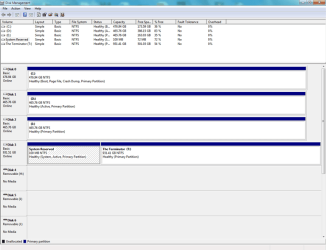
I am now booting off the SSD without any issue. However, I noticed the the 100MB System Reserved Partition is on one of my storage drives and not on the C drive. Shouldn't it be on the C drive?

Enclosure.
 

Attachments

  • Disk_Management.png
    Disk_Management.png
    29.2 KB · Views: 6

My Computer My Computer

At a glance

Windows 7 Professional x64i7-3770KCorsair Vengenance DDR3 8GBXFX HD 7850
Computer Manufacturer/Model Number
Homebrew
OS
Windows 7 Professional x64
CPU
i7-3770K
Motherboard
ASUS P8Z77-V-LK
Memory
Corsair Vengenance DDR3 8GB
Graphics Card(s)
XFX HD 7850
Monitor(s) Displays
Samsung SyncMaster731B
Screen Resolution
1280x1024
Hard Drives
SSD-Vertex4-WD 500 GB Blue x 2,WD Black 1TB
PSU
Corsair TX650
Case
Antec 300
Cooling
Corsair H80
Keyboard
G19
Internet Speed
12/1.5
The System Reserved Partition is still located on the 1TB HDD. Went through all of the steps.

Enclosure.
 

Attachments

  • Disk_Management.png
    Disk_Management.png
    29.6 KB · Views: 4

My Computer My Computer

At a glance

Windows 7 Professional x64i7-3770KCorsair Vengenance DDR3 8GBXFX HD 7850
Computer Manufacturer/Model Number
Homebrew
OS
Windows 7 Professional x64
CPU
i7-3770K
Motherboard
ASUS P8Z77-V-LK
Memory
Corsair Vengenance DDR3 8GB
Graphics Card(s)
XFX HD 7850
Monitor(s) Displays
Samsung SyncMaster731B
Screen Resolution
1280x1024
Hard Drives
SSD-Vertex4-WD 500 GB Blue x 2,WD Black 1TB
PSU
Corsair TX650
Case
Antec 300
Cooling
Corsair H80
Keyboard
G19
Internet Speed
12/1.5
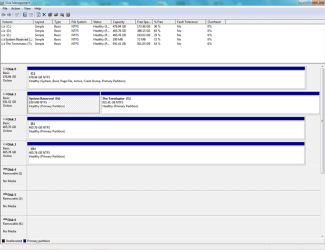
Yes but C is now being booting itself as signified by the System Active Boot flags. So your problem is solved.

You'll notice System flag has now been removed from System Reserved, which means you can go ahead and delete it, resize into the space if you want using Partition Wizard Resize Partition - Video Help.
 
Back
Top