New system / SSD advice

cushke

New member
Local time
2:17 AM
Messages
6
First off, hi. Long time lurker.

Anyway, I am the proud owner of brand new i7 930 2.8, 6GB 1600 DDR3 Triple Channel RAM and Asus P6X58D Premium. Graphics card is an old GTX 8800 but I'm not an avid gamer so it's quite alright.

I'm fairly happy with my system, except for some minor things. My WEI is only 5.9, dragged down by my HD. (Others are - respectively 7.5/7.5/6.9/6.9).
My OS HD is a 1TB 64MB WD10EARS Caviar Green.
I have 3 Samsung HD103UJ 1TB drives sitting in RAID0, acting as my storage. (Planning to get 1 or 2 extra drives and go for RAID5)

Now my question to you guys... I am returning this WD HD because it's choking my system. I have the chance to upgrade to a Caviar Black for 15€... or should I shell out 150€ more and get an SSD?
I realize it's just a question of budget but I'd like to see your opinions on the subject.
 

My Computer

OS
7 Ultimate x64
CPU
Intel i7 930 2.8
Motherboard
Asus P6X58D Premium
Memory
6Gb Corsait DDR3 Triple
Graphics Card(s)
Nvidia GTX8800
Sound Card
Onboard
Monitor(s) Displays
Samsung 24"
A good OCZ or Intel SSD will definitely speed up your system, But you should be prepared to reinstall Windows7 (because of all the automatic settings that the Win7 installer makes) - else you can clone but then you have to do a lot of finagling yourself.
For the OS, a 60GB disk is ample - even a 30GB SSD may do because Win7 will hardly ever be bigger than 20GBs (unbless you have a lot of games in the program library). The data should then go on your Raid. Expect the WEI for the disk to go to 7.3 or better - but that does not mean much in my book.
 

My Computer

Computer Manufacturer/Model Number
HP, Dell, Gateway, Toshiba - 4 laptops and 2 desktops
OS
Vista, Windows7, Mint Mate, Zorin, Windows 8
CPU
from 1.6GHz Duo to i7
Monitor(s) Displays
2x HP w2207
Hard Drives
5x HDD, 7x SSD, 12x Externals
Keyboard
with trackball - no mices
Mouse
Trackball mice
Internet Speed
DSL 6000
While performance would increase with the black over the blue....your score will stay 5.9. The only way to really drive that up is with an SSD drive...which will make a big difference. Application starts are almost instant and there is no noise. I use an SSD for my OS and a Caviar black for storage in my box.
 

My Computer

Computer Manufacturer/Model Number
Self-Built in July 2009
OS
Windows 7 Ultimate x64
CPU
Intel Q9550 2.83Ghz OC'd to 3.40Ghz
Motherboard
Gigabyte GA-EP45-UD3R rev. 1.1, F12 BIOS
Memory
8GB G.Skill PI DDR2-800, 4-4-4-12 timings
Graphics Card(s)
EVGA 1280MB Nvidia GeForce GTX570
Sound Card
Realtek ALC899A 8 channel onboard audio
Monitor(s) Displays
23" Acer x233H
Screen Resolution
1920x1080
Hard Drives
Intel X25-M 80GB Gen 2 SSD
Western Digital 1TB Caviar Black, 32MB cache. WD1001FALS
PSU
Corsair 620HX modular
Case
Antec P182
Cooling
stock
Keyboard
ABS M1 Mechanical
Mouse
Logitech G9 Laser Mouse
Internet Speed
15/2 cable modem
Other Info
Windows and Linux enthusiast. Logitech G35 Headset.
Go for the SSD I use an OCZ Vertex 128 GB Drive the difference is like comparing driving a Formula 1 racing car to a Hearse. Well not quite that bad.

I use a dual boot system on the SSD I have Win 7 and on my Seagate 1TB I have XP, the is an amazing difference in speed. I have been using XP all day as my scanner will only work on a 32 bit system and while it is quite fast I was glad to get back to Win 7 and the SSD. In my opinion if you can afford it go for the SSD bigger the better :)


Steve
 

My Computer

Computer Manufacturer/Model Number
Over Clockers Ultima Viper 2.80Ghz
OS
Windows 7 Ultimate 64 - OEM Service Pack 1
CPU
Intel Core i7 930 2.80Ghz Bloomfield Socket LGA 1366
Motherboard
Gigabyte GA-X58A-UD3R Intel X58 Socket 1366 DDR3
Memory
Patriot Viper 6GB 3x2GB DDR3 PC3-1200C9 1600Mhz Tri Channel
Graphics Card(s)
Asus ATI Radeon HD 5770 CuCore 1024MB GDDR5 PCI Express
Sound Card
Realtek ALC889 @ Intel 82801JB ICH10 - High Definition Audio
Monitor(s) Displays
Samsung SyncMaster 920N 19"
Screen Resolution
1280*1024
Hard Drives
1 x OCZ Vertex2 Series 120GB 2.5" SATA-II SSD
1 x Seagate Barracuda 7200.12 1TB SATA-II 32MB Cache
1 x Western Digital Caviar Green 2TB SATA-II 64 MB Cache
PSU
Corsair TX 650W ATX SLi
Case
Antec 902 Ultimate Gaming Case Black
Cooling
Prolimatech Megahalems Rev B CPU Cooler Socket 775/1156/1366
Keyboard
Microsoft Comfort Curve Keyboard
Mouse
Microsoft Optical USB
Internet Speed
ADSL24 FTTC 34.2 Mbps Down 7.1Mbps Up
Other Info
OcUK 22x DVDSATA ReWriter Black
Akasa AK-FN058 Apache Black Super Silent 120mm Fan
Printer Epson Stylus Photo R300
Scanner Canon Canoscan 8000F
I very recently installed a SSD on my laptop.

My hard drive score jumped 2 points.

The performance increase is noticeable.

Incidentally, I did that which supposedly you can not do and that is to replace my existing hard drive, 160 GB, with a 128 GB SSD using Windows 7 Backup and Restore.

If you decide to go with SSD, I'll be glad to assist in advice as to how to "clone" your existing drive.
 

My Computer

Computer Manufacturer/Model Number
Toshiba Satellite S875D-S7239 laptop
OS
MS Windows 7 Ultimate SP1 64-bit
CPU
AMD A10-4600M
Motherboard
AMD Pumori (Socket FT1)
Memory
6.00 GB Dual-Channel DDR3 @ 798MHz (11-11-12-28)
Graphics Card(s)
AMD Radeon HD 7660G
Sound Card
High Definition Audio Device
Monitor(s) Displays
Generic PnP Monitor (1600x900@60Hz)
Screen Resolution
1600x900@60Hz
Hard Drives
SSD 119GB Corsair CSSD-V128GB2 ATA Device
Keyboard
Standard PS/2 Keyboard
Mouse
HP Wireless Optical Mobile Mouse Model FHA-3410
Internet Speed
What the local pub, local coffee shop offers.
Other Info
Optical Drive:MATSHITA BD-CMB UJ160B ATA Device


Also have an Asus ha1002xp netbook with Win 7 Ultimate installed.
As I posted elsewhere, SSD cost per GB storage is roughly 10 times that of SATA HDDs ($0.24 v. $2.61). The question I ask myself, is the cost/benefit ratio pragmatic or otherwise demonstrable? For me, it is not.

WHS suggested, below, that you might expect a WEI of 7.3 or better but that did not mean that much to him. I could not agree more.

Pparks1 extolled the increase in launch time and quiet operation. I would not appreciate the difference in an app launching in 3 seconds v. a half a second. But that's just me. And quiet: I never hear my SATA HDD activity due to ambient room noise, the radio, case fans, or my stomach growling.

Steve-Pressman contrasts the difference in boot times between XP and Win7. Not really fair to do since, by design, Win7 is going to boot and shut down faster than XP regardless. (I, too, dual boot XP/Win7)

My suggestion would be to visit the various sites (Google points to many) that benchmark and compare SSDs and SATA HDDs and then decide if the cost/benefit ratio to you is worthwhile.

Monk
 

My Computer

Computer Manufacturer/Model Number
Custom
OS
Dual boot XP Pro SP3x86 and Win7 Pro x64
CPU
AMD Phenom II x3 720 BE OCed to 3.3 GHz
Motherboard
Asus M3A79T Deluxe
Memory
2x2GB OCZ OCZ2RPR10664GK PC2-8500 DDR2
Graphics Card(s)
Sapphire ATi Radeon 4830 HD x2 (XFire)
Sound Card
Integrated (SoundMax)
Monitor(s) Displays
Dual: LG L227WTG/LG M237WD
Screen Resolution
1680 x 1050; 1920 x1280
Hard Drives
3 WDC WD7501AALS-00J7B0
PSU
Zalman 750HD Modular
Case
Antec 900
Cooling
4 120mm, 1 200mm fans
Keyboard
Black with lots of keys
Mouse
Razer Lachesis, Logitech RumbePad2, Logitech Marble
Internet Speed
Who counts
Other Info
7:1 SS
Thanks for the advice everyone.

Just for the record: I am not aiming for the highest WEI score or anything. I found it interesting that the score was dragged down a lot by a HDD. I only recently got back into hardware. I was a hardware geek back when Voodoo cards were still the shit, so yeah...

Anyway, I'm still on the fence about the SSD. I've been reading some reviews about the Intel X-25 series... I want to get the 40Gb X-25 v SSD for budgetary reasons but the 80Gb X-25 M looks so god damn sexy in benchmarks. It's _just_ another 80€...

@karl: Appreciate the help but this Win7 is only 3 days old and all my data is backed up daily so I'm not really fussed about cloning. Thanks though!
 

My Computer

OS
7 Ultimate x64
CPU
Intel i7 930 2.8
Motherboard
Asus P6X58D Premium
Memory
6Gb Corsait DDR3 Triple
Graphics Card(s)
Nvidia GTX8800
Sound Card
Onboard
Monitor(s) Displays
Samsung 24"
i also am thinking about this, when i start a program like photoshop it takes about 5 seconds, don't seem alot but seeing i have quad core and 4 gig ram, i want it to be instant because my cpu can do this, open it up again and it's instant, because it's been cached. the hdd is trying to find the data by spinning it on the drive. I also notice that peoples welcome screens just a blur.

So the reason why i will be upgrading, it's because i think my HDD is bottlenecking my pc, it could be so much faster, i know what it can do with a SSD.

But it's fast comapred to some HDD users out there, so i can't imagine what it would be like with an SSD.
 

My Computer

Computer type
PC/Desktop
Computer Manufacturer/Model Number
Custom Build
OS
Windows 8 Pro 64 bit
CPU
Intel Core i7 3770K @ 4.2 GHz
Motherboard
Gigabyte Z77X-D3H
Memory
8GB Corsair XMS3 1333mhz 2x4GB
Graphics Card(s)
Gigabyte Radeon HD 7970 OC WindForce
Sound Card
VIA High Definition Audio
Monitor(s) Displays
Dell S2740L
Screen Resolution
1920x1080
Hard Drives
Samsung 250GB 840 Pro (2.5) (OS+Aps)
Toshiba DT01ACA100 1TB 7200RPM (3.5) (Games)
PSU
Coolmaster Silent ProM 600W
Case
Coolermaster HAF 912 Plus
Cooling
Cooler Master Hyper 612S
Keyboard
Logitech Wireless Keyboard
Mouse
Thermaltake TteSPORTS Theron Gaming Mouse
Internet Speed
50-60Mbs (DL) 12-20Mbs (UL) BT Infinity FTTC
Antivirus
Bitdefender Anti Virus Plus 2015
Browser
Google Chrome
Other Info
Samsung SH-B083L 8x Blu-Ray Reader
Pparks1 extolled the increase in launch time and quiet operation. I would not appreciate the difference in an app launching in 3 seconds v. a half a second. But that's just me. And quiet: I never hear my SATA HDD activity due to ambient room noise, the radio, case fans, or my stomach growling.
Where I really feel the difference is when launching a game. Games that used to take 15-20 seconds to get into the main menu are now there in about 3-5.

No doubt, they are expensive...but at least it's a noticeable improvement across the board. While I wouldn't say that I couldn't use a computer without an SSD...I also don't regret my purchase in any way.
 

My Computer

Computer Manufacturer/Model Number
Self-Built in July 2009
OS
Windows 7 Ultimate x64
CPU
Intel Q9550 2.83Ghz OC'd to 3.40Ghz
Motherboard
Gigabyte GA-EP45-UD3R rev. 1.1, F12 BIOS
Memory
8GB G.Skill PI DDR2-800, 4-4-4-12 timings
Graphics Card(s)
EVGA 1280MB Nvidia GeForce GTX570
Sound Card
Realtek ALC899A 8 channel onboard audio
Monitor(s) Displays
23" Acer x233H
Screen Resolution
1920x1080
Hard Drives
Intel X25-M 80GB Gen 2 SSD
Western Digital 1TB Caviar Black, 32MB cache. WD1001FALS
PSU
Corsair 620HX modular
Case
Antec P182
Cooling
stock
Keyboard
ABS M1 Mechanical
Mouse
Logitech G9 Laser Mouse
Internet Speed
15/2 cable modem
Other Info
Windows and Linux enthusiast. Logitech G35 Headset.
Pparks1 extolled the increase in launch time and quiet operation. I would not appreciate the difference in an app launching in 3 seconds v. a half a second. But that's just me. And quiet: I never hear my SATA HDD activity due to ambient room noise, the radio, case fans, or my stomach growling.
Where I really feel the difference is when launching a game. Games that used to take 15-20 seconds to get into the main menu are now there in about 3-5.

No doubt, they are expensive...but at least it's a noticeable improvement across the board. While I wouldn't say that I couldn't use a computer without an SSD...I also don't regret my purchase in any way.

Although I have never run an SSD, based on your experiences, I can see where some games might benefit. For me, the launch time for most games is not an issue. However, waiting for DA Origins to launch and load sometimes challenges the limits of my patience.

Monk
 

My Computer

Computer Manufacturer/Model Number
Custom
OS
Dual boot XP Pro SP3x86 and Win7 Pro x64
CPU
AMD Phenom II x3 720 BE OCed to 3.3 GHz
Motherboard
Asus M3A79T Deluxe
Memory
2x2GB OCZ OCZ2RPR10664GK PC2-8500 DDR2
Graphics Card(s)
Sapphire ATi Radeon 4830 HD x2 (XFire)
Sound Card
Integrated (SoundMax)
Monitor(s) Displays
Dual: LG L227WTG/LG M237WD
Screen Resolution
1680 x 1050; 1920 x1280
Hard Drives
3 WDC WD7501AALS-00J7B0
PSU
Zalman 750HD Modular
Case
Antec 900
Cooling
4 120mm, 1 200mm fans
Keyboard
Black with lots of keys
Mouse
Razer Lachesis, Logitech RumbePad2, Logitech Marble
Internet Speed
Who counts
Other Info
7:1 SS
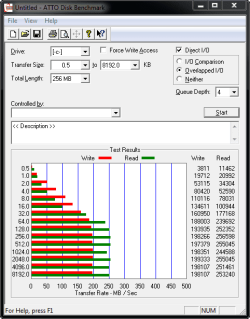
Most of my program open in under 2 seconds Phtoshop, Dreamweaver, Fireworks Outlook 2010, Word 2010, Excel 2010, Google Chrome is so fast I can't even time it :D

Here are my SSD Bench Marks


Steve
 

Attachments

  • Bench Mark OCZ VERTX 128GB.png
    Bench Mark OCZ VERTX 128GB.png
    10.3 KB · Views: 21

My Computer

Computer Manufacturer/Model Number
Over Clockers Ultima Viper 2.80Ghz
OS
Windows 7 Ultimate 64 - OEM Service Pack 1
CPU
Intel Core i7 930 2.80Ghz Bloomfield Socket LGA 1366
Motherboard
Gigabyte GA-X58A-UD3R Intel X58 Socket 1366 DDR3
Memory
Patriot Viper 6GB 3x2GB DDR3 PC3-1200C9 1600Mhz Tri Channel
Graphics Card(s)
Asus ATI Radeon HD 5770 CuCore 1024MB GDDR5 PCI Express
Sound Card
Realtek ALC889 @ Intel 82801JB ICH10 - High Definition Audio
Monitor(s) Displays
Samsung SyncMaster 920N 19"
Screen Resolution
1280*1024
Hard Drives
1 x OCZ Vertex2 Series 120GB 2.5" SATA-II SSD
1 x Seagate Barracuda 7200.12 1TB SATA-II 32MB Cache
1 x Western Digital Caviar Green 2TB SATA-II 64 MB Cache
PSU
Corsair TX 650W ATX SLi
Case
Antec 902 Ultimate Gaming Case Black
Cooling
Prolimatech Megahalems Rev B CPU Cooler Socket 775/1156/1366
Keyboard
Microsoft Comfort Curve Keyboard
Mouse
Microsoft Optical USB
Internet Speed
ADSL24 FTTC 34.2 Mbps Down 7.1Mbps Up
Other Info
OcUK 22x DVDSATA ReWriter Black
Akasa AK-FN058 Apache Black Super Silent 120mm Fan
Printer Epson Stylus Photo R300
Scanner Canon Canoscan 8000F
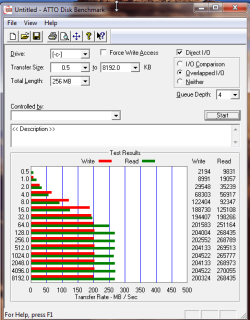
Here is my benchmark
SSD is a Corsair Nova 128GB (125.03GB Corsair CSSD-V128GB2)
 

Attachments

  • DiskBenchmark.png
    DiskBenchmark.png
    15.9 KB · Views: 15

My Computer

Computer Manufacturer/Model Number
Toshiba Satellite S875D-S7239 laptop
OS
MS Windows 7 Ultimate SP1 64-bit
CPU
AMD A10-4600M
Motherboard
AMD Pumori (Socket FT1)
Memory
6.00 GB Dual-Channel DDR3 @ 798MHz (11-11-12-28)
Graphics Card(s)
AMD Radeon HD 7660G
Sound Card
High Definition Audio Device
Monitor(s) Displays
Generic PnP Monitor (1600x900@60Hz)
Screen Resolution
1600x900@60Hz
Hard Drives
SSD 119GB Corsair CSSD-V128GB2 ATA Device
Keyboard
Standard PS/2 Keyboard
Mouse
HP Wireless Optical Mobile Mouse Model FHA-3410
Internet Speed
What the local pub, local coffee shop offers.
Other Info
Optical Drive:MATSHITA BD-CMB UJ160B ATA Device


Also have an Asus ha1002xp netbook with Win 7 Ultimate installed.
So I finally decided to get rid of my Caviar Green and use it as my backup disk.

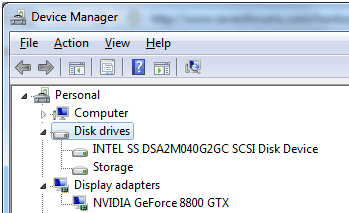
I got an Intel X25-V SSD 40Gb. I'm fairly happy with my SSD performance so far but I can't boot in AHCI mode. I installed Intel Matrix Storage Manager, the correct chipset driver for my mobo (P6X58D Premium). Even installed Marvell driver V1.0.0.1027 but now my disk somehow shows up as SCSI (see attach).
I don't have any performance issues (benchmarks look good, see SSD perf thread) but I'd rather not have it listed as SCSI and boot in AHCI.

I currently boot in RAID, but the SSD is not in any array, only my storage (3x1TB RAID0)...

Any ideas? I've been through the technet article (Error message when you start a Windows 7 or Windows Vista-based computer after you change the SATA mode of the boot drive: "STOP 0x0000007B INACCESSABLE_BOOT_DEVICE") and HKEY_LOCAL_MACHINE\System\CurrentControlSet\Services\IastorV start is on 0 (however msahci isn't...)
I tried picking drivers manually but it won't let me pick msahci or anything like that, just generic disk driver. Annoying.
 

Attachments

  • ssdscsi.png
    ssdscsi.png
    8.7 KB · Views: 2

My Computer

OS
7 Ultimate x64
CPU
Intel i7 930 2.8
Motherboard
Asus P6X58D Premium
Memory
6Gb Corsait DDR3 Triple
Graphics Card(s)
Nvidia GTX8800
Sound Card
Onboard
Monitor(s) Displays
Samsung 24"
First off, hi. Long time lurker.

Anyway, I am the proud owner of brand new i7 930 2.8, 6GB 1600 DDR3 Triple Channel RAM and Asus P6X58D Premium. Graphics card is an old GTX 8800 but I'm not an avid gamer so it's quite alright.

I'm fairly happy with my system, except for some minor things. My WEI is only 5.9, dragged down by my HD. (Others are - respectively 7.5/7.5/6.9/6.9).
My OS HD is a 1TB 64MB WD10EARS Caviar Green.
I have 3 Samsung HD103UJ 1TB drives sitting in RAID0, acting as my storage. (Planning to get 1 or 2 extra drives and go for RAID5)

Now my question to you guys... I am returning this WD HD because it's choking my system. I have the chance to upgrade to a Caviar Black for 15€... or should I shell out 150€ more and get an SSD?
I realize it's just a question of budget but I'd like to see your opinions on the subject.

I replaced the drive on my Toshiba laptop with an SSD (128 GB Corsair Nova). The Toshiba drive was 160 GB.

I definitely noticed the performance difference (5.4 to 7.4 disk score on the Windows Performance Index). Am well-pleased with my decision.

I cloned the drive using only Disk Management and Windows Backup and Restore. According to many you can't go from bigger to smaller bur I did and I did not need to reinstalll Win 7 and zero problems.

Be sure to buy a SSD with Trim implemented.
 

My Computer

Computer Manufacturer/Model Number
Toshiba Satellite S875D-S7239 laptop
OS
MS Windows 7 Ultimate SP1 64-bit
CPU
AMD A10-4600M
Motherboard
AMD Pumori (Socket FT1)
Memory
6.00 GB Dual-Channel DDR3 @ 798MHz (11-11-12-28)
Graphics Card(s)
AMD Radeon HD 7660G
Sound Card
High Definition Audio Device
Monitor(s) Displays
Generic PnP Monitor (1600x900@60Hz)
Screen Resolution
1600x900@60Hz
Hard Drives
SSD 119GB Corsair CSSD-V128GB2 ATA Device
Keyboard
Standard PS/2 Keyboard
Mouse
HP Wireless Optical Mobile Mouse Model FHA-3410
Internet Speed
What the local pub, local coffee shop offers.
Other Info
Optical Drive:MATSHITA BD-CMB UJ160B ATA Device


Also have an Asus ha1002xp netbook with Win 7 Ultimate installed.
Congrats on the SSD, saw your benchmark on the SSD Performance site, that is an amazing score. I did some research before buying my X25 V, and never saw a score anywhere near that high.

Did you update the SSD firmware?
Should be - Intel® X25-V Value SATA SSD on 34nm (silver case) - updates to FW version 02HD

Did you try the Intel(R) Rapid Storage Technology 9.6 driver?

I currently boot in RAID, but the SSD is not in any array, only my storage (3x1TB RAID0)...

Was your BIOS setting in SATA or RAID when you installed the SSD?

I remember, vaguely, finding a site that said you will need to disconnect the RAID array, have the SSD the only drive connected when you install it and load the OS. Don't remember if you need to set it to SATA AHCI or not for the installation but, it can be ran in RAID.
Did a quick search but haven't found it. If I come across it, will post it here.

It will work with Trim after you re-connect the RAID array, as long as the SSD in not in RAID. Maybe search the Intel SSD support forum.

There is good info on the OCZ SSD site, Intel SSD support site and a few others.

Let us know if you find anything.
 

My Computer

Computer type
PC/Desktop
Computer Manufacturer/Model Number
76~2.0
OS
Windows 7 Ult x64 - SP1/ Windows 8 Pro x64
CPU
Intel Core i5-3570K 4.6GHz
Motherboard
Gigabyte GA-Z77X UD3H, f18
Memory
8GB (2X4GB) DDR3 1600 Corsair Vengeance CL8 1.5v
Graphics Card(s)
Sapphire HD 7770 Vapor-X OC 1GB DDR5
Sound Card
Onboard VIA VT2021
Monitor(s) Displays
22" LCD Dell
Screen Resolution
1680x1050
Hard Drives
Samsung 840Pro 128GB SSD,
Seagate Barracuda 500GB SATA2 7200rpm 32MB cache, Seagate Barracuda 1TB SATA2 7200rpm 32MB cache,
PSU
Corsair HX650W
Case
Cooler Master Storm Scout
Cooling
Corsair H80 2x12cm Noctua NF P12 , 2x14cm case fans
Keyboard
Logitech Wave
Mouse
CM Sentinel
Internet Speed
Dismal
Antivirus
Avast
Browser
Opera Next
Other Info
Haswell laptop: HP Envy 17t-j, i7-4700MQ, GeForce 740M 2GB DDR3, 17.3" Full HD 1920x1080, 16GB RAM, Samsung 840 Pro 128GB, 1TB Hitachi 7200 HDD,
Desktop: eSATA ports,
External eSATA Seagate 500GB SATA2 7200rpm,
External WD USB 500GB
Karl , I think you missed the last post. Proud owner of an SSD since yesterday!

Dave, I suppose it was in RAID from my old 7 install. I might disconnect my RAID after I backed up all my stuff on it and see what it does then.

Thanks for the info, I know what to do today!
 

My Computer

OS
7 Ultimate x64
CPU
Intel i7 930 2.8
Motherboard
Asus P6X58D Premium
Memory
6Gb Corsait DDR3 Triple
Graphics Card(s)
Nvidia GTX8800
Sound Card
Onboard
Monitor(s) Displays
Samsung 24"
There are a lot of people running 2 or more HDDs in RAID and a SSD not in RAID.

So it should be just disconnecting them for the SSD and OS installation then setting the RAID up, seem to remember that you don't have to re-install the RAID setup, just change the relevant BIOS settings and plug them back in.

Will post the info if I come across it.

Edit:

Found one small mention that with the new Intel Driver a SSD non-Raid will have Trim when HDD are in RAID.


From Intel.


The SSD showing up as a SCSI drive may be caused by the SATA port the SSD is connected to.
You need to have the SSD connected to SATA port 0, when installing the SSD and OS.
Be sure it's not connected to a Marvell controller port.

This isn't exactly the same issue, but the info confirms a couple of the steps mentioned. Further searching should find a closer situation to yours, but this is on the right track.

Re: X25-M G2 - Raid Problem

The configuration should be the following:
1. The SSD should be connected with the first of the available SATA ports (port0 or port1).
2. Before you are going to install Windows 7, you should unplug all other hdd's.
3. Once Win7 is up, you can reconnect the RAID'ed hdd's to the next SATA ports.
It is possible, that Windows 7 will not see your RAID partitions and data at once. You can repair this by opening the "IDE ATA/ATAPI Controllers" section of the Win7 Device Manager and replacing the listed "Standard Dual Channel PCI IDE Controllers", where the RAID'ed hdd's are connected,... Just do a right click onto them, use the "Update driver software" option and let the Device Manager show the compatible devices.

You should read this thread, not completely relevant to your issue but, good background info.

For any AHCI to RAID BIOS settings you might need to do there is a Good guide,

General Windows 7 Performance Tweaks - Enable RAID Mode after Installation

Most of the SSD tweaks in the above thread are for older Gen1 SSDs and are not needed with your Gen2 SSD.
The only changes needed are disable Disk Defrag and disk indexing. Some say to disable Superfetch, some say you don't need to, I have turned it back on to check if there are any issues.
Win7 will detect your SSD during installation and set everything that is needed, still double check them.
 
Last edited:

My Computer

Computer type
PC/Desktop
Computer Manufacturer/Model Number
76~2.0
OS
Windows 7 Ult x64 - SP1/ Windows 8 Pro x64
CPU
Intel Core i5-3570K 4.6GHz
Motherboard
Gigabyte GA-Z77X UD3H, f18
Memory
8GB (2X4GB) DDR3 1600 Corsair Vengeance CL8 1.5v
Graphics Card(s)
Sapphire HD 7770 Vapor-X OC 1GB DDR5
Sound Card
Onboard VIA VT2021
Monitor(s) Displays
22" LCD Dell
Screen Resolution
1680x1050
Hard Drives
Samsung 840Pro 128GB SSD,
Seagate Barracuda 500GB SATA2 7200rpm 32MB cache, Seagate Barracuda 1TB SATA2 7200rpm 32MB cache,
PSU
Corsair HX650W
Case
Cooler Master Storm Scout
Cooling
Corsair H80 2x12cm Noctua NF P12 , 2x14cm case fans
Keyboard
Logitech Wave
Mouse
CM Sentinel
Internet Speed
Dismal
Antivirus
Avast
Browser
Opera Next
Other Info
Haswell laptop: HP Envy 17t-j, i7-4700MQ, GeForce 740M 2GB DDR3, 17.3" Full HD 1920x1080, 16GB RAM, Samsung 840 Pro 128GB, 1TB Hitachi 7200 HDD,
Desktop: eSATA ports,
External eSATA Seagate 500GB SATA2 7200rpm,
External WD USB 500GB
Back
Top