New to Backup and Restore.

Judesman

New member
Member
VIP
Local time
12:00 PM
Messages
217
For the first time I have set up Backup and Restore. I am saving to an external hard drive and in the Set Up I have selected "Let me choose". If I selected "Let Windows choose" would the backup include all of my Outlook files?

In "Let me choose" I have selected Data Files and Computer OS (C). But do I need to include a system image every time? It seems to take ages to complete the backup and must be using a lot of disc space.

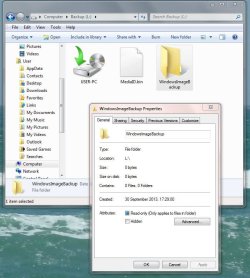
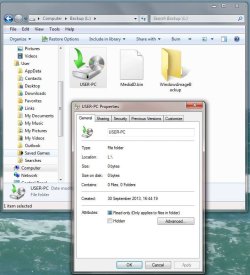
I am attaching a couple of screenshots because having completed the first backup there does not appear to be anything in the files. So where is all the information I have backed up?

Any help would be appreciated.
 

Attachments
  • Backup 30.09.13.JPG
    Backup 30.09.13.JPG
    76.9 KB · Views: 1
  • Windows Image Backup 30.09.13.JPG
    Windows Image Backup 30.09.13.JPG
    78.3 KB · Views: 1

My Computer My Computer

Computer type
PC/Desktop
Computer Manufacturer/Model Number
Dell OptiPlex 960
OS
Windows 7 64 bit
Memory
8 GB
Graphics Card(s)
Redeon HD 4670
Monitor(s) Displays
Dell
Antivirus
Norton
Browser
IE 10
i would suggest that you let windows decide on what to back up if you are unsure.

which outlook are you using? the file save moved under documents/outlook files from 2010 onwards.

your first backup will always take a while depending on the size of your hard drive.
 

My Computer My Computer

Computer type
PC/Desktop
Computer Manufacturer/Model Number
custom build
OS
Windows 7 Professional / Windows 8 Pro
CPU
intel i5 - 3450, 3.10GHz, 6MB Cache
Motherboard
gigabyte Z77-D3H
Memory
Kingston Hyper x 8gb 1600mhz
Graphics Card(s)
EVGA Nvidia 550Ti with 3D
Sound Card
N/A
Monitor(s) Displays
BenQ XL2411T 23inch gaming monitor
Screen Resolution
120mhz
Hard Drives
Kingston Hyper X 3K SSD 120GB
PSU
Corsair CX600M
Case
Zalman Z5
Cooling
coolermaster Hyper TX3
Keyboard
Cherry ZF5000
Mouse
Cherry ZF5000
Internet Speed
Sky Fibre 26meg download / 9mb upload
Antivirus
MSE free anti virus
Browser
Firefox
I am using Outlook 2007 so presumably "Let Windows choose" would include this. Can anyone tell me please why the files indicate that there is no information in them.

Thank you for your help.
 

My Computer My Computer

Computer type
PC/Desktop
Computer Manufacturer/Model Number
Dell OptiPlex 960
OS
Windows 7 64 bit
Memory
8 GB
Graphics Card(s)
Redeon HD 4670
Monitor(s) Displays
Dell
Antivirus
Norton
Browser
IE 10
yes that would be true. although if you wanted to complete a direct backup for your own peace of mind then the file path is - Local Settings\Application Data\Microsoft\Outlook

either this or you can complete a search for .pst file extension.

files indicated? can you kindly expand on this? have you completed the back up? and looking at the files? it maybe that you have your computer set to hide important files.

How-to unhide hidden files in Windows 7
 

My Computer My Computer

Computer type
PC/Desktop
Computer Manufacturer/Model Number
custom build
OS
Windows 7 Professional / Windows 8 Pro
CPU
intel i5 - 3450, 3.10GHz, 6MB Cache
Motherboard
gigabyte Z77-D3H
Memory
Kingston Hyper x 8gb 1600mhz
Graphics Card(s)
EVGA Nvidia 550Ti with 3D
Sound Card
N/A
Monitor(s) Displays
BenQ XL2411T 23inch gaming monitor
Screen Resolution
120mhz
Hard Drives
Kingston Hyper X 3K SSD 120GB
PSU
Corsair CX600M
Case
Zalman Z5
Cooling
coolermaster Hyper TX3
Keyboard
Cherry ZF5000
Mouse
Cherry ZF5000
Internet Speed
Sky Fibre 26meg download / 9mb upload
Antivirus
MSE free anti virus
Browser
Firefox
Yes the backup completed and I have hidden files displayed but it doesn't make any difference. I really don't know if I have successfully backed up my computer or not.
 

My Computer My Computer

Computer type
PC/Desktop
Computer Manufacturer/Model Number
Dell OptiPlex 960
OS
Windows 7 64 bit
Memory
8 GB
Graphics Card(s)
Redeon HD 4670
Monitor(s) Displays
Dell
Antivirus
Norton
Browser
IE 10
Back
Top