New to the forums and have a problem

cmp007

New member
Ive had my computer for over a year now and this hasnt started until about 3 days ago. Everytime I close my lid and leace it down for a while when I come back it starts up at the password screen and my hard disks have been shut down and the wireless internet has to restart (which takes like 10 minutes for some reason).

Ive went into the options and have
"when you close the lid - do nothing",
"require a password on wakeup - off",
"Turn off harddisk - never",
"sleep - never" and
"turn off display - never".
I mean I tihnk that covers everything. Am I missing something? I have no idea why it shuts my hard disks down everytime I close the lid. I wouldnt mind except for some reason with my wireless it take it 10 minutes for the internet to gain activity. Any help? Thanks
 

My Computer

OS
windows 7 32 bit
hi comp007, and welcome to sevenforums,

i'm not sure why your wireless is taking ten minutes to auto-reconnect - can you manually reconnect in this time?

you could try stopping windows from turning your wifi off - but it will probably lead to shorter battery life.

go to device manager >> find your wireless device >> right-click >> properties >> power management >> untick ''allow computer to turn off...'
 

My Computer

Computer Manufacturer/Model Number
mickey megabyte 1234
OS
ultimate 64 sp1
CPU
i5 2500K [email protected]
Motherboard
MSI P67A-GD53
Memory
8 gigs GSkill Ripjaws 1600
Graphics Card(s)
amd hd6950
Sound Card
creative x-fi gamer
Monitor(s) Displays
samsung 24"
Screen Resolution
1920x1080
Hard Drives
ocz vertex 2e 60 gig, samsung f3 1tb, buffalo 2tb ext
PSU
antec 550
Case
antec three hundred
Cooling
i'm a cooling fan
Keyboard
saitek eclipse ii
Mouse
logitech g3
Internet Speed
about 4 Mbps
Other Info
i love win7
Thanks man I tried that so I'll see if it works. My computers always on power so I'm not worries about it going dead. And yea I dunno WTF is the deal with the Internet. I think it's the wireless. My dad got AT&T to sell him one and set it up which is stupid and probably bought the shittiest one. It says Its a atheros ar9285 802.11b/g/n
 

My Computer

OS
windows 7 32 bit
hope it works - let us know! :)
 

My Computer

Computer Manufacturer/Model Number
mickey megabyte 1234
OS
ultimate 64 sp1
CPU
i5 2500K [email protected]
Motherboard
MSI P67A-GD53
Memory
8 gigs GSkill Ripjaws 1600
Graphics Card(s)
amd hd6950
Sound Card
creative x-fi gamer
Monitor(s) Displays
samsung 24"
Screen Resolution
1920x1080
Hard Drives
ocz vertex 2e 60 gig, samsung f3 1tb, buffalo 2tb ext
PSU
antec 550
Case
antec three hundred
Cooling
i'm a cooling fan
Keyboard
saitek eclipse ii
Mouse
logitech g3
Internet Speed
about 4 Mbps
Other Info
i love win7
Did you install the latest windows SP yet? I have heard this has caused wireless issues on laptops while HD issues on desktops?
 

My Computer

Computer type
PC/Desktop
Computer Manufacturer/Model Number
Self made
OS
windows 7 home premium 64, and Windows 10 64 bit
CPU
I7 940
Motherboard
ASUS P6TX58D Premium- BIOS VERSION 1402
Memory
12 GB Dominator 3 channel 1600
Graphics Card(s)
Radeon R9 Fury Nitro
Sound Card
Z1
Monitor(s) Displays
50 Inch Panasonic TV
Screen Resolution
1920x1080
Hard Drives
Main drive OCZ Revodrive V2 and 8 TB multi drives
PSU
Coolermaster 1000
Case
CoolerMaster 932
Cooling
Coolermaster Dual fan
Keyboard
mx 5500 revolution
Mouse
mx 5500 revolution
Internet Speed
12 mb
Browser
Chrome
Other Info
set up for 3D Blue Ray applications with a surround room of 12 speaker Definitive Technology and multi amps, main is driven by yamaha M-65
I installed some updates and thats when it started happening the other day. Not sure if it was the SP update or not though. But my wireless has always taken that long to connect. It will connect but says "limited activity" for about ten minutes. But if I go anywhere else to other wireless it connects instantly. So im getting its the wireless adapter we have
 

My Computer

OS
windows 7 32 bit
So after everything the PW screen doesn't come up but it still goes into sleep or something and shuts everything off including the wifi and has to restart. I have no idea why this started and why it wont stop. Anymore suggestions?
 

My Computer

OS
windows 7 32 bit
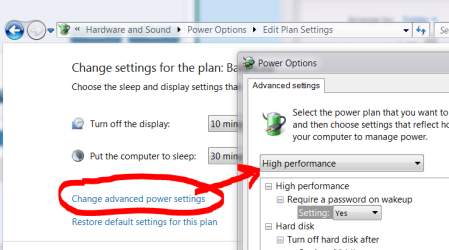
have you tried the high performance setting?

high.PNG

although it seems you may have a deeper problem if your wifi takes minutes to connect - normally it takes seconds.
 

My Computer

Computer Manufacturer/Model Number
mickey megabyte 1234
OS
ultimate 64 sp1
CPU
i5 2500K [email protected]
Motherboard
MSI P67A-GD53
Memory
8 gigs GSkill Ripjaws 1600
Graphics Card(s)
amd hd6950
Sound Card
creative x-fi gamer
Monitor(s) Displays
samsung 24"
Screen Resolution
1920x1080
Hard Drives
ocz vertex 2e 60 gig, samsung f3 1tb, buffalo 2tb ext
PSU
antec 550
Case
antec three hundred
Cooling
i'm a cooling fan
Keyboard
saitek eclipse ii
Mouse
logitech g3
Internet Speed
about 4 Mbps
Other Info
i love win7
Yea done the high performance thats what its been on. And ive gone through every setting to not turn the computer or hadrdisks off too
 

My Computer

OS
windows 7 32 bit
hmm...ok, i'm clutching at straws here: is there anything in the bios that may override these settings?
 

My Computer

Computer Manufacturer/Model Number
mickey megabyte 1234
OS
ultimate 64 sp1
CPU
i5 2500K [email protected]
Motherboard
MSI P67A-GD53
Memory
8 gigs GSkill Ripjaws 1600
Graphics Card(s)
amd hd6950
Sound Card
creative x-fi gamer
Monitor(s) Displays
samsung 24"
Screen Resolution
1920x1080
Hard Drives
ocz vertex 2e 60 gig, samsung f3 1tb, buffalo 2tb ext
PSU
antec 550
Case
antec three hundred
Cooling
i'm a cooling fan
Keyboard
saitek eclipse ii
Mouse
logitech g3
Internet Speed
about 4 Mbps
Other Info
i love win7
sorry, i'm all out of ideas.

i've asked for help, and hopefully someone will be along soon offering suggestions.
 

My Computer

Computer Manufacturer/Model Number
mickey megabyte 1234
OS
ultimate 64 sp1
CPU
i5 2500K [email protected]
Motherboard
MSI P67A-GD53
Memory
8 gigs GSkill Ripjaws 1600
Graphics Card(s)
amd hd6950
Sound Card
creative x-fi gamer
Monitor(s) Displays
samsung 24"
Screen Resolution
1920x1080
Hard Drives
ocz vertex 2e 60 gig, samsung f3 1tb, buffalo 2tb ext
PSU
antec 550
Case
antec three hundred
Cooling
i'm a cooling fan
Keyboard
saitek eclipse ii
Mouse
logitech g3
Internet Speed
about 4 Mbps
Other Info
i love win7
Well now it goes back to the log in screen and still turns off harddisks.
 

My Computer

OS
windows 7 32 bit
Lets hope you did a system back up. If so then just do a restore. You may see a notice that not all files were backed up. This is because the .dll files in the SP were not installed correctly. Just click OK and do a reboot. I think you will find that everything went back to normal and all is working well. Do not allow windows to auto install updates.
 

My Computer

Computer type
PC/Desktop
Computer Manufacturer/Model Number
Self made
OS
windows 7 home premium 64, and Windows 10 64 bit
CPU
I7 940
Motherboard
ASUS P6TX58D Premium- BIOS VERSION 1402
Memory
12 GB Dominator 3 channel 1600
Graphics Card(s)
Radeon R9 Fury Nitro
Sound Card
Z1
Monitor(s) Displays
50 Inch Panasonic TV
Screen Resolution
1920x1080
Hard Drives
Main drive OCZ Revodrive V2 and 8 TB multi drives
PSU
Coolermaster 1000
Case
CoolerMaster 932
Cooling
Coolermaster Dual fan
Keyboard
mx 5500 revolution
Mouse
mx 5500 revolution
Internet Speed
12 mb
Browser
Chrome
Other Info
set up for 3D Blue Ray applications with a surround room of 12 speaker Definitive Technology and multi amps, main is driven by yamaha M-65
Do a back up first! This way in case anything goes wrong you can get back to were you are now!

You mentioned that it works fine at other locations, so I would recommend to uninstall everything that you have on the wireless network and then reboot first. Then reinstall it all fresh. This might fix your problem and not interfere with anything else on your computer.

If it works for fresh locations at other places this just makes sense. Good luck my friend!
 

My Computer

Computer type
PC/Desktop
Computer Manufacturer/Model Number
Self made
OS
windows 7 home premium 64, and Windows 10 64 bit
CPU
I7 940
Motherboard
ASUS P6TX58D Premium- BIOS VERSION 1402
Memory
12 GB Dominator 3 channel 1600
Graphics Card(s)
Radeon R9 Fury Nitro
Sound Card
Z1
Monitor(s) Displays
50 Inch Panasonic TV
Screen Resolution
1920x1080
Hard Drives
Main drive OCZ Revodrive V2 and 8 TB multi drives
PSU
Coolermaster 1000
Case
CoolerMaster 932
Cooling
Coolermaster Dual fan
Keyboard
mx 5500 revolution
Mouse
mx 5500 revolution
Internet Speed
12 mb
Browser
Chrome
Other Info
set up for 3D Blue Ray applications with a surround room of 12 speaker Definitive Technology and multi amps, main is driven by yamaha M-65
Ok so this problem has been bothering me some more. I was using my SIW and looking through things and it says under "lid close action" to goto sleep. But in ALL the power options it says do nothing. WTF does that mean. How the hell do I change it when it says its changed? Using SIW i cant change it from there so I was wondering if I could change it going into the regedit or something?
 

My Computer

OS
windows 7 32 bit
*cough*gremlins*cough*

Check out your programs list in Control Panel > Uninstall a Program. Is there ANYTHING there that you are unsure of what it is? My idea here is it's possible there's a third-party program running itself in hopes of "increasing your computer's performance," as they usually tout.

Another idea, at least for part of this issue, is that the login screen reappearing can also be prompted by resuming from the screen saver. Since it's not listed with the power settings, at least check under the screen saver settings that "On resume, display login screen," is unticked.

That's all I can think of for now...
 

My Computer

Computer type
PC/Desktop
OS
Windows 7 Pro x64 SP1
CPU
AMD Phenom II x6 1090T Black Edition 3.2GHz
Motherboard
ASUS M4A88TD-V EVO/USB3
Memory
Patriot G ‘Sector 5’ Edition 8GB (2 x 4GB) 1600MHz
Sound Card
(onboard) Realtek® ALC 892 8-Channel High Definition Audio
Monitor(s) Displays
ViewSonic VX2253 22"
Screen Resolution
1920x1080
Hard Drives
Transcend SSD720 2.5" SATAIII 64GB SSD; Western Digital Caviar Green WD20EARS 2TB 64MB 3.5" HDD
LG WH10LS30 10X Blu-ray Burner with LightScribe
PSU
CORSAIR TX Series 950W ATX12V 80 Plus Bronze
Case
Cooler Master HAF X NVidia Edition; 5 Green LED Fans!
Cooling
CORSAIR A70 120mm Dual-Fan
Keyboard
Verbatim 97472 Mini Wireless Slim
Mouse
bundled Verbatim 97472 Wireless
Antivirus
Avast
Browser
Chrome
Other Info
Ultraportable/Desktop Replacement Laptop:
circa Oct 2006,
Dell XPS M1210,
Windows 7 Professional 32-bit,
Intel Core 2 Duo T7200 2.0GHz,
3.25 (4) GB of RAM,
NVidia GeForce Go 7400,
500GB Seagate Momentus 7200RPM HDD
Back
Top