New to win7

KenB

New member
Local time
2:44 PM
Messages
22
Hi All,
I am new to win7 as my old pc finaly died, now have a new pc with win7 and oh! how different it is to my old xp.
I think I am going to have a lot of catching up to do.... to start with I have a load of new folders on my Live Mail, I have at last found how to put my emails into the folders by using 'move to', but is there a way of showing these folders on my LM page under inbox, like it used to be in xp?
Ken
 

My Computer

Computer Manufacturer/Model Number
acer aspire x1430
OS
windows 7 Home Premium 64bit
CPU
AMD E-300 dual core processor
Memory
4gb
Graphics Card(s)
AMD Radeon HD 6300 graphics
Hard Drives
500gb Hard Drive

My Computer

Computer type
PC/Desktop
Computer Manufacturer/Model Number
Golden Mk. I.4
OS
Windows 10 Pro x64 ; Xubuntu x64
CPU
Intel i7 860 @ 2.80 GHz O/C'ed to 4.0GHz
Motherboard
Gigabyte P55A-UD3R Rev.1. Award BIOS F13
Memory
16GB Corsair Vengance DDR3 @ 661 MHz Dual Channel (9-9-9-24)
Graphics Card(s)
EVGA NVidia GTX 560 1024MB
Sound Card
Realtek Integrated
Monitor(s) Displays
Dual Samsung SyncMaster 2494HS
Screen Resolution
1920*1080 and 1920*1080
Hard Drives
1*Samsung 840 EVO 120GB SSD;
1*OCZ Vertex 2 60GB SSD;
2*Samsung F3 SpinPoint 1TB in RAID0;
1*Samsung F1 SpinPoint 1TB;
2*Western Digital 1TB External USB 3.0
1*Western Digital 500GB External USB 3.0
1*Seagate 500GB External USB 2.0
PSU
Thermaltake ToughPower QFan 750W
Case
Thermaltake Element S VK60001W2Z
Cooling
Corsair H60 Water Cooling, 2*230mm and 2*80mm case fans
Keyboard
Logitech G110
Mouse
Logitech MX518
Thanks Golden but it didn't do what I want... I would like to see the folders I have made and containing read emails to show on the left side under my inbox, so that I can access them without haveing to go into 'Folders', this option doesn't seem to be listed on quick views?
Ken
 

My Computer

Computer Manufacturer/Model Number
acer aspire x1430
OS
windows 7 Home Premium 64bit
CPU
AMD E-300 dual core processor
Memory
4gb
Graphics Card(s)
AMD Radeon HD 6300 graphics
Hard Drives
500gb Hard Drive
Whoops. Sorry Ken, Let me have a bit more of a dig around....or in the worst case I'll find someone that knows how to do this.

Sit tight,
Golden
 

My Computer

Computer type
PC/Desktop
Computer Manufacturer/Model Number
Golden Mk. I.4
OS
Windows 10 Pro x64 ; Xubuntu x64
CPU
Intel i7 860 @ 2.80 GHz O/C'ed to 4.0GHz
Motherboard
Gigabyte P55A-UD3R Rev.1. Award BIOS F13
Memory
16GB Corsair Vengance DDR3 @ 661 MHz Dual Channel (9-9-9-24)
Graphics Card(s)
EVGA NVidia GTX 560 1024MB
Sound Card
Realtek Integrated
Monitor(s) Displays
Dual Samsung SyncMaster 2494HS
Screen Resolution
1920*1080 and 1920*1080
Hard Drives
1*Samsung 840 EVO 120GB SSD;
1*OCZ Vertex 2 60GB SSD;
2*Samsung F3 SpinPoint 1TB in RAID0;
1*Samsung F1 SpinPoint 1TB;
2*Western Digital 1TB External USB 3.0
1*Western Digital 500GB External USB 3.0
1*Seagate 500GB External USB 2.0
PSU
Thermaltake ToughPower QFan 750W
Case
Thermaltake Element S VK60001W2Z
Cooling
Corsair H60 Water Cooling, 2*230mm and 2*80mm case fans
Keyboard
Logitech G110
Mouse
Logitech MX518
If you take a listing, such as inbox, right click inbox and select new folder, you will get a dialogue box asking you to name the folder. Name it and click OK and it will show up under inbox. If it does not show up, there will be a small arrow next to inbox, click the arrow and it will expand inbox to show your folder. After that, you can use the move to or you can simply drag and drop emails from the inbox to the new folder. You can create folders under any of the headings and drag and drop emails between any folder.
 

My Computers

System One System Two

  • Computer type
    PC/Desktop
    Computer Manufacturer/Model Number
    ALWAYS UNDER CONSTRUCTION
    OS
    Windows 11 Pro
    CPU
    Ryzen 9 5900X
    Motherboard
    Asus X570 Crosshair Viii Hero
    Memory
    32GB G Skill DDR4-3600
    Graphics Card(s)
    EVGA RTX 3080 FTW 3 Ultra
    Sound Card
    On Board/Sennheiser PC37X Headset
    Monitor(s) Displays
    3 X Asus 27"
    Screen Resolution
    2560x1440
    Hard Drives
    2 X 1 TB NVME drives
    PSU
    EVGA 850
    Case
    Phanteks Eclipse P400A
    Cooling
    EVGA 280 AIO
    Keyboard
    Logitech G510s/ Logitech G13
    Mouse
    Logitech G502
    Internet Speed
    24/1
    Antivirus
    ESET/MBAM Pro/SAS Pro
    Browser
    Chrome/ Firefox/ Edge
  • Computer type
    Laptop
    System Manufacturer/Model Number
    Dell 16 Plus
    OS
    Windows 11 Pro
    CPU
    Intel Ultra 9 288V
    Memory
    32 GB LPDDR5X 8533
    Monitor(s) Displays
    16" Mini-LED HDR600 Touch 90 Hz
    Screen Resolution
    2560X1600
    Hard Drives
    1 TB NVME
Thank you essenbe,
That is what I was looking for, I have now put my new named folders under my inbox and have transferred emails from the 'all emails' listing, but now I would like to delete the first folders I made that are in the move folders box?
Ken
 

My Computer

Computer Manufacturer/Model Number
acer aspire x1430
OS
windows 7 Home Premium 64bit
CPU
AMD E-300 dual core processor
Memory
4gb
Graphics Card(s)
AMD Radeon HD 6300 graphics
Hard Drives
500gb Hard Drive
You should be able to right click and select delete.
 

My Computers

System One System Two

  • Computer type
    PC/Desktop
    Computer Manufacturer/Model Number
    ALWAYS UNDER CONSTRUCTION
    OS
    Windows 11 Pro
    CPU
    Ryzen 9 5900X
    Motherboard
    Asus X570 Crosshair Viii Hero
    Memory
    32GB G Skill DDR4-3600
    Graphics Card(s)
    EVGA RTX 3080 FTW 3 Ultra
    Sound Card
    On Board/Sennheiser PC37X Headset
    Monitor(s) Displays
    3 X Asus 27"
    Screen Resolution
    2560x1440
    Hard Drives
    2 X 1 TB NVME drives
    PSU
    EVGA 850
    Case
    Phanteks Eclipse P400A
    Cooling
    EVGA 280 AIO
    Keyboard
    Logitech G510s/ Logitech G13
    Mouse
    Logitech G502
    Internet Speed
    24/1
    Antivirus
    ESET/MBAM Pro/SAS Pro
    Browser
    Chrome/ Firefox/ Edge
  • Computer type
    Laptop
    System Manufacturer/Model Number
    Dell 16 Plus
    OS
    Windows 11 Pro
    CPU
    Intel Ultra 9 288V
    Memory
    32 GB LPDDR5X 8533
    Monitor(s) Displays
    16" Mini-LED HDR600 Touch 90 Hz
    Screen Resolution
    2560X1600
    Hard Drives
    1 TB NVME
Hi Essenbe, it is the folders in the 'move to' box I want to delete, nothing happens if you right click on them.
yes the folders under inbox on the main message screen will delete...but it is them I want and not the first ones I made in move to.
I would send a screen shot if I knew how?
Ken
 

My Computer

Computer Manufacturer/Model Number
acer aspire x1430
OS
windows 7 Home Premium 64bit
CPU
AMD E-300 dual core processor
Memory
4gb
Graphics Card(s)
AMD Radeon HD 6300 graphics
Hard Drives
500gb Hard Drive
If you scroll down on the left side to 'storage folders' and expand that by clicking the arrow, you should be able to delete all of those folders. That is the default location for imported email. If you did it some other way, please explain and I will try to figure out what to do.
 

My Computers

System One System Two

  • Computer type
    PC/Desktop
    Computer Manufacturer/Model Number
    ALWAYS UNDER CONSTRUCTION
    OS
    Windows 11 Pro
    CPU
    Ryzen 9 5900X
    Motherboard
    Asus X570 Crosshair Viii Hero
    Memory
    32GB G Skill DDR4-3600
    Graphics Card(s)
    EVGA RTX 3080 FTW 3 Ultra
    Sound Card
    On Board/Sennheiser PC37X Headset
    Monitor(s) Displays
    3 X Asus 27"
    Screen Resolution
    2560x1440
    Hard Drives
    2 X 1 TB NVME drives
    PSU
    EVGA 850
    Case
    Phanteks Eclipse P400A
    Cooling
    EVGA 280 AIO
    Keyboard
    Logitech G510s/ Logitech G13
    Mouse
    Logitech G502
    Internet Speed
    24/1
    Antivirus
    ESET/MBAM Pro/SAS Pro
    Browser
    Chrome/ Firefox/ Edge
  • Computer type
    Laptop
    System Manufacturer/Model Number
    Dell 16 Plus
    OS
    Windows 11 Pro
    CPU
    Intel Ultra 9 288V
    Memory
    32 GB LPDDR5X 8533
    Monitor(s) Displays
    16" Mini-LED HDR600 Touch 90 Hz
    Screen Resolution
    2560X1600
    Hard Drives
    1 TB NVME
Hi Essenbe,
If you go to the 'move to' box in the middle of the top task bar, open it and select new folder, name it and it will open up in that box, it is what I did originally,
having opened and named a folder try and delete it?
I made and named a whole bunch of new folders in that box only to find out that they do not appear on my main message screen, I then made some new ones as you suggested and they are ok and where I wanted them...under the inbox folder, they also appear in the move to box under the first ones I made and it is the first ones I want to delete.
Ken
 
Last edited:

My Computer

Computer Manufacturer/Model Number
acer aspire x1430
OS
windows 7 Home Premium 64bit
CPU
AMD E-300 dual core processor
Memory
4gb
Graphics Card(s)
AMD Radeon HD 6300 graphics
Hard Drives
500gb Hard Drive
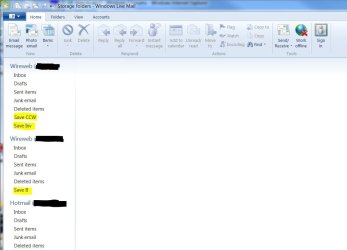
You had to add the folders you made somewhere. WLM will default the location to your last selected folder unless you specified differently in the Move To - Add Folder. You can't delete the five fixed folders (Inbox, Drafts, Sent Items, Junk Email & Deleted Items) but you can delete any of the folders you created. Any of the folders in the left pane that contain sub-folders will have an arrowhead in front of it. Click on that arrowhead to expand the folder(s) until you find the ones you added. You can then right-click on it and delete it.

Actually seeing what you're talking about would make more sense. Use the link below to learn how to post photos and screen captures to the forum. You can use the pencil on Snipit to over-mark private data before saving the image. (Or use your own photo update software.)

Posting-Files


Here's an example. The highlighted folders were added.
 

Attachments

  • Email.JPG
    Email.JPG
    54.8 KB · Views: 7
Last edited:

My Computer

Computer type
PC/Desktop
Computer Manufacturer/Model Number
Built 2/11/2011
OS
Windows 7 Pro-x64
CPU
i7-2600 3.4GHz - 3.8GHz Turbo
Motherboard
Intel DH67BL-B3
Memory
8Gb - 2x4GB, Muskin 991770 PC3-1333
Graphics Card(s)
Integrated Intel HD 2000
Sound Card
Integrated Intel 10.1 HD, RealTek ALC892
Monitor(s) Displays
Asus LCD VH222H, Haier HL24XSL2a
Screen Resolution
1920x1080, 1920x1080
Hard Drives
Crucial SSD C300-128Gb,
Western Digital WD5002AALX - 500Gb,
Western Digital WD7501AALS - 750Gb
PSU
Seasonic 650W 80+ Gold Modular
Case
Rosewill Defender
Cooling
Stock CPU, Four 120mm case fans, PCH fan added
Keyboard
Logitech EX100 Y-RBH94 Wireless
Mouse
Logitech EX100 M-RCE95 Wireless
Internet Speed
3.0/1.5 Mbs
Antivirus
Microsoft Security Essentials
Browser
Microsoft Internet Explorer 11
Other Info
Antec Veris Premier-Multimedia IR Station,
Cyber Accoustics-3602 Speakers,
AFT XM-5U Card Reader,
Hauppauge TV-HVR-2250,
Sony LX300 USB Turntable
Well after a lot of messing about it seems to have sorted itself out, it seems I mays have made a folder and moved it to another folder?? now sorted
Ken
 

My Computer

Computer Manufacturer/Model Number
acer aspire x1430
OS
windows 7 Home Premium 64bit
CPU
AMD E-300 dual core processor
Memory
4gb
Graphics Card(s)
AMD Radeon HD 6300 graphics
Hard Drives
500gb Hard Drive
I'm glad you sorted it out. Thanks to Carwiz for the help. Sorry, but I was in th middle of re building a computer and was off line for awhile.
 

My Computers

System One System Two

  • Computer type
    PC/Desktop
    Computer Manufacturer/Model Number
    ALWAYS UNDER CONSTRUCTION
    OS
    Windows 11 Pro
    CPU
    Ryzen 9 5900X
    Motherboard
    Asus X570 Crosshair Viii Hero
    Memory
    32GB G Skill DDR4-3600
    Graphics Card(s)
    EVGA RTX 3080 FTW 3 Ultra
    Sound Card
    On Board/Sennheiser PC37X Headset
    Monitor(s) Displays
    3 X Asus 27"
    Screen Resolution
    2560x1440
    Hard Drives
    2 X 1 TB NVME drives
    PSU
    EVGA 850
    Case
    Phanteks Eclipse P400A
    Cooling
    EVGA 280 AIO
    Keyboard
    Logitech G510s/ Logitech G13
    Mouse
    Logitech G502
    Internet Speed
    24/1
    Antivirus
    ESET/MBAM Pro/SAS Pro
    Browser
    Chrome/ Firefox/ Edge
  • Computer type
    Laptop
    System Manufacturer/Model Number
    Dell 16 Plus
    OS
    Windows 11 Pro
    CPU
    Intel Ultra 9 288V
    Memory
    32 GB LPDDR5X 8533
    Monitor(s) Displays
    16" Mini-LED HDR600 Touch 90 Hz
    Screen Resolution
    2560X1600
    Hard Drives
    1 TB NVME
Back
Top