New User Account Login Issues

cimage

New member
Member
Local time
8:03 PM
Messages
38
I did a clean install of Windows 7 Home Premium 64bit some 5 months back and created following users account :-
User 1 admin
User 2 admin
Guest account standard (default)
Admin (default)

Till recently, none of the other accounts were ever used I was using Users 1 with admin privileges. I have noticed that none of the account including default Guest and Admin accounts work. Upon trying to log it returns with following error “The User Profile Service failed the logon. User profile cannot be loaded.”

I deleted all the non functional account but default Admin account (which again doesn’t work). Created new account via CP with no success. Even newly created Guest Account (default) throws the same error.

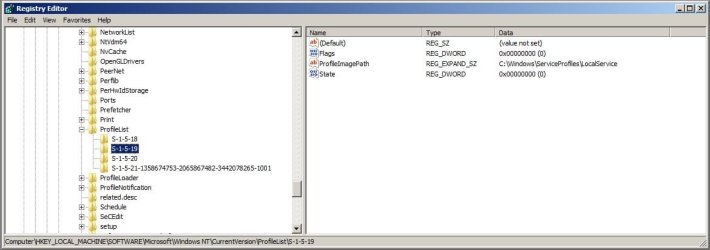
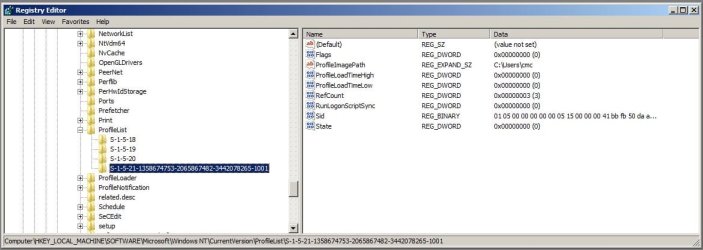
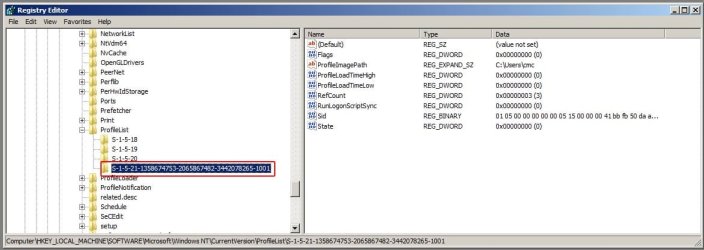
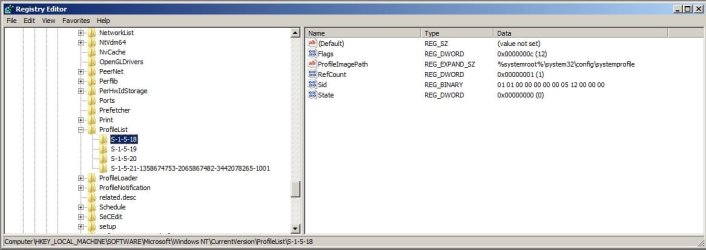
I searched the forum for solution and found that I need to manually delete SID key. I don’t understand what I need to delete and attaching the screenshot for perusal.

To recap I currently have just 2 login; Default Admin and created cmc – admin
Help appreciated.
 

Attachments
  • Untitled-1.jpg
    Untitled-1.jpg
    58.9 KB · Views: 55
  • Untitled-2.jpg
    Untitled-2.jpg
    58.1 KB · Views: 37
  • 3.jpg
    3.jpg
    57.5 KB · Views: 36
  • 4.jpg
    4.jpg
    67.5 KB · Views: 32
Last edited:

My Computer

Computer type
PC/Desktop
Computer Manufacturer/Model Number
custom
OS
win7 Home Premium 64 bit
CPU
core2quad q8200
Motherboard
Gigabyte EP45-UD3P
Memory
8GB
Graphics Card(s)
ZOTAC ZT-60403-10L GeForce GT 630 2GB 128-bit DDR3 PCI
Hard Drives
Hard Disk 4 numbers

My Computer

Computer Manufacturer/Model Number
* BFK Customs *
OS
W 7 64-bit Ultimate
CPU
Intel Q9550 Yorkfield
Motherboard
ASUS P5Q Pro
Memory
8GB Dominator 8500C5D
Graphics Card(s)
ATI : XFX 5870
Sound Card
Realtek HD Audio 7-1
Monitor(s) Displays
1x 47" LCD HDMI & 3x 26" LCD HDMI
Screen Resolution
1920x1080P & 1920x1200
Hard Drives
1x 80GB Intel X25-M G2 SSD : 1x 500GB & 1x 640GB WD Caviar Black(s)
PSU
Corsair 620HX
Case
Cooler Master RC-690
Cooling
Tuniq Tower 120, 2x 140mm and 3x 120mm case fans
Keyboard
Microsoft 500
Mouse
Razer Diamondback 3G
Internet Speed
14 Mb/s
Other Info
1x Koutech 3Gb/s SATA HDD Hot Swap Rack
I had the same problem and found no simple solution. I did a factory restore (OEM supplied OS) and put the applications back and everything appears ok at the moment. Source of the problem - unknown.
 

My Computer

Computer type
PC/Desktop
Computer Manufacturer/Model Number
Own build
OS
Windows 7x64 Home Premium SP1
CPU
Intel i7 2600k
Motherboard
ASUS P8Z68 Deluxe
Memory
G.Skill Ripjaws (DDR3-1600) 2x4GB
Graphics Card(s)
Nvidia GeForce GTS 450; Intel HD Graphics 3000(GT2+)
Monitor(s) Displays
Dell Ultrasharp IPS panel U2311H, Samsung SyncMaster P2350
Screen Resolution
1920x1080
Hard Drives
Samsung 850 Pro SSD 256GB, Samsung SSD 840 120GB, Seagates 1TB Barracuda ST31000528AS x2
PSU
Seasonic M12II 520W
Case
Lian Li Lancool PC-K60
Cooling
Case: 1x120mm, 3x140mm CPU: Hyper 212+
Keyboard
Logitech MK520 (wireless)
Mouse
Logitech MK520
Internet Speed
6-7 Mbps
Antivirus
Norton Security Premium, Malwarebytes on 2 (MSE on 3rd PC)
Browser
FireFox
Other Info
Audio: Logitech Z523 2.1
Hello mjf, welcome to Seven Forums!


As you say you have an OEM Windows 7 have a look at the tutorial at the link below, it'll show you how to create a Windows 7 recovery dick that can be used to repair your W7ndows 7.

http://www.sevenforums.com/tutorials/2083-system-repair-disc-create.html


Hello Bill2, welcome to Seven Forums!


That's the exact same link I posted above; thanks for helping out though.
 

My Computer

Computer Manufacturer/Model Number
* BFK Customs *
OS
W 7 64-bit Ultimate
CPU
Intel Q9550 Yorkfield
Motherboard
ASUS P5Q Pro
Memory
8GB Dominator 8500C5D
Graphics Card(s)
ATI : XFX 5870
Sound Card
Realtek HD Audio 7-1
Monitor(s) Displays
1x 47" LCD HDMI & 3x 26" LCD HDMI
Screen Resolution
1920x1080P & 1920x1200
Hard Drives
1x 80GB Intel X25-M G2 SSD : 1x 500GB & 1x 640GB WD Caviar Black(s)
PSU
Corsair 620HX
Case
Cooler Master RC-690
Cooling
Tuniq Tower 120, 2x 140mm and 3x 120mm case fans
Keyboard
Microsoft 500
Mouse
Razer Diamondback 3G
Internet Speed
14 Mb/s
Other Info
1x Koutech 3Gb/s SATA HDD Hot Swap Rack

My Computer

Computer Manufacturer/Model Number
Too many to describe...
OS
Windows 7 x64 pro/ Windows 7 x86 Pro/ XP SP3 x86
Re: I can create a "System Repair Disc" under the OS but I assume this only allows you to boot from disk and select recovery options like system image, system restore point recovery etc?
For the benefit of the thread source I tried these. The system image recovery gave me back the system 2 months prior to me noticing the problem. The login problem existed then too!

The only thing I couldn't try was a "Repair Install" because I believe you need the OS (retail) system disks. Actually not sure what Repair Install actually does.

My specific problem allowed me to apparently create accounts and activate the guest account BUT on first login when the desktop is normally setup the login error message appeared.

I have all the software I had before. Some of the windows updates may have been newer. I also didn't allow my son to reinstall all his Java compiler software.
 

My Computer

Computer type
PC/Desktop
Computer Manufacturer/Model Number
Own build
OS
Windows 7x64 Home Premium SP1
CPU
Intel i7 2600k
Motherboard
ASUS P8Z68 Deluxe
Memory
G.Skill Ripjaws (DDR3-1600) 2x4GB
Graphics Card(s)
Nvidia GeForce GTS 450; Intel HD Graphics 3000(GT2+)
Monitor(s) Displays
Dell Ultrasharp IPS panel U2311H, Samsung SyncMaster P2350
Screen Resolution
1920x1080
Hard Drives
Samsung 850 Pro SSD 256GB, Samsung SSD 840 120GB, Seagates 1TB Barracuda ST31000528AS x2
PSU
Seasonic M12II 520W
Case
Lian Li Lancool PC-K60
Cooling
Case: 1x120mm, 3x140mm CPU: Hyper 212+
Keyboard
Logitech MK520 (wireless)
Mouse
Logitech MK520
Internet Speed
6-7 Mbps
Antivirus
Norton Security Premium, Malwarebytes on 2 (MSE on 3rd PC)
Browser
FireFox
Other Info
Audio: Logitech Z523 2.1
Bare Foot Kid / mjf

Before posting my query, I did read the solution indicated by you and I quote here from my earlier post

" I searched the forum for solution and found that I need to manually delete SID key. I don’t understand what I need to delete and attaching the screenshot for perusal. "


Hope you can guide me after taking a look at the screenshots attached with my 1st post.

Thanks in advance.
 

My Computer

Computer type
PC/Desktop
Computer Manufacturer/Model Number
custom
OS
win7 Home Premium 64 bit
CPU
core2quad q8200
Motherboard
Gigabyte EP45-UD3P
Memory
8GB
Graphics Card(s)
ZOTAC ZT-60403-10L GeForce GT 630 2GB 128-bit DDR3 PCI
Hard Drives
Hard Disk 4 numbers
Hello again cimage.


My apologies mate, I don't know enough about your type of issue to advise you on deleting values from The Windows registry, as you're aware a miss-step in this section can permanently disable your PC, hopefully someone more knowledgeable with the registry can assist you further.


PS, So you had no success with the tutorial at the link I posted?
 

My Computer

Computer Manufacturer/Model Number
* BFK Customs *
OS
W 7 64-bit Ultimate
CPU
Intel Q9550 Yorkfield
Motherboard
ASUS P5Q Pro
Memory
8GB Dominator 8500C5D
Graphics Card(s)
ATI : XFX 5870
Sound Card
Realtek HD Audio 7-1
Monitor(s) Displays
1x 47" LCD HDMI & 3x 26" LCD HDMI
Screen Resolution
1920x1080P & 1920x1200
Hard Drives
1x 80GB Intel X25-M G2 SSD : 1x 500GB & 1x 640GB WD Caviar Black(s)
PSU
Corsair 620HX
Case
Cooler Master RC-690
Cooling
Tuniq Tower 120, 2x 140mm and 3x 120mm case fans
Keyboard
Microsoft 500
Mouse
Razer Diamondback 3G
Internet Speed
14 Mb/s
Other Info
1x Koutech 3Gb/s SATA HDD Hot Swap Rack
Bare Foot Kid

Not really as the entry description doesn't match to the entries I have.

Thanks anyway.
 

My Computer

Computer type
PC/Desktop
Computer Manufacturer/Model Number
custom
OS
win7 Home Premium 64 bit
CPU
core2quad q8200
Motherboard
Gigabyte EP45-UD3P
Memory
8GB
Graphics Card(s)
ZOTAC ZT-60403-10L GeForce GT 630 2GB 128-bit DDR3 PCI
Hard Drives
Hard Disk 4 numbers
Howdy.


Maybe someone will still come along that is able to assist you, keep an eye on this thread for a while yet.
 

My Computer

Computer Manufacturer/Model Number
* BFK Customs *
OS
W 7 64-bit Ultimate
CPU
Intel Q9550 Yorkfield
Motherboard
ASUS P5Q Pro
Memory
8GB Dominator 8500C5D
Graphics Card(s)
ATI : XFX 5870
Sound Card
Realtek HD Audio 7-1
Monitor(s) Displays
1x 47" LCD HDMI & 3x 26" LCD HDMI
Screen Resolution
1920x1080P & 1920x1200
Hard Drives
1x 80GB Intel X25-M G2 SSD : 1x 500GB & 1x 640GB WD Caviar Black(s)
PSU
Corsair 620HX
Case
Cooler Master RC-690
Cooling
Tuniq Tower 120, 2x 140mm and 3x 120mm case fans
Keyboard
Microsoft 500
Mouse
Razer Diamondback 3G
Internet Speed
14 Mb/s
Other Info
1x Koutech 3Gb/s SATA HDD Hot Swap Rack
That big long id you see listed there, that is the one for your account? CMC is that your admin account?
 

My Computer

Computer Manufacturer/Model Number
HP Pavilion dv7
OS
Windows 7
CPU
Core i7
Memory
8 GB
Graphics Card(s)
ATI FireGL
Monitor(s) Displays
Secondary is an HP L1940T
Screen Resolution
1680x1050
Hard Drives
160 GB SSD and 500 GB SATA
Keyboard
G11 Logitech
Mouse
G7 Logitech
Internet Speed
Fiber
Other Info
My rig smegging rules!
Currently I have 2 accounts :-

cmc - admin (working)

crk - standard (not working)

I cannot make out where is crk- std account. Here is the latest screen shot.
 

Attachments

  • 4.jpg
    4.jpg
    72.1 KB · Views: 9

My Computer

Computer type
PC/Desktop
Computer Manufacturer/Model Number
custom
OS
win7 Home Premium 64 bit
CPU
core2quad q8200
Motherboard
Gigabyte EP45-UD3P
Memory
8GB
Graphics Card(s)
ZOTAC ZT-60403-10L GeForce GT 630 2GB 128-bit DDR3 PCI
Hard Drives
Hard Disk 4 numbers
Currently I have 2 accounts :-

cmc - admin (working)

crk - standard (not working)

I cannot make out where is crk- std account. Here is the latest screen shot.


I am assuming that user "CRK" is currently created as a user when this screenshot was taken? If so, the main problem is that an SID is not even being created in the registry for this username. Without it, you cannot delete it and thus the solutions posted thus far you are right do not help you, though i do commend all who are trying to help! :cool:

Here is something you can try as I do not see that you have done it here.


  • Delete the problematic user account and then restart the computer.
  • Insert the Windows 7 disc and then boot to CD.
  • When presented, click on Repair Computer and select the option for Startup repair.
  • It's going to take awhile to complete, but after that, restart the computer and attempt to create the user account and see if your issues still persist.
If they do, then you may have to resign yourself to the fact that something went wonky when you installed 7 originally, but you are just finding out. I would copy your files and folders at that point and look at another clean install.
 

My Computer

Computer Manufacturer/Model Number
HP Pavilion dv7
OS
Windows 7
CPU
Core i7
Memory
8 GB
Graphics Card(s)
ATI FireGL
Monitor(s) Displays
Secondary is an HP L1940T
Screen Resolution
1680x1050
Hard Drives
160 GB SSD and 500 GB SATA
Keyboard
G11 Logitech
Mouse
G7 Logitech
Internet Speed
Fiber
Other Info
My rig smegging rules!
motc7

Thanks for your input.

As suggested, I did delete the non working account i.e. crk and went with Startup Repair via setup disk. No errors were detected. I am still unable to work with new account.

I guess the only option I am left is to go with clean install, oh boy that's lot of work.

Thanks
 

My Computer

Computer type
PC/Desktop
Computer Manufacturer/Model Number
custom
OS
win7 Home Premium 64 bit
CPU
core2quad q8200
Motherboard
Gigabyte EP45-UD3P
Memory
8GB
Graphics Card(s)
ZOTAC ZT-60403-10L GeForce GT 630 2GB 128-bit DDR3 PCI
Hard Drives
Hard Disk 4 numbers
motc7

Thanks for your input.

As suggested, I did delete the non working account i.e. crk and went with Startup Repair via setup disk. No errors were detected. I am still unable to work with new account.

I guess the only option I am left is to go with clean install, oh boy that's lot of work.

Thanks

Sorry to hear that it's come to this. One thing though. Before you backup your current profile I would go and hide hidden files and folders. You don't want to copy back in whatever is jacking things up again. Good luck and let us know how it worked. Also I suggest downloading killdisk for free and running that format over your HD then do clean install.
 

My Computer

Computer Manufacturer/Model Number
HP Pavilion dv7
OS
Windows 7
CPU
Core i7
Memory
8 GB
Graphics Card(s)
ATI FireGL
Monitor(s) Displays
Secondary is an HP L1940T
Screen Resolution
1680x1050
Hard Drives
160 GB SSD and 500 GB SATA
Keyboard
G11 Logitech
Mouse
G7 Logitech
Internet Speed
Fiber
Other Info
My rig smegging rules!

My Computer

Computer Manufacturer/Model Number
* BFK Customs *
OS
W 7 64-bit Ultimate
CPU
Intel Q9550 Yorkfield
Motherboard
ASUS P5Q Pro
Memory
8GB Dominator 8500C5D
Graphics Card(s)
ATI : XFX 5870
Sound Card
Realtek HD Audio 7-1
Monitor(s) Displays
1x 47" LCD HDMI & 3x 26" LCD HDMI
Screen Resolution
1920x1080P & 1920x1200
Hard Drives
1x 80GB Intel X25-M G2 SSD : 1x 500GB & 1x 640GB WD Caviar Black(s)
PSU
Corsair 620HX
Case
Cooler Master RC-690
Cooling
Tuniq Tower 120, 2x 140mm and 3x 120mm case fans
Keyboard
Microsoft 500
Mouse
Razer Diamondback 3G
Internet Speed
14 Mb/s
Other Info
1x Koutech 3Gb/s SATA HDD Hot Swap Rack
Howdy.


I haven't had experience with "killdisk" will the "Clean All" command in the tutorial at the link below do the same thing, just curious.

http://www.sevenforums.com/tutorials/52129-disk-clean-clean-all-diskpart-command.html?ltr=D

Well presumably he's killing his primary partition. I don't know if that wouldn't bring a BSOD if he's in Windows doing what you are proposing or not.

Killdisk is something he can burn to a disk, boot to it and nail it from there.
 

My Computer

Computer Manufacturer/Model Number
HP Pavilion dv7
OS
Windows 7
CPU
Core i7
Memory
8 GB
Graphics Card(s)
ATI FireGL
Monitor(s) Displays
Secondary is an HP L1940T
Screen Resolution
1680x1050
Hard Drives
160 GB SSD and 500 GB SATA
Keyboard
G11 Logitech
Mouse
G7 Logitech
Internet Speed
Fiber
Other Info
My rig smegging rules!
You can use it in a command window at boot before the install, "clean all" writes zeroes to the entire disk.

See the "Note" in the tutorial. ;)
 

My Computer

Computer Manufacturer/Model Number
* BFK Customs *
OS
W 7 64-bit Ultimate
CPU
Intel Q9550 Yorkfield
Motherboard
ASUS P5Q Pro
Memory
8GB Dominator 8500C5D
Graphics Card(s)
ATI : XFX 5870
Sound Card
Realtek HD Audio 7-1
Monitor(s) Displays
1x 47" LCD HDMI & 3x 26" LCD HDMI
Screen Resolution
1920x1080P & 1920x1200
Hard Drives
1x 80GB Intel X25-M G2 SSD : 1x 500GB & 1x 640GB WD Caviar Black(s)
PSU
Corsair 620HX
Case
Cooler Master RC-690
Cooling
Tuniq Tower 120, 2x 140mm and 3x 120mm case fans
Keyboard
Microsoft 500
Mouse
Razer Diamondback 3G
Internet Speed
14 Mb/s
Other Info
1x Koutech 3Gb/s SATA HDD Hot Swap Rack
You can use it in a command window at boot before the install, "clean all" writes zeroes to the entire disk.

See the "Note" in the tutorial. ;)

Oh yeah well that. I thought you meant nuke it from disk management.
 

My Computer

Computer Manufacturer/Model Number
HP Pavilion dv7
OS
Windows 7
CPU
Core i7
Memory
8 GB
Graphics Card(s)
ATI FireGL
Monitor(s) Displays
Secondary is an HP L1940T
Screen Resolution
1680x1050
Hard Drives
160 GB SSD and 500 GB SATA
Keyboard
G11 Logitech
Mouse
G7 Logitech
Internet Speed
Fiber
Other Info
My rig smegging rules!
Back
Top