
New video card "Mirrioring" itself on multiple monitors, please help

JohnnyScience

New member
Power User
Local time
3:38 AM
Messages
889
New video card "Mirrioring" itself on multiple monitors, please help

I have just upgraded video cards from two Nvidia 9800 GT cards to this MSI 260x: Newegg.com - MSI R7 260X 2GD5 OCV1 2GB 128-Bit GDDR5 PCI Express 3.0 HDCP Ready CrossFireX Support Video Card

I have a 3 monitor setup and I was told this monitor can handle up to 4 monitors independently of each other, able to have one giant desktop like I had with my two 9800 GT cards.

I only have 2 out of 3 monitors hooked up right now via DVI because I need a DP cable for the 3rd, but my 2 monitors are "mirroring" each other instead of being an extended desktop. When I go to Screen Resolution (win7 64) & click Detect it still only shows 1 monitor & when I hit Identify both monitors mirror each other with a big "1"

Does anyone know how I fix this? I can't seem to figure it out.

On top of this mirroring issue I have a screensaver called Helios & on my other 2 cards it would go across all 3 screens and be super smooth, now this card is very choppy & slow and freezes completely for a second or two.

I still have both monitors hooked up via DVI, but I have the 2nd monitor shut off because the mirroring was giving me a headache, so I'm not sure if it's still affecting how fast the card is working or not, but either way I'm still 1 monitor shy of my 3 setup... I'm almost afraid to try to hook the 3rd one up!

Is there some settings I can adjust to smooth everything out & stop this mirroring effect?

Should I delete the old Nvidia files & drivers etc or can I keep them on without issues incase this MSI card goes bad and I need to use the 9800 GT as a backup?

Thanks.
 

My Computer My Computer

At a glance

Windows 7 64 & Ubuntu 64Intel Quad Core Q6600 2.40GHz8gNvidia 9600 GT & 9800 GT
Computer Manufacturer/Model Number
Built it myself
OS
Windows 7 64 & Ubuntu 64
CPU
Intel Quad Core Q6600 2.40GHz
Motherboard
Asus
Memory
8g
Graphics Card(s)
Nvidia 9600 GT & 9800 GT
Sound Card
Turtle Beach 5.1
Monitor(s) Displays
Three 19" Dell's & one 46" Samsung 750
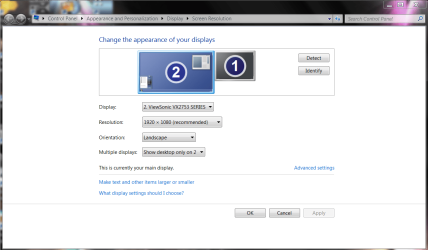
You should be able to right click on Desktop and get this screen after clicking SCREEN RESOLUTION

after that you should be able to manipulate Display Values

Once you get to the screen like this you should be able to choose Extend Displays /On the tab that says Landscape it will give you varies ways to change display from Duplicate to Extending them

I have a 2 monitor set up but the other one is used to watch stream content for family enjoyment it doesn't show the features unless it is turned on none the less this should give you an idea
 

Attachments

  • ds.PNG
    ds.PNG
    57 KB · Views: 4

My Computer My Computer

At a glance

Windows 10 Home Premium 64bit sp1Intel I7-6700K @ 4.6 Ghz 1.344 volts everyday OC32GB G-Skill TridentZ 3200mhz 16-18-18-38 DDR4Sli Gigabyte Windforce GTX 980 G1
Computer type
PC/Desktop
Computer Manufacturer/Model Number
CoreI7-6700K MrFingerIII Special Builds
OS
Windows 10 Home Premium 64bit sp1
CPU
Intel I7-6700K @ 4.6 Ghz 1.344 volts everyday OC
Motherboard
Asrock Fatality K6 Z170 Socket 1151
Memory
32GB G-Skill TridentZ 3200mhz 16-18-18-38 DDR4
Graphics Card(s)
Sli Gigabyte Windforce GTX 980 G1
Sound Card
AC97 Creative Rage Tactic 3D Headphones Bluetooth
Monitor(s) Displays
27" Asus ROG Swift PG278Q G-Sync 48" Vizio Smart HD TV
Screen Resolution
2560x1440p 27"- 48" Currently Gaming at 2560x1440p Res 2K
Hard Drives
250GB Samsung Evo840SSD Seagate baracuda 500 GB WD Mybook 500Gb 1TB Seagate Barracuda
PSU
HX1050w Corsair Silver 80plus certified crosfire/sli
Case
Enthod Pro Full Tower
Cooling
Corsair H110i GT 280 mm High Performance WaterBlock
Keyboard
Logitech wireless keyboard
Mouse
Logitech wireless mouse
Internet Speed
Cox Cable 100+ mb
Antivirus
WebRoot Spysweeper with Antivirus
Browser
IE-10, Chrome, Opera
Other Info
My Other Rig is a AMD FX8320E @4.6Ghz 16GB Ballistic Sport Ram
Mobo Asrock Fatality 990FX 120GB OCZ SSD 1TB Seagate Barracuda Corsair H75 Cooling PSU Corsair CX750
GPU GTX Gigabyte 970G1
I stated in my OP that I tried that and the 2nd monitor isn't being detected.
 

My Computer My Computer

At a glance

Windows 7 64 & Ubuntu 64Intel Quad Core Q6600 2.40GHz8gNvidia 9600 GT & 9800 GT
Computer Manufacturer/Model Number
Built it myself
OS
Windows 7 64 & Ubuntu 64
CPU
Intel Quad Core Q6600 2.40GHz
Motherboard
Asus
Memory
8g
Graphics Card(s)
Nvidia 9600 GT & 9800 GT
Sound Card
Turtle Beach 5.1
Monitor(s) Displays
Three 19" Dell's & one 46" Samsung 750
completely remove the nvidia control panel. it maybe conflicting with ccc. within ccc you should find a setting for eyeinfinity, this is probably overriding the default windows settings.
 

My Computer My Computer

At a glance

Windows 7 Ultimate x64, & Mac OS X 10.9.2Intel Core i5 2500kCorsair Vengence 8gb 1866mhzNvidia GTX 770 OC
Computer type
PC/Desktop
Computer Manufacturer/Model Number
Built by badgers!!!
OS
Windows 7 Ultimate x64, & Mac OS X 10.9.2
CPU
Intel Core i5 2500k
Motherboard
Asus P8z68 LE
Memory
Corsair Vengence 8gb 1866mhz
Graphics Card(s)
Nvidia GTX 770 OC
Monitor(s) Displays
2x ASUS LED 22" IPS
Screen Resolution
3840x1080
Hard Drives
240GB Crucial M500 SSD
120gb Corsair Force 3 SSD
1TB Western Digital
PSU
Corsair HX650w Modular
Case
Corsair Air 540
Cooling
Corsair H60 Push/Pull
Keyboard
Corsair K70/ Logitech G27 wheel
Mouse
Saitek R.A.T 9
Internet Speed
Too slow!
Other Info
AMD fusion E350N Home server-Windows Home Server 2011 (also made by badgers!)
2011 Macbook 2.4ghz Core2Duo, 4gb ddr3, 120gb Ocz Vertex SSD
Ok I will remove all Nvidia via Add/Remove Programs ?

What is CCC?

Will I need to do anything with the new cards drivers?
 

My Computer My Computer

At a glance

Windows 7 64 & Ubuntu 64Intel Quad Core Q6600 2.40GHz8gNvidia 9600 GT & 9800 GT
Computer Manufacturer/Model Number
Built it myself
OS
Windows 7 64 & Ubuntu 64
CPU
Intel Quad Core Q6600 2.40GHz
Motherboard
Asus
Memory
8g
Graphics Card(s)
Nvidia 9600 GT & 9800 GT
Sound Card
Turtle Beach 5.1
Monitor(s) Displays
Three 19" Dell's & one 46" Samsung 750
CCC is catalyst control center. Basically the control panel for your GPU. Its where you can adjust everything including multi monitor setups.
 

My Computer My Computer

At a glance

Windows 7 Ultimate x64, & Mac OS X 10.9.2Intel Core i5 2500kCorsair Vengence 8gb 1866mhzNvidia GTX 770 OC
Computer type
PC/Desktop
Computer Manufacturer/Model Number
Built by badgers!!!
OS
Windows 7 Ultimate x64, & Mac OS X 10.9.2
CPU
Intel Core i5 2500k
Motherboard
Asus P8z68 LE
Memory
Corsair Vengence 8gb 1866mhz
Graphics Card(s)
Nvidia GTX 770 OC
Monitor(s) Displays
2x ASUS LED 22" IPS
Screen Resolution
3840x1080
Hard Drives
240GB Crucial M500 SSD
120gb Corsair Force 3 SSD
1TB Western Digital
PSU
Corsair HX650w Modular
Case
Corsair Air 540
Cooling
Corsair H60 Push/Pull
Keyboard
Corsair K70/ Logitech G27 wheel
Mouse
Saitek R.A.T 9
Internet Speed
Too slow!
Other Info
AMD fusion E350N Home server-Windows Home Server 2011 (also made by badgers!)
2011 Macbook 2.4ghz Core2Duo, 4gb ddr3, 120gb Ocz Vertex SSD
Ok I'm not familiar with CCC is it something that came with the new MSI video card?

I have gone through Control Panel>Uninstall programs and removed anything related to Nvidia & then restarted & still not able to detect the additional monitor.

Someone else suggested to also remove the new card drivers via AMD uninstall program and then restart in safe mode to run a Drive Cleaner (not sure which one) to remove any additional Nvidia files. I'm still trying to figure out what AMD uninstaller to download and what Drive cleaner to run in safe mode?

Also I found the install disk in the bottom of the video card box, should I try putting that in? I plugged the card in & turned the computer on & it seemed to install everything once plugged in so I didn't bother with the disk since I was connected to the internet & I assumed it downloaded the newest files it needed?
 

My Computer My Computer

At a glance

Windows 7 64 & Ubuntu 64Intel Quad Core Q6600 2.40GHz8gNvidia 9600 GT & 9800 GT
Computer Manufacturer/Model Number
Built it myself
OS
Windows 7 64 & Ubuntu 64
CPU
Intel Quad Core Q6600 2.40GHz
Motherboard
Asus
Memory
8g
Graphics Card(s)
Nvidia 9600 GT & 9800 GT
Sound Card
Turtle Beach 5.1
Monitor(s) Displays
Three 19" Dell's & one 46" Samsung 750
Ok I'm not familiar with CCC is it something that came with the new MSI video card?

I have gone through Control Panel>Uninstall programs and removed anything related to Nvidia & then restarted & still not able to detect the additional monitor.

Someone else suggested to also remove the new card drivers via AMD uninstall program and then restart in safe mode to run a Drive Cleaner (not sure which one) to remove any additional Nvidia files. I'm still trying to figure out what AMD uninstaller to download and what Drive cleaner to run in safe mode?

Also I found the install disk in the bottom of the video card box, should I try putting that in? I plugged the card in & turned the computer on & it seemed to install everything once plugged in so I didn't bother with the disk since I was connected to the internet & I assumed it downloaded the newest files it needed?


Hang on a minute what ever you do don't use CCC you are using NVIDIA

and second i think what you need to do is have both monitors on pull the cable off the gpu of the one that isn't working and plug it back in it should detect it

I hope for your sake you didn't botch up and use CCC drivers with your Nvidia card
 

My Computer My Computer

At a glance

Windows 10 Home Premium 64bit sp1Intel I7-6700K @ 4.6 Ghz 1.344 volts everyday OC32GB G-Skill TridentZ 3200mhz 16-18-18-38 DDR4Sli Gigabyte Windforce GTX 980 G1
Computer type
PC/Desktop
Computer Manufacturer/Model Number
CoreI7-6700K MrFingerIII Special Builds
OS
Windows 10 Home Premium 64bit sp1
CPU
Intel I7-6700K @ 4.6 Ghz 1.344 volts everyday OC
Motherboard
Asrock Fatality K6 Z170 Socket 1151
Memory
32GB G-Skill TridentZ 3200mhz 16-18-18-38 DDR4
Graphics Card(s)
Sli Gigabyte Windforce GTX 980 G1
Sound Card
AC97 Creative Rage Tactic 3D Headphones Bluetooth
Monitor(s) Displays
27" Asus ROG Swift PG278Q G-Sync 48" Vizio Smart HD TV
Screen Resolution
2560x1440p 27"- 48" Currently Gaming at 2560x1440p Res 2K
Hard Drives
250GB Samsung Evo840SSD Seagate baracuda 500 GB WD Mybook 500Gb 1TB Seagate Barracuda
PSU
HX1050w Corsair Silver 80plus certified crosfire/sli
Case
Enthod Pro Full Tower
Cooling
Corsair H110i GT 280 mm High Performance WaterBlock
Keyboard
Logitech wireless keyboard
Mouse
Logitech wireless mouse
Internet Speed
Cox Cable 100+ mb
Antivirus
WebRoot Spysweeper with Antivirus
Browser
IE-10, Chrome, Opera
Other Info
My Other Rig is a AMD FX8320E @4.6Ghz 16GB Ballistic Sport Ram
Mobo Asrock Fatality 990FX 120GB OCZ SSD 1TB Seagate Barracuda Corsair H75 Cooling PSU Corsair CX750
GPU GTX Gigabyte 970G1
his new card is a r7 260x, thats not nvidia ;) so ccc is needed!!!

you should always download the latest drivers from AMDs website. the driver will contain CCC.
 

My Computer My Computer

At a glance

Windows 7 Ultimate x64, & Mac OS X 10.9.2Intel Core i5 2500kCorsair Vengence 8gb 1866mhzNvidia GTX 770 OC
Computer type
PC/Desktop
Computer Manufacturer/Model Number
Built by badgers!!!
OS
Windows 7 Ultimate x64, & Mac OS X 10.9.2
CPU
Intel Core i5 2500k
Motherboard
Asus P8z68 LE
Memory
Corsair Vengence 8gb 1866mhz
Graphics Card(s)
Nvidia GTX 770 OC
Monitor(s) Displays
2x ASUS LED 22" IPS
Screen Resolution
3840x1080
Hard Drives
240GB Crucial M500 SSD
120gb Corsair Force 3 SSD
1TB Western Digital
PSU
Corsair HX650w Modular
Case
Corsair Air 540
Cooling
Corsair H60 Push/Pull
Keyboard
Corsair K70/ Logitech G27 wheel
Mouse
Saitek R.A.T 9
Internet Speed
Too slow!
Other Info
AMD fusion E350N Home server-Windows Home Server 2011 (also made by badgers!)
2011 Macbook 2.4ghz Core2Duo, 4gb ddr3, 120gb Ocz Vertex SSD
Ok I'm not familiar with CCC is it something that came with the new MSI video card?

I have gone through Control Panel>Uninstall programs and removed anything related to Nvidia & then restarted & still not able to detect the additional monitor.

Someone else suggested to also remove the new card drivers via AMD uninstall program and then restart in safe mode to run a Drive Cleaner (not sure which one) to remove any additional Nvidia files. I'm still trying to figure out what AMD uninstaller to download and what Drive cleaner to run in safe mode?

Also I found the install disk in the bottom of the video card box, should I try putting that in? I plugged the card in & turned the computer on & it seemed to install everything once plugged in so I didn't bother with the disk since I was connected to the internet & I assumed it downloaded the newest files it needed?


Hang on a minute what ever you do don't use CCC you are using NVIDIA

and second i think what you need to do is have both monitors on pull the cable off the gpu of the one that isn't working and plug it back in it should detect it

I hope for your sake you didn't botch up and use CCC drivers with your Nvidia card

I hope for yours that you read the OP :D

The R7 is an ATI graphics card, one of the last years batch actually. So he should be using CCC.


@badger906 YOU NINJA'D ME!


Http://amd.com Is the place you want to go for this.

By the way, the card can handle 4 monitors when used for basic things like web browsing. When it comes to gaming your going to be limited to at the most half of that. This is because a lot more rendering happens within the card.
 

My Computer My Computer

At a glance

Windows 8.1Intel i5 3750k OC'd 4.0Ghz16GB Vengence CorsairGTX 770 OC 2GB Windforce
Computer type
PC/Desktop
Computer Manufacturer/Model Number
Custom Build
OS
Windows 8.1
CPU
Intel i5 3750k OC'd 4.0Ghz
Motherboard
P8Z77-V LX3
Memory
16GB Vengence Corsair
Graphics Card(s)
GTX 770 OC 2GB Windforce
Sound Card
C-Media 7.1 Surround Card
Monitor(s) Displays
Asus 3D 23" & BenQ 24" & LG 19"
Screen Resolution
1920*1080, 1920*1080, 1440*900
Hard Drives
Crucial 512GB SSD
WD 1.5 TB
WD 500Gb
PSU
850MW Silverstone
Case
inWin DragonRider
Cooling
4 * 140mm LED Akasa, One 140mm Fan Akasa
Keyboard
Corsair k95
Mouse
R.A.T 7 Contagion
Internet Speed
152 Mb Fiber Optic
Antivirus
ESET Nod32
Browser
Waterfox x64 / Chrome x64
Other Info
Freenas / Plex Media server
Q6600
6Gb DDR3
6TB ZFS Raid
500W PSu
2 x Intel NIC's
Ok ok The op is kind of confusing it says 9800GT so forgive the hasty reply i do read system specs from time to time and if he is using AMD it should work automatic

He should also edit his specs as well his specs clearly say gt 9600 and gt9800
 

My Computer My Computer

At a glance

Windows 10 Home Premium 64bit sp1Intel I7-6700K @ 4.6 Ghz 1.344 volts everyday OC32GB G-Skill TridentZ 3200mhz 16-18-18-38 DDR4Sli Gigabyte Windforce GTX 980 G1
Computer type
PC/Desktop
Computer Manufacturer/Model Number
CoreI7-6700K MrFingerIII Special Builds
OS
Windows 10 Home Premium 64bit sp1
CPU
Intel I7-6700K @ 4.6 Ghz 1.344 volts everyday OC
Motherboard
Asrock Fatality K6 Z170 Socket 1151
Memory
32GB G-Skill TridentZ 3200mhz 16-18-18-38 DDR4
Graphics Card(s)
Sli Gigabyte Windforce GTX 980 G1
Sound Card
AC97 Creative Rage Tactic 3D Headphones Bluetooth
Monitor(s) Displays
27" Asus ROG Swift PG278Q G-Sync 48" Vizio Smart HD TV
Screen Resolution
2560x1440p 27"- 48" Currently Gaming at 2560x1440p Res 2K
Hard Drives
250GB Samsung Evo840SSD Seagate baracuda 500 GB WD Mybook 500Gb 1TB Seagate Barracuda
PSU
HX1050w Corsair Silver 80plus certified crosfire/sli
Case
Enthod Pro Full Tower
Cooling
Corsair H110i GT 280 mm High Performance WaterBlock
Keyboard
Logitech wireless keyboard
Mouse
Logitech wireless mouse
Internet Speed
Cox Cable 100+ mb
Antivirus
WebRoot Spysweeper with Antivirus
Browser
IE-10, Chrome, Opera
Other Info
My Other Rig is a AMD FX8320E @4.6Ghz 16GB Ballistic Sport Ram
Mobo Asrock Fatality 990FX 120GB OCZ SSD 1TB Seagate Barracuda Corsair H75 Cooling PSU Corsair CX750
GPU GTX Gigabyte 970G1
Ok so I just installed a new SSD today so I really need to get this video card situation taken care of already.

1) So run AMD Clean uninstall in windows
2) Then boot in safe mode
3) Run Nvidia's Display Driver Uninstaller in safe mode
4) Restart
5) Then use the video card install cd when normals windows reloads? Is there where I get the fresh install of the AMD Catalyst drivers, or will the video card automatically download them when it reboots into normal mode with no nvidia drivers?
 

My Computer My Computer

At a glance

Windows 7 64 & Ubuntu 64Intel Quad Core Q6600 2.40GHz8gNvidia 9600 GT & 9800 GT
Computer Manufacturer/Model Number
Built it myself
OS
Windows 7 64 & Ubuntu 64
CPU
Intel Quad Core Q6600 2.40GHz
Motherboard
Asus
Memory
8g
Graphics Card(s)
Nvidia 9600 GT & 9800 GT
Sound Card
Turtle Beach 5.1
Monitor(s) Displays
Three 19" Dell's & one 46" Samsung 750
you installed an SSD without doing a clean instal of windows!?!?

you can download the latest driver from www.amd.com under downloads just select your os, gpu type and then the model.
 

My Computer My Computer

At a glance

Windows 7 Ultimate x64, & Mac OS X 10.9.2Intel Core i5 2500kCorsair Vengence 8gb 1866mhzNvidia GTX 770 OC
Computer type
PC/Desktop
Computer Manufacturer/Model Number
Built by badgers!!!
OS
Windows 7 Ultimate x64, & Mac OS X 10.9.2
CPU
Intel Core i5 2500k
Motherboard
Asus P8z68 LE
Memory
Corsair Vengence 8gb 1866mhz
Graphics Card(s)
Nvidia GTX 770 OC
Monitor(s) Displays
2x ASUS LED 22" IPS
Screen Resolution
3840x1080
Hard Drives
240GB Crucial M500 SSD
120gb Corsair Force 3 SSD
1TB Western Digital
PSU
Corsair HX650w Modular
Case
Corsair Air 540
Cooling
Corsair H60 Push/Pull
Keyboard
Corsair K70/ Logitech G27 wheel
Mouse
Saitek R.A.T 9
Internet Speed
Too slow!
Other Info
AMD fusion E350N Home server-Windows Home Server 2011 (also made by badgers!)
2011 Macbook 2.4ghz Core2Duo, 4gb ddr3, 120gb Ocz Vertex SSD
No I did a clean install on the SSD, (even though it messed up & I have to format it already)

But I am still having the same issues with the SSD, so I'm assuming I need to run the Nvidia DDU before installing the AMD drivers.

Does the video card automatically install it's own drivers when windows starts up & recognizes it?
 

My Computer My Computer

At a glance

Windows 7 64 & Ubuntu 64Intel Quad Core Q6600 2.40GHz8gNvidia 9600 GT & 9800 GT
Computer Manufacturer/Model Number
Built it myself
OS
Windows 7 64 & Ubuntu 64
CPU
Intel Quad Core Q6600 2.40GHz
Motherboard
Asus
Memory
8g
Graphics Card(s)
Nvidia 9600 GT & 9800 GT
Sound Card
Turtle Beach 5.1
Monitor(s) Displays
Three 19" Dell's & one 46" Samsung 750
well formay it first. a clean fresh install wont have any nvidia driver on it. so theres nothing to uninstall.

and no youll have to download the drivers from amds website.

ive taken all the effort out so just click this link:
http://support.amd.com/en-us/download/desktop?os=Windows 7 - 64

you want to downlaod the top one.
 

My Computer My Computer

At a glance

Windows 7 Ultimate x64, & Mac OS X 10.9.2Intel Core i5 2500kCorsair Vengence 8gb 1866mhzNvidia GTX 770 OC
Computer type
PC/Desktop
Computer Manufacturer/Model Number
Built by badgers!!!
OS
Windows 7 Ultimate x64, & Mac OS X 10.9.2
CPU
Intel Core i5 2500k
Motherboard
Asus P8z68 LE
Memory
Corsair Vengence 8gb 1866mhz
Graphics Card(s)
Nvidia GTX 770 OC
Monitor(s) Displays
2x ASUS LED 22" IPS
Screen Resolution
3840x1080
Hard Drives
240GB Crucial M500 SSD
120gb Corsair Force 3 SSD
1TB Western Digital
PSU
Corsair HX650w Modular
Case
Corsair Air 540
Cooling
Corsair H60 Push/Pull
Keyboard
Corsair K70/ Logitech G27 wheel
Mouse
Saitek R.A.T 9
Internet Speed
Too slow!
Other Info
AMD fusion E350N Home server-Windows Home Server 2011 (also made by badgers!)
2011 Macbook 2.4ghz Core2Duo, 4gb ddr3, 120gb Ocz Vertex SSD
Actually I just got it all worked out on my HDD, thank you. Now I have to plug my SSD back in & install it on that. (I'm in the process of moving from HDD to SSD so having to do all kinds of things)
 

My Computer My Computer

At a glance

Windows 7 64 & Ubuntu 64Intel Quad Core Q6600 2.40GHz8gNvidia 9600 GT & 9800 GT
Computer Manufacturer/Model Number
Built it myself
OS
Windows 7 64 & Ubuntu 64
CPU
Intel Quad Core Q6600 2.40GHz
Motherboard
Asus
Memory
8g
Graphics Card(s)
Nvidia 9600 GT & 9800 GT
Sound Card
Turtle Beach 5.1
Monitor(s) Displays
Three 19" Dell's & one 46" Samsung 750
So the last day or so both monitors that I have hooked up right now start to flicker/crunch together (I don't really know the proper term it just seems to go crazy at times)

I can restart & it will be fine for a bit & then start acting up again.

Any ideas or options to fix this?

Thanks.
 

My Computer My Computer

At a glance

Windows 7 64 & Ubuntu 64Intel Quad Core Q6600 2.40GHz8gNvidia 9600 GT & 9800 GT
Computer Manufacturer/Model Number
Built it myself
OS
Windows 7 64 & Ubuntu 64
CPU
Intel Quad Core Q6600 2.40GHz
Motherboard
Asus
Memory
8g
Graphics Card(s)
Nvidia 9600 GT & 9800 GT
Sound Card
Turtle Beach 5.1
Monitor(s) Displays
Three 19" Dell's & one 46" Samsung 750
could be driver related, ram related, cable, psu related ect.

First of all unplug one monitor and just run the one. does that solve the issue?

if it doesnt try a new cable on just the one. if that doesnt, download the latest beta driver, and or the previous version to what you have no.

if that doesnt work and or befoee you try any of the above try reseating your graphics card. as well as swapping the power cables for any others on your psu if you have them.

if none of that works try doing a ram test, see if thats the cause.

and or finally try another power supply if you have one/can borrow one.
 

My Computer My Computer

At a glance

Windows 7 Ultimate x64, & Mac OS X 10.9.2Intel Core i5 2500kCorsair Vengence 8gb 1866mhzNvidia GTX 770 OC
Computer type
PC/Desktop
Computer Manufacturer/Model Number
Built by badgers!!!
OS
Windows 7 Ultimate x64, & Mac OS X 10.9.2
CPU
Intel Core i5 2500k
Motherboard
Asus P8z68 LE
Memory
Corsair Vengence 8gb 1866mhz
Graphics Card(s)
Nvidia GTX 770 OC
Monitor(s) Displays
2x ASUS LED 22" IPS
Screen Resolution
3840x1080
Hard Drives
240GB Crucial M500 SSD
120gb Corsair Force 3 SSD
1TB Western Digital
PSU
Corsair HX650w Modular
Case
Corsair Air 540
Cooling
Corsair H60 Push/Pull
Keyboard
Corsair K70/ Logitech G27 wheel
Mouse
Saitek R.A.T 9
Internet Speed
Too slow!
Other Info
AMD fusion E350N Home server-Windows Home Server 2011 (also made by badgers!)
2011 Macbook 2.4ghz Core2Duo, 4gb ddr3, 120gb Ocz Vertex SSD
I uninstalled the latest driver & reinstalled the beta driver, seems to be working better.

Before I did that I also reduced the Refresh rate from 60hz to 59hz & that made a MAJOR difference even before trying the beta drivers.

Now the beta driver is on 60hz & I can't seem to get it to change to 59hz for extra stability but it keeps reverting back to 60hz

I do still get some lag/scratchy lines if I scroll a web page really fast, what would be the cause of this? It was happening before the beta driver too, even after I changed the refresh rate to 59hz it would still do it when scrolling a web page fast?

Any ideas?
 

My Computer My Computer

At a glance

Windows 7 64 & Ubuntu 64Intel Quad Core Q6600 2.40GHz8gNvidia 9600 GT & 9800 GT
Computer Manufacturer/Model Number
Built it myself
OS
Windows 7 64 & Ubuntu 64
CPU
Intel Quad Core Q6600 2.40GHz
Motherboard
Asus
Memory
8g
Graphics Card(s)
Nvidia 9600 GT & 9800 GT
Sound Card
Turtle Beach 5.1
Monitor(s) Displays
Three 19" Dell's & one 46" Samsung 750
Back
Top