New Win 7 install on machine with Vista

Screenshot not showing. Use Snipping Tool in start menu, attach using paper clip in reply box. Include full DM map and drive listings.

Did you wipe the HD using the tutorials provided?
 
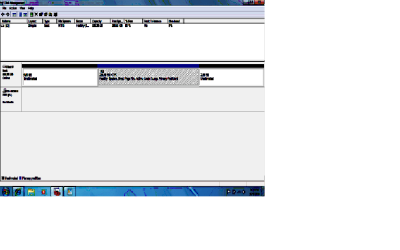
Bigger pic I think
 

Attachments

  • Pic bigger.png
    Pic bigger.png
    11.1 KB · Views: 8

My Computer My Computer

At a glance

Windows 7Intel Core(TM)2 Duo T5750 2.00 GHz3GB
Computer Manufacturer/Model Number
Dell Inspiron 1525
OS
Windows 7
CPU
Intel Core(TM)2 Duo T5750 2.00 GHz
Memory
3GB
Hard Drives
232 GB
Yep I did thanks,

My first Vist or Win7 machine so a little slow and I don't have it setup for my licking yet.
 

My Computer My Computer

At a glance

Windows 7Intel Core(TM)2 Duo T5750 2.00 GHz3GB
Computer Manufacturer/Model Number
Dell Inspiron 1525
OS
Windows 7
CPU
Intel Core(TM)2 Duo T5750 2.00 GHz
Memory
3GB
Hard Drives
232 GB
Licking ....liking.....
 

My Computer My Computer

At a glance

Windows 7Intel Core(TM)2 Duo T5750 2.00 GHz3GB
Computer Manufacturer/Model Number
Dell Inspiron 1525
OS
Windows 7
CPU
Intel Core(TM)2 Duo T5750 2.00 GHz
Memory
3GB
Hard Drives
232 GB
Cannot read the screenshot. Click it to see for yourself.

Use the Snipping Tool in the Start Menu to make a rectangular capture of the full DM map and listings as you have, then save file, attach with paper clip.

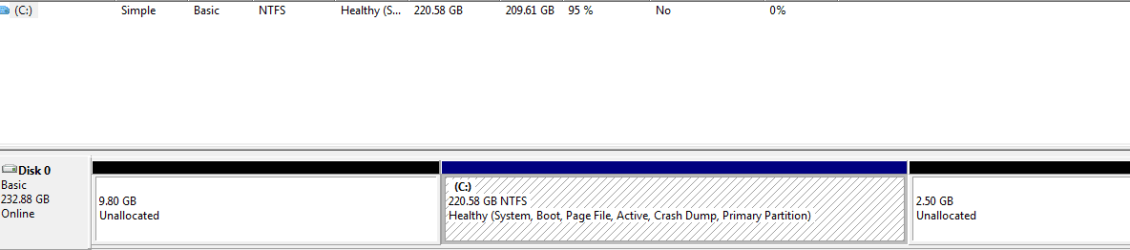
It is strange that Win7 installed with the space to its left. Do you now what caused this? It will help to be able to look closer.
 
Oh man am I having fun....not.

Having trouble "Access Denied" into my Doc, etc.

Should I start a new post with all the general questions I'm going to have to set this up like I like it?
 

My Computer My Computer

At a glance

Windows 7Intel Core(TM)2 Duo T5750 2.00 GHz3GB
Computer Manufacturer/Model Number
Dell Inspiron 1525
OS
Windows 7
CPU
Intel Core(TM)2 Duo T5750 2.00 GHz
Memory
3GB
Hard Drives
232 GB
Another pic
 

Attachments

  • Capture.PNG
    Capture.PNG
    5.1 KB · Views: 11

My Computer My Computer

At a glance

Windows 7Intel Core(TM)2 Duo T5750 2.00 GHz3GB
Computer Manufacturer/Model Number
Dell Inspiron 1525
OS
Windows 7
CPU
Intel Core(TM)2 Duo T5750 2.00 GHz
Memory
3GB
Hard Drives
232 GB
Another pic

Take a look at gregrocker's post15 & BFK's post 17.

They both told you to clean your HD.
Why did you not clean your HD?
 

My Computer My Computer

At a glance

ME/XP/Vista/Win7
OS
ME/XP/Vista/Win7
I deleted all partitions and then formated "C" what did I miss?

And if I missed a step I can start over if need be.

Although the two parts (not C), never disapearred they just showed as Unallocated.
 

My Computer My Computer

At a glance

Windows 7Intel Core(TM)2 Duo T5750 2.00 GHz3GB
Computer Manufacturer/Model Number
Dell Inspiron 1525
OS
Windows 7
CPU
Intel Core(TM)2 Duo T5750 2.00 GHz
Memory
3GB
Hard Drives
232 GB
I deleted all partitions and then formated "C" what did I miss?

And if I missed a step I can start over if need be.

Step 3 in the tutorial.
 

My Computer My Computer

At a glance

ME/XP/Vista/Win7
OS
ME/XP/Vista/Win7
What could be confusing about three times providing the same tutorials with big pictures?

So you have a Windows 7 install disk and you want to do-away with everything currently on the PC and just have Windows 7 installed? If the answer to these questions is yes, then have a look at the tutorials below.

Be advised: using the info in the first tutorial will over-write everything, all the data on the entire Hard Disk Drive (HDD) so make any backups of any data you don't want to lose before you get started.


SSD / HDD : Optimize for Windows Reinstallation

How to Do a Clean Installation with Windows 7

...With these things in mind, decide if you want to delete those partitions. If so the best method is to wipe the HD using the tutorial BarefootKid wrote and linked. This gives you the cleanest possible slate for new install: http://www.sevenforums.com/tutorials/91339-ssd-hdd-optimize-windows-reinstallation.html


Just follow these tutorials, they work in unison and will show you every step you need to take to have a clean fresh install of Windows 7 on the PC; take your time and study the tutorials well before you get started and you should have no problems, if you have further questions or need help someone here will be glad to assist you, just post back in this same thread.
 
Mine says 3. "Setup language" under "How to do a clean install with Win7".

I guess I should have used "How to optimize an SSD/HDD when your ready to reinstall...."

Since I was using a new OS I thought I was to use the 1st tutorial.

Guess I can start over, eyh? Is that the one I should have used?
 

My Computer My Computer

At a glance

Windows 7Intel Core(TM)2 Duo T5750 2.00 GHz3GB
Computer Manufacturer/Model Number
Dell Inspiron 1525
OS
Windows 7
CPU
Intel Core(TM)2 Duo T5750 2.00 GHz
Memory
3GB
Hard Drives
232 GB
How is performance?

The space before and after Win7 is negligible.

The only risk is that code needed to be cleaned off the HD which could interfere, but if performance is fine then run with it for awhile to see.

If you decide to keep it we can help you recover the extra space back into Win7, or you can leave it since it is small potatoes.
 
I'm using the other tutorial using DOS. I'm "Cleaning all" at this point.

Might as well do it right. I got the time which I guess know is going to take a couple of hours to write "0's".

Thanks for the info. I'll post back when I get stuck or installed.
 

My Computer My Computer

At a glance

Windows 7Intel Core(TM)2 Duo T5750 2.00 GHz3GB
Computer Manufacturer/Model Number
Dell Inspiron 1525
OS
Windows 7
CPU
Intel Core(TM)2 Duo T5750 2.00 GHz
Memory
3GB
Hard Drives
232 GB
Since you have time and are reading our suggestions now:

The installer is driver-complete with newer arriving quickly via optional Windows Updates. Any drivers then missing can be found on the Support Downloads webpage for your model computer or device. Only change drivers if performance dictates, starting with chipset and graphics.

Install programs slowly over time to gauge performance changes. Dont' allow any programs to write themselves into the msconfig>Startup list as they become freeloaders on your RAM and CPU. I only allow AV and gadgets.

Use a lightweight free AV like free MS Security Essentials which works great with Windows 7 firewall.

When its' set up, clean and order the HD perfectly with state-of-the-art CCleaner then Auslogics Disk and Registry defraggers monthly Then save a WIn7 backup image externally so you never have to reinstall again, just reimage the HD or replacement using DVD/Repair CD and stored image.

 
Hey, took a little longer going through the second re-install but I'm in the final stages of "Installing Windows".

Interesting about MS Security Essentials. I use AVG free but was going to ck out the Essentials.

Thanks again for all the help and since this my first Win7 install I'm sure I'll be back with questions.

"Expanding Windows files (20%)............

Going to be interested to see if some of my favorite utilities. That will probable be a challenge.
 

My Computer My Computer

At a glance

Windows 7Intel Core(TM)2 Duo T5750 2.00 GHz3GB
Computer Manufacturer/Model Number
Dell Inspiron 1525
OS
Windows 7
CPU
Intel Core(TM)2 Duo T5750 2.00 GHz
Memory
3GB
Hard Drives
232 GB
the wolfe,
Welcome to Win 7 Forums!
Be sure to fill in all the specs of your system and take a little time to review some of the great tutorials.
Check out Security Thread for the best of ....AV, Firewalls, MBAM and more which are all free!
 

My Computer My Computer

At a glance

Windows 7 Home Premium 64bitIntel(R)Core(TM)2 quad [email protected] 2.39GHz6GB DDR2 6400GeForce 8500/512MB
Computer Manufacturer/Model Number
HP M9077c
OS
Windows 7 Home Premium 64bit
CPU
Intel(R)Core(TM)2 quad [email protected] 2.39GHz
Motherboard
ASUSeK
Memory
6GB DDR2 6400
Graphics Card(s)
GeForce 8500/512MB
Sound Card
Realtek High Def Audio
Monitor(s) Displays
HP w2408 LCD 24" widescreen
Screen Resolution
1920x1200
Cooling
6 pack of Bud
Keyboard
MS wireless Inteli
Mouse
MS wireless Inteli
Will do! Thanks again for all the good stuff.

Love the site.
 

My Computer My Computer

At a glance

Windows 7Intel Core(TM)2 Duo T5750 2.00 GHz3GB
Computer Manufacturer/Model Number
Dell Inspiron 1525
OS
Windows 7
CPU
Intel Core(TM)2 Duo T5750 2.00 GHz
Memory
3GB
Hard Drives
232 GB
As for the Win7 backup image, does Windows have a utility. I have Acronis 9 but will have to see if it works with 7.
 

My Computer My Computer

At a glance

Windows 7Intel Core(TM)2 Duo T5750 2.00 GHz3GB
Computer Manufacturer/Model Number
Dell Inspiron 1525
OS
Windows 7
CPU
Intel Core(TM)2 Duo T5750 2.00 GHz
Memory
3GB
Hard Drives
232 GB

My Computer My Computer

At a glance

Windows 7 Home Premium 64bitIntel(R)Core(TM)2 quad [email protected] 2.39GHz6GB DDR2 6400GeForce 8500/512MB
Computer Manufacturer/Model Number
HP M9077c
OS
Windows 7 Home Premium 64bit
CPU
Intel(R)Core(TM)2 quad [email protected] 2.39GHz
Motherboard
ASUSeK
Memory
6GB DDR2 6400
Graphics Card(s)
GeForce 8500/512MB
Sound Card
Realtek High Def Audio
Monitor(s) Displays
HP w2408 LCD 24" widescreen
Screen Resolution
1920x1200
Cooling
6 pack of Bud
Keyboard
MS wireless Inteli
Mouse
MS wireless Inteli
Back
Top