- Local time
- 4:03 PM
- Messages
- 58
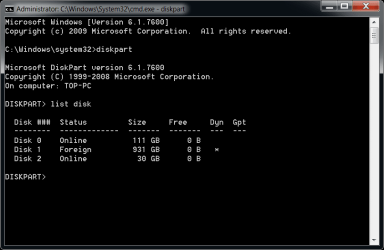
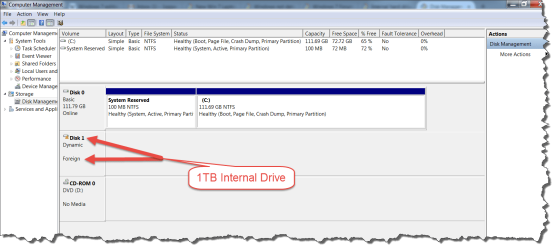
I just started from scratch on a Toshiba Satellite P875-S7201 laptop. It has two internal Hard Drive Ports, one that I used with a SanDisk SSD for installing the Windows 7 Ultimate Op system. The other has a WD Internal 1TB Drive sold as compatible with Win 8, 7, Vista, or XP. I have confirmed the driver is installed.
Many software applications can see this Hard Drive, including parts of Win 7,but when I look for it in the Windows 7 Computer Directory so I could write to it, it is not there. My intention was to place the Win 7 Operating System on the SSD and install the applications, Documents, Music, and other libraries to the additional Hard Disk.
Many software applications can see this Hard Drive, including parts of Win 7,but when I look for it in the Windows 7 Computer Directory so I could write to it, it is not there. My intention was to place the Win 7 Operating System on the SSD and install the applications, Documents, Music, and other libraries to the additional Hard Disk.
Last edited:
My Computer
At a glance
Windows 7 Home Premium 64-bit SP1Intel Mobile Core 2 Duo T6600 @ 2.20GHz Penry...4.00GB Dual-Channel DDR3 @ 398MHz (6-6-6-15)Intel Mobile Intel 4 Series Express Chipset F...
- Computer type
- Laptop
- Computer Manufacturer/Model Number
- Gateway NV78
- OS
- Windows 7 Home Premium 64-bit SP1
- CPU
- Intel Mobile Core 2 Duo T6600 @ 2.20GHz Penryn 45nm Technolo
- Motherboard
- Gateway NV78 (uPGA-478)
- Memory
- 4.00GB Dual-Channel DDR3 @ 398MHz (6-6-6-15)
- Graphics Card(s)
- Intel Mobile Intel 4 Series Express Chipset Family (Acer Inc
- Sound Card
- Realtek High Definition Audio
- Screen Resolution
- 1600 x 900
- Hard Drives
- 698GB Western Digital WDC WD7500BPKX-00HPJT0 ATA Device
(SATA)1863GB Disk drive (USB (SATA))
1862GB Disk drive (USB (SATA))
1863GB Disk drive (USB (SATA))
931GB Disk drive (USB (SATA))
- Browser
- Firefox
- Other Info
- I have Speccy if additional info required.



 )
)