New Windows 7 install, mouse is not moving like it used to

sluggerb

New member
Power User
VIP
Local time
11:47 AM
Messages
79
So I built a new PC. AMD FX 8310, AsRock 970M Pro3. My install was the windows 7 x64 Professional ISO download off MSDN with the USB3 drivers added in via the MSI Smart tool.

For some reason, the mouse speed/acceleration on this PC is different than my old PC. This is causing extreme muscle pain in my right arm, shoulder, and back as I try to adjust (I have non repairable nerve damage in the upper right part of my back and shoulder that makes me very sensitive to fine motor control movements). On my old PC I have absolutely zero mouse issues for over a decade of use. Here are the relevant details:

1. I am using the exact same mouse. It's an older Logitech M305. On my old PC it worked fine, on the new one, the acceleration and speed is slower.

2. I am using the same mousepad. In fact the entire desktop side of the PC is identical: Same keyboard, Mouse, mousepad, monitor, and cables as the old PC that did not have this issue. So I don't think it's a hardware issue amoung those items

3. I booted up the old PC and checked, and the software config is identical to the new PC. Neither had a mouse driver installed, both had the "Mouse" section of the control panel set to identical settings, the registry settings controlling mouse movement are identical (both are set to the defaults)

4. The keyboard I have has a built in touchpad, this also has the slower movement and acceleration issue as the mouse, despite it being the same piece of hardware and identically configured as the old PC.

5. I tried switching mice. Here are the one I tried:
Logitech M325 (USB, with Logitech drivers and with generic Windows drivers)
Logitech M317 (USB, with Logitech drivers and with generic Windows drivers)
Logitech G305 (USB, with Logitech drivers and with generic Windows drivers)
Generic wired PS/2 mouse (the motherboard has PS/2 headers)

None of them fixed the issue

6. I tried multiple USB ports, I tried the same USB port I was using on the old PC (USB Hub in keyboard) as well as a USB hub in the back of the PC that is attached directly to the motherboard, no difference.

7. I can make the mouse move differently by adjusting the acceleration curve settings in the registry but the X/Y coordinate system is confusing to me and I have not been able to tweak them correctly to get the mouse to move as expected. But, those settings are being respected, not ignored.

So the only difference between these two PC's are the motherboard itself (I don't know how that could make a difference in mouse speed) and the the OS install having USB3 drivers slip streamed in which I also don't think would make a difference since the issue happened on a PS/2 mouse

Any idea wtf could be going on? As it is now I am unable to configure the mouse to be comfortable to use, it causes pretty severe muscle knots and pain in the right side of my upper back and shoulder when using it, so unless a quick solution is found this PC is getting abandoned and I am going back to my old one.
 

My Computer My Computer

At a glance

Windows 7 Pro 32 & 64 bit
Computer type
PC/Desktop
OS
Windows 7 Pro 32 & 64 bit
You mentioned going into the registry. Why? Have you already tried settings in the Control Panel?

Whether you are using a USB 2.0 or USB 3.0 makes no difference because a mouse only needs USB 2.0. For wireless mice I have found USB 2.0 is better because there is a potential for interference if USB 3.0 is used.

Here are the settings for my Logitech M325 Mouse on my 18 year old HP laptop.

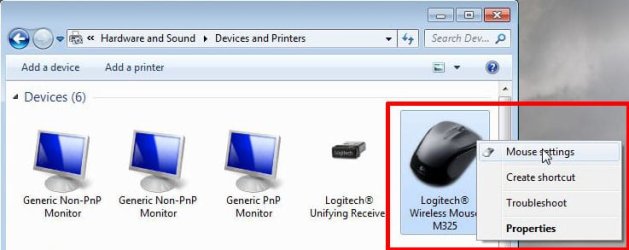
In Control Panel Right-click on mouse and select Mouse settings

mouse1.jpg

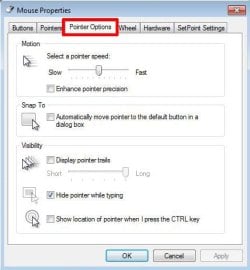
Select Pointer Options

mouse2.jpg

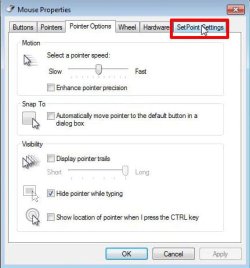
Optionally, if SetPoint is installed you can select SetPoint Settings

mouse3.jpg

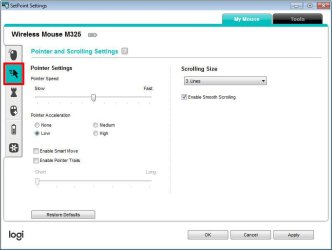
Select Pointer and Scrolling Settings

mouse4.jpg
 

My Computers My Computers

  • At a glance

    Windows 7 Home Premium 64-bitsAMD FX-8350GSKILL Ripjaw-X PC3 12800 8GB (2x4GB)ASUS ROG STRIX GTX 1060 6GB
    Computer type
    PC/Desktop
    Computer Manufacturer/Model Number
    Custom build
    OS
    Windows 7 Home Premium 64-bits
    CPU
    AMD FX-8350
    Motherboard
    Gigabyte GA-990FXA-UD3 (AM3+)
    Memory
    GSKILL Ripjaw-X PC3 12800 8GB (2x4GB)
    Graphics Card(s)
    ASUS ROG STRIX GTX 1060 6GB
    Sound Card
    Integrated
    Monitor(s) Displays
    Asus VE228H (21.5-in)
    Screen Resolution
    1920x1080 60Hz
    Hard Drives
    SAMSUNG 870 EVO 2.5 Inch SATA SSD (1TB)
    SAMSUNG 870 EVO 2.5 Inch SATA SSD (1TB)
    SAMSUNG 870 EVO 2.5 Inch SATA SSD (1TB)
    PSU
    Corsair RM750x (750 watts)
    Case
    Corsair Carbide Series 200R
    Cooling
    Corsair Hydro Series H60 (CWCH60)
    Keyboard
    Logitech Elite
    Mouse
    Logitech M510 Wireless Mouse
    Internet Speed
    Comcast Gigabit Extra (1200Mbps down / 35Mbps up)
    Antivirus
    Malwarebytes
    Browser
    Firefox, Edge, Chrome
    Other Info
    ASUS DRW-24B1ST DVD-RW (24X) optical drive
    Seagate Expansion Desk (5TB) external SATA/USB HDD
    Comcast XB8 Internet Gateway
  • At a glance

    Windows 7 Pro (64-bit)AMD Phenom II 960T X4Corsair XMS2 DDR2-800 8GB (4x2GB)ASUS ENGTX560 DCII OC/2DI/1GD5 1GB
    Computer type
    PC/Desktop
    System Manufacturer/Model Number
    Custom
    OS
    Windows 7 Pro (64-bit)
    CPU
    AMD Phenom II 960T X4
    Motherboard
    ASUS M4N82 Deluxe
    Memory
    Corsair XMS2 DDR2-800 8GB (4x2GB)
    Graphics Card(s)
    ASUS ENGTX560 DCII OC/2DI/1GD5 1GB
    Monitor(s) Displays
    Samsung 930B 19-inch LCD
    Screen Resolution
    1280x1024
    Hard Drives
    Samsung SSD 870 EVO 1000 GB (Windows 10)
    Seagate ST1000DM003 1000 GB (Windows 7)
    PSU
    Antec TruePower (new) TP-650
    Case
    Antec Three Hundred
    Cooling
    AMD stock cooler from FX8350
    Mouse
    Logitech M100
    Internet Speed
    Xfinity Gigabit Extra 1200/35 Mbps
You mentioned going into the registry. Why? Have you already tried settings in the Control Panel?

Per my OP:

"both had the "Mouse" section of the control panel set to identical settings"

The old PC did not have set point drivers installed. I installed them on the new PC but none of the settings helped. The problem seems to be that this install of windows is not correctly determining the acceleration, so when you try and land the pointer on something, it decelerates to quickly, requiring more muscle movement to get the pointer where you want it to go.
 

My Computer My Computer

At a glance

Windows 7 Pro 32 & 64 bit
Computer type
PC/Desktop
OS
Windows 7 Pro 32 & 64 bit
And now for a really way out option

Do they have identical themes???

part and parcel of each >>>theme<<< is the option to adjust various settings
Adjusting 1 does not have a Global effect
 

My Computer My Computer

At a glance

W7 home premium 32bit/W7HP 64bit/w10 tp insid...E5300 dual core3gbNvidia Geforce 7100 Nforce 630i
Computer type
PC/Desktop
Computer Manufacturer/Model Number
medionl/Aspire 6930G/acer x55a
OS
W7 home premium 32bit/W7HP 64bit/w10 tp insider ring
CPU
E5300 dual core
Motherboard
medion MS7366
Memory
3gb
Graphics Card(s)
Nvidia Geforce 7100 Nforce 630i
Monitor(s) Displays
avixc
Internet Speed
n (isp resticted to 72)
Antivirus
mse/pands
Browser
palemoon
Other Info
Belkin Fd7050 n USB using Railink RT2870 drivers, more upto date
And now for a really way out option

Do they have identical themes???

part and parcel of each >>>theme<<< is the option to adjust various settings
Adjusting 1 does not have a Global effect

Yes, each Windows 7 install has identical themes, identical Visual Performance settings, it is the same physical video card and identical video drivers with identical settings on each. Configuration wise, all mouse settings and visual settings are identical. I initially thought it was a USB thing, but even the PS/2 mouse suffers the same issue, so that eliminates that.

The only difference between the two machines is the motherboard, the CPU, the RAM, the PSU, and the USB3 drivers slipstreamed into the Win7 install. Literally all other hardware is the exact same (as in it was pulled out of the old PC and put in the new one)

One odd thing I just noticed, MisterEd's screenshot just showed the SetPoint drivers for the M325. On the old PC I had no drivers installed, just plugged in the mouse and that was it. In my first attempts to fix the new PC, Installed drivers, on my M305, it installed SetPoint, but on my M325, SetPoint was not the correct driver, upon installing it it told me to download "Logitech Options". I downloaded that and installed it and it did control the mouse (although did not have any configuration that solved my arm pain), but it's odd that he has a M325 that usesSetPoint where my M325 didnt work with SetPoint and required a different software package. My G305 required Logitech G Hub, so there were three total different driver software packages for the mice

The fact the PS/2 mouse still exhibits the issue leads me to believe it has nothing to do with USB, or the mice however.
 

My Computer My Computer

At a glance

Windows 7 Pro 32 & 64 bit
Computer type
PC/Desktop
OS
Windows 7 Pro 32 & 64 bit
I have used the Logitech M325 with several computers and have always used SetPoint. There were no problems and was never a suggestion to install any other software.

BTW, I just installed Options (v8.36.86) on the laptop with Windows 7 and a M325 mouse. Options scanned but could not find the mouse.
Note the laptop already has SetPoint (v6.70.55) on it.

Update:
I just remembered that one time I did an experiment on my laptop with Windows 10 on it. The laptop already had a Logitech M510 wireless mouse. That mouse required Logitech Options. In the experiment I paired a second mouse a Logitech M325.

I am not sure but this may mean that the Logitech M325 mouse may require SetPoint or Options depending upon the particular USB dongle it is paired with. This would explain why both SetPoint and Options are in the downloads for the Logitech M325. Which one you use depends upon the USB dongle you are using.
Downloads for Logitech M325
Windows 7: Unifying Software, SetPoint, Options
Windows 8: Unifying Software, SetPoint
Windows 10: Unifying Software, SetPoint, Options
Windows 11: Unifying Software, SetPoint

I have the Logitech MK550 Keyboard/Mouse Combo which includes the K350 Keyboard & M510 Mouse. Logitech says to use SetPoint for both. Although Setpoint works for the keyboard it does not work for the mouse. For the mouse I have to use Options.

Downloads for Logitech MK550 Keyboard/Mouse Combo:
Windows 7: Unifying Software, SetPoint
Windows 8: Unifying Software, SetPoint
Windows 10: Unifying Software, SetPoint
Windows 11: Unifying Software, SetPoints

Downloads for Logitech M510
Windows 7: SetPoint, Options
Windows 8: SetPoint, Options
Windows 10: Unifying Software, SetPoint, Options
Windows 11: Unifying Software, SetPoint, Options

From this I conclude that Logitech has confused things for its customers. That means you have to use whatever works for you.

All the Logitech mice I have use either SetPoint or Options. I don't have any mouse that uses G HUB.
 
Last edited:

My Computers My Computers

  • At a glance

    Windows 7 Home Premium 64-bitsAMD FX-8350GSKILL Ripjaw-X PC3 12800 8GB (2x4GB)ASUS ROG STRIX GTX 1060 6GB
    Computer type
    PC/Desktop
    Computer Manufacturer/Model Number
    Custom build
    OS
    Windows 7 Home Premium 64-bits
    CPU
    AMD FX-8350
    Motherboard
    Gigabyte GA-990FXA-UD3 (AM3+)
    Memory
    GSKILL Ripjaw-X PC3 12800 8GB (2x4GB)
    Graphics Card(s)
    ASUS ROG STRIX GTX 1060 6GB
    Sound Card
    Integrated
    Monitor(s) Displays
    Asus VE228H (21.5-in)
    Screen Resolution
    1920x1080 60Hz
    Hard Drives
    SAMSUNG 870 EVO 2.5 Inch SATA SSD (1TB)
    SAMSUNG 870 EVO 2.5 Inch SATA SSD (1TB)
    SAMSUNG 870 EVO 2.5 Inch SATA SSD (1TB)
    PSU
    Corsair RM750x (750 watts)
    Case
    Corsair Carbide Series 200R
    Cooling
    Corsair Hydro Series H60 (CWCH60)
    Keyboard
    Logitech Elite
    Mouse
    Logitech M510 Wireless Mouse
    Internet Speed
    Comcast Gigabit Extra (1200Mbps down / 35Mbps up)
    Antivirus
    Malwarebytes
    Browser
    Firefox, Edge, Chrome
    Other Info
    ASUS DRW-24B1ST DVD-RW (24X) optical drive
    Seagate Expansion Desk (5TB) external SATA/USB HDD
    Comcast XB8 Internet Gateway
  • At a glance

    Windows 7 Pro (64-bit)AMD Phenom II 960T X4Corsair XMS2 DDR2-800 8GB (4x2GB)ASUS ENGTX560 DCII OC/2DI/1GD5 1GB
    Computer type
    PC/Desktop
    System Manufacturer/Model Number
    Custom
    OS
    Windows 7 Pro (64-bit)
    CPU
    AMD Phenom II 960T X4
    Motherboard
    ASUS M4N82 Deluxe
    Memory
    Corsair XMS2 DDR2-800 8GB (4x2GB)
    Graphics Card(s)
    ASUS ENGTX560 DCII OC/2DI/1GD5 1GB
    Monitor(s) Displays
    Samsung 930B 19-inch LCD
    Screen Resolution
    1280x1024
    Hard Drives
    Samsung SSD 870 EVO 1000 GB (Windows 10)
    Seagate ST1000DM003 1000 GB (Windows 7)
    PSU
    Antec TruePower (new) TP-650
    Case
    Antec Three Hundred
    Cooling
    AMD stock cooler from FX8350
    Mouse
    Logitech M100
    Internet Speed
    Xfinity Gigabit Extra 1200/35 Mbps
When I installed SetPoint it did not see the mouse and told me to get Options, so you may be right. Either way, the M305 with SetPoint or the M325 with options both had the wrong acceleration

It seems to be the lowest point on the accell curve. The mouse point slows down to much when you are honing in on one point, require more fine motor control to go the last few millimetres, which is what is tearing my arm up. It's a shame because if I cant get this solved I am trashing this computer and going back to my old one, and it would suck to not be able to enjoy my new PC all because this random Windows Install doesn't manage the mouse correctly.
 

My Computer My Computer

At a glance

Windows 7 Pro 32 & 64 bit
Computer type
PC/Desktop
OS
Windows 7 Pro 32 & 64 bit
I use the mousepad built into my laptop, and an old driver that has various settings, one of which is "Slow Motion" which de-accelerates the mouse as you are describing, (apparently handy if working on something like a CAD program where you're needing to make very small, fine movements). I keep it disabled.

I realize you're using a different mouse than I do, but what you are describing sounds 100% like a mouse driver issue. Not that the settings are wrong, but that you need a different driver for that mouse on that system. In your place I would install a different driver from Logitech (if that's the make of the mouse) and just see what happens. Since you're using W7 don't necessarily need the newest Logitech driver, but I'd pick one newer than the one you're using on your last system... and I'd keep trying drivers until I found one that works right. (I've been through this before myself.) Good luck.

EDIT: I just looked at your screenshots and you might try first (since it's quick) checking the box for "enhanced pointer precision" and then click APPLY and stay on that page and just throw the mouse around a little. And further down for acceleration, you have LOW checked. Forget about the settings on the old system, play with the setting on the new system. Try changing acceleration from LOW to MED or HIGH, then click APPLY and again, take the mouse for a little ride around the page. If changing these settings doesn't do anything, or does something unexpected, then the mouse driver is wrong for that system. If changing the settings does make a difference, but not exactly what you want, keep going through looking for settings relative to your issue and try different things. If none of that works (which will only take literally less than a minute or two), then go find a new mouse driver to try. You may have to try a few before you find one that plays nice with your new hardware. Chipsets on the MB effect the entire system. Nothing is "one size fits all" - that's why new systems have their own mouse drivers (like when someone buys a computer or laptop already built).
 

My Computer My Computer

At a glance

Win 7 Ultimate 64-bit
OS
Win 7 Ultimate 64-bit
When I installed SetPoint it did not see the mouse and told me to get Options, so you may be right. Either way, the M305 with SetPoint or the M325 with options both had the wrong acceleration

It seems to be the lowest point on the accell curve. The mouse point slows down to much when you are honing in on one point, require more fine motor control to go the last few millimetres, which is what is tearing my arm up. It's a shame because if I cant get this solved I am trashing this computer and going back to my old one, and it would suck to not be able to enjoy my new PC all because this random Windows Install doesn't manage the mouse correctly.
Before you give up on this computer you might consider reinstalling Windows 7 and the chipset drivers for the motherboard. It might be something as simple as a driver problem, however, a reinstall might be the best way to address that.

BTW, I have a desktop computer with an AMD FX 8350 CPU. It is on a Gigabyte GA-990FXA UD3 motherboard. I have used several wired and wireless Logitech mice with it with no problems.
 

My Computers My Computers

  • At a glance

    Windows 7 Home Premium 64-bitsAMD FX-8350GSKILL Ripjaw-X PC3 12800 8GB (2x4GB)ASUS ROG STRIX GTX 1060 6GB
    Computer type
    PC/Desktop
    Computer Manufacturer/Model Number
    Custom build
    OS
    Windows 7 Home Premium 64-bits
    CPU
    AMD FX-8350
    Motherboard
    Gigabyte GA-990FXA-UD3 (AM3+)
    Memory
    GSKILL Ripjaw-X PC3 12800 8GB (2x4GB)
    Graphics Card(s)
    ASUS ROG STRIX GTX 1060 6GB
    Sound Card
    Integrated
    Monitor(s) Displays
    Asus VE228H (21.5-in)
    Screen Resolution
    1920x1080 60Hz
    Hard Drives
    SAMSUNG 870 EVO 2.5 Inch SATA SSD (1TB)
    SAMSUNG 870 EVO 2.5 Inch SATA SSD (1TB)
    SAMSUNG 870 EVO 2.5 Inch SATA SSD (1TB)
    PSU
    Corsair RM750x (750 watts)
    Case
    Corsair Carbide Series 200R
    Cooling
    Corsair Hydro Series H60 (CWCH60)
    Keyboard
    Logitech Elite
    Mouse
    Logitech M510 Wireless Mouse
    Internet Speed
    Comcast Gigabit Extra (1200Mbps down / 35Mbps up)
    Antivirus
    Malwarebytes
    Browser
    Firefox, Edge, Chrome
    Other Info
    ASUS DRW-24B1ST DVD-RW (24X) optical drive
    Seagate Expansion Desk (5TB) external SATA/USB HDD
    Comcast XB8 Internet Gateway
  • At a glance

    Windows 7 Pro (64-bit)AMD Phenom II 960T X4Corsair XMS2 DDR2-800 8GB (4x2GB)ASUS ENGTX560 DCII OC/2DI/1GD5 1GB
    Computer type
    PC/Desktop
    System Manufacturer/Model Number
    Custom
    OS
    Windows 7 Pro (64-bit)
    CPU
    AMD Phenom II 960T X4
    Motherboard
    ASUS M4N82 Deluxe
    Memory
    Corsair XMS2 DDR2-800 8GB (4x2GB)
    Graphics Card(s)
    ASUS ENGTX560 DCII OC/2DI/1GD5 1GB
    Monitor(s) Displays
    Samsung 930B 19-inch LCD
    Screen Resolution
    1280x1024
    Hard Drives
    Samsung SSD 870 EVO 1000 GB (Windows 10)
    Seagate ST1000DM003 1000 GB (Windows 7)
    PSU
    Antec TruePower (new) TP-650
    Case
    Antec Three Hundred
    Cooling
    AMD stock cooler from FX8350
    Mouse
    Logitech M100
    Internet Speed
    Xfinity Gigabit Extra 1200/35 Mbps
I realize you're using a different mouse than I do, but what you are describing sounds 100% like a mouse driver issue.

I tend to agree with you, however across a spectrum of USB Mice with no driver installed (just the default Microsoft one), Set Point Installed, Logitech Options Installed, and Logitech gHub installed, as well as a PS/2 mouse, all acting identically, that would be a single issue persisting across 4 different driver states and 2 different hardware states. But, it could be one other Windows component that all of these interact with that is acting up?

I am going to boot up the old PC in a bit and check the driver installed in that. I want to look at it on the actual physical system, not the P2V setup I have for it.

If changing these settings doesn't do anything, or does something unexpected, then the mouse driver is wrong for that system.

Changing the settings DOES impact the way the mouse moves, but every setting all suffers from the same broken acceleration curve. So I can make the mouse move faster, slower, accelerate faster, and slower, but as you hone in on an object, it always drops off the acceleration to quickly. It is super bizarre

Chipsets on the MB effect the entire system. Nothing is "one size fits all" - that's why new systems have their own mouse drivers (like when someone buys a computer or laptop already built).
I think maybe it might be the chipset driver. I have the latest chipset driver installed, I will try uninstalling it and see what happens. Also, as it stands, I actually found a spare motherboard on ebay for $30, so on a lark I bought it, so I may try a physical hardware swap on the motherboard and see what happens. Who knows, it might be a hardware thing on the mobo.

Before you give up on this computer you might consider reinstalling Windows 7 and the chipset drivers for the motherboard. It might be something as simple as a driver problem, however, a reinstall might be the best way to address that.

If/when I do the mobo swap I will be doing that. I also might just try it on the system as it stands now. I am also going to see if I can find any generic chipset drivers and try those vs the manufacturer ones

Really appreciate all the thoughtful advice, I will keep you updated on how it goes.

Edit: I did check and it looks like the 970 chipset driver on the Asrock website (that is what I have installed now) is version 12.3 released on 01/15/2015, while the 970 chipset on the AMD website is version 18.10.0830 released on 9/4/2018. Easy enough to uninstall and reinstall and try out.

- - - Updated - - -

OK, now this is interesting...

I went to uninstall the 12.3 chipset drivers, and the PC blue screened with an IRQ_NOT_LESS_THAN_OR_EQUAL. Odd. So I rebooted, tried again, same blue screen. I rebooted into safe mode, tried it there, same blue screen

So I tried to install the new version of the driver over the old version, and got the same blue screen that time. Another oddity, when I installed the old driver when I first built the system, the only thing the Catalyst Manager installed was a USB filter driver. The new driver is the Radeon installer, and it tries to install the USB Filter driver, AND an IDE and SATA driver.

Since there doesn't seem to be a way to get 12.3 off this thing without blue screening, and I was planning on rebuilding it anyway, later tonight or tomm I will rebuild it from scratch with a fresh Win7 install and use the newer drivers.

Does anyone think the BSOD indicates bad hardware and I should just skip right to the mobo swap though?
 

My Computer My Computer

At a glance

Windows 7 Pro 32 & 64 bit
Computer type
PC/Desktop
OS
Windows 7 Pro 32 & 64 bit
Does anyone think the BSOD indicates bad hardware and I should just skip right to the mobo swap though?

That BSOD can happen for a variety of reasons. I've had it myself in the past and in my case it was a driver issue. It's almost certainly a driver issue here too since it occurred after trying to uninstall the chipset drivers. I could be wrong but I would not expect the computer to boot properly without chipset drivers installed, and it's always been my understanding to update them by simply installing the new drivers, which uninstalls the old ones in the process... which you tried next with the same result, but maybe a kerfuffle there from uninstalling them the first time. Sometimes Windows "works in mysterious ways" and needs a couple reboots or a time out after "an event," then when you try the same thing later or the next day, it works. But that error is not an indication of bad hardware, imo, so if you have the time and are curious (like I would be in your place), I would do as you say and try from scratch with the system the way it is, before swapping out the mobo. That way, whether it works or not, you've added to your knowledge. Otherwise you'll never know.

And it does happen on occasion that the latest drivers are not the best drivers for some particular hardware. I realize you're only trying to update them due to the mouse issue, but it might be the newer chipset drivers don't play nice with the hardware. Though it would be nice to find the update works now, and the mouse issue is resolved. Good luck.
 

My Computer My Computer

At a glance

Win 7 Ultimate 64-bit
OS
Win 7 Ultimate 64-bit
So I think I got the driver swapped out. I noticed the BSOD always happened after the "USB device disconnected sound" played, so I first unplugged all my USB devices and plugged in a PS/2 KB and mouse, and that stopped the BSOD. When I tried to uninstall the old Catalyst drivers, I got an error saying they had already been uninstalled. So I tried to install the new ones, and there was no BSOD, but the install it failed on the IDE and SATA driver but the new USB Filter driver DID install. Since the old 12.3 driver only installed the USB filter driver, this seems to be how it should work (I was able to update the SATA driver directly via device manager). Unfortunately, it did not change the mouse behavior in any way. My new M305 also showed up from eBay, so now I am using the same mouse as the old system, and that made no difference. So I think we can say with certainty it is NOT the mouse hardware at all, which only leaves the motherboard or Windows itself as the culprit.

I went to swap the motherboard out, and noticed that the one I bought off eBay has a crack in the top corner. I messaged the seller but I am probably going to return it, even though it appears no traces are damaged, but still. I bought another one off eBay and that will be here Friday. In between then and now I am going to do a fresh Win7 install, if that fixes it great, if not this weekend I will swap the motherboard out. If that doesn't fix it then this rig is getting abandoned and I will just go back to my old PC and start on building a newer Intel i7-9700 build.
 
Last edited:

My Computer My Computer

At a glance

Windows 7 Pro 32 & 64 bit
Computer type
PC/Desktop
OS
Windows 7 Pro 32 & 64 bit
So I swapped the motherboard on the system (same model)

The mouse is definitely moving differently now, but not always the same way. Sometimes it feels fine, sometimes it slows down like the previous mobo, sometimes it just stops moving for a second and then starts moving again. I installed the latest AMD drivers, didnt seem to make much of a difference. Occasioanlly the computer makes the "USB Device Unplugged" noise too.

I did notice that this board has the NIC and 2 USB ports on the same physical connector, and when I installed the NIC driver ([FONT=arial, helvetica, sans-serif]Realtek RTL8111E) it made the same "USB Disconnected" noise. Maybe there's some conflict with the Realtek driver? I am using the driver from the mobo manufacturer website, I cannot find a manufacturer/Realtek driver download anywhere.

I'm going to give it a few days and if not resolve this is getting trashed and I am building a new Intel build


[/FONT]
 

My Computer My Computer

At a glance

Windows 7 Pro 32 & 64 bit
Computer type
PC/Desktop
OS
Windows 7 Pro 32 & 64 bit

My Computers My Computers

  • At a glance

    7 X64i5 84002x8gb 3200mhz
    Computer type
    PC/Desktop
    OS
    7 X64
    CPU
    i5 8400
    Motherboard
    gigabyte b365m ds3h
    Memory
    2x8gb 3200mhz
    Hard Drives
    various
    PSU
    pure power 11 400w cm
    Case
    Coolermaster
    Cooling
    cryorig m9i
  • At a glance

    7x64g54008gb ddr4 2400
    Computer type
    PC/Desktop
    OS
    7x64
    CPU
    g5400
    Motherboard
    ga b365m ds3h
    Memory
    8gb ddr4 2400
    PSU
    xfx pro 450w
Still trying this new mobo, and unfortunately, it;s not great. It's certainly better, but I am still getting some discomfort. I'm going to give it a few more days to see if I can adjust, if not it's off to the garbage heap and on to the new Intel build
 

My Computer My Computer

At a glance

Windows 7 Pro 32 & 64 bit
Computer type
PC/Desktop
OS
Windows 7 Pro 32 & 64 bit
Back
Top