New Windows XP data transfer tool and end of support notifications

Brink

Administrator
Staff member
Local time
1:08 AM
Messages
74,909
Location
Oklahoma
As the end of support for Windows XP on April 8th nears we’re continuing to focus on ensuring customers are aware of the deadline and helping them to migrate to a modern operating system such as Windows 8.1. Today we have some news on both those fronts.


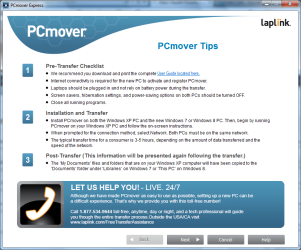
To help customers on Windows XP prepare to move to a new PC, we are announcing a free transfer tool that will be available beginning this month. We have partnered with Laplink to provide Windows XP users with a free data migration tool called PCmover Express for Windows XP which copies your files and settings from your Windows XP PC to a new device running Windows 7, Windows 8 or Windows 8.1. This tool will copy your files, music, videos, email and user profiles and settings from your old PC to your new device, transferring across your home or work network, and even enables Windows XP users to customize exactly what they want to bring over to their new device.

PCmover Express will be available for download in English starting later this week via WindowsXP.com as well as French, German, Italian, Japanese and Spanish coming later in March and it will be available in Korean, Chinese, Russian and Brazilian Portuguese after that. But if someone doesn’t want to wait for the tool to be released in their local language, they can access Laplink’s tool in other languages as well via Microsoft’s Download Center.

For Windows XP users wanting to transfer applications from their old computer, Laplink is also making available its software that migrates apps called PCmover Professional at a special price - see here for details.

On March 8th, 2014, Windows XP customers using the Home or Professional editions who have elected to receive updates via Windows Update will receive an official notification on their desktop screen via Windows Update informing them that support for Windows XP will end on April 8th, 2014.


The notification will include a link to our Windows XP End of Support website where Windows XP users can find all the information they need on the end of support for Windows XP and what it means and how they can stay protected against security risks and viruses after April 8th. The notification will reoccur on the 8th of every month unless disabled by the user.For customers unsure of what version of Windows they are using, they can go to AmIRunningXP.com, a website designed to automatically tell if a PC is running on Windows XP or a newer version of Windows like Windows 7, Windows 8, or Windows 8.1. If it detects Windows XP, the website provides guidance on how to upgrade ahead of the April 8th end of support deadline.

aggbug.aspx

More...

See also: Free data transfer - End of support Windows XP - Microsoft Windows
 
Last edited:

My Computer My Computer

At a glance

64-bit Windows 11 Pro for WorkstationsIntel i7-8700K OC'd to 5 GHz64 GB (4x16GB) G.SKILL TridentZ RGB DDR4 3600...ASUS ROG-STRIX-GTX1080TI-O11G-GAMING
Computer type
PC/Desktop
Computer Manufacturer/Model Number
Self built custom
OS
64-bit Windows 11 Pro for Workstations
CPU
Intel i7-8700K OC'd to 5 GHz
Motherboard
ASUS ROG Maximus XI Formula Z390
Memory
64 GB (4x16GB) G.SKILL TridentZ RGB DDR4 3600 MHz
Graphics Card(s)
ASUS ROG-STRIX-GTX1080TI-O11G-GAMING
Sound Card
Integrated
Monitor(s) Displays
2 x Samsung Odyssey G7 27"
Screen Resolution
2560x1440
Hard Drives
1TB Samsung 990 PRO M.2,
4TB Samsung 990 PRO PRO M.2,
TerraMaster F8 SSD Plus NAS
PSU
Seasonic Prime Titanium 850W
Case
Thermaltake Core P3
Cooling
Corsair Hydro H115i
Keyboard
Logitech wireless K800
Mouse
Logitech MX Master 4
Internet Speed
2 Gb/s Download and 100 Mb/s Upload
Antivirus
Malwarebyte Anti-Malware Premium
Browser
Google Chrome
Other Info
Logitech Z625 speaker system,
Logitech BRIO 4K Pro webcam,
HP Color LaserJet Pro MFP M477fdn,
APC SMART-UPS RT 1000 XL - SURT1000XLI,
Galaxy S23 Plus phone
How thoughtful of them to provide this tool in such a timely fashion! :rolleyes:
 

My Computer My Computer

At a glance

Windows 7 Ultimate x86 and x64
Computer type
PC/Desktop
Computer Manufacturer/Model Number
Dell, HP, Toshiba, Compaq
OS
Windows 7 Ultimate x86 and x64
>For Windows XP users wanting to transfer applications from their old computer...

This forum can expect an increase in posts about apps that will not update and will not uninstall. I've encountered several 32bit installers "transferred" by Laplink to a 64bit OS. Some will run, but others halt with the warning that it is the wrong app for a 64bit OS.

I cringe when I see that Laplink has been used to move apps. The last computer that I worked on had most of Dell's bloatware for a desktop "transferred" to a Toshiba laptop - including modem drivers, digital phone line monitor and Dell's software update management tool. Oddly enough, most of it ran.
 

My Computer My Computer

At a glance

W7 Pro SP1 64biti78GBIntel HD Graphics
Computer type
Laptop
Computer Manufacturer/Model Number
Employer provided Dell Latitude
OS
W7 Pro SP1 64bit
CPU
i7
Memory
8GB
Graphics Card(s)
Intel HD Graphics
Hard Drives
crappy SSD
Antivirus
Employer mandated Symantec Endpoint Protection
Browser
Pale Moon 64bit, IE11 64bit & Chrome 64bit
If you still run XP you likely don't have programs worth keeping.
 

My Computer My Computer

At a glance

W7 Pro 64Intel i3 3220 @ 3.3 GHz2x8GB DDR 3 1600 Kingstononboard
Computer Manufacturer/Model Number
homemade
OS
W7 Pro 64
CPU
Intel i3 3220 @ 3.3 GHz
Motherboard
ASRock H77M
Memory
2x8GB DDR 3 1600 Kingston
Graphics Card(s)
onboard
Sound Card
onboard
Monitor(s) Displays
two 21" LCD
Hard Drives
128 GB Samsung 830
PSU
OCZ400MXSP
Cooling
Stock
Internet Speed
DSL
If you still run XP you likely don't have programs worth keeping.

Overgeneralization much?

There are plenty of legitimate software that are only happy when they run inside Windows XP. Many older games, and in particular Japanese visual novels, come to mind among other examples. Heck, even older Microsoft-published games like Age of Empires II had problems running under Vista/7 until it got its HD re-release last year.

This is to say nothing of drivers for older hardware (I've found that a Windows 7 driver for a particular printer lacked features its XP driver had) and older hardware themselves that still work perfectly fine.

Security is no doubt an important thing to keep ahead of, but the reality of the world is that when something needs doing then pragmatism, practicality, and economics decide the day.
 

My Computer My Computer

At a glance

Windows 7 Ultimate x64 SP1Intel Core i7 2700K @ 3.5GHz (TurboBoost disa...16GB (4x4GB) Kingston HyperX DDR3 1600MHz @ 1...Nvidia EVGA GeForce GTX 1060 6GB
Computer type
PC/Desktop
Computer Manufacturer/Model Number
N/A (custom-built)
OS
Windows 7 Ultimate x64 SP1
CPU
Intel Core i7 2700K @ 3.5GHz (TurboBoost disabled)
Motherboard
ASUS P8Z68-V/GEN3
Memory
16GB (4x4GB) Kingston HyperX DDR3 1600MHz @ 1333MHz
Graphics Card(s)
Nvidia EVGA GeForce GTX 1060 6GB
Sound Card
Realtek High Definition Audio (motherboard integrated)
Monitor(s) Displays
NEC Multisync EX231W
Screen Resolution
1920x1080 @ 60Hz via DVI-D
Hard Drives
2x Western Digital 1TB SATA3 Caviar Black Internal HDD // 1x WD 500GB USB 3.0 "My Passport Essential" External HDD // 1x WD 1TB USB 3.0 "My Passport Essential" External HDD // 2x WD 2TB USB 3.0 "My Passport Essential" External HDD
PSU
Corsair Professional Series Gold AX850
Case
Antec 300
Cooling
Air-cooling
Keyboard
Steelseries 6Gv2
Mouse
Steelseries Sensei RAW Glossy, Logitech M500
Internet Speed
DSL (AT&T)
Antivirus
Microsoft Security Essentials
Browser
Pale Moon, Mozilla Firefox 12, Opera 12, Chromium, IE9
Other Info
Virtual Machines (VirtualBox):
* Japanese Windows XP Professional SP3
* Japanese Windows 7 Professional SP1
Now that the transfer tool has become available, I have downloaded it and am reading about its use. It seems that it is not a direct transfer tool (doesn't transfer via flash drive or direct network connection) , the transfer takes place over the Internet. That could mean some long transfer times for people (like me) with slow Internet connections. Laplink will provide a "high speed transfer cable" free with the purchase of the pro version of PC Mover, which is also the version you need to move your "apps". Doesn't look promising to me. I will be testing the free version soon.

Please stand by.
 

My Computer My Computer

At a glance

Windows 7 Ultimate x86 and x64
Computer type
PC/Desktop
Computer Manufacturer/Model Number
Dell, HP, Toshiba, Compaq
OS
Windows 7 Ultimate x86 and x64
How can you upgrade from xp to win 7 on the same computer ? Will the pcmover program do that ?
 

My Computer My Computer

At a glance

Windows 10 Pro - 64 bitIntel i7 2600K8 Gig ddr3 1600 mhz - viper extreme (Patriot)EVGA 980 TI
Computer type
PC/Desktop
Computer Manufacturer/Model Number
Custom Build
OS
Windows 10 Pro - 64 bit
CPU
Intel i7 2600K
Motherboard
Asus P8P67
Memory
8 Gig ddr3 1600 mhz - viper extreme (Patriot)
Graphics Card(s)
EVGA 980 TI
Monitor(s) Displays
2 - Lg 21" LED , sony 48 " bravia LED
Hard Drives
one - samsung 840 series 465.76 GB SSD
two - wd 2 tB black
one - wd 1.5 tb black
one - wb 1 tb black
PSU
1000 Watt Coolmaster : Silent Pro Gold
Case
antec 1200
Cooling
watercooled
Mouse
logitech wireless
Antivirus
Norton Security 2015
Other Info
powerware 3.1 KVA FERRUPS with 4 - 1000 Amp Deep cycle batteries ...
Well finally there is a transfer tool.
 

My Computer My Computer

At a glance

Windows 7 Professional 32-bit/Windows 8 64-bi...Intel Core 2 Quad Q6600/Intel Core i7 4790/In...2GB/16GB/4GBIntel G33/G31 Express(Vostro)/NVIDIA GeForce ...
Computer type
PC/Desktop
Computer Manufacturer/Model Number
Dell Vostro 400/Dell XPS 8700(Slightly Customized for me by Dell)/Toshiba Satellite T135
OS
Windows 7 Professional 32-bit/Windows 8 64-bit/Win7 Pro64-bit
CPU
Intel Core 2 Quad Q6600/Intel Core i7 4790/Intel Pentium
Memory
2GB/16GB/4GB
Graphics Card(s)
Intel G33/G31 Express(Vostro)/NVIDIA GeForce GTX 745(XPS)
Monitor(s) Displays
HP 2009m(Vostro)/ViewSonic VX2250wm-LED(XPS)
Screen Resolution
1600x900(Vostro)/1920x1080(XPS)
Hard Drives
Seagate ST3160815AS(Vostro)/Western Digital Blue(Satellite)
External:
Western Digital My Passport 0748
Samsung HM121HC
Keyboard
Dell L100)(Vostro)/Dell KB2133p(XPS)
Mouse
Dell M-UAV-DEL8(XPS)
Internet Speed
100 Mbit/s(Only when IPTV is plugged out)
Antivirus
Avast, Malwarebytes PRO
Browser
Internet Explorer 11
Other Info
Note: Names with slashes between two different parts mean that the left is my old desktop and the right is my old laptop and the middle is my new desktop.(Unless specified)
Ping is horrible for servers overseas in US and Europe.
New laptop:LG Gram(Not available in US) Processor:Intel Core i3 4th Gen Ultra Low Power RAM:4GB Hard Drive:SK Hynix OEM MSATA or M.2 Graphics:Intel HD
Is that software worth using? What if XP users wants some unsupported files be left deleted?
 

My Computer My Computer

At a glance

Windows 7 Home Premium 64-BITAMD A8 7200P8GB 1600mhzRadeon R5 (APU) + Radeon R5 M230 2GB Dual Gra...
Computer type
PC/Desktop
Computer Manufacturer/Model Number
ASUS X550ZE
OS
Windows 7 Home Premium 64-BIT
CPU
AMD A8 7200P
Motherboard
N/A
Memory
8GB 1600mhz
Graphics Card(s)
Radeon R5 (APU) + Radeon R5 M230 2GB Dual Graphics
Sound Card
Realtek ALC269 with SonicMaster
Monitor(s) Displays
Laptop Display
Screen Resolution
1920 x 1080 @60hz
Hard Drives
WDC WD50 00LPVX-80V0TT0 (500GB)
PSU
Laptop Charger
Mouse
ARMAGGEDON TEXTRON SCORPION 7
Internet Speed
100 mbps DOWN / 50 mbps UP
Antivirus
Windows Defender
Browser
Mozzila FireFox, Valve Steam in-game internet browser
Ok, here it is. I just completed the transfer from an XP machine to a 32-bit Win 7 machine.

First off, it is a live transfer (machine to machine) over your local network. It does not create a transfer file, you cannot use it to upgrade a single computer from XP to 7.

Secondly, it is SLOW! I transfered 3gb of data, it took 2 hours!

Third, it does NOT transfer any programs. That is reserved for the Pro version, which is for sale.

It did run without problems. It transfered documents, pictures, favorites (including favorites bar), desktop contents and wallpaper. It did place the pictures and documents in the correct folders.

In conclusion, this piece of software is without value. It did not do anything that can't be done with a flash drive in 1/10 the time.
 

Attachments

  • pcmover.png
    pcmover.png
    52.4 KB · Views: 1

My Computer My Computer

At a glance

Windows 7 Ultimate x86 and x64
Computer type
PC/Desktop
Computer Manufacturer/Model Number
Dell, HP, Toshiba, Compaq
OS
Windows 7 Ultimate x86 and x64
Hi there.

Forgive my being obtuse here but what does this actually DO that Windows explorer or a program like Acronis can't do already ORDERS OF MAGNITUDE FASTER using a usb stick / drive (and you get a backup too)-- you aren't copying APPLICATIONS but only DATA (inc music etc)

This IMO can be accomplished far more easily and quickly via these sorts of programs -- also by using something like a USB stick / drive you've also got a BACKUP too of your files / data.

The laplink method over any sort of network - using Wireless which is what I would imagine most people who would probably use the laplink method will take HOURS if not days - assuming they have any sort of decent size video / music collections.

Ms would have done far better to have come to an arrangement with Acronis / Macrium or whatever to provide a limited free version of these programs (rather like you get when buying some types of external USB portable drives).

Technical users or most users on these forums will probably have LAN (wired connections) but the average joe will be reliant on Wi-Fi -- and even with a decent Wi-Fi system try and see how long it takes to copy 300 GB data for example.

Incidentally in any case - even on an XP system you should ALWAYS HAVE BACKUP -- and if you already have backed up your data simply restore it to the new machine (Data here - not applications as this process isn't for upgrading the OS).

Seems to me this hobbled laplink software is about as useful as a chocolate teapot. They obviously want you to buy the PRO version which works with a cable --even here though IMO you are better off with a decent backup program.


(Finally in any case you can use IE itself for FTP if you really want to copy files from one computer to another using this type of method - or even any old free FTP program so the whole piece of software is totally redundant anyway. However using a transfer via a USB stick / drive is simply the quickest and easiest for most people and this of course doesn't require any sort of LAN and can be done without having to connect the computers together (another sort of issue for non technical people).

Cheers
jimbo
 

My Computer My Computer

At a glance

Linux CENTOS 7 / various Windows OS'es and se...Intel i7 Intel i58GB, 16GBOn Motherboard
Computer type
PC/Desktop
Computer Manufacturer/Model Number
Custom built, several laptops HP/ASUS
OS
Linux CENTOS 7 / various Windows OS'es and servers
CPU
Intel i7 Intel i5
Memory
8GB, 16GB
Graphics Card(s)
On Motherboard
Sound Card
Realtek HD audio
Monitor(s) Displays
Apple Cinema display, Samsung LCD
Screen Resolution
1920 X 1080
Hard Drives
4 X 1TB SATA
Mouse
Toshiba wireless laser
Internet Speed
> 20MB up
~~~
...what does this actually DO that Windows explorer ... can't do already...
~~~
...but the average joe will be reliant on Wi-Fi ...
In other forums that I frequent, members (average Joes?) have a hard time grasping the abstract concept of folder structures. They open Word, create a document and save it wherever Word saves stuff. They would not know how to find their documents via Windows Explorer. And they would never be able to find/transfer IE's Favorites and the Favorites bar.

This transfer tool seems to handle finding the files (as long as the files are in the correct location?) and putting them into the new* folder structure.

*users vs. documents and settings

As far as the idea of backing up files... that too is beyond lots of users.


Along the same lines, I was helping a person to stop using Word as I described above. I wanted this user to get used Windows Explorer. The next day, I get an e-mail asking me "why the info at the top is different from the info in the window". It took a few e-mails before I realized that this user had discovered folder aliases (My Documents vs. Documents).

When that user asked my why MS made things so confusing - I had no answer. What could I say?
 

My Computer My Computer

At a glance

W7 Pro SP1 64biti78GBIntel HD Graphics
Computer type
Laptop
Computer Manufacturer/Model Number
Employer provided Dell Latitude
OS
W7 Pro SP1 64bit
CPU
i7
Memory
8GB
Graphics Card(s)
Intel HD Graphics
Hard Drives
crappy SSD
Antivirus
Employer mandated Symantec Endpoint Protection
Browser
Pale Moon 64bit, IE11 64bit & Chrome 64bit
And isn't this endorsed by Microsoft unlike the others?
 

My Computer My Computer

At a glance

Windows 7 Professional 32-bit/Windows 8 64-bi...Intel Core 2 Quad Q6600/Intel Core i7 4790/In...2GB/16GB/4GBIntel G33/G31 Express(Vostro)/NVIDIA GeForce ...
Computer type
PC/Desktop
Computer Manufacturer/Model Number
Dell Vostro 400/Dell XPS 8700(Slightly Customized for me by Dell)/Toshiba Satellite T135
OS
Windows 7 Professional 32-bit/Windows 8 64-bit/Win7 Pro64-bit
CPU
Intel Core 2 Quad Q6600/Intel Core i7 4790/Intel Pentium
Memory
2GB/16GB/4GB
Graphics Card(s)
Intel G33/G31 Express(Vostro)/NVIDIA GeForce GTX 745(XPS)
Monitor(s) Displays
HP 2009m(Vostro)/ViewSonic VX2250wm-LED(XPS)
Screen Resolution
1600x900(Vostro)/1920x1080(XPS)
Hard Drives
Seagate ST3160815AS(Vostro)/Western Digital Blue(Satellite)
External:
Western Digital My Passport 0748
Samsung HM121HC
Keyboard
Dell L100)(Vostro)/Dell KB2133p(XPS)
Mouse
Dell M-UAV-DEL8(XPS)
Internet Speed
100 Mbit/s(Only when IPTV is plugged out)
Antivirus
Avast, Malwarebytes PRO
Browser
Internet Explorer 11
Other Info
Note: Names with slashes between two different parts mean that the left is my old desktop and the right is my old laptop and the middle is my new desktop.(Unless specified)
Ping is horrible for servers overseas in US and Europe.
New laptop:LG Gram(Not available in US) Processor:Intel Core i3 4th Gen Ultra Low Power RAM:4GB Hard Drive:SK Hynix OEM MSATA or M.2 Graphics:Intel HD
And isn't this endorsed by Microsoft unlike the others?

Which explains all too clearly why it is so inadequate and useless. What I find odd is that M$ has, in the past, produced tools for this purpose (FASTwiz and Easy Transfer) which are actually pretty good. Why contract this to someone with such a poor track record? I thought Laplink was long gone.
 

My Computer My Computer

At a glance

Windows 7 Ultimate x86 and x64
Computer type
PC/Desktop
Computer Manufacturer/Model Number
Dell, HP, Toshiba, Compaq
OS
Windows 7 Ultimate x86 and x64
I'm a long-time user of LapLink products and (yes) I actually used the PCMover Pro version to transfer a complete setup from one machine to another -- and it worked! Furthermore, the Pro version allows you to build a file of the transfer stuff, copy that to the new PC, and do the transfer local to the second PC. That does not take hours to do.

But, that said, I have to agree that PCMover without the apps migration feature is an app that is not needed. MS already provides such a feature in Windows Easy Transfer -- which also does NOT migrate apps.
 

My Computer My Computer

At a glance

Win7 Pro 32-bit, Win8 Pro 32-bitAMD Phenom II X6 1090T4GB ddr3 1300AMD HD 4290 onboard
Computer type
PC/Desktop
Computer Manufacturer/Model Number
Custom
OS
Win7 Pro 32-bit, Win8 Pro 32-bit
CPU
AMD Phenom II X6 1090T
Motherboard
Gigabyte
Memory
4GB ddr3 1300
Graphics Card(s)
AMD HD 4290 onboard
Sound Card
Builtin Realtek HD Audio
Monitor(s) Displays
Samsung 24" widescreen, LG 23" widescreen
Screen Resolution
1920x1200/1920x1080
Hard Drives
Kingston 256GB SSD
Keyboard
Logitech Illuminated Keyboard
Mouse
Logitech M705 wireless mouse
Antivirus
Norton Av 2013
Browser
IE v10
Back
Top