Solved newb- Search/Replace wildcard question ...?

Bansaw

New member
Local time
8:23 PM
Messages
26
Location
A Brit based in the USA
In search and replace in MS Word, or Excel, how do I replace this:

(415e)

with this:

(415e)


ie: simply search for a number within parenthesis and make it italicized?

Or maybe a macro?
An example of a cell would be
Code:
1:22:01 to 1:23:01  (415e)  duration 1
 
Last edited:

My Computer

OS
Spectrum 48k
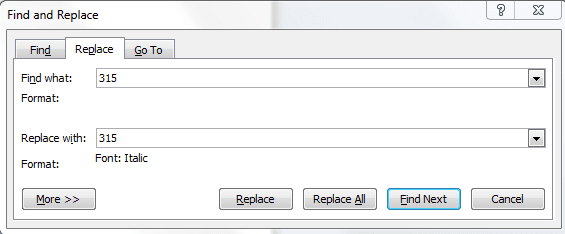
Hit F5 to bring up this dialog box.

F5.PNG

Select the Replace tab.

Type (315) in the Find What field.

Hit Ctrl+I to invoke Italics formatting and type (315) in the Replace With field (Note the format annotated under Replace With).

Click Replace All followed by OK.
 

My Computer

Computer Manufacturer/Model Number
HP Pavilion Elite 495UK
OS
Windows 7 Ultimate SP1 64-Bit
CPU
Intel Core i7 870 @ 2.93GHz
Motherboard
MSI 2A9C (CPU1)
Memory
8Gb Dual-Channel DDR3 @ 664MHz
Graphics Card(s)
nVidia GeForce GTX 460 1024MB dedicated RAM
Sound Card
Realtek HD Audio
Monitor(s) Displays
HP2310i
Screen Resolution
1920 x 1080
Hard Drives
1x1954GB Hitachi HDS22020ALA 330 (RAID), 1x1954GB Hitachi External for backup and storage
PSU
460W
Case
HP Elite
Cooling
Air cooled
Keyboard
Logitech K750 solar-powered keyboard
Mouse
Logitech Wireless M180 mouse
Internet Speed
2Mb
Other Info
Pure Avanti Flow Internet Radio with iPod Dock, 64Gb iPod, HP USB Speakers, Sony MDR-V500 Headphones, Sony Vaio F-Series Laptop
thanks for your reply seavixen.

that works in MS Word I think.
But I tried it just now in Excel and it didn't work.
The searches work differently in Excel and Word it looks like.

Can you make it work for EXCEL?
 

My Computer

OS
Spectrum 48k
Yes, it is different.

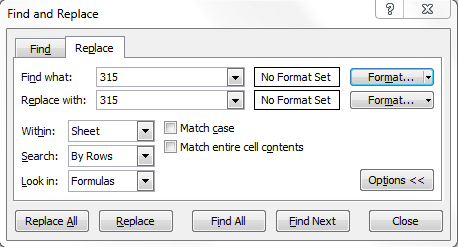
Excel Replace.PNG

Not sure which version of Excel you're using, but I'm using 2010.

Click Find & Select at the far right of the ribbon on the Home tab.

Select Replace & Options then choose your format.
 

My Computer

Computer Manufacturer/Model Number
HP Pavilion Elite 495UK
OS
Windows 7 Ultimate SP1 64-Bit
CPU
Intel Core i7 870 @ 2.93GHz
Motherboard
MSI 2A9C (CPU1)
Memory
8Gb Dual-Channel DDR3 @ 664MHz
Graphics Card(s)
nVidia GeForce GTX 460 1024MB dedicated RAM
Sound Card
Realtek HD Audio
Monitor(s) Displays
HP2310i
Screen Resolution
1920 x 1080
Hard Drives
1x1954GB Hitachi HDS22020ALA 330 (RAID), 1x1954GB Hitachi External for backup and storage
PSU
460W
Case
HP Elite
Cooling
Air cooled
Keyboard
Logitech K750 solar-powered keyboard
Mouse
Logitech Wireless M180 mouse
Internet Speed
2Mb
Other Info
Pure Avanti Flow Internet Radio with iPod Dock, 64Gb iPod, HP USB Speakers, Sony MDR-V500 Headphones, Sony Vaio F-Series Laptop
Excellent help seavixen32! I thought I was pretty savvy about Find and Replace, but you opened my eyes to a lot of customizations possible.
Rep+ to you.

And for other posters, here's some additional info that I just discovered:

To replace regular fonts with ANY FONT STYLE you want (e.g. new font, font size, bold/not bold, italics/no italics, etc.):
In a Word doc, open Find + Replace. Select the Replace tab.
Type the desired text in the ‘Find What’ field.
In the ‘Replace With’ field, type the desired text.
Then, with the cursor still inside the ‘Replace With’ box, at the bottom-left of the Find + Replace screen, select Format, then Font, and then you can then select any font changes you wish.
 

My Computer

Computer Manufacturer/Model Number
HP Pavillion dv5t (generation 1)
OS
Vista 64 bit and 32 bit (SP2)
CPU
Intel(R) Core(TM)2 Duo Processor T9400 (2.53 GHz
Memory
4GB DDR2 System Memory (2 Dimm)
Graphics Card(s)
512 MB NVIDIA GeForce 9600M GT
Monitor(s) Displays
15.4" diagonal WSXGA+ High-Definition HP BrightView Widescre
Screen Resolution
1680 x 1050
Hard Drives
320GB 5400RPM SATA Hard Drive with HP ProtectSmart Hard Drive Protection
Keyboard
Built-in HP
Mouse
Built in - Synaptics TouchPad V6.5 on PS/2 Port
Internet Speed
Max
Other Info
~ Intel Next-Gen Wireless-N Mini-card w/Bluetooth ~ Blu-Ray ROM DVD+/-R/RW ~ Integ. HDTV Hybrid Tuner ~ 12 Cell Battery ~ MS Office (Home Premium) 2007 ~
Thank you very much for your kind comments. Obviously, when people take time out to add to my reputation it is very much appreciated, but like many more on WSF, I take great pleasure in knowing I've helped someone.
 

My Computer

Computer Manufacturer/Model Number
HP Pavilion Elite 495UK
OS
Windows 7 Ultimate SP1 64-Bit
CPU
Intel Core i7 870 @ 2.93GHz
Motherboard
MSI 2A9C (CPU1)
Memory
8Gb Dual-Channel DDR3 @ 664MHz
Graphics Card(s)
nVidia GeForce GTX 460 1024MB dedicated RAM
Sound Card
Realtek HD Audio
Monitor(s) Displays
HP2310i
Screen Resolution
1920 x 1080
Hard Drives
1x1954GB Hitachi HDS22020ALA 330 (RAID), 1x1954GB Hitachi External for backup and storage
PSU
460W
Case
HP Elite
Cooling
Air cooled
Keyboard
Logitech K750 solar-powered keyboard
Mouse
Logitech Wireless M180 mouse
Internet Speed
2Mb
Other Info
Pure Avanti Flow Internet Radio with iPod Dock, 64Gb iPod, HP USB Speakers, Sony MDR-V500 Headphones, Sony Vaio F-Series Laptop
Back
Top