newbie that installed windows 7 after boot disk falure

cookiemae

New member
Local time
7:36 PM
Messages
4
Untitled.pngdisk man.jpg

computer.jpg
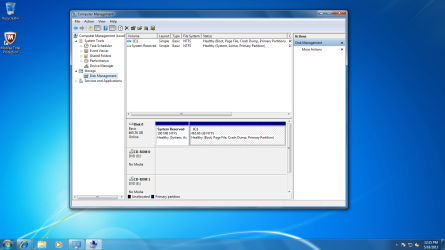
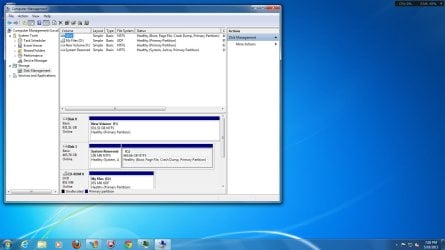
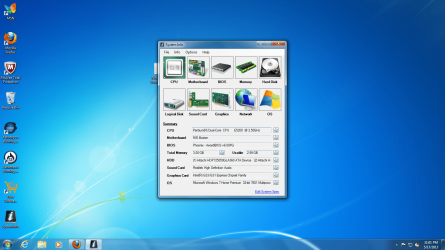
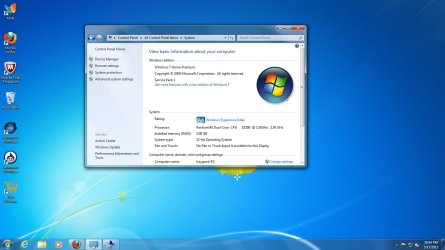
i have 2 hard drives in my computer one was 500 and the other was1tb now i have no space after i installed windows 7. before i installed windows 7 i had a boot disk falure and could not do a system restore so thats why i used the 7 disk.should i reinstall the 7 again?how do i get to use all the space i use to have? thanks for any help i can get
 
Last edited:

My Computer My Computer

Computer type
PC/Desktop
Computer Manufacturer/Model Number
hp
OS
Microsoft Windows 7 Home Premium 32-bit 7601 Multiprocessor Free Service Pack 1
CPU
Pentium(R) Dual-Core CPU E5200 @ 2.50GHz
Motherboard
MSI Boston
Memory
3.00 GB
Graphics Card(s)
Intel(R) G33/G31 Express Chipset Family
Sound Card
Realtek High Definition Audio
Screen Resolution
1600 x 900 x 32 bits (4294967296 colors) @ 60 Hz
Hard Drives
(1) Hitachi HDP725050GLA360 ATA Device (2) Hitachi HDS721010DLE630 ATA Device
Antivirus
mcafee
Browser
firefox
I don't know what you did but you somehow partitioned each drive into two small partitions of 48.82GB and 9.77GB with the rest left unallocated. Any data on either is probably lost.

The best thing you can do is do the Windows 7 install again, but disconnect which ever drive you DO NOT want Windows 7 installed to, leave just the one you want.

During the install, delete all partitions on it then create a new partition that spans the entire drive and complete the install. Once done, shutdown and reconnect the 2nd drive then use Disk Management to delete the existing partitions on it and create one or more, what ever size you want them to be.

Or ... read here: http://www.sevenforums.com/tutorials/219487-clean-reinstall-factory-oem-windows-7-a.html
 

My Computer My Computer

Computer type
PC/Desktop
Computer Manufacturer/Model Number
Lenovo IdeaCenter 450
OS
Windows 10 Pro X64
CPU
Intel Quad Core i7-4770 @ 3.4Ghz
Memory
16.0GB PC3-12800 DDR3 SDRAM 1600 MHz
Graphics Card(s)
Intel Integrated HD Graphics
Sound Card
Realtek HD Audio
Monitor(s) Displays
HP 22" LCD
Screen Resolution
1680 x 1050
Hard Drives
250GB Samsung EVO SATA-3 SSD
2TB Seagate ST2000DM001 SATA-2
1.5TB Seagate ST3150041AS SATA
Keyboard
Dell USB
Mouse
Lenovo USB
Internet Speed
Cable via Road Runner 3MB Upload, 30MB Download
Antivirus
Windows Defender, MBAM Pro, MBAE
Browser
Seamonkey
Other Info
UEFI/GPT
PLDS DVD-RW DH16AERSH

My Computer My Computer

Computer type
PC/Desktop
Computer Manufacturer/Model Number
Skylake Special #666
OS
Windows 10 Pro x64
CPU
Intel Core i7 6700K
Motherboard
Asus Sabertooth Z170 Mark 1
Memory
GSkill TridentZ RGB 16GB 3600 16-16-16-36
Graphics Card(s)
EVGA GTX 980 Ti SC x2
Sound Card
Realtek High Definition
Monitor(s) Displays
AOC G2460PG
Screen Resolution
1920 x 1080 144Hz
Hard Drives
Samsung 860 Pro 256GB, Seagate Barracuda 4TB x2
PSU
EVGA 1000 P2, EVGA White Custom Braided Cables
Case
Corsair Vengeance C70 Gunmetal Black
Cooling
Corsair H100i v2, Corsair ML120 x2, Thermal Grizzly Kryonaut
Keyboard
Logitech G910 Orion Spectrum
Mouse
Logitech G700s
Internet Speed
Verizon Fios Quantum Gateway 75/75
Antivirus
Windows Defender, Malwarebytes Free 3.8.3
Browser
Chrome
Other Info
Corsair SP120 x4, LG Blu-ray Drive, Durabrand HT-395 100 Watt Dolby Digital Amp, Corsair H2100 Wireless 7.1 Headset
If you want the WIn7 you installed on C you can delete the small partition to it's right in Disk Management and then Extend C into as much space as you want: Partition or Volume - Delete
Partition or Volume - Extend

If you have files on the other HD you need to rescue you can access them through Start>Computer, drag them to the desired folder on the left-hand explorer bar.

Once you have the files off the other HD you can delete all partitions and create new ones as you wish for storing a backup of your files and an image backup so you never have to reinstall again:
Backup User and System Files
Backup Complete Computer - Create an Image Backup

If you want to try to start the other Win7 then follow the Troubleshooting Steps for Windows 7 . You may only need to unplug C HD, boot the DVD to run a few Startup Repairs.
 
disk.png
Thanks for all the help this i is what the disk look like now.Is it ok? I unplugged the second drive.now i will plug it back up . i would like to use this 1tb disk for storage only do i need to reformat this secon drive/ thanks again you all have been Great!!!!
 

My Computer My Computer

Computer type
PC/Desktop
Computer Manufacturer/Model Number
hp
OS
Microsoft Windows 7 Home Premium 32-bit 7601 Multiprocessor Free Service Pack 1
CPU
Pentium(R) Dual-Core CPU E5200 @ 2.50GHz
Motherboard
MSI Boston
Memory
3.00 GB
Graphics Card(s)
Intel(R) G33/G31 Express Chipset Family
Sound Card
Realtek High Definition Audio
Screen Resolution
1600 x 900 x 32 bits (4294967296 colors) @ 60 Hz
Hard Drives
(1) Hitachi HDP725050GLA360 ATA Device (2) Hitachi HDS721010DLE630 ATA Device
Antivirus
mcafee
Browser
firefox
:o Thanks
 

My Computer My Computer

Computer type
PC/Desktop
Computer Manufacturer/Model Number
hp
OS
Microsoft Windows 7 Home Premium 32-bit 7601 Multiprocessor Free Service Pack 1
CPU
Pentium(R) Dual-Core CPU E5200 @ 2.50GHz
Motherboard
MSI Boston
Memory
3.00 GB
Graphics Card(s)
Intel(R) G33/G31 Express Chipset Family
Sound Card
Realtek High Definition Audio
Screen Resolution
1600 x 900 x 32 bits (4294967296 colors) @ 60 Hz
Hard Drives
(1) Hitachi HDP725050GLA360 ATA Device (2) Hitachi HDS721010DLE630 ATA Device
Antivirus
mcafee
Browser
firefox
Untitled.jpg


yea!!!!!!thanks
 

My Computer My Computer

Computer type
PC/Desktop
Computer Manufacturer/Model Number
hp
OS
Microsoft Windows 7 Home Premium 32-bit 7601 Multiprocessor Free Service Pack 1
CPU
Pentium(R) Dual-Core CPU E5200 @ 2.50GHz
Motherboard
MSI Boston
Memory
3.00 GB
Graphics Card(s)
Intel(R) G33/G31 Express Chipset Family
Sound Card
Realtek High Definition Audio
Screen Resolution
1600 x 900 x 32 bits (4294967296 colors) @ 60 Hz
Hard Drives
(1) Hitachi HDP725050GLA360 ATA Device (2) Hitachi HDS721010DLE630 ATA Device
Antivirus
mcafee
Browser
firefox
It's best to have the OS drive in DISK0 slot so it won't derail the boot files to a preceding Primary partition during reinstall or repairs.

If this is too much trouble then be sure to unplug all other HD's if you do a reinstall or repair.
 
Back
Top