Newby problem - Windows 7 and RAID 5

Quelle

New member
Local time
8:35 PM
Messages
12
Location
Yorkshire
I am aware that this subject has received attention before, but as a first time PC builder, I am still puzzled.

The system I have built has a Gigabyte GA-P55A-UD7 motherboard, an Intel i7 860 processor and four 1TB seamaster SATA HDDs

Following Gigabyte user manaual instructions, I configured the four HDDs in RAID 5 in the RAID BIOS, then proceeded to install Windws 7 Home Premium 64 bit.

When appropriate to do so, I installed the SATA RAID Driver that I had copied from the Gigabyte DVD.

At this point the Windows installer informed me that it couldn't install Windows on my hard drive (which was showing 2.7TB unallocated space) and suggested that I check that the driver was enabled in BIOS - I'm not sure how to do that.

I have tried Gigabyte's Technical help line and they suggested downloading the
Intel RAID driver version 9.6.0.1014. When I tried this, and let it self-extract, Windows installer said it could find no 'signed drivers' - and Gigabyte have stopped responding to me!

I'd be really grateful for any help.
 

My Computer

Computer Manufacturer/Model Number
Self build
OS
Window 7 Home Premium 64 bit
CPU
Intel i7 860
Motherboard
Gigabyte GA-P55A-UD7
Memory
2x Kingston KVR1333D3N9K2/8G
Graphics Card(s)
Gainward GeForce GTX 460 GLH
Monitor(s) Displays
IIlyama B2712HDS
Hard Drives
4x 1TB Seagate Barracuda 7200.12 ST31000528AS
PSU
Coolermaster Silent Pro Gold Modular 700W
Case
Coolermaster CM690 ii
Hello Quelle, welcome to Seven Forums!


Look in the BIOS for something called "Storage Configuration" or something similar, there should be options like "AHCI" "RAID" "IDE" you will have to configure it to RAID for it to move ahead.

We're seeing a lot of issues with people trying to install Windows 7 to such large partitions, and invariably when the space is reduced the installation goes ahead seamlessly.

I wouldn't try to install to a space/partition any larger than 100GB, that should be plenty for all your needs and after the install is complete and booting good then the partition can be enlarged if needed.

   Note

I have just created a tutortial for this at this link below.

DISKPART : At PC Startup

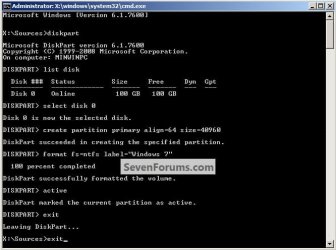
Have a look at Method One in this tutorial at the link below to see how to use the Windows installer to use diskpart to partition the HDD before the install actually starts; the snip below has the commands needed, in the correct order to do the job the correct way.

The size formula = 1024MB = 1GB - 1024x100 = 102400, you can use/create any size you like.

Be sure to post back with any further questions you may have and to keep us informed.

SSD / HDD : Optimize for Windows Reinstallation
click to enlarge
Diskpart_Commands.jpg
 
Last edited:

My Computer

Computer Manufacturer/Model Number
* BFK Customs *
OS
W 7 64-bit Ultimate
CPU
Intel Q9550 Yorkfield
Motherboard
ASUS P5Q Pro
Memory
8GB Dominator 8500C5D
Graphics Card(s)
ATI : XFX 5870
Sound Card
Realtek HD Audio 7-1
Monitor(s) Displays
1x 47" LCD HDMI & 3x 26" LCD HDMI
Screen Resolution
1920x1080P & 1920x1200
Hard Drives
1x 80GB Intel X25-M G2 SSD : 1x 500GB & 1x 640GB WD Caviar Black(s)
PSU
Corsair 620HX
Case
Cooler Master RC-690
Cooling
Tuniq Tower 120, 2x 140mm and 3x 120mm case fans
Keyboard
Microsoft 500
Mouse
Razer Diamondback 3G
Internet Speed
14 Mb/s
Other Info
1x Koutech 3Gb/s SATA HDD Hot Swap Rack
One spec on your mobo/controller:

SATA 3Gb/s: Support for SATA RAID 0, RAID 1, RAID 5, and RAID 10
SATA 6Gb/s: Support for SATA RAID 0 and RAID 1

Will get back...
 

My Computer

Computer Manufacturer/Model Number
Dell and Custom
OS
Systems 1 and 2: Windows 7 Enterprise x64, Win 8 Developer
CPU
System 1: i7 [email protected], System 2: AMD FX-4100 Zambezi 3.6G
Motherboard
System 1:Dell 06NWYK System 2: ASUS M5A97 AM3+
Memory
System 1: 8GB System 2: 8GB
Graphics Card(s)
System 1: ATI FirePro V4800 System 2: Radeon HD 6850
Sound Card
System 1: onboard System 2: onboard
Monitor(s) Displays
System1: Viewsonic HDMI 24"
Screen Resolution
System 1: 1920x1080 System 2: 1920x1080
Hard Drives
System 1: Mirrored .5B drives System 2: Seagate Barracuda ST1000DM003 1TB 7200 RPM 64MB Cache SATA 6.0Gb/s
Case
System 1: Dell System 2: Cooler Master
Internet Speed
10 MBPS
When you installed Windows, did it ask for third party drivers? If so, you would install your raid drivers at that point. Or did you not get to that point?
 

My Computer

Computer Manufacturer/Model Number
Dell and Custom
OS
Systems 1 and 2: Windows 7 Enterprise x64, Win 8 Developer
CPU
System 1: i7 [email protected], System 2: AMD FX-4100 Zambezi 3.6G
Motherboard
System 1:Dell 06NWYK System 2: ASUS M5A97 AM3+
Memory
System 1: 8GB System 2: 8GB
Graphics Card(s)
System 1: ATI FirePro V4800 System 2: Radeon HD 6850
Sound Card
System 1: onboard System 2: onboard
Monitor(s) Displays
System1: Viewsonic HDMI 24"
Screen Resolution
System 1: 1920x1080 System 2: 1920x1080
Hard Drives
System 1: Mirrored .5B drives System 2: Seagate Barracuda ST1000DM003 1TB 7200 RPM 64MB Cache SATA 6.0Gb/s
Case
System 1: Dell System 2: Cooler Master
Internet Speed
10 MBPS
One spec on your mobo/controller:

SATA 3Gb/s: Support for SATA RAID 0, RAID 1, RAID 5, and RAID 10
SATA 6Gb/s: Support for SATA RAID 0 and RAID 1

Will get back...


You have a good point here, is he using "SATE II/3Gb/s" or "SATA III/6Gb/s" HDDs.
 

My Computer

Computer Manufacturer/Model Number
* BFK Customs *
OS
W 7 64-bit Ultimate
CPU
Intel Q9550 Yorkfield
Motherboard
ASUS P5Q Pro
Memory
8GB Dominator 8500C5D
Graphics Card(s)
ATI : XFX 5870
Sound Card
Realtek HD Audio 7-1
Monitor(s) Displays
1x 47" LCD HDMI & 3x 26" LCD HDMI
Screen Resolution
1920x1080P & 1920x1200
Hard Drives
1x 80GB Intel X25-M G2 SSD : 1x 500GB & 1x 640GB WD Caviar Black(s)
PSU
Corsair 620HX
Case
Cooler Master RC-690
Cooling
Tuniq Tower 120, 2x 140mm and 3x 120mm case fans
Keyboard
Microsoft 500
Mouse
Razer Diamondback 3G
Internet Speed
14 Mb/s
Other Info
1x Koutech 3Gb/s SATA HDD Hot Swap Rack
BFK and Lemur - many thanks for your replies - good not to feel alone in this! The HDDs are billed as SATA 3Gb/s, and I have plugged them into SATA2_0 through to SATA2_3 connectors on the motherboard, which are Intel P55 Chipset 3 Gb/s.

I am now reviewing BFK's tutorial advice and will then report back!

Many thanks again

Quelle
 

My Computer

Computer Manufacturer/Model Number
Self build
OS
Window 7 Home Premium 64 bit
CPU
Intel i7 860
Motherboard
Gigabyte GA-P55A-UD7
Memory
2x Kingston KVR1333D3N9K2/8G
Graphics Card(s)
Gainward GeForce GTX 460 GLH
Monitor(s) Displays
IIlyama B2712HDS
Hard Drives
4x 1TB Seagate Barracuda 7200.12 ST31000528AS
PSU
Coolermaster Silent Pro Gold Modular 700W
Case
Coolermaster CM690 ii
Oh - and I should say, when attempting the Windows 7 install, I reached a screen where it asked me to Load Drivers. This I did - the driver came from the Gigabyte disk that came with the mobo. I copied it to a USB stick on my current office ciomputer. That all seemed to go ok - except that after I had confirmed the driver and it had loaded, it then came up with the message that it was unable to load Windows 7 on Drive 0 (the RAID 5 configuration)
 

My Computer

Computer Manufacturer/Model Number
Self build
OS
Window 7 Home Premium 64 bit
CPU
Intel i7 860
Motherboard
Gigabyte GA-P55A-UD7
Memory
2x Kingston KVR1333D3N9K2/8G
Graphics Card(s)
Gainward GeForce GTX 460 GLH
Monitor(s) Displays
IIlyama B2712HDS
Hard Drives
4x 1TB Seagate Barracuda 7200.12 ST31000528AS
PSU
Coolermaster Silent Pro Gold Modular 700W
Case
Coolermaster CM690 ii
The latest Intel SATA RAID Drivers is 9.6.0.10149.43, with a data of September 3, 2010. I recommend grabbing that one of the net.

GA-P55A-UD7 (rev. 1.0) - GIGABYTE

The GIGABYTE SATA2 Preinstall driver (For AHCI / RAID Mode)
Note: Press F6 during Windows setup to read from floppy.
OS:Windows XP 64bit,Windows Vista 64bit,Windows 7 64bit - 1.17.54.1 0.19 MB 2010/04/29
 

My Computer

Computer Manufacturer/Model Number
Dell and Custom
OS
Systems 1 and 2: Windows 7 Enterprise x64, Win 8 Developer
CPU
System 1: i7 [email protected], System 2: AMD FX-4100 Zambezi 3.6G
Motherboard
System 1:Dell 06NWYK System 2: ASUS M5A97 AM3+
Memory
System 1: 8GB System 2: 8GB
Graphics Card(s)
System 1: ATI FirePro V4800 System 2: Radeon HD 6850
Sound Card
System 1: onboard System 2: onboard
Monitor(s) Displays
System1: Viewsonic HDMI 24"
Screen Resolution
System 1: 1920x1080 System 2: 1920x1080
Hard Drives
System 1: Mirrored .5B drives System 2: Seagate Barracuda ST1000DM003 1TB 7200 RPM 64MB Cache SATA 6.0Gb/s
Case
System 1: Dell System 2: Cooler Master
Internet Speed
10 MBPS
Thanks Lemur

This was recommended to me by the Gigabyte technical team also - I duly downloaded it, let it self extract and then loaded it on to a USB stick. When I tried to download it when the Windows 7 install suggested, it came back with a message that there were no 'signed drivers'. Not sure what that means. Should this be preinstalled perhaps?

Meanwhile I am currently cleaning my RAID5 HDD as per BFK suggestion. Given that I have 4 TB in total, this is going to take some time! It should be ready by breakfast time in the UK!

Quelle
 

My Computer

Computer Manufacturer/Model Number
Self build
OS
Window 7 Home Premium 64 bit
CPU
Intel i7 860
Motherboard
Gigabyte GA-P55A-UD7
Memory
2x Kingston KVR1333D3N9K2/8G
Graphics Card(s)
Gainward GeForce GTX 460 GLH
Monitor(s) Displays
IIlyama B2712HDS
Hard Drives
4x 1TB Seagate Barracuda 7200.12 ST31000528AS
PSU
Coolermaster Silent Pro Gold Modular 700W
Case
Coolermaster CM690 ii
I'm sorry mate, I didn't mean for you to do a "clean all" (Step One) on the HDDs, I just meant for you to see how to boot to diskpart (Method One) so you could use diskpart to do the partition creation before you started the install.
 

My Computer

Computer Manufacturer/Model Number
* BFK Customs *
OS
W 7 64-bit Ultimate
CPU
Intel Q9550 Yorkfield
Motherboard
ASUS P5Q Pro
Memory
8GB Dominator 8500C5D
Graphics Card(s)
ATI : XFX 5870
Sound Card
Realtek HD Audio 7-1
Monitor(s) Displays
1x 47" LCD HDMI & 3x 26" LCD HDMI
Screen Resolution
1920x1080P & 1920x1200
Hard Drives
1x 80GB Intel X25-M G2 SSD : 1x 500GB & 1x 640GB WD Caviar Black(s)
PSU
Corsair 620HX
Case
Cooler Master RC-690
Cooling
Tuniq Tower 120, 2x 140mm and 3x 120mm case fans
Keyboard
Microsoft 500
Mouse
Razer Diamondback 3G
Internet Speed
14 Mb/s
Other Info
1x Koutech 3Gb/s SATA HDD Hot Swap Rack
I like MadTownIdiot's suggestion. Make the drivers signed and install as suggested.
 

My Computer

Computer Manufacturer/Model Number
Dell and Custom
OS
Systems 1 and 2: Windows 7 Enterprise x64, Win 8 Developer
CPU
System 1: i7 [email protected], System 2: AMD FX-4100 Zambezi 3.6G
Motherboard
System 1:Dell 06NWYK System 2: ASUS M5A97 AM3+
Memory
System 1: 8GB System 2: 8GB
Graphics Card(s)
System 1: ATI FirePro V4800 System 2: Radeon HD 6850
Sound Card
System 1: onboard System 2: onboard
Monitor(s) Displays
System1: Viewsonic HDMI 24"
Screen Resolution
System 1: 1920x1080 System 2: 1920x1080
Hard Drives
System 1: Mirrored .5B drives System 2: Seagate Barracuda ST1000DM003 1TB 7200 RPM 64MB Cache SATA 6.0Gb/s
Case
System 1: Dell System 2: Cooler Master
Internet Speed
10 MBPS
It's typically not recommended to install an operating system to a RAID 5 array. Since it has to calculate parity on each write, you suffer some performance penalties on the drive that the OS is installed to.

Typically, you run a RAID 1 mirror or a RAID 0, 10 stripe for the OS..and then RAID 5 for a data partition.
 

My Computer

Computer Manufacturer/Model Number
Self-Built in July 2009
OS
Windows 7 Ultimate x64
CPU
Intel Q9550 2.83Ghz OC'd to 3.40Ghz
Motherboard
Gigabyte GA-EP45-UD3R rev. 1.1, F12 BIOS
Memory
8GB G.Skill PI DDR2-800, 4-4-4-12 timings
Graphics Card(s)
EVGA 1280MB Nvidia GeForce GTX570
Sound Card
Realtek ALC899A 8 channel onboard audio
Monitor(s) Displays
23" Acer x233H
Screen Resolution
1920x1080
Hard Drives
Intel X25-M 80GB Gen 2 SSD
Western Digital 1TB Caviar Black, 32MB cache. WD1001FALS
PSU
Corsair 620HX modular
Case
Antec P182
Cooling
stock
Keyboard
ABS M1 Mechanical
Mouse
Logitech G9 Laser Mouse
Internet Speed
15/2 cable modem
Other Info
Windows and Linux enthusiast. Logitech G35 Headset.
It's typically not recommended to install an operating system to a RAID 5 array. Since it has to calculate parity on each write, you suffer some performance penalties on the drive that the OS is installed to.

Typically, you run a RAID 1 mirror or a RAID 0, 10 stripe for the OS..and then RAID 5 for a data partition.

Yep. RAID 5 for my servers. RAID 1+0 for workstations. I just run RAID 0 b/c I like striping and all data is backed up on server. I'm not quite sure why you'd want to run RAID 5 on workstation unless it truly is mission critical, is hot swappable, and you can't afford it to be down.
 

My Computer

Computer Manufacturer/Model Number
Dell and Custom
OS
Systems 1 and 2: Windows 7 Enterprise x64, Win 8 Developer
CPU
System 1: i7 [email protected], System 2: AMD FX-4100 Zambezi 3.6G
Motherboard
System 1:Dell 06NWYK System 2: ASUS M5A97 AM3+
Memory
System 1: 8GB System 2: 8GB
Graphics Card(s)
System 1: ATI FirePro V4800 System 2: Radeon HD 6850
Sound Card
System 1: onboard System 2: onboard
Monitor(s) Displays
System1: Viewsonic HDMI 24"
Screen Resolution
System 1: 1920x1080 System 2: 1920x1080
Hard Drives
System 1: Mirrored .5B drives System 2: Seagate Barracuda ST1000DM003 1TB 7200 RPM 64MB Cache SATA 6.0Gb/s
Case
System 1: Dell System 2: Cooler Master
Internet Speed
10 MBPS
BFK - not to worry, the HDD cleaned whilst we were asleep! I then created a 100GB partition as per tutorial, and continued with installing Windows 7 - and got the same result - it refused to install to the partition.

That was using the original driver taken from the Gigabyte DVD. I have downloaded the Intel SATA RAID Driver 9.6.0.1014 suggested by Gigabyte and Lemar. When downloaded, it then self extracts to a file named iata_cd. Clicking on that reveals nothing to my untutored eye that resembles a driver! When I try to load this file as the driver, Windows 7 installer says it cannot find signed drivers.

I am now contemplating usinf Mad Town Idiots suggestion of trying to sign the iata_cd supposed driver. However if someone could have a look at this driver for me and see if it is, or contains a driver, I would be much obliged.

I also note the comments about the in-advisability of loading Windows 7 to a RAID5 drive. Since I only have 4 HDDs, I take it that I need another one (!) if I want RAID0/1 for Windows and RAID5 for data.

A feeling of weariness is descending on my shoulders, and I wonder if I should just load Windows 7 on a single HDD and see if it will talk to a - HDD RAID 5 for data. I've spent a week trying to sort this out, and my wife asked who I was this morning!

I am really grateful to all for their help with this matter.

Quelle


Intel SATA RAID Driver OS:Windows XP 32bit,Windows XP 64bit,Windows Vista 32bit,Windows Vista 64bit,Windows 7 32bit,Windows 7 64bit,Windows Server 2003 32bit,Windows Server 2003 64bit
9.​6.​0.​1014
 

My Computer

Computer Manufacturer/Model Number
Self build
OS
Window 7 Home Premium 64 bit
CPU
Intel i7 860
Motherboard
Gigabyte GA-P55A-UD7
Memory
2x Kingston KVR1333D3N9K2/8G
Graphics Card(s)
Gainward GeForce GTX 460 GLH
Monitor(s) Displays
IIlyama B2712HDS
Hard Drives
4x 1TB Seagate Barracuda 7200.12 ST31000528AS
PSU
Coolermaster Silent Pro Gold Modular 700W
Case
Coolermaster CM690 ii
Hello again Quelle.


Maybe as an experiment you should break the RAID and install to a single HDD to confirm that the machine has no other issues and will in-fact function as intended.

If so just leave a single HDD connected to the mobo for the install; you would have to set the "storage config" in the BIOS back to AHCI, best setting for a single HDD.

A wipe would not be needed but create a single 100GB partition to install to.

Then you would have an install of Windows 7 to "play" with while you research the best RAID config to pursue if that is indeed where you want to go.

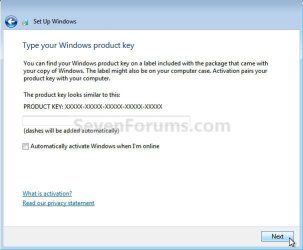
Don't enter an activation key when presented with this dialog box during the install, this will give you 120 days to sort how you want to proceed.

Activation Trial Period - Extend Up to 120 Days

click to enlarge
No Key.jpg
 

My Computer

Computer Manufacturer/Model Number
* BFK Customs *
OS
W 7 64-bit Ultimate
CPU
Intel Q9550 Yorkfield
Motherboard
ASUS P5Q Pro
Memory
8GB Dominator 8500C5D
Graphics Card(s)
ATI : XFX 5870
Sound Card
Realtek HD Audio 7-1
Monitor(s) Displays
1x 47" LCD HDMI & 3x 26" LCD HDMI
Screen Resolution
1920x1080P & 1920x1200
Hard Drives
1x 80GB Intel X25-M G2 SSD : 1x 500GB & 1x 640GB WD Caviar Black(s)
PSU
Corsair 620HX
Case
Cooler Master RC-690
Cooling
Tuniq Tower 120, 2x 140mm and 3x 120mm case fans
Keyboard
Microsoft 500
Mouse
Razer Diamondback 3G
Internet Speed
14 Mb/s
Other Info
1x Koutech 3Gb/s SATA HDD Hot Swap Rack
Thanks BFK. WIll do. That Shift+F10 - does that only work on the Language screen?
 

My Computer

Computer Manufacturer/Model Number
Self build
OS
Window 7 Home Premium 64 bit
CPU
Intel i7 860
Motherboard
Gigabyte GA-P55A-UD7
Memory
2x Kingston KVR1333D3N9K2/8G
Graphics Card(s)
Gainward GeForce GTX 460 GLH
Monitor(s) Displays
IIlyama B2712HDS
Hard Drives
4x 1TB Seagate Barracuda 7200.12 ST31000528AS
PSU
Coolermaster Silent Pro Gold Modular 700W
Case
Coolermaster CM690 ii
shift+f10 will work at anytime before the actual install process starts, but the best time to do it is before clicking "install windows now"
also if you really have to have a redundant RAID setup, and you have (or can get) 4 identical HDDs, why not consider RAID 10?. It will be much faster than raid 5 and just as reliable if you have good hardware to work with, but the problem with RAID is it usually doesn't work very well unless you're using enterprise class HDDs and the motherboard has a good, built in RAID controller. Most of the problems I've seen with RAID have been as a direct result of trying to set it up on hardware that wasn't designed for it, using a PCI RAID controller or worse, software based RAID.
IMO.. the more trouble you have getting windows installed, the more likely it will crash in the future
 
   Note

I have just created a tutortial for this at this link below.

DISKPART : At PC Startup

Hello Quelle.


Sorry I didn't have it for you yesterday mate. :o
 

My Computer

Computer Manufacturer/Model Number
* BFK Customs *
OS
W 7 64-bit Ultimate
CPU
Intel Q9550 Yorkfield
Motherboard
ASUS P5Q Pro
Memory
8GB Dominator 8500C5D
Graphics Card(s)
ATI : XFX 5870
Sound Card
Realtek HD Audio 7-1
Monitor(s) Displays
1x 47" LCD HDMI & 3x 26" LCD HDMI
Screen Resolution
1920x1080P & 1920x1200
Hard Drives
1x 80GB Intel X25-M G2 SSD : 1x 500GB & 1x 640GB WD Caviar Black(s)
PSU
Corsair 620HX
Case
Cooler Master RC-690
Cooling
Tuniq Tower 120, 2x 140mm and 3x 120mm case fans
Keyboard
Microsoft 500
Mouse
Razer Diamondback 3G
Internet Speed
14 Mb/s
Other Info
1x Koutech 3Gb/s SATA HDD Hot Swap Rack
Dear BFK and all others who have helped me with this

Many thanks for all your help - sorry for the 24+ hour radio silence - car purchase got in the way!

Anyway, in the interim I have had a communication from Gigabyte. They tell me of a new BIOS I should download, and a different RAID driver download. They also tell me that a bootable RAID with an O/S on it is limited to 2 TB - so I was snookered from the outset!

Also in the interim I have unconfigured the RAID 5 and loaded Windows 7 successfully on a 100GB partition on one of the four 1TB HDDs.

Enter my son, visiting from the south of England last evening, who took over the whole shaboodle, and has now given me four separate named drives and downloaded stuff I didn't know I wanted....!

So I am not quite where I wanted to be with my new PC build, but having something constructed and having learnt a lot and increased my confidence has been very good. A really good experience has been the tremendous help you guys have given me - for which I am deeply indebted.

Now I go into a state of deep meditation and work out what to do next...RAID 10? Who knows!

Quelle
 

My Computer

Computer Manufacturer/Model Number
Self build
OS
Window 7 Home Premium 64 bit
CPU
Intel i7 860
Motherboard
Gigabyte GA-P55A-UD7
Memory
2x Kingston KVR1333D3N9K2/8G
Graphics Card(s)
Gainward GeForce GTX 460 GLH
Monitor(s) Displays
IIlyama B2712HDS
Hard Drives
4x 1TB Seagate Barracuda 7200.12 ST31000528AS
PSU
Coolermaster Silent Pro Gold Modular 700W
Case
Coolermaster CM690 ii
Back
Top