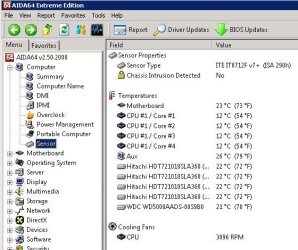
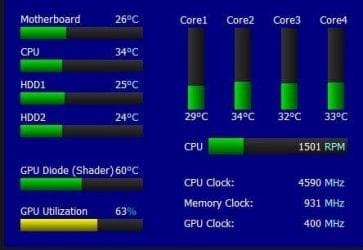
I have just recently built a computer. There was a problem with it and my friend and I had to trouble shoot it. When trouble shooting, we had to remove the CPU, ruining the heat paste. We have recently just reapplied the heat paste using the pea method. The only concern I have is that when I use CPUID Hard Ware Monitor, it says that the temperature for the computer is under 20 degrees Celsius when I'm browsing. I'm not sure if this is normal or not. Please help.
If the temps are low, then in my view you should not be worried. It's high temps that you should be concerned about. As you mentioned that you re applied thermal paste. Your CPU heat sink pipes are getting properly cooled and getting good air flow.
My Computer
At a glance
Windows 11 x64i5 2500K @ 3.3 GHz16 GB DDR 3 @ 1600MhzMSI 1050TI 4GB OC version
Computer type
PC/Desktop
Computer Manufacturer/Model Number
Custom Bulid/Self made
OS
Windows 11 x64
CPU
i5 2500K @ 3.3 GHz
Motherboard
ASUS P8 Z77 V pro
Memory
16 GB DDR 3 @ 1600Mhz
Graphics Card(s)
MSI 1050TI 4GB OC version
Sound Card
On Board (Realtek HD audio)
Monitor(s) Displays
Samsung 22" LCD
Screen Resolution
1920*1080
Hard Drives
Seagate 1 TB, WD 1TB, Seagate 2 TB ( I use a lot of space)
try using cpuz or speed fan theyre my prefered monitoring software for everything related.
the easiest way to tell if its a dodgy reading is to simply measure the temperature in the room your sat in. if its more than 20c then its impossible for an air cooler to give a lower temp.
My Computer
At a glance
Windows 7 Ultimate x64, & Mac OS X 10.9.2Intel Core i5 2500kCorsair Vengence 8gb 1866mhzNvidia GTX 770 OC
Computer type
PC/Desktop
Computer Manufacturer/Model Number
Built by badgers!!!
OS
Windows 7 Ultimate x64, & Mac OS X 10.9.2
CPU
Intel Core i5 2500k
Motherboard
Asus P8z68 LE
Memory
Corsair Vengence 8gb 1866mhz
Graphics Card(s)
Nvidia GTX 770 OC
Monitor(s) Displays
2x ASUS LED 22" IPS
Screen Resolution
3840x1080
Hard Drives
240GB Crucial M500 SSD
120gb Corsair Force 3 SSD
1TB Western Digital
PSU
Corsair HX650w Modular
Case
Corsair Air 540
Cooling
Corsair H60 Push/Pull
Keyboard
Corsair K70/ Logitech G27 wheel
Mouse
Saitek R.A.T 9
Internet Speed
Too slow!
Other Info
AMD fusion E350N Home server-Windows Home Server 2011 (also made by badgers!)
2011 Macbook 2.4ghz Core2Duo, 4gb ddr3, 120gb Ocz Vertex SSD
Lower than ambient temp reading is not unheard of, some thermal resistors have trouble at lower temps. THIS site has some good info on chip and board sensors. Temps under 30C may be inaccurate but as the temp increases so should the accuracy, by 30+C it should be very close, +/-1C. I have a cpu that reads accurate down to 28C, then it drops to 12C, nothing in between.
You may encounter sensors that report the temp as the "difference" from a predetermined temp, ie devise is actual temp of 42C, but the reported temp is 58C or 58 degrees from 100C, the 100C being the predetermined temperature.
My Computer
At a glance
Win8/8.1,Win7-U64, Vista U64, uncounted Linux...AMD and Intell, 9590, 8350, i5 3570kCorsair G SkillCrossfired Sapphire HD 7950 Vapor-X, ASUS R9 ...
Computer type
PC/Desktop
Computer Manufacturer/Model Number
Custom, Dell and Lenono LT's
OS
Win8/8.1,Win7-U64, Vista U64, uncounted Linux distor's
CPU
AMD and Intell, 9590, 8350, i5 3570k
Motherboard
CFVFZ, GA990FXA, Z77e-itx
Memory
Corsair G Skill
Graphics Card(s)
Crossfired Sapphire HD 7950 Vapor-X, ASUS R9 280X TOP
As has been noted, try several monitor apps - I use AIDA64. I have found that in general these apps give good readings with Intel, but sometimes inaccurate results with AMD - eg here on my Athlon X4 server
cpu cores well below ambient !
My Computer
At a glance
Windows 7 pro x64 SP1Intel i7-2600k o/c to 4.6GHz8GB Mushkin 1866MHzNvidia GTX 750 Ti 2GB
Computer type
PC/Desktop
Computer Manufacturer/Model Number
self build
OS
Windows 7 pro x64 SP1
CPU
Intel i7-2600k o/c to 4.6GHz
Motherboard
MSI Z68-GD80
Memory
8GB Mushkin 1866MHz
Graphics Card(s)
Nvidia GTX 750 Ti 2GB
Sound Card
integrated
Monitor(s) Displays
Liyama ProLite 27"
Screen Resolution
1920*1080 px
Hard Drives
Seagate 2TB
PSU
Coolermaster GX 750W
Case
Antec 300 case + 5 fans
Cooling
Dark Rock Pro
Internet Speed
62Mbit down 18Mbit up
Antivirus
MSE
Browser
Firefox
Other Info
Blackgold BGT3650 Quad HD TV card. Also have various 3770 + 4770K render boxes.
speed fan says my cores are currently running at 112-118c... im not seeing any steam venting from my radiator or pump so I think its another dodgy reading!
My Computer
At a glance
Windows 7 Ultimate x64, & Mac OS X 10.9.2Intel Core i5 2500kCorsair Vengence 8gb 1866mhzNvidia GTX 770 OC
Computer type
PC/Desktop
Computer Manufacturer/Model Number
Built by badgers!!!
OS
Windows 7 Ultimate x64, & Mac OS X 10.9.2
CPU
Intel Core i5 2500k
Motherboard
Asus P8z68 LE
Memory
Corsair Vengence 8gb 1866mhz
Graphics Card(s)
Nvidia GTX 770 OC
Monitor(s) Displays
2x ASUS LED 22" IPS
Screen Resolution
3840x1080
Hard Drives
240GB Crucial M500 SSD
120gb Corsair Force 3 SSD
1TB Western Digital
PSU
Corsair HX650w Modular
Case
Corsair Air 540
Cooling
Corsair H60 Push/Pull
Keyboard
Corsair K70/ Logitech G27 wheel
Mouse
Saitek R.A.T 9
Internet Speed
Too slow!
Other Info
AMD fusion E350N Home server-Windows Home Server 2011 (also made by badgers!)
2011 Macbook 2.4ghz Core2Duo, 4gb ddr3, 120gb Ocz Vertex SSD
"Core Temp" is what AMD refers to as "TCTL" and is a non-physical temperature on an arbitrary scale measured in degrees. It does not represent an actual physical temperature like die or case temperature
Basically the temp is not accurate until it reaches 40-45c and will show the wrong temp when idle.
Most program's will read the core temp which is the temp you are seeing but not the true temp while below 40-45c. If you use a program like HWinfo64 HWiNFO, HWiNFO32/64 - Download it will show you the core temp as well as the socket temp like in my screen shot. It's the load temp's you need to watch but if you want to know the idle temp just look at the socket temp and use the core temp reading for true load temp's.
Never run more than 1 program which monitors temp's though as running multiple app's will cause false readings.