I have recently purchased an internal hard-drive and enclosure (WD Scorpio Blue 500 GB internal Hard-drive and NEXStar CX NST-200SU-BK enclosure). Shortly after I attempted to use the device I discovered that it would not function through my laptops eSATA port. I then accessed the drive using USB, gave it a primary partition, and assigned it the letter G. After this entire process I still could not accesses the drive using eSATA. Has anyone encountered this problem before and found a solution?
My Computer
At a glance
Windows 7 Home Premium x64AMD Turion(tm) II Dual-Core Mobile M500 2.20GHz4.00 GBAMD M880G with ATI Mobility Radeon HD 4200
Computer Manufacturer/Model Number
Hewlett-Packard/Hp Pavilion dv7 Notebook PC 4300ca
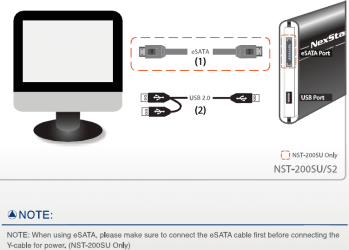
How did you connect the drive to your laptop? It looks as though it gets its power via the USB ports, so did you connect both cables in the order specified (see below) ?
Note: When using eSATA, please make sure to connect the eSATA cable first before connecting the Y-cable for power.
My Computer
At a glance
Windows 8.1 Pro RTM x64Intel Core-i5-3570K 4-core @ 3.4GHz (Ivy Brid...4 x 4GB DDR3-1600 Corsair Vengeance CMZ8GX3M2...MSI GeForce GTX770 Gaming OC 2GB
4 x 4GB DDR3-1600 Corsair Vengeance CMZ8GX3M2A1600C9B (16GB)
Graphics Card(s)
MSI GeForce GTX770 Gaming OC 2GB
Sound Card
Realtek High Definition on board solution (ALC 898)
Monitor(s) Displays
ViewSonic VA1912w Widescreen (VGA)
Screen Resolution
1440x900
Hard Drives
OCZ Agility 3 SSD 120GB SATA III x2 (RAID 0)
Samsung HD501LJ 500GB SATA II x2
Hitachi HDS721010CLA332 1TB SATA II
Iomega 1.5TB Ext USB 2.0
WD 2.0TB Ext USB 3.0
Do you have a USB charger (the sort that you plug into the mains which allows you to charge MP3 players etc)? If so, try using that as the power source instead of the USB ports on the laptop.
My Computer
At a glance
Windows 8.1 Pro RTM x64Intel Core-i5-3570K 4-core @ 3.4GHz (Ivy Brid...4 x 4GB DDR3-1600 Corsair Vengeance CMZ8GX3M2...MSI GeForce GTX770 Gaming OC 2GB
4 x 4GB DDR3-1600 Corsair Vengeance CMZ8GX3M2A1600C9B (16GB)
Graphics Card(s)
MSI GeForce GTX770 Gaming OC 2GB
Sound Card
Realtek High Definition on board solution (ALC 898)
Monitor(s) Displays
ViewSonic VA1912w Widescreen (VGA)
Screen Resolution
1440x900
Hard Drives
OCZ Agility 3 SSD 120GB SATA III x2 (RAID 0)
Samsung HD501LJ 500GB SATA II x2
Hitachi HDS721010CLA332 1TB SATA II
Iomega 1.5TB Ext USB 2.0
WD 2.0TB Ext USB 3.0
4 x 4GB DDR3-1600 Corsair Vengeance CMZ8GX3M2A1600C9B (16GB)
Graphics Card(s)
MSI GeForce GTX770 Gaming OC 2GB
Sound Card
Realtek High Definition on board solution (ALC 898)
Monitor(s) Displays
ViewSonic VA1912w Widescreen (VGA)
Screen Resolution
1440x900
Hard Drives
OCZ Agility 3 SSD 120GB SATA III x2 (RAID 0)
Samsung HD501LJ 500GB SATA II x2
Hitachi HDS721010CLA332 1TB SATA II
Iomega 1.5TB Ext USB 2.0
WD 2.0TB Ext USB 3.0
I'm having the same problem, laptop won't recognize HDD in esata enclosure. I bought a new cable and it's still not recognized. Powered by a USB ac wall unit. The same enclosure works with USB.
My Computer
At a glance
Windows 7 Professional 64bit8GBIntel HD Graphics, NVIDIA GeForce
I'm having the same problem, laptop won't recognize HDD in esata enclosure. I bought a new cable and it's still not recognized. Powered by a USB ac wall unit. The same enclosure works with USB.
I finally solved my esata drive not being recognized by using a Cables to Go cable. Apparently the male end is deep enough to make a connection. (is that what she said? )
My Computer
At a glance
Windows 7 Professional 64bit8GBIntel HD Graphics, NVIDIA GeForce




 )
)