
You are using an out of date browser. It may not display this or other websites correctly.
You should upgrade or use an alternative browser.
You should upgrade or use an alternative browser.
Next Desktop background - missing from right click
- Thread starter Franck49
- Start date


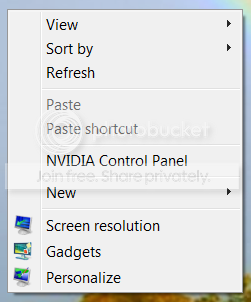
Could you be a little bit more specific please. When you right click on your desktop, you should see this:
My Computer
- Computer Manufacturer/Model Number
- HP, Dell, Gateway, Toshiba - 4 laptops and 2 desktops
- OS
- Vista, Windows7, Mint Mate, Zorin, Windows 8
- CPU
- from 1.6GHz Duo to i7
- Monitor(s) Displays
- 2x HP w2207
- Hard Drives
- 5x HDD, 7x SSD, 12x Externals
- Keyboard
- with trackball - no mices
- Mouse
- Trackball mice
- Internet Speed
- DSL 6000

- Local time
- 7:58 AM
- Messages
- 3,028
Yes...when I right click my desktop I have an option to view next desktop background.
My Computer
- Computer Manufacturer/Model Number
- tw33k
- OS
- Windows 7 Ultimate (x64) SP1
- CPU
- Intel 3770k 4.6GHz
- Motherboard
- ASUS Maximus V Formula
- Memory
- 8GB (2x 4GB) Crucial Ballistix
- Graphics Card(s)
- Sapphire 7950 (1060/1600)
- Sound Card
- On Board Realtek HD Audio
- Monitor(s) Displays
- 27" Acer B273HU (via HDMI)
- Screen Resolution
- 2048 x 1152
- Hard Drives
- Crucial M4 128GB
2TB WD Black
1TB Samsung F3 SATA
1TB WD Elite External
2TB WD USB 3.0
- PSU
- Corsair AX750 Gold
- Case
- Corsair Obsidian 800DW
- Cooling
- Corsair H100 (2x AP-121/2x UK-3000 push/pull)
- Keyboard
- Microsoft Wireless 5000
- Mouse
- Microsoft Wireless 5000
- Internet Speed
- 5mb/s
- Other Info
- Logitech z-2300 2.1 speakers
Lamptron FC-5 v2

Hello Franck49, welcome to Seven Forums!
I haven't run "Desktop Slideshow" for a while but I just enabled it and as tw33k says it is there.
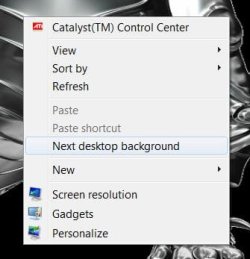
I haven't run "Desktop Slideshow" for a while but I just enabled it and as tw33k says it is there.
My Computer
- Computer Manufacturer/Model Number
- * BFK Customs *
- OS
- W 7 64-bit Ultimate
- CPU
- Intel Q9550 Yorkfield
- Motherboard
- ASUS P5Q Pro
- Memory
- 8GB Dominator 8500C5D
- Graphics Card(s)
- ATI : XFX 5870
- Sound Card
- Realtek HD Audio 7-1
- Monitor(s) Displays
- 1x 47" LCD HDMI & 3x 26" LCD HDMI
- Screen Resolution
- 1920x1080P & 1920x1200
- Hard Drives
- 1x 80GB Intel X25-M G2 SSD : 1x 500GB & 1x 640GB WD Caviar Black(s)
- PSU
- Corsair 620HX
- Case
- Cooler Master RC-690
- Cooling
- Tuniq Tower 120, 2x 140mm and 3x 120mm case fans
- Keyboard
- Microsoft 500
- Mouse
- Razer Diamondback 3G
- Internet Speed
- 14 Mb/s
- Other Info
- 1x Koutech 3Gb/s SATA HDD Hot Swap Rack
Yes...when I right click my desktop I have an option to view next desktop background.
How come I don't have that? Where is the setting?
My Computer
- Computer Manufacturer/Model Number
- HP, Dell, Gateway, Toshiba - 4 laptops and 2 desktops
- OS
- Vista, Windows7, Mint Mate, Zorin, Windows 8
- CPU
- from 1.6GHz Duo to i7
- Monitor(s) Displays
- 2x HP w2207
- Hard Drives
- 5x HDD, 7x SSD, 12x Externals
- Keyboard
- with trackball - no mices
- Mouse
- Trackball mice
- Internet Speed
- DSL 6000
Yes...when I right click my desktop I have an option to view next desktop background.
How come I don't have that? Where is the setting?
Do you have "Slideshow" enabled? R click desktop select "Personalize".
My Computer
- Computer Manufacturer/Model Number
- * BFK Customs *
- OS
- W 7 64-bit Ultimate
- CPU
- Intel Q9550 Yorkfield
- Motherboard
- ASUS P5Q Pro
- Memory
- 8GB Dominator 8500C5D
- Graphics Card(s)
- ATI : XFX 5870
- Sound Card
- Realtek HD Audio 7-1
- Monitor(s) Displays
- 1x 47" LCD HDMI & 3x 26" LCD HDMI
- Screen Resolution
- 1920x1080P & 1920x1200
- Hard Drives
- 1x 80GB Intel X25-M G2 SSD : 1x 500GB & 1x 640GB WD Caviar Black(s)
- PSU
- Corsair 620HX
- Case
- Cooler Master RC-690
- Cooling
- Tuniq Tower 120, 2x 140mm and 3x 120mm case fans
- Keyboard
- Microsoft 500
- Mouse
- Razer Diamondback 3G
- Internet Speed
- 14 Mb/s
- Other Info
- 1x Koutech 3Gb/s SATA HDD Hot Swap Rack
Got it. I only had single pictures as desktop - now it works. Thanks.
P: I never cared about those MS desktops. There are better pictures - including my own.
P: I never cared about those MS desktops. There are better pictures - including my own.
My Computer
- Computer Manufacturer/Model Number
- HP, Dell, Gateway, Toshiba - 4 laptops and 2 desktops
- OS
- Vista, Windows7, Mint Mate, Zorin, Windows 8
- CPU
- from 1.6GHz Duo to i7
- Monitor(s) Displays
- 2x HP w2207
- Hard Drives
- 5x HDD, 7x SSD, 12x Externals
- Keyboard
- with trackball - no mices
- Mouse
- Trackball mice
- Internet Speed
- DSL 6000

Got it. I only had single pictures as desktop - now it works. Thanks.
P: I never cared about those MS desktops. There are better pictures - including my own.
You're right, and I use my own from time to time in slideshow. Then I get tired of them and use some that I've downloaded. Probably wastes a lot of resources, but I have some to spare since I don't really do a whole lot.

My Computer
- Computer type
- PC/Desktop
- Computer Manufacturer/Model Number
- Self build
- OS
- Windows 10 Home
- CPU
- Intel Core i5 3550
- Motherboard
- ASUS P8Z77-V LX (LGA1155)
- Memory
- Corsair Vengeance DDR3 16GB
- Graphics Card(s)
- Nvidia GEForce GTX 970 SSC
- Monitor(s) Displays
- Hanns-G 23.6", Acer 17"
- Screen Resolution
- 1920x1080, 1440x900
- Hard Drives
- Sandisk SSD 256 GB
WD500GB
WD640GB
Seagage Ultra + 1TB ext.
BWD 800GB
WD 1TB ext
- PSU
- Antec 650w
- Case
- Cooler Master Centurion 534
- Cooling
- COOLER MASTER GeminII S524, 3 120 mm case fans.
- Keyboard
- Logitech MK300
- Mouse
- Logitech MK300
- Internet Speed
- Cable
- Antivirus
- MSSE, Malwarebytes
- Browser
- IE 10, Chrome

Hello Franck49, glad you got it sorted.
My Computer
- Computer Manufacturer/Model Number
- * BFK Customs *
- OS
- W 7 64-bit Ultimate
- CPU
- Intel Q9550 Yorkfield
- Motherboard
- ASUS P5Q Pro
- Memory
- 8GB Dominator 8500C5D
- Graphics Card(s)
- ATI : XFX 5870
- Sound Card
- Realtek HD Audio 7-1
- Monitor(s) Displays
- 1x 47" LCD HDMI & 3x 26" LCD HDMI
- Screen Resolution
- 1920x1080P & 1920x1200
- Hard Drives
- 1x 80GB Intel X25-M G2 SSD : 1x 500GB & 1x 640GB WD Caviar Black(s)
- PSU
- Corsair 620HX
- Case
- Cooler Master RC-690
- Cooling
- Tuniq Tower 120, 2x 140mm and 3x 120mm case fans
- Keyboard
- Microsoft 500
- Mouse
- Razer Diamondback 3G
- Internet Speed
- 14 Mb/s
- Other Info
- 1x Koutech 3Gb/s SATA HDD Hot Swap Rack