Solved Next Gen ?... WMP 12

  • Thread starter Thread starter Legacy Code
  • Start date Start date
L

Legacy Code

Guest
I have been messing around with WMP12 recently and i have had an idea id like to throw out to the forum for comment and conversation.

Windows Media Player 12 has a GUI , under that GUI it has key points that needs to be clicked to perform an action. You click a PNG and it plays ( as if by magic ) a song/ video / displays a photo. Do you think it would be possible to restructure the GUI's look , kinda like you do in a custom visual style ?

I dont mean actually move the trigger points , just lose the original GUI and super impose a new one on top of it. Ive worked out that you can turn down the opacity on the main window gradients ( LBG_BOTTOM_TRANSPARENCY & LBG_TOP_TRANSPARENCY) save it as the original PNG and its cool, it works.


Will i have to make my replacement PNG's exactly the same size as the originals Obviously keeping the same placement to allow the trigger points to work ? Can anyone actually work out the parameters by looking at the code.( its all Dutch to me :eek: )

Has anyone tried this before , either on 7 or vista ... did you win or fail ?

Yes i can hear you say try it and find out but i thought id make this post to see if any one has any advice on the subject ?

Would anyone be intrested in using a new design in WMP 12 ?

Anyone else care to chip in and see what we can/cant do with it ?

Here is a very rough idea what i have in mind , Yes its not done that well and the buttons are not a true representation of the original controls ( just some icons i found to try out ) Its just to illustrate what im getting at ( see screenshot)

Any views or comments please ?

Thanks.:geek:
 

Attachments

  • Capture1.png
    Capture1.png
    3.9 KB · Views: 31
Last edited:
I assume that the coordinates of the PNGs that you see in WMP12 and all other WMP versions are stored in the 256 category... So I'll run off that for this next bit. If you are thinking of moving buttons around, then read this. Otherwise, skip to below the first quote.

If you were planning on just changing the buttons' appearances, it would work...but if you were planning to move things to different spots of WMP, like you said, it would be hard. All that in the 256 category is hex code, you would need a hex editor to do it. But it would be hard.
Now, if you think, as the quote below says, the WSZ files in the 256 seem to be WinAmp skin files, but they're, as said, a different format, which possibly means that Microsoft possibly has a tool that they use exclusively to make the full-screen themes. Which also possibly means that they are adverse to us editing the placement of the main theme, and would probably keep any other ways to do it hidden.


Taken from Tech-Archive.net:

You cannot though individualise the actual skin used by WMP11 (the default
full mode skin). The skin's name is MAINAPPSKIN2.WSZ, you can extract it out
of the wmploc.dll file using a resource editor, but you cannot actually edit
it using a WYSIWYG editor, the extension alludes to the extension of skins
used by WinAmp, but in fact it's a totally different format, so the only way
to edit it is to use a Hex Editor, which is more complicated than editing
through a resource hacker.


So...yea...if you just plan on changing the colors, then it's all fine. But for placement, probably not.


Will i have to make my replacement PNG's exactly the same size as the originals Obviously keeping the same placement to allow the trigger points to work ?
Not necessarily, but the trigger points, which are in fact PNGs themselves (and their size can be edited) would only react to any mouseclicks within the trigger area. Lemme give an example.

Here is what you see: 453.png

Here is what the program sees: map.png
What I mean by that is that the program is looking for the color red and sets that color to the pause function. If the user clicks anywhere in that red circle, the program will see that and run the pause function. :p


I would personally love to do this, but I don't know whether you plan on just the GUI appearance or the placement of the GUI. ;)


Hope it helped!
 
Last edited:

My Computer

Computer type
PC/Desktop
Computer Manufacturer/Model Number
Custom built
OS
Windows 8 Pro 64-bit
CPU
Intel Core i7 950 @4.4GHz
Motherboard
EVGA 131-GT-E767
Memory
12GB DDR3 1333MHz @1400 (9-9-9-24)
Graphics Card(s)
2x AMD Radeon HD 6770
Sound Card
Sound Blaster Audigy
Monitor(s) Displays
Acer S231HL + Acer E19T5W
Screen Resolution
1920x1080 + 1440x900
Hard Drives
128GB Samsung 840 Pro
1TB Seagate Barracuda 7200RPM 64mb
500GB Seagate Barracuda 7200RPM 16mb
PSU
Corsair GS800
Case
Custom-made
Cooling
CM Hyper212+, lots of fans
Keyboard
NMB RT8255C+
Mouse
Func MS-3
Internet Speed
30/1.5
Antivirus
Microsoft Security Essentials/Spybot SD/Malwarebytes
Browser
Google Chrome
Other Info
Onkyo TX-27 receiver & two Realistic Optimus T100s.
Kinda knew you would answer this one bro ....

All im thinking is replace all the bottom PNG's( and some top ones , be rude not to) to something cool looking.

HEX ? ok just speak to me in Klingon , i may understand it better lol.

Kinda understand about trigger points , but your saying as long as a user clicks in the "red circle area" it wont matter if its square , triangle or sheep looking.

So like in my original screen shot , do you think that would work ? Its not like im replacing one for one PNG's.... be more like 4-5 PNG's for one new( my ) image and maybe some glow. Its not a simple hue /colour saturation swap is it ?

Could we use HEX to alter the main body ( top and bottom basic colour, maybe black ) and add some glass effect kinda glow as well ?

Thanks for the reply...Super Star :D

EDIT : The trigger points will always be in place .. i dont plan on deleting anything .....just make the originals ...errr
hide , be invisible ... pretend they not around ... you get my drift :D
 
Last edited:
XD!

HEX = hexadecimal...if you've ever used an advanced image program like GIMP or Photoshop, in the color chooser you'll see something like FF0000 for Red and 00FF00 for Green. That's hex. But it doesn't just pertain to colors, like in this case...

About the shape of the trigger points, correct. It can be any shape, and it will still work, so long as the user knows where to click... ;)

About "Its not like im replacing one for one PNG's" and "Its not a simple hue /colour saturation swap is it ?", I don't understand what you mean...but I can try to give you the answer to the second...
The button can be anything you want it to be. It can be the same button with the hue changed, it can be the buttons in your screenshot, it could be a button with a little dog in it. So long as it's assigned to the resource of the PNG you're replacing. So....basically, what you did with the buttons in the Red and Green Wmploc.dll themes, but those red and green PNGs can be anything, but it's best to keep them the same size.

I'm not proficient at Hex, but I have a hex editor, and I might see if I can have a go at it. Don't expect any miracles though. :(

As for glass...I have no idea. At all.

And, lastly, for "hiding" the originals....Don't think that's possible, for what you're trying to do..think you have to completely replace the existing PNGs.

Yea....
 

My Computer

Computer type
PC/Desktop
Computer Manufacturer/Model Number
Custom built
OS
Windows 8 Pro 64-bit
CPU
Intel Core i7 950 @4.4GHz
Motherboard
EVGA 131-GT-E767
Memory
12GB DDR3 1333MHz @1400 (9-9-9-24)
Graphics Card(s)
2x AMD Radeon HD 6770
Sound Card
Sound Blaster Audigy
Monitor(s) Displays
Acer S231HL + Acer E19T5W
Screen Resolution
1920x1080 + 1440x900
Hard Drives
128GB Samsung 840 Pro
1TB Seagate Barracuda 7200RPM 64mb
500GB Seagate Barracuda 7200RPM 16mb
PSU
Corsair GS800
Case
Custom-made
Cooling
CM Hyper212+, lots of fans
Keyboard
NMB RT8255C+
Mouse
Func MS-3
Internet Speed
30/1.5
Antivirus
Microsoft Security Essentials/Spybot SD/Malwarebytes
Browser
Google Chrome
Other Info
Onkyo TX-27 receiver & two Realistic Optimus T100s.
XD!

HEX = hexadecimal...


Yea....

Okay , So now is a good time to leave this post and drink my beer or else it will get cold LOL

I think im a little over my head now .... but if we keep the original PNG but hide it (open up the graphic in PS , turn down the opacity with the slider in the layers pallet and add a new graphic and save it , im kinda hoping it will work as it will still be in the application , you just wont see it. Delete it and the application will not work/ or it will show up as a nasty black/white space with a red X to show you that you just failed :cry:

About "Its not like im replacing one for one PNG's" and "Its not a simple hue /colour saturation swap is it ?", I don't understand what you mean...

Ok open up WMP12 (png 1) and press PLAY, put your cursor over the play button and it will use a "mouse over" PNG that shows a glow around the play button (png 2) listen to a song , then stop it and it will show a new png to display PAUSE (png 3).

To change the colour of them all is easy , just make an "Action" in PS , automate it and run a batch to change the colour in bulk ...easy as you like. Maybe the basic control panel has 30 pngs to edit just to change the colour... we want to replace ALL/MOST of the pngs in the player.

Folder 257 has around 500 pngs i think ? Sure some are animated gifs and cant be edited in PS ( grapical equaliser/spectrum analyser ) and some are for the Superbar mini player ( bottom and sideways orientated tool bar players, dont wanna mess with them to much . Same as the thumbnail player and its controls) STILL a lot of stuff to change. Once we work out what to change and what to leave it wont be to bad. Maybe it will slim down to 100-200 pngs , maybe not even that ... Think its best to just try and replace the main controls to start with.

I was thinking make some glassy Orbs and add the original player controls on top of the orbs to start with.Lose the outline of the player controls completely.Just show the control buttons ????

How cool would it be to create a new custom interface for WMP12 ? Sure it dont sound hard to do and it will be time consuming . It has possibilities im sure most will agree with that.

So to sum up, dont move any controls , just replace the current PNGs and add some custom ones to create a new visual style.
 
Why keep the original PNG but hide it? Why not just replace it like you said at the bottom of your post? :P

There is also the somewhat easier and more flexible option of creating a skin and telling people to use it at fullscreen...but my expertise at skins isn't great at all...and then you have to code in XML...so...nevermind. :p

Ok open up WMP12 (png 1) and press PLAY, put your cursor over the play button and it will use a "mouse over" PNG that shows a glow around the play button (png 2) listen to a song , then stop it and it will show a new png to display PAUSE (png 3).

Just a side note, that PNG 3 is not the pause button. PNG 3 is actually what appears when you have clicked the play button, but have not released the mouse button yet. :p

I was thinking make some glassy Orbs and add the original player controls on top of the orbs to start with.

So..make some orbs...and then overwrite them with the originals? O_o?


My idea of what we would do is simply go in, figure out and make a list of what the things we need (excluding the PNGs from the older versions) are... and then make replacements to them, and then overwrite the cooresponding PNGs with the ones we just made. Is that the idea you're going for?
 

My Computer

Computer type
PC/Desktop
Computer Manufacturer/Model Number
Custom built
OS
Windows 8 Pro 64-bit
CPU
Intel Core i7 950 @4.4GHz
Motherboard
EVGA 131-GT-E767
Memory
12GB DDR3 1333MHz @1400 (9-9-9-24)
Graphics Card(s)
2x AMD Radeon HD 6770
Sound Card
Sound Blaster Audigy
Monitor(s) Displays
Acer S231HL + Acer E19T5W
Screen Resolution
1920x1080 + 1440x900
Hard Drives
128GB Samsung 840 Pro
1TB Seagate Barracuda 7200RPM 64mb
500GB Seagate Barracuda 7200RPM 16mb
PSU
Corsair GS800
Case
Custom-made
Cooling
CM Hyper212+, lots of fans
Keyboard
NMB RT8255C+
Mouse
Func MS-3
Internet Speed
30/1.5
Antivirus
Microsoft Security Essentials/Spybot SD/Malwarebytes
Browser
Google Chrome
Other Info
Onkyo TX-27 receiver & two Realistic Optimus T100s.
Yea png 3 is just an outer glow that shows up , its just a hollow play/pause button with outer glow added to it (257~ 440 / 7805 i think ?)

Ok cool i will start messing with things tomorrow/today ( its early morning in London) and try and break WMP as best as i can. So delete the original graphic and replace it with a new one, ...sounds like a plan.
 
Those look like the trigger PNGs to me. Sounds like a great plan. It'll be tomorrow in my case. I would get started tonight but I have perfect ideas for those transparency scripts that are fresh in my mind...off to edit! :)
 

My Computer

Computer type
PC/Desktop
Computer Manufacturer/Model Number
Custom built
OS
Windows 8 Pro 64-bit
CPU
Intel Core i7 950 @4.4GHz
Motherboard
EVGA 131-GT-E767
Memory
12GB DDR3 1333MHz @1400 (9-9-9-24)
Graphics Card(s)
2x AMD Radeon HD 6770
Sound Card
Sound Blaster Audigy
Monitor(s) Displays
Acer S231HL + Acer E19T5W
Screen Resolution
1920x1080 + 1440x900
Hard Drives
128GB Samsung 840 Pro
1TB Seagate Barracuda 7200RPM 64mb
500GB Seagate Barracuda 7200RPM 16mb
PSU
Corsair GS800
Case
Custom-made
Cooling
CM Hyper212+, lots of fans
Keyboard
NMB RT8255C+
Mouse
Func MS-3
Internet Speed
30/1.5
Antivirus
Microsoft Security Essentials/Spybot SD/Malwarebytes
Browser
Google Chrome
Other Info
Onkyo TX-27 receiver & two Realistic Optimus T100s.
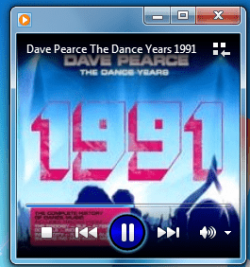
Okay .. just had a quick bash at it and i have deleted ( hidden to be honest) the "main player out line" and deleted "glass control surround", also added a button to all the player interfaces : Main , superbar bottom/top and side superbar and small window player ( looks rough but its just a tester )

Listed "main player outline" and "main body glass surround" png numbers from 257 as well as png's/psd altered (,")
 

Attachments

  • outline wmp 12 removed.PNG
    outline wmp 12 removed.PNG
    3.4 KB · Views: 398
  • Capture 3.PNG
    Capture 3.PNG
    29.5 KB · Views: 954
  • wmp 12 png _257_folder.txt
    wmp 12 png _257_folder.txt
    446 bytes · Views: 31
  • Capture3.PNG
    Capture3.PNG
    3.1 KB · Views: 11
  • PNG_PSD.zip
    PNG_PSD.zip
    580.3 KB · Views: 26
Awesome! Digging into it now. I'm betting I'll be going to sleep within the hour. I'll be back probably around 11AM your time. 'Till then, signing off. :)
 

My Computer

Computer type
PC/Desktop
Computer Manufacturer/Model Number
Custom built
OS
Windows 8 Pro 64-bit
CPU
Intel Core i7 950 @4.4GHz
Motherboard
EVGA 131-GT-E767
Memory
12GB DDR3 1333MHz @1400 (9-9-9-24)
Graphics Card(s)
2x AMD Radeon HD 6770
Sound Card
Sound Blaster Audigy
Monitor(s) Displays
Acer S231HL + Acer E19T5W
Screen Resolution
1920x1080 + 1440x900
Hard Drives
128GB Samsung 840 Pro
1TB Seagate Barracuda 7200RPM 64mb
500GB Seagate Barracuda 7200RPM 16mb
PSU
Corsair GS800
Case
Custom-made
Cooling
CM Hyper212+, lots of fans
Keyboard
NMB RT8255C+
Mouse
Func MS-3
Internet Speed
30/1.5
Antivirus
Microsoft Security Essentials/Spybot SD/Malwarebytes
Browser
Google Chrome
Other Info
Onkyo TX-27 receiver & two Realistic Optimus T100s.
Oh, and one last thing. the slider resources around 3886 are the slider resources for the volume slider on this view.
54439d1266294419-next-gen-wmp-12-outline-wmp-12-removed.png


EDIT: I guess I have more time to spend. So, I'll utilize it.

Also add in that the background resource is 5321. :p
 

My Computer

Computer type
PC/Desktop
Computer Manufacturer/Model Number
Custom built
OS
Windows 8 Pro 64-bit
CPU
Intel Core i7 950 @4.4GHz
Motherboard
EVGA 131-GT-E767
Memory
12GB DDR3 1333MHz @1400 (9-9-9-24)
Graphics Card(s)
2x AMD Radeon HD 6770
Sound Card
Sound Blaster Audigy
Monitor(s) Displays
Acer S231HL + Acer E19T5W
Screen Resolution
1920x1080 + 1440x900
Hard Drives
128GB Samsung 840 Pro
1TB Seagate Barracuda 7200RPM 64mb
500GB Seagate Barracuda 7200RPM 16mb
PSU
Corsair GS800
Case
Custom-made
Cooling
CM Hyper212+, lots of fans
Keyboard
NMB RT8255C+
Mouse
Func MS-3
Internet Speed
30/1.5
Antivirus
Microsoft Security Essentials/Spybot SD/Malwarebytes
Browser
Google Chrome
Other Info
Onkyo TX-27 receiver & two Realistic Optimus T100s.
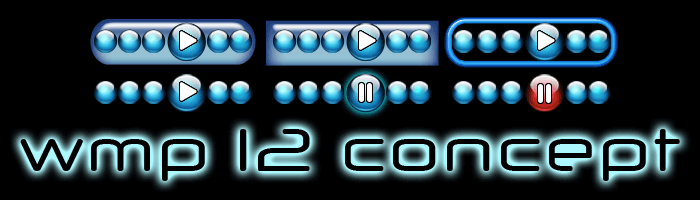
Few ideas , Not a true representation but something to think about :D
 

Attachments

  • wmp12concept.gif
    wmp12concept.gif
    32 KB · Views: 14
Looks awesome :)

Codename it Project 13 and we're all set. ;)

Oh! And I wonder if it's possible for me to implement my transparency program to work its magic on certain parts of WMP that aren't affected by Aero settings...I've tried and failed, but no use not trying again..
 

My Computer

Computer type
PC/Desktop
Computer Manufacturer/Model Number
Custom built
OS
Windows 8 Pro 64-bit
CPU
Intel Core i7 950 @4.4GHz
Motherboard
EVGA 131-GT-E767
Memory
12GB DDR3 1333MHz @1400 (9-9-9-24)
Graphics Card(s)
2x AMD Radeon HD 6770
Sound Card
Sound Blaster Audigy
Monitor(s) Displays
Acer S231HL + Acer E19T5W
Screen Resolution
1920x1080 + 1440x900
Hard Drives
128GB Samsung 840 Pro
1TB Seagate Barracuda 7200RPM 64mb
500GB Seagate Barracuda 7200RPM 16mb
PSU
Corsair GS800
Case
Custom-made
Cooling
CM Hyper212+, lots of fans
Keyboard
NMB RT8255C+
Mouse
Func MS-3
Internet Speed
30/1.5
Antivirus
Microsoft Security Essentials/Spybot SD/Malwarebytes
Browser
Google Chrome
Other Info
Onkyo TX-27 receiver & two Realistic Optimus T100s.
not working , just shopped.
 

Attachments

  • mock up 1.png
    mock up 1.png
    6.4 KB · Views: 19
All set doesn't mean release! :eek:
All set's just a joke. :p

That pic looks pretty good...I think now's the time for me to start working on my own interpretation...
Black theme. :)

Wow, just noticed how many smilies I used in that post. -sigh-
 

My Computer

Computer type
PC/Desktop
Computer Manufacturer/Model Number
Custom built
OS
Windows 8 Pro 64-bit
CPU
Intel Core i7 950 @4.4GHz
Motherboard
EVGA 131-GT-E767
Memory
12GB DDR3 1333MHz @1400 (9-9-9-24)
Graphics Card(s)
2x AMD Radeon HD 6770
Sound Card
Sound Blaster Audigy
Monitor(s) Displays
Acer S231HL + Acer E19T5W
Screen Resolution
1920x1080 + 1440x900
Hard Drives
128GB Samsung 840 Pro
1TB Seagate Barracuda 7200RPM 64mb
500GB Seagate Barracuda 7200RPM 16mb
PSU
Corsair GS800
Case
Custom-made
Cooling
CM Hyper212+, lots of fans
Keyboard
NMB RT8255C+
Mouse
Func MS-3
Internet Speed
30/1.5
Antivirus
Microsoft Security Essentials/Spybot SD/Malwarebytes
Browser
Google Chrome
Other Info
Onkyo TX-27 receiver & two Realistic Optimus T100s.
Project 13 it is , was going to ask you about transparency at the bottom of the player as well.... Going to try and get a working .dll going later on.
 
I just checked, the player control resources you have in the text file aren't the ones that the player uses. I think the ones that the player uses are into the higher numbers, but that's just a theory, the entire 257 folder is all jumbled up.
 

My Computer

Computer type
PC/Desktop
Computer Manufacturer/Model Number
Custom built
OS
Windows 8 Pro 64-bit
CPU
Intel Core i7 950 @4.4GHz
Motherboard
EVGA 131-GT-E767
Memory
12GB DDR3 1333MHz @1400 (9-9-9-24)
Graphics Card(s)
2x AMD Radeon HD 6770
Sound Card
Sound Blaster Audigy
Monitor(s) Displays
Acer S231HL + Acer E19T5W
Screen Resolution
1920x1080 + 1440x900
Hard Drives
128GB Samsung 840 Pro
1TB Seagate Barracuda 7200RPM 64mb
500GB Seagate Barracuda 7200RPM 16mb
PSU
Corsair GS800
Case
Custom-made
Cooling
CM Hyper212+, lots of fans
Keyboard
NMB RT8255C+
Mouse
Func MS-3
Internet Speed
30/1.5
Antivirus
Microsoft Security Essentials/Spybot SD/Malwarebytes
Browser
Google Chrome
Other Info
Onkyo TX-27 receiver & two Realistic Optimus T100s.
Okay, here is the list of resources I've found so far: (updated for more stuff I found)


3881 - position bar
3882 - position bar 2
3883 - position slider (not tested, should be correct)
3884 - above, hover over
3885 - volume slider regular
3886 - volume slider holding
3887 - volume slider hover
4162 - play button
4163 - play button 2 (not tested)
4164 - pause button
4165 - play button 3 (unknown location)
4166 - next button
4167 - next button greyed out
4168 - previous button
4169 - previous button greyed out
4170 - rewind
4171 - same as above
4172 - fast forward
4173 - fast forward 2
4175 - shuffle (glow?)
4176 - shuffle
4177 - repeat (glow?)
4178 - repeat
4179 - stop
4180 - stop grayed out
4181-4184 - top right window buttons
4190 - go back to library from now playing
4191 - go to now playing from library
4200 - possibly the now playing controls, kinda distorted, not tested


5240 - volume bar (not tested)
5241-5208 - volume button different ranges of volume
5321 - large now playing background
5333 - another version of 4190?
5334 - a random picture?
5350 - forward and back buttons regular
5351 - above held down
5352 - above mouse over
5353 - above grayed out
5360 - related to above, maybe the background?
5361 - exact same as above
5504-5515 - probably the play/burn/sync pane's device icons
5521-5523+5534 - look like progress bars to me.
5524-5529 - gray stars
5530-5532 - gold stars, darkest one is mosue held down, lightest one is hover over
5547 - another device
5609 - dolby digital logo (remove this?)
5611-5626 - buffering

5672 - another volume bar...dunno if this is for this current version or not, but its transparent so it might be the now playing volume bar, surrounding resources would go with it then

12164 - main player body (betting this is for use with basic theme)
12165 - probably the now playing bar
12200 - main play body's transparency (betting this is for use with Aero)
12201 - another now playing body (may be transparency)

14153-27800 - more control button (play, pause, etc) resources, might be aero copies of the ones previously mentioned, not gonna test them

29712-29775 - icons for misc. things

34162 - even MORE control button resources
 

My Computer

Computer type
PC/Desktop
Computer Manufacturer/Model Number
Custom built
OS
Windows 8 Pro 64-bit
CPU
Intel Core i7 950 @4.4GHz
Motherboard
EVGA 131-GT-E767
Memory
12GB DDR3 1333MHz @1400 (9-9-9-24)
Graphics Card(s)
2x AMD Radeon HD 6770
Sound Card
Sound Blaster Audigy
Monitor(s) Displays
Acer S231HL + Acer E19T5W
Screen Resolution
1920x1080 + 1440x900
Hard Drives
128GB Samsung 840 Pro
1TB Seagate Barracuda 7200RPM 64mb
500GB Seagate Barracuda 7200RPM 16mb
PSU
Corsair GS800
Case
Custom-made
Cooling
CM Hyper212+, lots of fans
Keyboard
NMB RT8255C+
Mouse
Func MS-3
Internet Speed
30/1.5
Antivirus
Microsoft Security Essentials/Spybot SD/Malwarebytes
Browser
Google Chrome
Other Info
Onkyo TX-27 receiver & two Realistic Optimus T100s.
i replaced these pngs and the play/pause button works sweet. :party:( main full screen player )

4153 - back ground main player button icon.
4154 - back ground main player button icon.
4155 - back ground main player button icon.
4156 - back ground main player button icon.

I'll do the same for all the other buttons ( back ,forward , stop, shuffle, repeat and switch to now playing.)

any ideas what controls the "time playing " function ?

Edit : I had to save one png and rename it each time so it didn't wobble about when pressed , was a tad tricky to align them all perfectly , but worked out ok;)
 

Attachments

  • pause.PNG
    pause.PNG
    4 KB · Views: 8
  • play.PNG
    play.PNG
    2.4 KB · Views: 8
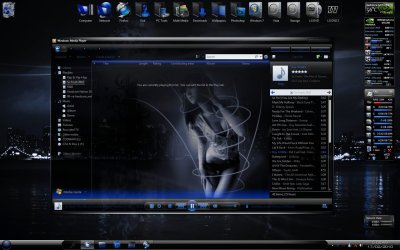
Here is one of the skins I made for WMP12 :)

2010-02-17_050206.jpg
 

My Computer

Computer Manufacturer/Model Number
Home Brew
OS
Windows 7 Ultimate Vista Ultimate x64
CPU
Core 2 Duo E8500 3.16Ghz @ 3.8Ghz
Motherboard
eVGA 750i FTW
Memory
2x2Gigs Patriot PC2-6400 LL
Graphics Card(s)
Inno3D GeForce GTX260 216 SP
Monitor(s) Displays
ASUS VW222U 22" 2ms Response time
Screen Resolution
1680x1050
Hard Drives
SATA 150GB
SATA II 250GB
USB IDE 750GB Ext.
PSU
HYTEC 600W & Thermaltake 650W Toughpower Power Exp
Case
Thermaltake Armor LCS (Liquid Cooling System)
Cooling
Liquid Cooling System
Keyboard
Logitech G15 Gaming Keyboard
Mouse
Logitech G9 Gaming Mouse
Back
Top