
Hello,
Need some help setting up a RAID 0 setup for a spare disc on my Win 7 64 bit system.
Asus K8N-E Deluxe motherboard. Win 7 installed on a RAID 0 array running off the Si3114 onboard controller.
I have two spare 250gb drives that I attached to the SATA1 and SATA2 ports on the MB, and activated the Nvidia RAID in the BIOS. Set up the two drives as a RAID 0 striped set in bios, and then booted off the Si3114 RAID set.
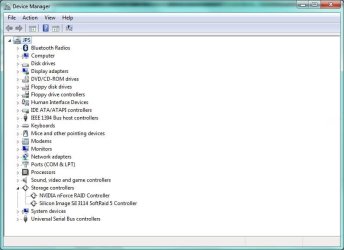
Windows does not see the Nvidia RAID 0 array. Device manager says the NVIDIA nforce RAID Controller 10.6.0.16 is installed and running (see attached nvraid1.jpg).
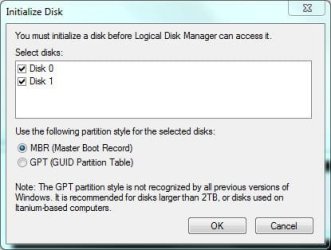
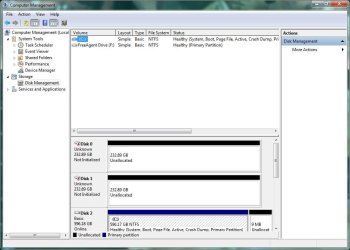
Disc management sees the two drives, and pop's up the window seen in nvraid2.jpg. Nvraid3.jpg is the main management window.
My question is, how do I go about getting the Nvidia RAID controller to recognize the nvidia RAID 0 array as a single disc in Win 7, not as two 250gb SATA discs?
Thanks for any help provided.
Need some help setting up a RAID 0 setup for a spare disc on my Win 7 64 bit system.
Asus K8N-E Deluxe motherboard. Win 7 installed on a RAID 0 array running off the Si3114 onboard controller.
I have two spare 250gb drives that I attached to the SATA1 and SATA2 ports on the MB, and activated the Nvidia RAID in the BIOS. Set up the two drives as a RAID 0 striped set in bios, and then booted off the Si3114 RAID set.
Windows does not see the Nvidia RAID 0 array. Device manager says the NVIDIA nforce RAID Controller 10.6.0.16 is installed and running (see attached nvraid1.jpg).
Disc management sees the two drives, and pop's up the window seen in nvraid2.jpg. Nvraid3.jpg is the main management window.
My question is, how do I go about getting the Nvidia RAID controller to recognize the nvidia RAID 0 array as a single disc in Win 7, not as two 250gb SATA discs?
Thanks for any help provided.
Attachments
My Computer
- OS
- XP/Win7