NFS: Hot Pursuit Install Fail. Why??

sparky05084

New member
Local time
4:19 PM
Messages
16
Location
Cheshire
Hey all.
Ok, so I'm back again and at the mercy of this forum. I really hope I can get some help with this one as I'm completely stuck and have been trying for over 2 hours now to try and solve it.
Basically, I am trying to install NFS: Hot Pursuit and when it gets to the installing DirectX screen it doesn’t progress any further. The disc will spin up and hit full speed and at this point you are expecting the progress bar to start filling up and the install to take place.
However, that is not the case here. What happens is that the disc will stay at full speed for like 5 mins and then will eventually spin down and rest for say 3 mins. Then, the procedure will start again. Oh, and as for the progress bar? Does tiddly squat. It just sits there and you see an empty space and nothing happens. The disc will happily spin for all eternity and will only stop when you have obviously ran out of patience (trust me I managed to make 2 brews and nip out to a mates for an hour and came back – still nothing) and manually stop the installation.
What makes me laugh and is a joke is that simply pressing our friend the little red X does nothing either. Oh no, it wants to sit there and annoy you by purposefully showing you that it is not installing your game. You have to use Task Manager to kill it and even then you have to encourage it with 25+ clicks. I always get past the Serial Number screen so it’s not like it’s having a problem authenticating my copy and it is definitely not a hardware fault.
What is annoying me is the fact that in XP (and I still have it on my slave drive by the way) this game both installed fine and plays well. I could go play it now if I wanted but that is just the point, I’d be in XP 32 bit and not Win 7. Before you ask as well whilst it’s fresh in my mind, I have the lasts drivers and that is for every piece of hardware that my system comprises including my GPU and I haven’t changed anything at all. I simply let it update to the max when I first installed it and have recently ran an update just to confirm what I already know, that I am up to date with everything.
My internet connection is fine too and I just can’t get my head around the fact that I’ve seen this very same screen (installing DirectX) on practically every game I’ve installed and it usually whizzes by no trouble. Not much strain on a PC is it to install a game. I mean come on, NFS?? J
Why then, is an O/S such as Windows 7 that is supposed to be far superior in every way to those that stood before it, be struggling to even install a game? I’m sorry that it sounds like I’m having a rant but please see it from my side. The whole reason I put Windows 7 on was to see an improvement in my systems performance and to also see an improvement in games. I wanted to see physically what 64 bit was like (never experienced it) and speed my system up.
This far I am not impressed. I have had it running for the third day now and I don’t remember having these sorts of problems with XP.
What’s going on?
Thanks all for reading.
Sparky 05084
 

My Computer My Computer

At a glance

Windows 7 64 Home PremiumIntel Core 2 Duo E6700 @ 2.66Ghz (stock)Corsair XMS DDR2 6GBLeadtek Winfast PX8800 GTX
Computer Manufacturer/Model Number
Evesham
OS
Windows 7 64 Home Premium
CPU
Intel Core 2 Duo E6700 @ 2.66Ghz (stock)
Motherboard
Foxconn P9657AA-8KS2H
Memory
Corsair XMS DDR2 6GB
Graphics Card(s)
Leadtek Winfast PX8800 GTX
Sound Card
Creative XF-I Sounblaster Extreme Audio
Monitor(s) Displays
NEC MultiSync LCD 20" (2070WNX)
Screen Resolution
1680 x 1050 (Maximum Supported Resolution for GPU)
Hard Drives
WD Caviar Green 1TB (WD10EARS-00Y5B1)
Primary drive with Win 7 (Location 0)

WD 320GB (WD3200JS-00PDB0)
Slave drive (Win XP 32 bit) which will eventually be used for storage and backup (Location 1)
PSU
Epsilon 600W
Case
Evesham Xpider Black/Silver
Cooling
Stock
Keyboard
Logitech Deluxe 650 Cordless
Mouse
Logitech MX1000 Laser
Internet Speed
10Mb Connection (Avg @ 7.5Mb)
this is a known issue, it's your firewall blocking the program from contacting the activation server, temporarily disable your antivirus and realtime protection until the install starts, it should work after this.
 

My Computer My Computer

At a glance

Windows 7 Ultimate x64 SP1Intel Q6600 @ 2.6Ghz4Gb DDR2 Corsair Dominator @ 800Mhz 5-5-5-15EVGA 560 GTX SC FTW 1GB
Computer type
PC/Desktop
Computer Manufacturer/Model Number
Custom Build
OS
Windows 7 Ultimate x64 SP1
CPU
Intel Q6600 @ 2.6Ghz
Motherboard
Evga NF78-CK-132-A 3-Way SLI
Memory
4Gb DDR2 Corsair Dominator @ 800Mhz 5-5-5-15
Graphics Card(s)
EVGA 560 GTX SC FTW 1GB
Sound Card
Realtek HD 7.1 Audio, Plantronics GameCom780 7.1 Headset
Monitor(s) Displays
Dell S2409W
Screen Resolution
1920 x 1080
Hard Drives
SanDisk SDSSDHII-120G-G25 120GB SSD
Samsung 7200RPM 750Gb SATA
Samsung 850 EVO 120GB SSD
Western Digital Green 1TB 7200RPM
PSU
Xigmatek 750W Quad sli quad core 80% eff
Case
Antec 900 Gaming Case
Cooling
Zalman CNPS9700-NT NVIDIA Tritium
Keyboard
Logitech generic keyboard, MS wireless keyboard
Mouse
Razor Lachesis Banshee V2 Blue, 4000DPI, MS wireless mouse
Internet Speed
152Mb Virgin Media Fibre Optic
Antivirus
Microsoft Security Essentials
Browser
Google Chrome
Other Info
Wireless Gaming Receiver for Windows, Wireless Xbox 360 Pad
this is a known issue, it's your firewall blocking the program from contacting the activation server, temporarily disable your antivirus and realtime protection until the install starts, it should work after this.

As I said in my post, It gets past the installation part of the core components as I succsefully enter the serial code and it stops at "installing DirectX" screen. This should not happen and everytime I quit the install (due to simply giving up out of frustration) I have to re enter the serial code each time. I am told it is accepted and the install does continue like you say but then just halts.

It managed to install Crysis 2 and that very same screen popped up but was gone in less than a minute as it installed. I appreciate your reply but that is not the solution I am looking for. I have by the way tried it though but only to confirm what I already know; Disabling my Antivirus/Firewall does nothing and the install still hangs.
 

My Computer My Computer

At a glance

Windows 7 64 Home PremiumIntel Core 2 Duo E6700 @ 2.66Ghz (stock)Corsair XMS DDR2 6GBLeadtek Winfast PX8800 GTX
Computer Manufacturer/Model Number
Evesham
OS
Windows 7 64 Home Premium
CPU
Intel Core 2 Duo E6700 @ 2.66Ghz (stock)
Motherboard
Foxconn P9657AA-8KS2H
Memory
Corsair XMS DDR2 6GB
Graphics Card(s)
Leadtek Winfast PX8800 GTX
Sound Card
Creative XF-I Sounblaster Extreme Audio
Monitor(s) Displays
NEC MultiSync LCD 20" (2070WNX)
Screen Resolution
1680 x 1050 (Maximum Supported Resolution for GPU)
Hard Drives
WD Caviar Green 1TB (WD10EARS-00Y5B1)
Primary drive with Win 7 (Location 0)

WD 320GB (WD3200JS-00PDB0)
Slave drive (Win XP 32 bit) which will eventually be used for storage and backup (Location 1)
PSU
Epsilon 600W
Case
Evesham Xpider Black/Silver
Cooling
Stock
Keyboard
Logitech Deluxe 650 Cordless
Mouse
Logitech MX1000 Laser
Internet Speed
10Mb Connection (Avg @ 7.5Mb)
have you tried running the installer as an adminstrator? or setting it to xp mode?
 

My Computer My Computer

At a glance

Windows 7 Ultimate x64 SP1Intel Q6600 @ 2.6Ghz4Gb DDR2 Corsair Dominator @ 800Mhz 5-5-5-15EVGA 560 GTX SC FTW 1GB
Computer type
PC/Desktop
Computer Manufacturer/Model Number
Custom Build
OS
Windows 7 Ultimate x64 SP1
CPU
Intel Q6600 @ 2.6Ghz
Motherboard
Evga NF78-CK-132-A 3-Way SLI
Memory
4Gb DDR2 Corsair Dominator @ 800Mhz 5-5-5-15
Graphics Card(s)
EVGA 560 GTX SC FTW 1GB
Sound Card
Realtek HD 7.1 Audio, Plantronics GameCom780 7.1 Headset
Monitor(s) Displays
Dell S2409W
Screen Resolution
1920 x 1080
Hard Drives
SanDisk SDSSDHII-120G-G25 120GB SSD
Samsung 7200RPM 750Gb SATA
Samsung 850 EVO 120GB SSD
Western Digital Green 1TB 7200RPM
PSU
Xigmatek 750W Quad sli quad core 80% eff
Case
Antec 900 Gaming Case
Cooling
Zalman CNPS9700-NT NVIDIA Tritium
Keyboard
Logitech generic keyboard, MS wireless keyboard
Mouse
Razor Lachesis Banshee V2 Blue, 4000DPI, MS wireless mouse
Internet Speed
152Mb Virgin Media Fibre Optic
Antivirus
Microsoft Security Essentials
Browser
Google Chrome
Other Info
Wireless Gaming Receiver for Windows, Wireless Xbox 360 Pad
Well, that's simple. Windows 7 is a major change from XP and you're trying to install a game that was made long before 7. You pretty much have to expect problems like this, not just assume that "because it's Windows 7, everything will run better."
This is where Windows' compatibility mode kicks in. Try running the game installation in XP compatibility mode.
 

My Computer My Computer

At a glance

Windows 7 Professional SP1 32-bitIntel Core 2 Duo E6600 2.4GHz4GB DDR2-667 (4x1GB in dual-channel config)nVidia GeForce 9800 GT
Computer type
PC/Desktop
Computer Manufacturer/Model Number
Custom-built
OS
Windows 7 Professional SP1 32-bit
CPU
Intel Core 2 Duo E6600 2.4GHz
Motherboard
Asus PL5D2
Memory
4GB DDR2-667 (4x1GB in dual-channel config)
Graphics Card(s)
nVidia GeForce 9800 GT
Sound Card
Creative X-Fi XtremeMusic
Monitor(s) Displays
Acer P236H
Screen Resolution
1920x1200 (DVI)
Hard Drives
OCZ SSD Vertex Plus 60GB SATA (Firmware 3.55), 64MB cache
Hitachi HD321KJ SATA, 320GB, 7200rpm, 16MB cache
PSU
Antec TruePower 2.0
Case
Cooler Master Centurion
Cooling
Too many fans
Keyboard
Standard
Mouse
Microsoft wireless optical mouse
Internet Speed
AT&T U-verse (18mbit/sec)
Antivirus
Microsoft Security Essentials
Browser
Firefox
Other Info
Other devices:
Compaq CQ-60 laptop
Google Nexus 7 (2012) tablet
Nvidia SHIELD tablet (US/LTE)
Hardkernel ODROID-XU single-board computer (Samsung Exynos 5420)
You pretty much have to expect problems like this, not just assume that "because it's Windows 7, everything will run better."

Fair point mate. just a little ticked off because up to now I've had nothing but problems. By the way, installing games is only one of a number of issues that I'm dealing with now. Perhaps it is time to consider a new PC as I really do wonder sometimes if my mobo just doesn't like Win 7.

Incidentally, for future reference could you please tell me how to run an install such as a game in XP compatability mode or Adminstrator mode. Cheers.
 

My Computer My Computer

At a glance

Windows 7 64 Home PremiumIntel Core 2 Duo E6700 @ 2.66Ghz (stock)Corsair XMS DDR2 6GBLeadtek Winfast PX8800 GTX
Computer Manufacturer/Model Number
Evesham
OS
Windows 7 64 Home Premium
CPU
Intel Core 2 Duo E6700 @ 2.66Ghz (stock)
Motherboard
Foxconn P9657AA-8KS2H
Memory
Corsair XMS DDR2 6GB
Graphics Card(s)
Leadtek Winfast PX8800 GTX
Sound Card
Creative XF-I Sounblaster Extreme Audio
Monitor(s) Displays
NEC MultiSync LCD 20" (2070WNX)
Screen Resolution
1680 x 1050 (Maximum Supported Resolution for GPU)
Hard Drives
WD Caviar Green 1TB (WD10EARS-00Y5B1)
Primary drive with Win 7 (Location 0)

WD 320GB (WD3200JS-00PDB0)
Slave drive (Win XP 32 bit) which will eventually be used for storage and backup (Location 1)
PSU
Epsilon 600W
Case
Evesham Xpider Black/Silver
Cooling
Stock
Keyboard
Logitech Deluxe 650 Cordless
Mouse
Logitech MX1000 Laser
Internet Speed
10Mb Connection (Avg @ 7.5Mb)
just right click the setup.exe file and select run as administrator.

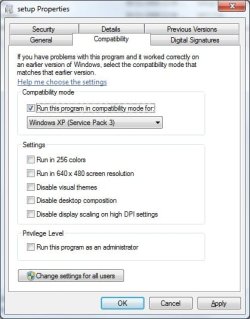
for compatibility mode right click and select properties, then choose compatibility tab and choose xp service pack 3
compatability tab.jpg
 

My Computer My Computer

At a glance

Windows 7 Ultimate x64 SP1Intel Q6600 @ 2.6Ghz4Gb DDR2 Corsair Dominator @ 800Mhz 5-5-5-15EVGA 560 GTX SC FTW 1GB
Computer type
PC/Desktop
Computer Manufacturer/Model Number
Custom Build
OS
Windows 7 Ultimate x64 SP1
CPU
Intel Q6600 @ 2.6Ghz
Motherboard
Evga NF78-CK-132-A 3-Way SLI
Memory
4Gb DDR2 Corsair Dominator @ 800Mhz 5-5-5-15
Graphics Card(s)
EVGA 560 GTX SC FTW 1GB
Sound Card
Realtek HD 7.1 Audio, Plantronics GameCom780 7.1 Headset
Monitor(s) Displays
Dell S2409W
Screen Resolution
1920 x 1080
Hard Drives
SanDisk SDSSDHII-120G-G25 120GB SSD
Samsung 7200RPM 750Gb SATA
Samsung 850 EVO 120GB SSD
Western Digital Green 1TB 7200RPM
PSU
Xigmatek 750W Quad sli quad core 80% eff
Case
Antec 900 Gaming Case
Cooling
Zalman CNPS9700-NT NVIDIA Tritium
Keyboard
Logitech generic keyboard, MS wireless keyboard
Mouse
Razor Lachesis Banshee V2 Blue, 4000DPI, MS wireless mouse
Internet Speed
152Mb Virgin Media Fibre Optic
Antivirus
Microsoft Security Essentials
Browser
Google Chrome
Other Info
Wireless Gaming Receiver for Windows, Wireless Xbox 360 Pad
Cheers all for the replies and advice. Ok, a strange one this and you will no doubt be suprised to hear that I didn't need to run it as administrator or in XP compatibility.

I just started the whole install process again and it just.....well.....installed.

It did the whole DirectX procedure and then patched the game then I launched it and it seems ok (up to now).

Even recognised my Subsonic Wireless controller and let me set it up which is good as I did need to download the drivers in XP. Perhaps my faith may yet be restored with Windows 7.

Now, I have the task of transferring my save data from XP to the install folder in Win 7. I think if I put it in a pen drive or something and copy it over to the game folder then I won't have to start all over again (70% Career progress).

Any ideas guys?
 

My Computer My Computer

At a glance

Windows 7 64 Home PremiumIntel Core 2 Duo E6700 @ 2.66Ghz (stock)Corsair XMS DDR2 6GBLeadtek Winfast PX8800 GTX
Computer Manufacturer/Model Number
Evesham
OS
Windows 7 64 Home Premium
CPU
Intel Core 2 Duo E6700 @ 2.66Ghz (stock)
Motherboard
Foxconn P9657AA-8KS2H
Memory
Corsair XMS DDR2 6GB
Graphics Card(s)
Leadtek Winfast PX8800 GTX
Sound Card
Creative XF-I Sounblaster Extreme Audio
Monitor(s) Displays
NEC MultiSync LCD 20" (2070WNX)
Screen Resolution
1680 x 1050 (Maximum Supported Resolution for GPU)
Hard Drives
WD Caviar Green 1TB (WD10EARS-00Y5B1)
Primary drive with Win 7 (Location 0)

WD 320GB (WD3200JS-00PDB0)
Slave drive (Win XP 32 bit) which will eventually be used for storage and backup (Location 1)
PSU
Epsilon 600W
Case
Evesham Xpider Black/Silver
Cooling
Stock
Keyboard
Logitech Deluxe 650 Cordless
Mouse
Logitech MX1000 Laser
Internet Speed
10Mb Connection (Avg @ 7.5Mb)
Cheers all for the replies and advice. Ok, a strange one this and you will no doubt be suprised to hear that I didn't need to run it as administrator or in XP compatibility.

I just started the whole install process again and it just.....well.....installed.

It did the whole DirectX procedure and then patched the game then I launched it and it seems ok (up to now).

Even recognised my Subsonic Wireless controller and let me set it up which is good as I did need to download the drivers in XP. Perhaps my faith may yet be restored with Windows 7.

Now, I have the task of transferring my save data from XP to the install folder in Win 7. I think if I put it in a pen drive or something and copy it over to the game folder then I won't have to start all over again (70% Career progress).

Any ideas guys?
Didn't you say that XP was on a slave drive on the same system?

just copy it over to the install folder by navigating to it from computer :)
 

My Computer My Computer

At a glance

Windows 7 Ultimate x64 SP1Intel Q6600 @ 2.6Ghz4Gb DDR2 Corsair Dominator @ 800Mhz 5-5-5-15EVGA 560 GTX SC FTW 1GB
Computer type
PC/Desktop
Computer Manufacturer/Model Number
Custom Build
OS
Windows 7 Ultimate x64 SP1
CPU
Intel Q6600 @ 2.6Ghz
Motherboard
Evga NF78-CK-132-A 3-Way SLI
Memory
4Gb DDR2 Corsair Dominator @ 800Mhz 5-5-5-15
Graphics Card(s)
EVGA 560 GTX SC FTW 1GB
Sound Card
Realtek HD 7.1 Audio, Plantronics GameCom780 7.1 Headset
Monitor(s) Displays
Dell S2409W
Screen Resolution
1920 x 1080
Hard Drives
SanDisk SDSSDHII-120G-G25 120GB SSD
Samsung 7200RPM 750Gb SATA
Samsung 850 EVO 120GB SSD
Western Digital Green 1TB 7200RPM
PSU
Xigmatek 750W Quad sli quad core 80% eff
Case
Antec 900 Gaming Case
Cooling
Zalman CNPS9700-NT NVIDIA Tritium
Keyboard
Logitech generic keyboard, MS wireless keyboard
Mouse
Razor Lachesis Banshee V2 Blue, 4000DPI, MS wireless mouse
Internet Speed
152Mb Virgin Media Fibre Optic
Antivirus
Microsoft Security Essentials
Browser
Google Chrome
Other Info
Wireless Gaming Receiver for Windows, Wireless Xbox 360 Pad
I would happily do that if it wasn't for the fact that I cannot locate where the actual "save files" or game progress folder is :)
 

My Computer My Computer

At a glance

Windows 7 64 Home PremiumIntel Core 2 Duo E6700 @ 2.66Ghz (stock)Corsair XMS DDR2 6GBLeadtek Winfast PX8800 GTX
Computer Manufacturer/Model Number
Evesham
OS
Windows 7 64 Home Premium
CPU
Intel Core 2 Duo E6700 @ 2.66Ghz (stock)
Motherboard
Foxconn P9657AA-8KS2H
Memory
Corsair XMS DDR2 6GB
Graphics Card(s)
Leadtek Winfast PX8800 GTX
Sound Card
Creative XF-I Sounblaster Extreme Audio
Monitor(s) Displays
NEC MultiSync LCD 20" (2070WNX)
Screen Resolution
1680 x 1050 (Maximum Supported Resolution for GPU)
Hard Drives
WD Caviar Green 1TB (WD10EARS-00Y5B1)
Primary drive with Win 7 (Location 0)

WD 320GB (WD3200JS-00PDB0)
Slave drive (Win XP 32 bit) which will eventually be used for storage and backup (Location 1)
PSU
Epsilon 600W
Case
Evesham Xpider Black/Silver
Cooling
Stock
Keyboard
Logitech Deluxe 650 Cordless
Mouse
Logitech MX1000 Laser
Internet Speed
10Mb Connection (Avg @ 7.5Mb)
Usually when this happens, I start a monitoring tool like Total Uninstall, then start the game, play a bit and make a savegame. Then I quit and let TU create the changelog. Wham, I can see exactly where the game put the savegame. :)
 

My Computer My Computer

At a glance

Windows 7 Professional SP1 32-bitIntel Core 2 Duo E6600 2.4GHz4GB DDR2-667 (4x1GB in dual-channel config)nVidia GeForce 9800 GT
Computer type
PC/Desktop
Computer Manufacturer/Model Number
Custom-built
OS
Windows 7 Professional SP1 32-bit
CPU
Intel Core 2 Duo E6600 2.4GHz
Motherboard
Asus PL5D2
Memory
4GB DDR2-667 (4x1GB in dual-channel config)
Graphics Card(s)
nVidia GeForce 9800 GT
Sound Card
Creative X-Fi XtremeMusic
Monitor(s) Displays
Acer P236H
Screen Resolution
1920x1200 (DVI)
Hard Drives
OCZ SSD Vertex Plus 60GB SATA (Firmware 3.55), 64MB cache
Hitachi HD321KJ SATA, 320GB, 7200rpm, 16MB cache
PSU
Antec TruePower 2.0
Case
Cooler Master Centurion
Cooling
Too many fans
Keyboard
Standard
Mouse
Microsoft wireless optical mouse
Internet Speed
AT&T U-verse (18mbit/sec)
Antivirus
Microsoft Security Essentials
Browser
Firefox
Other Info
Other devices:
Compaq CQ-60 laptop
Google Nexus 7 (2012) tablet
Nvidia SHIELD tablet (US/LTE)
Hardkernel ODROID-XU single-board computer (Samsung Exynos 5420)
Ok, I managed to pinpoint a post on the EA site relating to my problem:

Answer

However, I did the steps (Vista as it's practically the same as Win 7) mentioned and when I try to start the game it crashes '-'

Not good.
 

My Computer My Computer

At a glance

Windows 7 64 Home PremiumIntel Core 2 Duo E6700 @ 2.66Ghz (stock)Corsair XMS DDR2 6GBLeadtek Winfast PX8800 GTX
Computer Manufacturer/Model Number
Evesham
OS
Windows 7 64 Home Premium
CPU
Intel Core 2 Duo E6700 @ 2.66Ghz (stock)
Motherboard
Foxconn P9657AA-8KS2H
Memory
Corsair XMS DDR2 6GB
Graphics Card(s)
Leadtek Winfast PX8800 GTX
Sound Card
Creative XF-I Sounblaster Extreme Audio
Monitor(s) Displays
NEC MultiSync LCD 20" (2070WNX)
Screen Resolution
1680 x 1050 (Maximum Supported Resolution for GPU)
Hard Drives
WD Caviar Green 1TB (WD10EARS-00Y5B1)
Primary drive with Win 7 (Location 0)

WD 320GB (WD3200JS-00PDB0)
Slave drive (Win XP 32 bit) which will eventually be used for storage and backup (Location 1)
PSU
Epsilon 600W
Case
Evesham Xpider Black/Silver
Cooling
Stock
Keyboard
Logitech Deluxe 650 Cordless
Mouse
Logitech MX1000 Laser
Internet Speed
10Mb Connection (Avg @ 7.5Mb)
Back
Top