
Nice tool for security

gautam7

New member
Guru
Local time
2:54 AM
Messages
173
Location
Assam
Hi everyone, I just come across the term vertualization. after some searching i downloaded RVS 2010. It is working fine no noticable change in CPU and RAM uses. Now i think even if my AV miss something and i m infected i know i am just a reboot away for complete curation. In theory this is perfect. I m interested to know how good it is in real life?? Have u guys used such vertualization product, please share your views and experience. Thanks in advance...
 

My Computer

Computer Manufacturer/Model Number
Compaq CQ 40- 330 TU laptop
OS
windows 7 ultimate 32 bit
CPU
Intel core 2 duo T6400 @ 2.00 GHz
Motherboard
Compal model 3607
Memory
2048 MB DDR 2 399.0 MHz
I just come across the term vertualization. after some searching i downloaded RVS 2010. It is working fine no noticable change in CPU and RAM uses. Now i think even if my AV miss something and i m infected i know i am just a reboot away for complete curation.

hi.....returnil is a good addition but do remember to turn it on when dabbling with the unknowns:p and learn to exclude folders for saving your work if you plan to keep it on....it uses f-prot av engine which is oky-doky...shadow defender is its better brother though

visit their official forum at wilders....for more info...beta and help

Official Returnil Support Forum
 

My Computer

OS
windows 7 ultimate 64 bit,Windows 7 ultimate 32 bit,Windows XP sp3 home

My Computer

Computer type
PC/Desktop
Computer Manufacturer/Model Number
Dell XPS 420
OS
Windows 10, Home Clean Install
CPU
Intel Core2 processsor Q8200(2.33Ghz 1333FSB) Quad Core Tech
Motherboard
Dell
Memory
6 gb
Graphics Card(s)
ATI Radeon 256MB HD3650
Sound Card
Intergrated 7.1 Channel Audio
Monitor(s) Displays
Dell SP2009W 20"
Hard Drives
640 GB Serial ATA Hard drive
Cooling
Fan
Keyboard
Dell USB Keyboard
Mouse
Dell Premium Optical USB
Internet Speed
DSL 2.85
.it uses f-prot av engine which is oky-doky

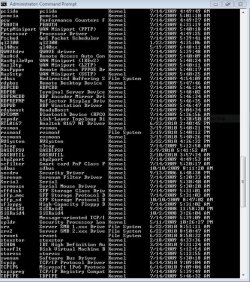
Hi i m using it by turning off the virus guard :D. and in the comand promt i m not seeing anything like SPTD. i m giving a snap shot of the comand pomt.
 

Attachments

  • Capture.JPG
    Capture.JPG
    138.6 KB · Views: 18

My Computer

Computer Manufacturer/Model Number
Compaq CQ 40- 330 TU laptop
OS
windows 7 ultimate 32 bit
CPU
Intel core 2 duo T6400 @ 2.00 GHz
Motherboard
Compal model 3607
Memory
2048 MB DDR 2 399.0 MHz
You are fine. I saw the term virtualiaztion and just wanted to be sure that there was no SPTD driver

On another note, you have some old drivers, you may want to update them.
Anything older than 7/09, may be less than current.
 

My Computer

Computer type
PC/Desktop
Computer Manufacturer/Model Number
Dell XPS 420
OS
Windows 10, Home Clean Install
CPU
Intel Core2 processsor Q8200(2.33Ghz 1333FSB) Quad Core Tech
Motherboard
Dell
Memory
6 gb
Graphics Card(s)
ATI Radeon 256MB HD3650
Sound Card
Intergrated 7.1 Channel Audio
Monitor(s) Displays
Dell SP2009W 20"
Hard Drives
640 GB Serial ATA Hard drive
Cooling
Fan
Keyboard
Dell USB Keyboard
Mouse
Dell Premium Optical USB
Internet Speed
DSL 2.85
Thanks Rich for your time but how can i update my driver ?? I googled that question but found nothing which can help. could you provide some link. i m using windows 7 64 bit OS. Thanks in advance....
 

My Computer

Computer Manufacturer/Model Number
Compaq CQ 40- 330 TU laptop
OS
windows 7 ultimate 32 bit
CPU
Intel core 2 duo T6400 @ 2.00 GHz
Motherboard
Compal model 3607
Memory
2048 MB DDR 2 399.0 MHz
Here is part of the answer, check back for my second link.
How To Find Drivers:
Quote:
- search Google for the name of the driver
- compare the Google results with what's installed on your system to figure out which device/program it belongs to
- visit the web site of the manufacturer of the hardware/program to get the latest drivers (DON'T use Windows Update or the Update driver function of Device Manager).
- if there are difficulties in locating them, post back with questions and someone will try and help you locate the appropriate program.

Here is the second link that I promised

http://www.carrona.org/dvrref.html


- - The most common drivers are listed on this page: Driver Reference
- - Driver manufacturer links are on this page: Drivers and Downloads
 

My Computer

Computer type
PC/Desktop
Computer Manufacturer/Model Number
Dell XPS 420
OS
Windows 10, Home Clean Install
CPU
Intel Core2 processsor Q8200(2.33Ghz 1333FSB) Quad Core Tech
Motherboard
Dell
Memory
6 gb
Graphics Card(s)
ATI Radeon 256MB HD3650
Sound Card
Intergrated 7.1 Channel Audio
Monitor(s) Displays
Dell SP2009W 20"
Hard Drives
640 GB Serial ATA Hard drive
Cooling
Fan
Keyboard
Dell USB Keyboard
Mouse
Dell Premium Optical USB
Internet Speed
DSL 2.85
This article may help you with finding new drivers: How to update a Windows hardware driver Its written for xp, but the principles are the same. The only difference is where device manager can be found, otherwise I think it's good.
 

My Computer

Computer Manufacturer/Model Number
ATX Custom Build 2012
OS
Windows 7 Enterprise x64 SP1
CPU
Intel Core i3-2100 @ 3.10GHz
Motherboard
Intel DH67CL desktop ATX
Memory
10 GB DDR3
Graphics Card(s)
Asus EAH5450 series (Radeon)
Monitor(s) Displays
Samsung SyncMaster 226BW, Samsung Syncmaster P2450H
Screen Resolution
226BW: 1680 x 1050 & P2450H: 1920 x 1080
Hard Drives
Western Digital 320 GB sata (boot), Samsung 640 GB sata, Seagate 2 TB sata (data)
PSU
Cooler Master Extreme Power Plus 500W
Case
Thermaltake V3 Black Edition
Cooling
stock cooling with added intake fan
Keyboard
HP Wireless Elite Keyboard Wireless Keyboard
Mouse
Microsoft Touch
Internet Speed
Comcast Cable business class <=18Mb {averages 12Mb}
Other Info
Optical drives: LG SuperMulti Blue, HP DVD 1260T
Other: Kensington Bluetooth Receiver
Network: Buffalo Wireless N USB, DLink N router/DLink Ethernet Switch/DLink Xtreme N wireless bridge
Printer: HP Photosmart Plus, HP Officejet Pro 8600 Plus
PCs: HP dv6-3040us (7 x64 SP1), HP DM4-2165dx (7 x64 SP1), HP Pavilion zv6130us (7 x86), Apple Macbook Air (Lion)
************

My Computer

Computer Manufacturer/Model Number
Samsung NP530U4B-S02IN
OS
Windows® 8 Pro (64-bit)
CPU
Intel® Core™ i5 Processor 2467M (1.60GHz, 3MB L3 Cache)
Motherboard
Samsung Electronics
Memory
6GB DDR3 System Memory at 1,333MHz (on BD 4GB + 2GB x 1)
Graphics Card(s)
AMD Radeon™ HD7550M 1GB DDR3 (Ext. Graphic)
Sound Card
Realtek High Definition Audio
Monitor(s) Displays
35.56cm (14.0) SuperBright 300nit HD LED Display
Screen Resolution
1366x768
Hard Drives
1TB S-ATA II Hard Drive (5400RPM) with ExpressCache 16GB SSD
Internet Speed
sucks
Antivirus
Microsoft Security Essentials
Browser
Google Chrome (Sync enabled)
How are these different from the Try N Decide mode in Acronis?

It makes a virtual enviroment on a seperate partition or HD, and keeps all changes there.
When finished doing whatever you you want, you can just just dump it all and be back to where you before it started, or keep all changes.
So anything you do really never gets done to the OS.

Just curious how they are different.
 

My Computer

Computer Manufacturer/Model Number
Custom (Self Build)
OS
Windows 7 Home Premium 64bit
CPU
Intel Core i7 2700k
Motherboard
eVGA P67 SLI
Memory
8GB Mushkin Redline Ridgebacks @1866
Graphics Card(s)
EVGA GTX570 SC
Sound Card
XiFi Titanium HD
Monitor(s) Displays
LG W2453V
Screen Resolution
1920x1080
Hard Drives
Intel 320 80GB -- Intel X25-V 40GB --WD Black 1TB x2 -- WD Blue 640GB
PSU
Seasonic x750
Case
Corsair 600T SE White
Cooling
eVGA Superclocked CPU Cooler
Keyboard
Saitek Cyborg
Antivirus
Kaspersky
Browser
IE
Other Info
LG BD/DVD

My Computer

Computer type
PC/Desktop
Computer Manufacturer/Model Number
Bruce ... somewhere in his 40's
OS
Windows 7 Ultimate 32bit SP1
CPU
Intel(R) Core(TM)2 Quad CPU @ 2.40GHz, 2400 MHz
Motherboard
INTEL/D975XBX2
Memory
4 GB
Graphics Card(s)
ATI Radeon HD 2600 Pro
Monitor(s) Displays
Samsung SyncMaster 914v
Screen Resolution
1280 x 1024
Hard Drives
2/500GB each ... ST3500630AS ATA Device.
One is not connected
PSU
Rocketfish 700 W
Case
G.Skill Gigabyte Chassis
Keyboard
Standard PS/2 Keyboard
Mouse
Microsoft PS/2 Mouse
Internet Speed
DSL
Antivirus
Avira Internet Security
Browser
IE 11
Other Info
ATI HDMI Audio
Thanks everyone i think i will give a try to driver update but this will take some time i guess, thanks for the info..
 

My Computer

Computer Manufacturer/Model Number
Compaq CQ 40- 330 TU laptop
OS
windows 7 ultimate 32 bit
CPU
Intel core 2 duo T6400 @ 2.00 GHz
Motherboard
Compal model 3607
Memory
2048 MB DDR 2 399.0 MHz
SPTD.sys driver isn't a bad thing ... if you have it
(sptd) sptd [Kernel | Boot | Running] -> C:\WINDOWS\System32\Drivers\sptd.sys
sptd - sptd.sys - Program Information

As long as you have the newest version, there should be no problems, however the earlier versions have been problematic and were known to cause BSOD crashes... ;)
 

My Computer

Computer type
PC/Desktop
Computer Manufacturer/Model Number
LENOVO K450 @3.0GHZ
OS
64-bit Windows 8.1 Pro
CPU
Core(TM) i5 CPU 4330 Haswell @ 3.20GHz
Motherboard
LENOVO
Memory
12.00 GB
Graphics Card(s)
Intel(R) HD Graphics
Sound Card
Intel HD integtrated
Monitor(s) Displays
HP 25' ISP Monitor
Screen Resolution
1900/1020
Hard Drives
(1) ST1000DM003-1CH162 (2) Generic STORAGE DEVICE USB Device (3) Generic STORAGE DEVICE USB Device
Internet Speed
100mb down/10mb up
Back
Top