Solved No 3.5mm Output

ShamboPyro

New member
Local time
11:30 PM
Messages
9
So the speakers on my computer work fine (internal), but I when I plug in headphones I just get a notification from Realtek that I plugged in a device. No sound comes out. I know it's not a hardware problem because the headphones work fine on Ubuntu.
 

My Computer

Computer type
Laptop
Computer Manufacturer/Model Number
Asus
OS
New Jersey
Memory
8gb
Graphics Card(s)
Nvidia GTX 560
Antivirus
United States
Did it ever work? or is this a recent problem?
 

My Computer

Computer type
PC/Desktop
Computer Manufacturer/Model Number
My Own Build
OS
Windows 10 64 bit
CPU
Intel i7 6700K
Motherboard
ASUS ROG Maximus VIII Hero
Memory
16GB Corsair Dominator
Graphics Card(s)
Intel CPU Graphics
Sound Card
RealTek
Monitor(s) Displays
27" Dell S2719dgf
Screen Resolution
2560X1440
Hard Drives
1 TB Samsung 850 EVO SSD for Win 10 Pro
500GB Samsung 850 EVO SSD for Win 10 Insider
2 TB drive for backup
PSU
EVGA Supernova 750G2
Case
BeQuiet Silent Base 600
Cooling
Deepcool Captain 120EX
Keyboard
Microsoft Wireless 2000
Mouse
Microsoft wireless
Internet Speed
100 MB/sec (Cable)
Antivirus
Microsoft Defender and Malwarebytes
Browser
Edge/Firefox
Other Info
Cakewalk (Sonar) by BandLab and Studio One 4.1 Pro recording studio software. MOTU 896Mk3 Hybrid recording interface, Frontier Tranzport wireless control unit, Behringer X-Touch Control Surface.
Five USB connected optical drives for CD Audio production using Nero BurningROM
It did, this is sort of a recent problem. I haven't been on Windows for a while though.
 

My Computer

Computer type
Laptop
Computer Manufacturer/Model Number
Asus
OS
New Jersey
Memory
8gb
Graphics Card(s)
Nvidia GTX 560
Antivirus
United States
Go to the Device Manager and display the Sound devices. You should only have the RealTek and possibly an HDMI sound (if you have that capabi8lity). If there is also an "HD Audio Codec" shown, uninstall that as it could be interferring with the RealTek.

If there is no other device, as mentioned, Uninstall the RealTek in the Device Manager -RIGHT click on the RealTek entry to highlight it and then LEFT click "Uninstall". DO NOT uninstall the drivers. Restart the PC and when Windows starts it will detect and reinstall the sound.
 

My Computer

Computer type
PC/Desktop
Computer Manufacturer/Model Number
My Own Build
OS
Windows 10 64 bit
CPU
Intel i7 6700K
Motherboard
ASUS ROG Maximus VIII Hero
Memory
16GB Corsair Dominator
Graphics Card(s)
Intel CPU Graphics
Sound Card
RealTek
Monitor(s) Displays
27" Dell S2719dgf
Screen Resolution
2560X1440
Hard Drives
1 TB Samsung 850 EVO SSD for Win 10 Pro
500GB Samsung 850 EVO SSD for Win 10 Insider
2 TB drive for backup
PSU
EVGA Supernova 750G2
Case
BeQuiet Silent Base 600
Cooling
Deepcool Captain 120EX
Keyboard
Microsoft Wireless 2000
Mouse
Microsoft wireless
Internet Speed
100 MB/sec (Cable)
Antivirus
Microsoft Defender and Malwarebytes
Browser
Edge/Firefox
Other Info
Cakewalk (Sonar) by BandLab and Studio One 4.1 Pro recording studio software. MOTU 896Mk3 Hybrid recording interface, Frontier Tranzport wireless control unit, Behringer X-Touch Control Surface.
Five USB connected optical drives for CD Audio production using Nero BurningROM
Okay, I uninstalled it. Now I have to wait for it to reboot. The stupid disk checker went automatically when I rebooted and realized after it was too late to cancel.
 

My Computer

Computer type
Laptop
Computer Manufacturer/Model Number
Asus
OS
New Jersey
Memory
8gb
Graphics Card(s)
Nvidia GTX 560
Antivirus
United States
Okay, I tried what you said, but no luck. Any other suggestions?
 

My Computer

Computer type
Laptop
Computer Manufacturer/Model Number
Asus
OS
New Jersey
Memory
8gb
Graphics Card(s)
Nvidia GTX 560
Antivirus
United States
Also, there was something called "NVIDIA HIGH DEFINITION AUDIO" in the device manager. Should I have uninstalled that?
 

My Computer

Computer type
Laptop
Computer Manufacturer/Model Number
Asus
OS
New Jersey
Memory
8gb
Graphics Card(s)
Nvidia GTX 560
Antivirus
United States
The NVIDIA is for HDMI audio. That is OK.

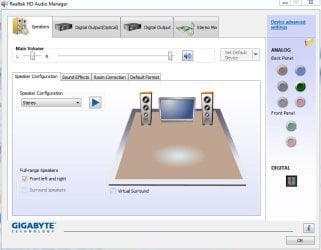
Do you have a RealTek "HD Audio Manager" panel (or some similar) in the Control Panel/Hardware and Sound? If you do, check it for any configuration options. May be something in there about the headphone jack or outputs.

This is what my RealTek manager panel looks like:
 

Attachments

  • realtek manager.JPG
    realtek manager.JPG
    51.1 KB · Views: 2

My Computer

Computer type
PC/Desktop
Computer Manufacturer/Model Number
My Own Build
OS
Windows 10 64 bit
CPU
Intel i7 6700K
Motherboard
ASUS ROG Maximus VIII Hero
Memory
16GB Corsair Dominator
Graphics Card(s)
Intel CPU Graphics
Sound Card
RealTek
Monitor(s) Displays
27" Dell S2719dgf
Screen Resolution
2560X1440
Hard Drives
1 TB Samsung 850 EVO SSD for Win 10 Pro
500GB Samsung 850 EVO SSD for Win 10 Insider
2 TB drive for backup
PSU
EVGA Supernova 750G2
Case
BeQuiet Silent Base 600
Cooling
Deepcool Captain 120EX
Keyboard
Microsoft Wireless 2000
Mouse
Microsoft wireless
Internet Speed
100 MB/sec (Cable)
Antivirus
Microsoft Defender and Malwarebytes
Browser
Edge/Firefox
Other Info
Cakewalk (Sonar) by BandLab and Studio One 4.1 Pro recording studio software. MOTU 896Mk3 Hybrid recording interface, Frontier Tranzport wireless control unit, Behringer X-Touch Control Surface.
Five USB connected optical drives for CD Audio production using Nero BurningROM
I've already tried that. It seems to think it doesn't exist, but when I plug it in it shows a notification. Here's what mine shows: (notice the few analog buttons)

screenshot of sound.png
 

My Computer

Computer type
Laptop
Computer Manufacturer/Model Number
Asus
OS
New Jersey
Memory
8gb
Graphics Card(s)
Nvidia GTX 560
Antivirus
United States
On that display it looks like the speaker is muted. Which would be normal operation - when you plug in a headset it mutes the speakers.

However since its not outputting to the headphone jack, and from what you have done with software and having a known good headset, it appears to be a hardware problem.
 

My Computer

Computer type
PC/Desktop
Computer Manufacturer/Model Number
My Own Build
OS
Windows 10 64 bit
CPU
Intel i7 6700K
Motherboard
ASUS ROG Maximus VIII Hero
Memory
16GB Corsair Dominator
Graphics Card(s)
Intel CPU Graphics
Sound Card
RealTek
Monitor(s) Displays
27" Dell S2719dgf
Screen Resolution
2560X1440
Hard Drives
1 TB Samsung 850 EVO SSD for Win 10 Pro
500GB Samsung 850 EVO SSD for Win 10 Insider
2 TB drive for backup
PSU
EVGA Supernova 750G2
Case
BeQuiet Silent Base 600
Cooling
Deepcool Captain 120EX
Keyboard
Microsoft Wireless 2000
Mouse
Microsoft wireless
Internet Speed
100 MB/sec (Cable)
Antivirus
Microsoft Defender and Malwarebytes
Browser
Edge/Firefox
Other Info
Cakewalk (Sonar) by BandLab and Studio One 4.1 Pro recording studio software. MOTU 896Mk3 Hybrid recording interface, Frontier Tranzport wireless control unit, Behringer X-Touch Control Surface.
Five USB connected optical drives for CD Audio production using Nero BurningROM
But the jack works perfectly on Ubuntu.
 

My Computer

Computer type
Laptop
Computer Manufacturer/Model Number
Asus
OS
New Jersey
Memory
8gb
Graphics Card(s)
Nvidia GTX 560
Antivirus
United States
Oh, this is the PC with Linux on it too. I thought it was a separate PC.

That takes it back to the driver or configuration.

No guarantees, but try the generic RealTek driver and see if that fixes it. Make a System Restore point before installing the generic RealTek driver in case it screws up things.

Realtek
 

My Computer

Computer type
PC/Desktop
Computer Manufacturer/Model Number
My Own Build
OS
Windows 10 64 bit
CPU
Intel i7 6700K
Motherboard
ASUS ROG Maximus VIII Hero
Memory
16GB Corsair Dominator
Graphics Card(s)
Intel CPU Graphics
Sound Card
RealTek
Monitor(s) Displays
27" Dell S2719dgf
Screen Resolution
2560X1440
Hard Drives
1 TB Samsung 850 EVO SSD for Win 10 Pro
500GB Samsung 850 EVO SSD for Win 10 Insider
2 TB drive for backup
PSU
EVGA Supernova 750G2
Case
BeQuiet Silent Base 600
Cooling
Deepcool Captain 120EX
Keyboard
Microsoft Wireless 2000
Mouse
Microsoft wireless
Internet Speed
100 MB/sec (Cable)
Antivirus
Microsoft Defender and Malwarebytes
Browser
Edge/Firefox
Other Info
Cakewalk (Sonar) by BandLab and Studio One 4.1 Pro recording studio software. MOTU 896Mk3 Hybrid recording interface, Frontier Tranzport wireless control unit, Behringer X-Touch Control Surface.
Five USB connected optical drives for CD Audio production using Nero BurningROM
Well computer kinda froze before I even read about that realtek driver so I rebooted and heard the logon sound from my speaker. I don't know what you did but you fixed it. Thanks for all the help!
 

My Computer

Computer type
Laptop
Computer Manufacturer/Model Number
Asus
OS
New Jersey
Memory
8gb
Graphics Card(s)
Nvidia GTX 560
Antivirus
United States
The connected speaker.
 

My Computer

Computer type
Laptop
Computer Manufacturer/Model Number
Asus
OS
New Jersey
Memory
8gb
Graphics Card(s)
Nvidia GTX 560
Antivirus
United States
Magic (grin).
 

My Computer

Computer type
PC/Desktop
Computer Manufacturer/Model Number
My Own Build
OS
Windows 10 64 bit
CPU
Intel i7 6700K
Motherboard
ASUS ROG Maximus VIII Hero
Memory
16GB Corsair Dominator
Graphics Card(s)
Intel CPU Graphics
Sound Card
RealTek
Monitor(s) Displays
27" Dell S2719dgf
Screen Resolution
2560X1440
Hard Drives
1 TB Samsung 850 EVO SSD for Win 10 Pro
500GB Samsung 850 EVO SSD for Win 10 Insider
2 TB drive for backup
PSU
EVGA Supernova 750G2
Case
BeQuiet Silent Base 600
Cooling
Deepcool Captain 120EX
Keyboard
Microsoft Wireless 2000
Mouse
Microsoft wireless
Internet Speed
100 MB/sec (Cable)
Antivirus
Microsoft Defender and Malwarebytes
Browser
Edge/Firefox
Other Info
Cakewalk (Sonar) by BandLab and Studio One 4.1 Pro recording studio software. MOTU 896Mk3 Hybrid recording interface, Frontier Tranzport wireless control unit, Behringer X-Touch Control Surface.
Five USB connected optical drives for CD Audio production using Nero BurningROM
Back
Top