

Look for the USB flash stick under Hard Drives in the Boot Menu, not Flash drives.
It will be listed by its make and model.
If the flash stick will not boot using UltraISO, then try formatting the stick Primary in Disk Management, loading Win7 files into the root and booting then. If this fails, then try Win2Flash: How to: install Windows (any version from XP to Win7) from a USB/flash drive | | dotTech
You never responded to the suggestion to install to a second partition from XP, since the installer would run in XP.
Please also respond to where you got Windows 7 ISO and key.
in this site tere are 2 softwares
1. A Bootable USB (for vista users only)
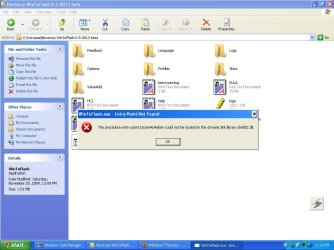
2. WinToFlash -that says something like this:=
I HAVE DOWNLOADED WINDOWS 7 FROM TORRENT
Attachments
My Computer
At a glance
windows 72.32 GB DDR3
- Computer Manufacturer/Model Number
- compaq cq62
- OS
- windows 7
- CPU
- 2.3
- Memory
- 2 GB DDR3
- Monitor(s) Displays
- 15.6"
- Screen Resolution
- 1366*768
- Hard Drives
- 320 GB
- Internet Speed
- BROADBAND
- Other Info
- PROCESSOR - I5, 320 GB HDD
