
No access to networked xp computers

Boogieman

New member
Local time
6:54 AM
Messages
4
I have upgraded my vista home premium to Win 7. I now cannot access the Xp computers on my home network but I can access my other Vista computers ok. I can ping all by ip and name ok. But file access just comes up with error 0x80070035 'the network path was not found'. All the computers can access the Win7 computer and read files ok. All the computers are on the same workgroup, Nothing been changed on any other computer as it all worked before this upgrade! Tried disabling the firewall, set to Home network, no homegroup set. The original vista drive which I 'ghosted' before I upgraded to 7 still works with full access to all networked computers.
 

My Computer

Computer Manufacturer/Model Number
Self Build
OS
Win 7 Build 7100
CPU
Intel Quad 9300
Motherboard
Gigabyte P35C-DS3R
Memory
2Gb DDR3
Graphics Card(s)
NVIDIA 8800GT
Sound Card
RealteK o/b
Monitor(s) Displays
Acer AL2416W
Screen Resolution
1920 x 1200
Hard Drives
4 x 500gb Maxtor
PSU
Tagan TG700-U33
Case
Coolermaster
Cooling
Air
Keyboard
Microsoft
Mouse
Microsoft Trackball Explorer
Internet Speed
4 meg
Hey Boogieman! If it helps any, I can relate! I had the same problem during the betas. I did a clean install of RC and for a while, all was well. This morning, something changed on my laptop. It can no longer access my windows xp machine. Gives the same error: "the network path was not found". I also did a clean install of RC on my desktop machine and it is still working fine with the xp machine networked. I have compared everything I can think to compare and all is the same yet my laptop doesn't see my xp machine. I can ping it fine and even see it in the network but when I double click it, it gives me the same error. I hope someone has a fix for this!
 

My Computer

Computer Manufacturer/Model Number
Dell / Studio xps
OS
Windows7 x64 7600 16385
CPU
Intel I7 920
Motherboard
Dell
Memory
6GB DDR3
Graphics Card(s)
ATI Radeon HD4350
Sound Card
Integrated 7.1 channel
Hard Drives
Hitachi HDT721064SLA360 (596 GB)
Keyboard
Logitech EX110
Mouse
Logitech LX8
network discovery turned on? managing by user accounts and passwords, not by Homegroup? Does the user account on XP have a password? remapped shares, rebooted both computers?
 

My Computer

Computer Manufacturer/Model Number
CUSTOM
OS
XP/win7 x86 build 7127
CPU
Athlon64 X2 DUAL 4200+ 2.21ghz
Motherboard
ASUS K8 PRO SLI
Memory
2GB Dual Chan DDR2 Corsair
Graphics Card(s)
Nvidia 6800GT
Sound Card
nvidia
Monitor(s) Displays
19' LCD
Screen Resolution
1280x1024
Hard Drives
WD 250, 2x500, 2x1TB IDE/USB
WD 250 SATA (system)
SEAGATE 120 Sata
PSU
coolermaster 450
Case
SUPERFLOWER
Cooling
1 HDD bay fan, 5x80mm Case Fans, AEROGATE II Fan/Temp
Keyboard
MS wireless
Mouse
MS Wireless
Internet Speed
fassssssssst
I have setup win7 several times now on my home & business networks. The first one was win7-beta 7000. I choose HOMEGROUP since it was my frist time with win7. It did not work well with my networks. Since then I have choose Work Network as the default network setup for win7 computers. They all work fine on the networks sharing files & printers.
 

My Computer

Computer type
PC/Desktop
Computer Manufacturer/Model Number
Built them myself, Science Experiments !
OS
Win7 Enterprise, Win7 x86 (Ult 7600), Win7 x64 Ult 7600, TechNet RTM on AMD x64 (2.8Ghz)
CPU
AMD fx8350 4ghz, AMD-32 2400mhz, AMD-64 3200mhz, AMDx64 2.8G
Motherboard
SIS 755, ECS-K8M890M-M (Ult 7600), GigaByte & others
Memory
2gb, 4gb on the Ult 7600, 4gb on Technet RTM, 32gb on FX8350
Graphics Card(s)
Draw my own Graphics, several nVidia cards
Sound Card
on motherboard
Monitor(s) Displays
19" flat scr, 28" I-Inc widescr,22" Emprex Widescr, 23" Acer
Screen Resolution
1280 x 1024, 1440 x 900, 1920 x 1080
Hard Drives
6 pata Ide HD's & 2 Sata HD's
added 80gb external on Ult 7600 computer,
numerous extra 1tb, 2TB, 3Tb SATA HD's
A collection of ext HD Docks w/ HDs
PSU
430w, 550w, 600w, 700, 800, etc
Case
All Generic Full Towers
Cooling
Open Air & a few fans, some w/ colored LEDs
Keyboard
Compaq & Dell recycled from GoodWill
Mouse
Made in China Optical Wired Mouse
Internet Speed
Fast Cable InterNet
Antivirus
AVG Free on 24 different Desktops, NO Problems!
Browser
IE 8 is preferred, but use FireFox sometimes
Other Info
Linksys Routers, switches, & Hubs
Too Many USB Flash Drives to count, Biggest is 64GB !
Eight computers in my home network.
Sixteen computers at my business network.
Linked via TeamViewer !
Lots of old used spare computer parts everywhere!

My Computer

Computer Manufacturer/Model Number
CUSTOM
OS
XP/win7 x86 build 7127
CPU
Athlon64 X2 DUAL 4200+ 2.21ghz
Motherboard
ASUS K8 PRO SLI
Memory
2GB Dual Chan DDR2 Corsair
Graphics Card(s)
Nvidia 6800GT
Sound Card
nvidia
Monitor(s) Displays
19' LCD
Screen Resolution
1280x1024
Hard Drives
WD 250, 2x500, 2x1TB IDE/USB
WD 250 SATA (system)
SEAGATE 120 Sata
PSU
coolermaster 450
Case
SUPERFLOWER
Cooling
1 HDD bay fan, 5x80mm Case Fans, AEROGATE II Fan/Temp
Keyboard
MS wireless
Mouse
MS Wireless
Internet Speed
fassssssssst
No access to networked computers FIX

After spending many hours messing with settings on my Win7 machine and getting nowhere I found a suggestion on the net to uninstall the network adapter on my XP computer in device manager and restart the machine! The machines had all be rebooted sevaral times before so I didn't think this would make a difference but I'll try anything! IT WORKED ON ALL MY COMPUTERS!!!!!!! Don't no why it should have made a difference as it worked fine when I was using Vista so give it a go and good luck.
 

My Computer

Computer Manufacturer/Model Number
Self Build
OS
Win 7 Build 7100
CPU
Intel Quad 9300
Motherboard
Gigabyte P35C-DS3R
Memory
2Gb DDR3
Graphics Card(s)
NVIDIA 8800GT
Sound Card
RealteK o/b
Monitor(s) Displays
Acer AL2416W
Screen Resolution
1920 x 1200
Hard Drives
4 x 500gb Maxtor
PSU
Tagan TG700-U33
Case
Coolermaster
Cooling
Air
Keyboard
Microsoft
Mouse
Microsoft Trackball Explorer
Internet Speed
4 meg
Hey Boogieman... YOU DA MAN!!! Removed Realtec network adapter in device manager on WinXP machine and rebooted. XP auto reinstalled and now my W7 laptop sees AND CAN ACCESS the XP machine again! And to think how many reinstalls I did during the beta to get that working! :cry: Now I'm wondering if maybe I should put DriverMax on the XP machine and see if there is a better device driver for the network card. Thanks all for the suggestions!
 

My Computer

Computer Manufacturer/Model Number
Dell / Studio xps
OS
Windows7 x64 7600 16385
CPU
Intel I7 920
Motherboard
Dell
Memory
6GB DDR3
Graphics Card(s)
ATI Radeon HD4350
Sound Card
Integrated 7.1 channel
Hard Drives
Hitachi HDT721064SLA360 (596 GB)
Keyboard
Logitech EX110
Mouse
Logitech LX8
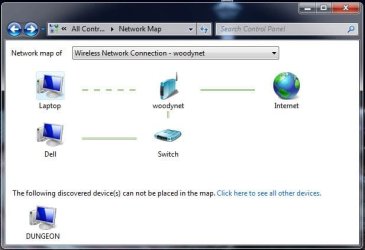
The only thing that is still strange is the network maps. Here they are for both my W7 machines. All is working now so I think I'll leave well enough alone but these are strange network maps!
 

Attachments

  • Dungeon map.PNG
    Dungeon map.PNG
    30.5 KB · Views: 57
  • Laptop map.JPG
    Laptop map.JPG
    33.6 KB · Views: 75

My Computer

Computer Manufacturer/Model Number
Dell / Studio xps
OS
Windows7 x64 7600 16385
CPU
Intel I7 920
Motherboard
Dell
Memory
6GB DDR3
Graphics Card(s)
ATI Radeon HD4350
Sound Card
Integrated 7.1 channel
Hard Drives
Hitachi HDT721064SLA360 (596 GB)
Keyboard
Logitech EX110
Mouse
Logitech LX8
Back
Top