Solved No activation key available for Win 7 Ultimate update

Arcadian

New member
Member
VIP
Local time
11:33 PM
Messages
199
I used to have Win 7 Home Premium till it got a bit corrupted a few weeks ago so upgraded to Win 7 Ultimate. All worked fine then the Windows 30 day trial appeared so changed to that. I'd also read about the not genuine version and even though I had the black screen I was still able to use it as before so no problem.

Out of curiosity I thought I'd find out what they were charging anyway but got no further as the page was no longer available, so presumably Windows are no longer offering the chance to buy the key ?

Is there a work around option anywhere ?

Thanks
 

My Computer My Computer

Computer type
Laptop
Computer Manufacturer/Model Number
HP Presario CQ 56
OS
Windows 7 Home Premium 64bit
Antivirus
Zone Alarm
Browser
Firefox
Hi Arcadian,

The Product Key that you have for your Windows 7 Home Premium will only work with that version of Windows! You will probably be better off just re-installing Windows 7 Home Premium and using your Current Product Key.

I hope this helps!
 

My Computer My Computer

Computer type
Laptop
Computer Manufacturer/Model Number
Fujitsu LIFEBOOK
OS
Win 7 HP SP1 64-bit Vista HB SP2 32-bit Linux Mint 18.3
CPU
Intel(R) Pentium(R) CPU P6200 @ 2.13GHz
Motherboard
FUJITSU FJNBB06
Memory
4.00 GB
Graphics Card(s)
Intel(R) Graphics Media Accelerator HD
Sound Card
[1] Realtek High Definition Audio [2] Intel(R) Display Audio
Screen Resolution
1366 x 768 x 32 bits (4294967296 colors) @ 59 Hz
Hard Drives
TOSHIBA MK5076GSX
Antivirus
AVG FREE
Unfortunately I bought it s/hand off my reliable PC repair guy after he'd overhauled it 7 or 8 years ago, however he never said anything about a key so I've always assumed everything was ok.
 

My Computer My Computer

Computer type
Laptop
Computer Manufacturer/Model Number
HP Presario CQ 56
OS
Windows 7 Home Premium 64bit
Antivirus
Zone Alarm
Browser
Firefox
Hi Arcadian,

Unfortunately I bought it s/hand off my reliable PC repair guy after he'd overhauled it 7 or 8 years ago, however he never said anything about a key so I've always assumed everything was ok.

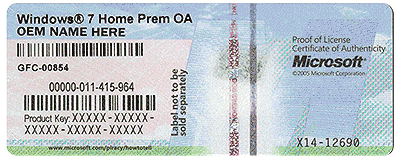
Is the Product Key on a sticker on the bottom of the laptop or in the battery compartment?

You could use Magic Jelly Bean to find your Product Key: Magic Jelly Bean

You could also use Belarc Advisor to find your Product Key: Belarc Advisor

I hope this helps!
 

My Computer My Computer

Computer type
Laptop
Computer Manufacturer/Model Number
Fujitsu LIFEBOOK
OS
Win 7 HP SP1 64-bit Vista HB SP2 32-bit Linux Mint 18.3
CPU
Intel(R) Pentium(R) CPU P6200 @ 2.13GHz
Motherboard
FUJITSU FJNBB06
Memory
4.00 GB
Graphics Card(s)
Intel(R) Graphics Media Accelerator HD
Sound Card
[1] Realtek High Definition Audio [2] Intel(R) Display Audio
Screen Resolution
1366 x 768 x 32 bits (4294967296 colors) @ 59 Hz
Hard Drives
TOSHIBA MK5076GSX
Antivirus
AVG FREE
Thanks found it underneath so what's next ?
 

My Computer My Computer

Computer type
Laptop
Computer Manufacturer/Model Number
HP Presario CQ 56
OS
Windows 7 Home Premium 64bit
Antivirus
Zone Alarm
Browser
Firefox
Hi Arcadian,

Thanks, found it underneath. So what's next?

I take it that you don't have a Windows 7 SP1 installation disc?
 

My Computer My Computer

Computer type
Laptop
Computer Manufacturer/Model Number
Fujitsu LIFEBOOK
OS
Win 7 HP SP1 64-bit Vista HB SP2 32-bit Linux Mint 18.3
CPU
Intel(R) Pentium(R) CPU P6200 @ 2.13GHz
Motherboard
FUJITSU FJNBB06
Memory
4.00 GB
Graphics Card(s)
Intel(R) Graphics Media Accelerator HD
Sound Card
[1] Realtek High Definition Audio [2] Intel(R) Display Audio
Screen Resolution
1366 x 768 x 32 bits (4294967296 colors) @ 59 Hz
Hard Drives
TOSHIBA MK5076GSX
Antivirus
AVG FREE
Afraid not no....
 

My Computer My Computer

Computer type
Laptop
Computer Manufacturer/Model Number
HP Presario CQ 56
OS
Windows 7 Home Premium 64bit
Antivirus
Zone Alarm
Browser
Firefox
Hi Arcadian,

If you want to do a clean install then here is how to do it.

You can download the latest Windows 7 SP1 ISO file from here: TechBench

Then use the following information:
Windows (Final) > Windows 7 SP1 [build 7601] > Windows 7 Ultimate SP1 > English > Win_Ult_SP1_English_x64.iso

Obviously change the language and bit type to suit.

Once downloaded, extract the contents of the ISO using something like 7-zip and then either delete or rename the ei.cfg [ISO > Sources > ei.cfg] file [this will unlock all the versions of Windows 7 and make them available on reinstallation] from the ISO and either burn it [you can't just copy and paste it because it won't work] to a DVD or USB ready for the clean installation.

You could also use the ei.cfg removal utility: ei.cfg removal utility

NOTE: If the version of Windows you are installing is Windows 7 Ultimate then there is NO need to remove the ei.cfg file as instructed above.

To burn the ISO to a DVD you could use the Windows 7 built in ISO burner.
To burn the ISO to a USB you could either use: Rufus 2.18 or Rufus 2.18 Portable.

On the installation you can select whatever version of Windows 7 you have a valid Product Key for [in your case Windows 7 Home Premium]. This is also the only version that you will be able to activate.

IMPORTANT: Make sure that you backup ALL your essential files before you start a clean install. This is because during the clean install process ALL your documents, pictures, music, data files and any installed software programs will be erased and become irretrievable.

I hope this helps!
 

My Computer My Computer

Computer type
Laptop
Computer Manufacturer/Model Number
Fujitsu LIFEBOOK
OS
Win 7 HP SP1 64-bit Vista HB SP2 32-bit Linux Mint 18.3
CPU
Intel(R) Pentium(R) CPU P6200 @ 2.13GHz
Motherboard
FUJITSU FJNBB06
Memory
4.00 GB
Graphics Card(s)
Intel(R) Graphics Media Accelerator HD
Sound Card
[1] Realtek High Definition Audio [2] Intel(R) Display Audio
Screen Resolution
1366 x 768 x 32 bits (4294967296 colors) @ 59 Hz
Hard Drives
TOSHIBA MK5076GSX
Antivirus
AVG FREE
Oh dear that's really kind of you but not a techie at all as it's all way, way over my head and I know I'd definitely screw it up. So as it's already working ok and I've got Win 10 as my main pc better safe than sorry I think....:-)
 

My Computer My Computer

Computer type
Laptop
Computer Manufacturer/Model Number
HP Presario CQ 56
OS
Windows 7 Home Premium 64bit
Antivirus
Zone Alarm
Browser
Firefox

Attachments

  • HardwareCOA.gif
    HardwareCOA.gif
    707.8 KB · Views: 22

My Computer My Computer

Computer type
PC/Desktop
Computer Manufacturer/Model Number
Skylake Special #666
OS
Windows 10 Pro x64
CPU
Intel Core i7 6700K
Motherboard
Asus Sabertooth Z170 Mark 1
Memory
GSkill TridentZ RGB 16GB 3600 16-16-16-36
Graphics Card(s)
EVGA GTX 980 Ti SC x2
Sound Card
Realtek High Definition
Monitor(s) Displays
AOC G2460PG
Screen Resolution
1920 x 1080 144Hz
Hard Drives
Samsung 860 Pro 256GB, Seagate Barracuda 4TB x2
PSU
EVGA 1000 P2, EVGA White Custom Braided Cables
Case
Corsair Vengeance C70 Gunmetal Black
Cooling
Corsair H100i v2, Corsair ML120 x2, Thermal Grizzly Kryonaut
Keyboard
Logitech G910 Orion Spectrum
Mouse
Logitech G700s
Internet Speed
Verizon Fios Quantum Gateway 75/75
Antivirus
Windows Defender, Malwarebytes Free 3.8.3
Browser
Chrome
Other Info
Corsair SP120 x4, LG Blu-ray Drive, Durabrand HT-395 100 Watt Dolby Digital Amp, Corsair H2100 Wireless 7.1 Headset
Thanks. As I said at the beginning I was only wondering out of curiosity what they would charge for a key, and although the black screen was a bit of a pain saying this is not a genuine version there was still no problem overall.

However what I did find was a website that said it could remove "this is not a genuine version" which sounded interesting so gave it a try and it worked fine so everything is now solved. I can't find its URL but I did copy out the instructions....

  • Go to start menu
  • Search “cmd” in the search tab, right click it
  • Select “Run as Administrator” (this will run the command prompt with administrator privileges)
  • A page with a black background, will popup; Type SLMGR -REARM and then press enter. (SLMGR is a tool which manages Windows software license. REARM is a command which resets license status of the machine.)

  • You will see a window which displays the following text “Command completed successfully. Please restart the system for the changes to take effect”. Press “okay”.
  • Restart your computer, and check to see if the error has been removed or not.
  • **If for some reason the “This copy of windows is not genuine” error hasn’t gone away; repeat the same procedure but this time with “SLMGR /REARM” command.
So not at all bad for a non-techie I think though perhaps a tad too much for an 8 year old....;)
 

My Computer My Computer

Computer type
Laptop
Computer Manufacturer/Model Number
HP Presario CQ 56
OS
Windows 7 Home Premium 64bit
Antivirus
Zone Alarm
Browser
Firefox
This post has been removed by Paul Black.
 
Last edited:

My Computer My Computer

Computer type
Laptop
Computer Manufacturer/Model Number
Fujitsu LIFEBOOK
OS
Win 7 HP SP1 64-bit Vista HB SP2 32-bit Linux Mint 18.3
CPU
Intel(R) Pentium(R) CPU P6200 @ 2.13GHz
Motherboard
FUJITSU FJNBB06
Memory
4.00 GB
Graphics Card(s)
Intel(R) Graphics Media Accelerator HD
Sound Card
[1] Realtek High Definition Audio [2] Intel(R) Display Audio
Screen Resolution
1366 x 768 x 32 bits (4294967296 colors) @ 59 Hz
Hard Drives
TOSHIBA MK5076GSX
Antivirus
AVG FREE
Home Premium Iso file is not available. ( except in czech)

He needs to download the Ultimate iso and run eicfg remover.


An 8 year old could install Windows, it`s very simple.

No need to make an All in 1 Installer, just download the Home Premium Iso file and burn to DVD or use Rufus to put the Iso file on a USB Stick and use that to install W7 HP.

TechBench by WZT (v4.1.1)

Clean Install Windows 7 - Windows 7 Help Forums

Rufus - Create bootable USB drives the easy way

Then use your key to activate W7 Home Premium.

Snip Snap, Done :-)
 

My Computers My Computers

System One System Two

  • Computer type
    PC/Desktop
    OS
    7 X64
    CPU
    i5 8400
    Motherboard
    gigabyte b365m ds3h
    Memory
    2x8gb 3200mhz
    Hard Drives
    various
    PSU
    pure power 11 400w cm
    Case
    Coolermaster
    Cooling
    cryorig m9i
  • Computer type
    PC/Desktop
    OS
    7x64
    CPU
    g5400
    Motherboard
    ga b365m ds3h
    Memory
    8gb ddr4 2400
    PSU
    xfx pro 450w
We know what rearming means.

You can get up to 90 days, then you are back in non genuine state. After that things will start shutting down.

:rolleyes:


Thanks. As I said at the beginning I was only wondering out of curiosity what they would charge for a key, and although the black screen was a bit of a pain saying this is not a genuine version there was still no problem overall.

However what I did find was a website that said it could remove "this is not a genuine version" which sounded interesting so gave it a try and it worked fine so everything is now solved. I can't find its URL but I did copy out the instructions....

  • Go to start menu
  • Search “cmd” in the search tab, right click it
  • Select “Run as Administrator” (this will run the command prompt with administrator privileges)
  • A page with a black background, will popup; Type SLMGR -REARM and then press enter. (SLMGR is a tool which manages Windows software license. REARM is a command which resets license status of the machine.)

  • You will see a window which displays the following text “Command completed successfully. Please restart the system for the changes to take effect”. Press “okay”.
  • Restart your computer, and check to see if the error has been removed or not.
  • **If for some reason the “This copy of windows is not genuine” error hasn’t gone away; repeat the same procedure but this time with “SLMGR /REARM” command.
So not at all bad for a non-techie I think though perhaps a tad too much for an 8 year old....;)
 

My Computers My Computers

System One System Two

  • Computer type
    PC/Desktop
    OS
    7 X64
    CPU
    i5 8400
    Motherboard
    gigabyte b365m ds3h
    Memory
    2x8gb 3200mhz
    Hard Drives
    various
    PSU
    pure power 11 400w cm
    Case
    Coolermaster
    Cooling
    cryorig m9i
  • Computer type
    PC/Desktop
    OS
    7x64
    CPU
    g5400
    Motherboard
    ga b365m ds3h
    Memory
    8gb ddr4 2400
    PSU
    xfx pro 450w
Aw shucks, that stinks :(

OK then, create an All in 1 Installer, by downloading W7 Ultimate, it`s very simple to remove the file.

The instructions have been given, and it also is very simple to do.

Refer to Paul`s instructions in reply #8
 

My Computer My Computer

Computer type
PC/Desktop
Computer Manufacturer/Model Number
Skylake Special #666
OS
Windows 10 Pro x64
CPU
Intel Core i7 6700K
Motherboard
Asus Sabertooth Z170 Mark 1
Memory
GSkill TridentZ RGB 16GB 3600 16-16-16-36
Graphics Card(s)
EVGA GTX 980 Ti SC x2
Sound Card
Realtek High Definition
Monitor(s) Displays
AOC G2460PG
Screen Resolution
1920 x 1080 144Hz
Hard Drives
Samsung 860 Pro 256GB, Seagate Barracuda 4TB x2
PSU
EVGA 1000 P2, EVGA White Custom Braided Cables
Case
Corsair Vengeance C70 Gunmetal Black
Cooling
Corsair H100i v2, Corsair ML120 x2, Thermal Grizzly Kryonaut
Keyboard
Logitech G910 Orion Spectrum
Mouse
Logitech G700s
Internet Speed
Verizon Fios Quantum Gateway 75/75
Antivirus
Windows Defender, Malwarebytes Free 3.8.3
Browser
Chrome
Other Info
Corsair SP120 x4, LG Blu-ray Drive, Durabrand HT-395 100 Watt Dolby Digital Amp, Corsair H2100 Wireless 7.1 Headset
Hi Arcadian,

If you do decide to re-install Windows 7 SP1 in the future then here are the re-vamped instructions.

Instructions for a clean install of Windows 7 SP1 if there is NO Installation Disc.

Make sure that you have your Product Key available for the version of Windows that you are re-installing.
On a laptop it will either be on a sticker on the bottom of the laptop or in the battery compartment. If the sticker it is too worn to read or there isn't one then you can find it by either using Belarc Advisor or Magic Jelly Bean. Write this Product Key down an keep it in a safe place.

Download the latest Windows 7 SP1 ISO file from TechBench using the following information [obviously change the language and bit type to suit]:

Windows (Final) > Windows 7 SP1 [build 7601] > Windows 7 Ultimate SP1 > English > Win7_Ult_SP1_English_x64.iso

[1] Once downloaded, extract the contents of the ISO to the Desktop for example using something like 7-Zip.

[2] Either delete or rename the ei.cfg file [ISO > Sources > ei.cfg].
This will unlock ALL the Windows 7 versions on the ISO and make them available on the re-installation.
You could also use the ei.cfg removal utility.

NOTE: If the version of Windows you are re-installing is Windows 7 Ultimate then there is NO need to remove the ei.cfg file as instructed above.

[3] Either burn the ISO [you can't just copy and paste it because it won't work] to a DVD or USB.

To burn the ISO to a DVD you can use the Windows 7 built in ISO burner.
To burn the ISO to a USB you can either use: Rufus 2.18 or Rufus 2.18 Portable.

On the re-installation you can select whatever version of Windows 7 you have a valid Product Key for. This is also the only version that you will be able to activate.

IMPORTANT: Make sure that you backup ALL your essential files before you start a clean install. This is because during the clean install process ALL your Documents, Pictures, Music, Videos, Data Files and any installed software programs will be erased and become irretrievable.

I hope this helps!
 
Last edited:

My Computer My Computer

Computer type
Laptop
Computer Manufacturer/Model Number
Fujitsu LIFEBOOK
OS
Win 7 HP SP1 64-bit Vista HB SP2 32-bit Linux Mint 18.3
CPU
Intel(R) Pentium(R) CPU P6200 @ 2.13GHz
Motherboard
FUJITSU FJNBB06
Memory
4.00 GB
Graphics Card(s)
Intel(R) Graphics Media Accelerator HD
Sound Card
[1] Realtek High Definition Audio [2] Intel(R) Display Audio
Screen Resolution
1366 x 768 x 32 bits (4294967296 colors) @ 59 Hz
Hard Drives
TOSHIBA MK5076GSX
Antivirus
AVG FREE
Well if it does eventually shutdown and to avoid any further problems how about the option of upgrading to Win 10 fairly soon anyway, as basically I'm only looking to have a backup pc always ready in case of problems with my 18 month old Win 10....?
 

My Computer My Computer

Computer type
Laptop
Computer Manufacturer/Model Number
HP Presario CQ 56
OS
Windows 7 Home Premium 64bit
Antivirus
Zone Alarm
Browser
Firefox
You can only upgrade an activated edition of win7.

It is very easy.

1. Download the Ultimate iso file

2. Run the eicfg tool - a windows pops up - it asks you to browse to the iso. It does the job almost instantly.

Now you have an iso from which you can install any edition of win7. Obviously install the edition for which you have a key.
 

My Computers My Computers

System One System Two

  • Computer type
    PC/Desktop
    OS
    7 X64
    CPU
    i5 8400
    Motherboard
    gigabyte b365m ds3h
    Memory
    2x8gb 3200mhz
    Hard Drives
    various
    PSU
    pure power 11 400w cm
    Case
    Coolermaster
    Cooling
    cryorig m9i
  • Computer type
    PC/Desktop
    OS
    7x64
    CPU
    g5400
    Motherboard
    ga b365m ds3h
    Memory
    8gb ddr4 2400
    PSU
    xfx pro 450w
As I said in my first post I'm already using Ultimate or is Ultimate iso something different.... ?
 

My Computer My Computer

Computer type
Laptop
Computer Manufacturer/Model Number
HP Presario CQ 56
OS
Windows 7 Home Premium 64bit
Antivirus
Zone Alarm
Browser
Firefox
Hi Arcadian,

As I said in my first post I'm already using Ultimate or is Ultimate iso something different.... ?

No, Ultimate ISO is the same.
I have re-vamped the instructions in Post #16. You can ignore No 2 as per the NOTE.

I hope this helps!
 

My Computer My Computer

Computer type
Laptop
Computer Manufacturer/Model Number
Fujitsu LIFEBOOK
OS
Win 7 HP SP1 64-bit Vista HB SP2 32-bit Linux Mint 18.3
CPU
Intel(R) Pentium(R) CPU P6200 @ 2.13GHz
Motherboard
FUJITSU FJNBB06
Memory
4.00 GB
Graphics Card(s)
Intel(R) Graphics Media Accelerator HD
Sound Card
[1] Realtek High Definition Audio [2] Intel(R) Display Audio
Screen Resolution
1366 x 768 x 32 bits (4294967296 colors) @ 59 Hz
Hard Drives
TOSHIBA MK5076GSX
Antivirus
AVG FREE
Back
Top