
No application for search and How add Agent Ransack to disk context?

dkperez

New member
Member
Local time
4:20 AM
Messages
31
Running Windows 7 Professional 64-bit.

When you right-click while on a folder in Windows Explorer, "search" isn't working. It complains that "This file does not have a program associated with it..." I presume I somehow clobbered something, somewhere. How do I get this working again? I presume I need to create an association, but with what?

I installed Agent Ransack for doing searches, and it works fine from the context menu (right click while in Windows Explorer) for ANY folder EXCEPT the top level disk... So, I can search "Program Files" just fine, but I can't search "c:" because the command doesn't show up in the context menu at the disk level. How do I add it?
 

My Computer My Computer

At a glance

Windows 7 Home Premium 64-bitI5-7208GBNvidia GTS 360M
Computer type
Laptop
Computer Manufacturer/Model Number
Toshiba
OS
Windows 7 Home Premium 64-bit
CPU
I5-720
Motherboard
Toshiba X505-Q870
Memory
8GB
Graphics Card(s)
Nvidia GTS 360M
Hard Drives
Seagate 1TB Hybrid
Hitachi 500GB
External SATA Hitachi 500GB
Just in passing, the "Everything" alternative to Windows Search DOES insert itself into the right-click context menu and can be used for EVERYTHING you right-click on, including a top-level drive letter.

It shows up as "Search Everything..." with whatever top-level drive letter or current folder location you're at in Explorer already pre-populated in the search argument field of the Everything dialog that appears. You then type whatever full/partial/wildcard file name you're looking for and the search is limited to the top-level drive or current high-level folder.

And of course there's always the Everything object permanently present in the System Tray for you to right-click and select "New Search Window" to initiate a blank new search.

I've not used Agent Ransack, because I've been a long-time convert to Everything and see no need to have anything else for my "full/partial/wildcard file name search" alternative to Windows Search.
 

My Computer My Computer

At a glance

Windows 7 Pro x64 (1), Win7 Pro X64 (2)i5-3350p 3.1Ghz/6MB-cache (1); E8400 3.0Ghz/6...8GB PC3-12800 DDR3 (1); 4GB PC3-10600 DDR3 (2)ATI HD7750 (1), (see TV cards); ATI R7 250 (2)
Computer type
PC/Desktop
Computer Manufacturer/Model Number
Home-built, two systems (1) and (2)
OS
Windows 7 Pro x64 (1), Win7 Pro X64 (2)
CPU
i5-3350p 3.1Ghz/6MB-cache (1); E8400 3.0Ghz/6MB-cache (2)
Motherboard
ASUS P8Z77-V Pro (1); ASUS P5Q3 (2)
Memory
8GB PC3-12800 DDR3 (1); 4GB PC3-10600 DDR3 (2)
Graphics Card(s)
ATI HD7750 (1), (see TV cards); ATI R7 250 (2)
Sound Card
Realtek ALC892 HD Audio (1); Realtek ALC1200 HD Audio (2)
Monitor(s) Displays
Eizo HD2441W LCD, Eizo S2433W (1); Eizo 24" S2433W (2)
Screen Resolution
1920x1200, 1920x1200 (1); 1920x1200 (2)
Hard Drives
(1) 1TB SATA-II (7200RPM), 2x2TB SATA-III (7200RPM), 250GB SATA-III (10000RPM) for OS; 2x2TB external USB 3.0

(2) 320GB SATA-II (7200RPM), 750GB SATA-II (7200RPM), 150GB SATA-II (10000RPM) for OS; 2TB external USB 3.0
PSU
Nesteq ECS-6001 600W (1); Nesteq ECS-5001 500W (2)
Case
Acousti-Case 360 (1) and (2)
Cooling
Noctua NH-U12P SE2 for CPU, 2x120mm case fans (1) and (2)
Keyboard
IBM PS/2 (1) and (2)
Mouse
Logitech MX Revolution wireless (1); Microsoft wired (2)
Internet Speed
100mbps down / 10mbps up
Antivirus
Microsoft Security Essentials; Malwarebyte Anti-Malware Pro
Browser
Firefox
Other Info
Ceton InfiniTV 4-tuner cablecard-enabled TV card as well as Hauppauge HVR-2250 OTA/ATSC 2-tuner TV card in (1), running under Win7 WMC
I also use Search Everything. Been using it for a long time. It works so well I haven't looked for another program.
 

My Computer My Computer

At a glance

Windows 10 Pro. 64/ version 1709 Windows 7 Pr...Intel i7-6800K @ 4.3Corsair Platinum 16 gig @2400EVGA GTX 1070 OC
Computer type
PC/Desktop
Computer Manufacturer/Model Number
Home made Desktop
OS
Windows 10 Pro. 64/ version 1709 Windows 7 Pro/64
CPU
Intel i7-6800K @ 4.3
Motherboard
ASUS X-99 Deluxe II
Memory
Corsair Platinum 16 gig @2400
Graphics Card(s)
EVGA GTX 1070 OC
Monitor(s) Displays
Asus 27" LED LCD/VE278Q
Screen Resolution
1920-1080 or 1280-720 HDMI
Hard Drives
INTEL SSD 730-240 Gb Sata 3.0/
PSU
EVGA Platium 1200W
Case
Phanteks Luxe Tempered Glass 8 fans/ one radiator
Cooling
XSPC/ Water Cooled CPU
Keyboard
Das 4 Professional
Mouse
Logitech M705/MX Anywhere 2-S
Internet Speed
100 mbits
Antivirus
Microsoft Security Essentials/ Malwarebytes Premium 3.0/ SAS
Browser
I.E. 11 default/Firefox/ ISP Time Warner Cable/Spectrum
Other Info
LG BluRay Burner/
Sound system-KLipsch-THX/
Icy Dock ssd Hot Swap bays.
I just downloaded everything. It looks awfully basic...

Can someone tell me HOW to get the MS search reconnected to the top level context menu? If I can find that out, I may be able to figure out how to get Agent Ransack connected to the top level context menu.

I'll try everything again, but I didn't find anything for doing searches by date or size or across multiple disks, etc.
 

My Computer My Computer

At a glance

Windows 7 Home Premium 64-bitI5-7208GBNvidia GTS 360M
Computer type
Laptop
Computer Manufacturer/Model Number
Toshiba
OS
Windows 7 Home Premium 64-bit
CPU
I5-720
Motherboard
Toshiba X505-Q870
Memory
8GB
Graphics Card(s)
Nvidia GTS 360M
Hard Drives
Seagate 1TB Hybrid
Hitachi 500GB
External SATA Hitachi 500GB
I just downloaded everything. It looks awfully basic...
It is in fact "basic". It is 100% strictly for file name search, either full or partial or wildcard.

I, myself, do this type of "search" 99.999% of the time when I'm searching for something. And for this purpose Everything is 100% PERFECT, and instantaneously fast. As quickly as I can type, the program is keeping up with my keystrokes and the "hit list" revealed in the area below simply populates or is reduced in size as the fewer and fewer "hits" satisfy the search.

That's what this product is... a file name search only.


I'll try everything again, but I didn't find anything for doing searches by date or size or across multiple disks, etc.
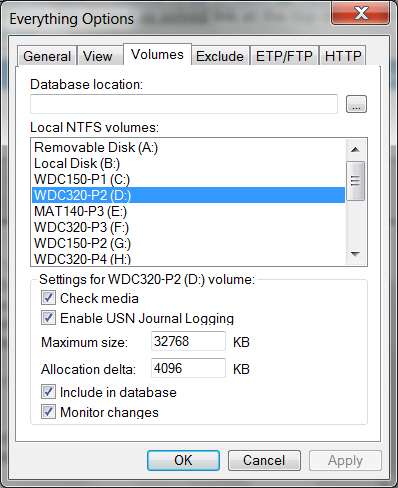
The index maintained by Everything is automatically inclusive of WHATEVER VOLUMES (i.e. disks) you specify in the Options configuration:

everythingoptions.jpg


Right-click on Everything in the System Tray and select "options". Then select the VOLUMES tab and "activate" your other disk drives for indexing or not. Just check the "check media" box and all the other boxes will also auto-check themselves. This is what you want, and now that drive's folders/files are part of the master Everything index process. You can also use the EXCLUDE tab to intentionally omit selected folders from the indexing process, if that's what you want.

If you want to do a more "exotic" search, by date or size or other characteristics (including imbedded text inside files, etc.) then you need to use a more "exotic" product. Everything is NOT this kind of product... it is 100% strictly for instant file name search.

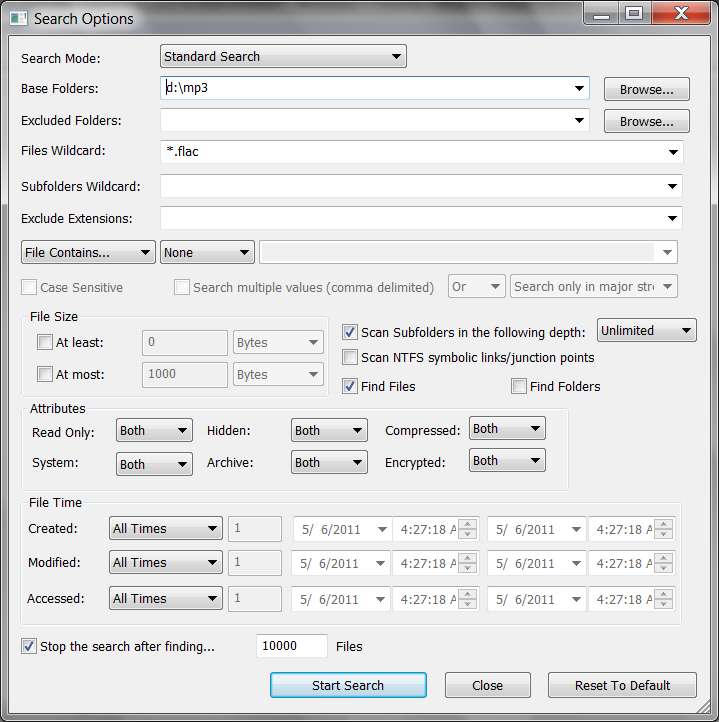
If you DO want a more "exotic" search as you've described, you might install another beauty of a Windows Search alternative: Search My Files. This product will do EXACTLY what you're asking for... but it's "on the fly", rather than index-based as Everything is for file names. So while Everything is literally "instantaneous" in its response which occurs AS YOU TYPE, Search My Files only begins its active search only after you complete configuring the search criteria and finally push the "start search" button. It may take some time, depending on how large the drive/folder search scope is as you've defined it.

searchmyfiles.jpg
 

My Computer My Computer

At a glance

Windows 7 Pro x64 (1), Win7 Pro X64 (2)i5-3350p 3.1Ghz/6MB-cache (1); E8400 3.0Ghz/6...8GB PC3-12800 DDR3 (1); 4GB PC3-10600 DDR3 (2)ATI HD7750 (1), (see TV cards); ATI R7 250 (2)
Computer type
PC/Desktop
Computer Manufacturer/Model Number
Home-built, two systems (1) and (2)
OS
Windows 7 Pro x64 (1), Win7 Pro X64 (2)
CPU
i5-3350p 3.1Ghz/6MB-cache (1); E8400 3.0Ghz/6MB-cache (2)
Motherboard
ASUS P8Z77-V Pro (1); ASUS P5Q3 (2)
Memory
8GB PC3-12800 DDR3 (1); 4GB PC3-10600 DDR3 (2)
Graphics Card(s)
ATI HD7750 (1), (see TV cards); ATI R7 250 (2)
Sound Card
Realtek ALC892 HD Audio (1); Realtek ALC1200 HD Audio (2)
Monitor(s) Displays
Eizo HD2441W LCD, Eizo S2433W (1); Eizo 24" S2433W (2)
Screen Resolution
1920x1200, 1920x1200 (1); 1920x1200 (2)
Hard Drives
(1) 1TB SATA-II (7200RPM), 2x2TB SATA-III (7200RPM), 250GB SATA-III (10000RPM) for OS; 2x2TB external USB 3.0

(2) 320GB SATA-II (7200RPM), 750GB SATA-II (7200RPM), 150GB SATA-II (10000RPM) for OS; 2TB external USB 3.0
PSU
Nesteq ECS-6001 600W (1); Nesteq ECS-5001 500W (2)
Case
Acousti-Case 360 (1) and (2)
Cooling
Noctua NH-U12P SE2 for CPU, 2x120mm case fans (1) and (2)
Keyboard
IBM PS/2 (1) and (2)
Mouse
Logitech MX Revolution wireless (1); Microsoft wired (2)
Internet Speed
100mbps down / 10mbps up
Antivirus
Microsoft Security Essentials; Malwarebyte Anti-Malware Pro
Browser
Firefox
Other Info
Ceton InfiniTV 4-tuner cablecard-enabled TV card as well as Hauppauge HVR-2250 OTA/ATSC 2-tuner TV card in (1), running under Win7 WMC
Are you able to use the Search off of the start button?
Do you have indexing turned on?
 

My Computer My Computer

At a glance

Windows 10 Pro. 64/ version 1709 Windows 7 Pr...Intel i7-6800K @ 4.3Corsair Platinum 16 gig @2400EVGA GTX 1070 OC
Computer type
PC/Desktop
Computer Manufacturer/Model Number
Home made Desktop
OS
Windows 10 Pro. 64/ version 1709 Windows 7 Pro/64
CPU
Intel i7-6800K @ 4.3
Motherboard
ASUS X-99 Deluxe II
Memory
Corsair Platinum 16 gig @2400
Graphics Card(s)
EVGA GTX 1070 OC
Monitor(s) Displays
Asus 27" LED LCD/VE278Q
Screen Resolution
1920-1080 or 1280-720 HDMI
Hard Drives
INTEL SSD 730-240 Gb Sata 3.0/
PSU
EVGA Platium 1200W
Case
Phanteks Luxe Tempered Glass 8 fans/ one radiator
Cooling
XSPC/ Water Cooled CPU
Keyboard
Das 4 Professional
Mouse
Logitech M705/MX Anywhere 2-S
Internet Speed
100 mbits
Antivirus
Microsoft Security Essentials/ Malwarebytes Premium 3.0/ SAS
Browser
I.E. 11 default/Firefox/ ISP Time Warner Cable/Spectrum
Other Info
LG BluRay Burner/
Sound system-KLipsch-THX/
Icy Dock ssd Hot Swap bays.
Running Windows 7 Professional 64-bit.

When you right-click while on a folder in Windows Explorer, "search" isn't working. It complains that "This file does not have a program associated with it..." I presume I somehow clobbered something, somewhere. How do I get this working again? I presume I need to create an association, but with what?

I installed Agent Ransack for doing searches, and it works fine from the context menu (right click while in Windows Explorer) for ANY folder EXCEPT the top level disk... So, I can search "Program Files" just fine, but I can't search "c:" because the command doesn't show up in the context menu at the disk level. How do I add it?

My Agent Ransack searches C: from the context menu - do you have anything ticked in the options menu, I don't. Perhaps it is because I run as admin but unlikely.

:rolleyes: :shock: :huh:
 

My Computer My Computer

At a glance

Windows 7 x64 SP1Athlon II x2 2154.0 GBOnboard
Computer Manufacturer/Model Number
Compaq desktop
OS
Windows 7 x64 SP1
CPU
Athlon II x2 215
Memory
4.0 GB
Graphics Card(s)
Onboard
Sound Card
Creative SB X-Fi Titanium HD (nice)
Monitor(s) Displays
24" Dell LCD
Screen Resolution
1900 x 1200
Hard Drives
320 GB, 500 GB and 750 GB 7200 rpm
PSU
430w
Keyboard
USB
Mouse
USB
Internet Speed
approx 10 Mbps
>Are you able to use the Search off of the start button?

No, I can't even run it from the start button. I get the same error. I've apparently clobbered some association and need to put it back, but I can't find anything that tells me where and how this particular association is done.
 

My Computer My Computer

At a glance

Windows 7 Home Premium 64-bitI5-7208GBNvidia GTS 360M
Computer type
Laptop
Computer Manufacturer/Model Number
Toshiba
OS
Windows 7 Home Premium 64-bit
CPU
I5-720
Motherboard
Toshiba X505-Q870
Memory
8GB
Graphics Card(s)
Nvidia GTS 360M
Hard Drives
Seagate 1TB Hybrid
Hitachi 500GB
External SATA Hitachi 500GB
>My Agent Ransack searches C: from the context menu - do you have anything >ticked in the options menu, I don't. Perhaps it is because I run as admin but >unlikely.

I BELIEVE mine USED TO run from the top level context menu... Similar to whatever I did to the MS search, I think I clobbered this one. Re-installing hasn't helped.

Since I'm the administrator on this system, I always run as an administrator.

I just checked, and I don't have any oddities set in the configuration or any options checked. Whatever I did, I ONLY clobbered the top level folder for a disk...

I've been through the registry, and can find context menu settings and can find Agent Ransack in the context menu. BUT, at least on my system, the context menu for the disk is different than the context menu for any of the folders on that disk. There are quite a few differences, and I can't find the context menu for the disk...

I KNOW they should both work 'cause BOTH work fine on my laptop. It's only on the desktop (where I go around playing with things and sometimes clobber stuff) that I've managed to goof things up...
 

My Computer My Computer

At a glance

Windows 7 Home Premium 64-bitI5-7208GBNvidia GTS 360M
Computer type
Laptop
Computer Manufacturer/Model Number
Toshiba
OS
Windows 7 Home Premium 64-bit
CPU
I5-720
Motherboard
Toshiba X505-Q870
Memory
8GB
Graphics Card(s)
Nvidia GTS 360M
Hard Drives
Seagate 1TB Hybrid
Hitachi 500GB
External SATA Hitachi 500GB
It can be really annoying when things like this happen - I don't suppose you have a system image to go back to?

:huh: :rolleyes:
 

My Computer My Computer

At a glance

Windows 7 x64 SP1Athlon II x2 2154.0 GBOnboard
Computer Manufacturer/Model Number
Compaq desktop
OS
Windows 7 x64 SP1
CPU
Athlon II x2 215
Memory
4.0 GB
Graphics Card(s)
Onboard
Sound Card
Creative SB X-Fi Titanium HD (nice)
Monitor(s) Displays
24" Dell LCD
Screen Resolution
1900 x 1200
Hard Drives
320 GB, 500 GB and 750 GB 7200 rpm
PSU
430w
Keyboard
USB
Mouse
USB
Internet Speed
approx 10 Mbps
Make sure you indexing is on. You will not be able to search if indexing is off.
Please fill out your complete specs to help others help you.
 

My Computer My Computer

At a glance

Windows 10 Pro. 64/ version 1709 Windows 7 Pr...Intel i7-6800K @ 4.3Corsair Platinum 16 gig @2400EVGA GTX 1070 OC
Computer type
PC/Desktop
Computer Manufacturer/Model Number
Home made Desktop
OS
Windows 10 Pro. 64/ version 1709 Windows 7 Pro/64
CPU
Intel i7-6800K @ 4.3
Motherboard
ASUS X-99 Deluxe II
Memory
Corsair Platinum 16 gig @2400
Graphics Card(s)
EVGA GTX 1070 OC
Monitor(s) Displays
Asus 27" LED LCD/VE278Q
Screen Resolution
1920-1080 or 1280-720 HDMI
Hard Drives
INTEL SSD 730-240 Gb Sata 3.0/
PSU
EVGA Platium 1200W
Case
Phanteks Luxe Tempered Glass 8 fans/ one radiator
Cooling
XSPC/ Water Cooled CPU
Keyboard
Das 4 Professional
Mouse
Logitech M705/MX Anywhere 2-S
Internet Speed
100 mbits
Antivirus
Microsoft Security Essentials/ Malwarebytes Premium 3.0/ SAS
Browser
I.E. 11 default/Firefox/ ISP Time Warner Cable/Spectrum
Other Info
LG BluRay Burner/
Sound system-KLipsch-THX/
Icy Dock ssd Hot Swap bays.
Plain, ordinary, PC box. As I said originally - running Windows 7 Professional, 64-bit.

So, does ANYBODY KNOW how to put a command into the context menu for a drive?
There's gotta be a SIMPLE way to add the $#%^^%$# search command back in and add other stuff manually.
 

My Computer My Computer

At a glance

Windows 7 Home Premium 64-bitI5-7208GBNvidia GTS 360M
Computer type
Laptop
Computer Manufacturer/Model Number
Toshiba
OS
Windows 7 Home Premium 64-bit
CPU
I5-720
Motherboard
Toshiba X505-Q870
Memory
8GB
Graphics Card(s)
Nvidia GTS 360M
Hard Drives
Seagate 1TB Hybrid
Hitachi 500GB
External SATA Hitachi 500GB
OK, I finally used the brute force and massive ignorance method... Uninstalled Ransack 64. Rebooted. Manually deleted all the folders and files in both program locations. Installed the 32-bit version. Verified that it showed up in all the context menus - along with the shortcuts for the 64-bit versions, which no longer work anywhere.....

Went into regedit and searched for Agent Ransack and deleted every occurrence where it was located in "Program Files" instead of "Program Fiels (x86)"......

Works fine now, so although it would still be nice to know how to get the MS search working, I don't really need it.........

So, this one can go to sleep unless someone can tell me specifically how to get the MS search working again.
 

My Computer My Computer

At a glance

Windows 7 Home Premium 64-bitI5-7208GBNvidia GTS 360M
Computer type
Laptop
Computer Manufacturer/Model Number
Toshiba
OS
Windows 7 Home Premium 64-bit
CPU
I5-720
Motherboard
Toshiba X505-Q870
Memory
8GB
Graphics Card(s)
Nvidia GTS 360M
Hard Drives
Seagate 1TB Hybrid
Hitachi 500GB
External SATA Hitachi 500GB
I will ask again. Do you have indexing turned on.
Plain ordinary box tells us nothing.
Have a nice day.
 

My Computer My Computer

At a glance

Windows 10 Pro. 64/ version 1709 Windows 7 Pr...Intel i7-6800K @ 4.3Corsair Platinum 16 gig @2400EVGA GTX 1070 OC
Computer type
PC/Desktop
Computer Manufacturer/Model Number
Home made Desktop
OS
Windows 10 Pro. 64/ version 1709 Windows 7 Pro/64
CPU
Intel i7-6800K @ 4.3
Motherboard
ASUS X-99 Deluxe II
Memory
Corsair Platinum 16 gig @2400
Graphics Card(s)
EVGA GTX 1070 OC
Monitor(s) Displays
Asus 27" LED LCD/VE278Q
Screen Resolution
1920-1080 or 1280-720 HDMI
Hard Drives
INTEL SSD 730-240 Gb Sata 3.0/
PSU
EVGA Platium 1200W
Case
Phanteks Luxe Tempered Glass 8 fans/ one radiator
Cooling
XSPC/ Water Cooled CPU
Keyboard
Das 4 Professional
Mouse
Logitech M705/MX Anywhere 2-S
Internet Speed
100 mbits
Antivirus
Microsoft Security Essentials/ Malwarebytes Premium 3.0/ SAS
Browser
I.E. 11 default/Firefox/ ISP Time Warner Cable/Spectrum
Other Info
LG BluRay Burner/
Sound system-KLipsch-THX/
Icy Dock ssd Hot Swap bays.
In answer to your question (there's an awful lot of non-answers here)...

The context menu for the C:\ drive is located under the HKCR\Drive registry key. For Agent Ransack it should be under HKCR\Drive\shellex\ContextMenuHandlers\AgentRansack

The Folder context menu options are similarily under HKCR\Directory.

There's one important point in that although the 32-bit version of Agent Ransack will work on Win x64 the shell extensions will not (out of the box) work in Explorer x64. The reason is that a 64-bit process (ie Explorer x64) can't load a 32-bit extension 'in-process'.

Next time you go through this you should try installing Agent Ransack x64 if you're using Explorer x64. I'd also recommend contacting Agent Ransack support if you have problems, they're normally pretty helpful and responsive.
 

My Computer My Computer

At a glance

7 x64
OS
7 x64
Yup, indexing is on. It's not the "search" fault, it used to work. "I" did something when messing around with context menus and clobbered the search. I"ll try snowdude's information and see if I can get it working again.......

I'm aware of the limitations on Agent Ransack 32, but I wanted to do something that would COMPLETELY remove and change what I had. Now that I have it working in 32-bit, I'll go through the same process again and go back to the 64-bit version when I've got a spare minute.

This should be a lesson to me NOT to do really dumb things without writing down what I'm doing or getting a registry backup or whatever! Unfortunately, with me, the ratio of dumb things to smart things is really in favor of the dumb things!
 

My Computer My Computer

At a glance

Windows 7 Home Premium 64-bitI5-7208GBNvidia GTS 360M
Computer type
Laptop
Computer Manufacturer/Model Number
Toshiba
OS
Windows 7 Home Premium 64-bit
CPU
I5-720
Motherboard
Toshiba X505-Q870
Memory
8GB
Graphics Card(s)
Nvidia GTS 360M
Hard Drives
Seagate 1TB Hybrid
Hitachi 500GB
External SATA Hitachi 500GB
Back
Top