No artifacts when overclocking

imeem

New member
Member
VIP
Local time
7:54 AM
Messages
387
For some reason, I OCed my HD 5770's gpu clock from 850 mhz to 940 mhz. I benchmark with 3Dmark Vantage and I saw no artifacts. This worries me and the highest I can OC the gpu clock is 960 mhz and what if I still don't see any artifacts at speed?
 

My Computer

Computer type
PC/Desktop
Computer Manufacturer/Model Number
Acer M802
OS
Win 7 & 10 x64
CPU
Intel(R) Core(TM)2 Quad CPU Q8400 @ 2.66GHz (4 CPUs), ~2.7GH
Motherboard
MB.SCQ07.002 MB KIT G43 ICH10R HMII EUPLOT6 ECS R
Memory
8GB DDR2
Graphics Card(s)
HD 6970 2 GB
Sound Card
Realtek ALC 888s
Monitor(s) Displays
AOC
Screen Resolution
1920x1080 60hz
Hard Drives
WD Black 1 TB

WD My Book Essential 1 TB external HDD
PSU
Corsair TX650m
Case
CM 690 II Advanced mid tower
Cooling
fan
Using a proper stress testing app like Kombustor or Furmark will show what Vantage fails to uncover in regards to artifacts.

Vantage is okay, but not as a definitive stress tester. However Vantage is still useful in other ways.


With Vanatge - pay attention to the FPS counter in each test.

Since obviously a higher clock will give you a higher 'max' FPS, it's the 'average, or sustained FPS' that will give you an indication whether the higher clock speed is actually improving, or hurting overall performance.

When a clock is stable @ the current voltage, there are certain sections you will notice that the 'average' FPS doesn't really move that much and that is a good thing.

There is a point when you up the clock speed where the framerate will start to vacillate (the FPS will continually drop and rise), which is a bad thing.

When that starts to occur, it's actually hurting the overall performance since your minimum framerates in real world games will drop further and drag your overall average FPS down.

Kombustor will show the same thing when testing. A sustained FPS is better than a vacillating one.

If you see zero artificats, but notice the dipping frames - you can either back the clock down or increase the voltage.
 

My Computer

Computer type
PC/Desktop
Computer Manufacturer/Model Number
Systems by SmartEyeball
OS
8 Pro x64
CPU
i7 3770K 4.6GHz
Motherboard
ASUS P8Z77 WS
Memory
16GB G.Skill Trident X 2666mhz
Graphics Card(s)
x2 EVGA 780 Ti Superclocked SLI
Sound Card
SB X-FI Surround 5.1 PRO USB / ATH-AD900 Headphones
Monitor(s) Displays
x3 Dell U2410 / 58" Samsung
Screen Resolution
5760*1200/ 1920*1200
Hard Drives
2x Intel 520 240GB (RAID 0) * 2x WD Caviar Blacks 2TB (RAID 0) * 2TB WD Caviar Black * Sony Optirac DVD
PSU
Silverstone Strider Evolution 1200W
Case
Thermaltake Level 10 GT Snow Edition
Cooling
Noctua NH-D14
Keyboard
Topre Realforce // Ducky Shine MX Black // Filco Ninja TKL
Mouse
Thermaltake Theron (Highly Recommended) + Razer Imperator
Antivirus
MSE
Browser
IE, FF, WaterFox
Other Info
GT Extreme V2 Sim Racing Cockpit + 40" LCD and K/B Mouse stand ▼
Fanatec CSR Elite Wheel + Clubsport V1 Pedals + CSR shifter/7G-H ▼Saitek X52 Pro ▼ TrackIR 5 Pro
Buttkicker v2 Seat Rumbler with Dedicated 5.1 and Sub Woofer attached to frame ▼
=
Bloody Big Grin
How do I increase the voltage? and Is Heavenly Beanchmark better than 3Dmark vantage?
 

My Computer

Computer type
PC/Desktop
Computer Manufacturer/Model Number
Acer M802
OS
Win 7 & 10 x64
CPU
Intel(R) Core(TM)2 Quad CPU Q8400 @ 2.66GHz (4 CPUs), ~2.7GH
Motherboard
MB.SCQ07.002 MB KIT G43 ICH10R HMII EUPLOT6 ECS R
Memory
8GB DDR2
Graphics Card(s)
HD 6970 2 GB
Sound Card
Realtek ALC 888s
Monitor(s) Displays
AOC
Screen Resolution
1920x1080 60hz
Hard Drives
WD Black 1 TB

WD My Book Essential 1 TB external HDD
PSU
Corsair TX650m
Case
CM 690 II Advanced mid tower
Cooling
fan
I benchmark again. At 900 mhz I overall I got higher avg fps than at 850 mhz. But at 950 mhz I got lower cpu score than when the video card was at 900 mhz.
 

My Computer

Computer type
PC/Desktop
Computer Manufacturer/Model Number
Acer M802
OS
Win 7 & 10 x64
CPU
Intel(R) Core(TM)2 Quad CPU Q8400 @ 2.66GHz (4 CPUs), ~2.7GH
Motherboard
MB.SCQ07.002 MB KIT G43 ICH10R HMII EUPLOT6 ECS R
Memory
8GB DDR2
Graphics Card(s)
HD 6970 2 GB
Sound Card
Realtek ALC 888s
Monitor(s) Displays
AOC
Screen Resolution
1920x1080 60hz
Hard Drives
WD Black 1 TB

WD My Book Essential 1 TB external HDD
PSU
Corsair TX650m
Case
CM 690 II Advanced mid tower
Cooling
fan
In all seriousness you should be able to use autotune in CCC and it will tune it to the highest possible speed and stress it at the same time, you need to hit escape to end the testing and your clock ill be adjusted to optimal settings, i.e. fps, no artifacts and use of CPU. Other than that using Unigine Sanctuary at 1024x768 Full Screen, 3DMark06 and Vantage will show how the card responds to the autotune from CCC.
 

My Computer

Computer Manufacturer/Model Number
DELL XPS Studio 435T
OS
Vista 64 Ultimate, Windows 7 64 Ultimate, Ubuntu 9.10
CPU
i7 975 3.3 GHz Extreme (Factory OC'd to 3.6 GHz)
Motherboard
DELL provided
Memory
18 Gb Tri-Channel 1066
Graphics Card(s)
ATI 5970 2048 Mb
Sound Card
X-Fi Extreme Gamer
Monitor(s) Displays
Vizio 37" HD-TV
Screen Resolution
1920 x 1080
Hard Drives
1.5 Tb HDD
1.5 Tb HDD
2.0 Tb Network Drive
512 Gb Crucial SSD
PSU
DELL Provided 475 watts
Case
DELL
Cooling
3 fans
Keyboard
Logitech Performance K350 Wireless
Mouse
Logitech Performance MX Wireless
Internet Speed
3 Mb up 750 Kb down
Other Info
Bamboo Fun Tablet, Belkin N+ Wireless router, Pioneer Dolby System Wireless Headphones, Bose 5.1 Dolby Surround Sound System, LifeCam VX 3000 Webcam, Blu-Ray/Hi Def DVD +RW combo and Blu-ray +RW,l 15 in 1 media card reader, Logitech Rumblepad 2, Hauppauge 2250 DTV Tuner with MS Media Center Remote

Laptop:Alienware M17x, Q9100 CPU, 8Gb RAM, 1920x1200 WUXGA LCD driven by 4870's in CrossFireX, Bl
How do I increase the voltage?

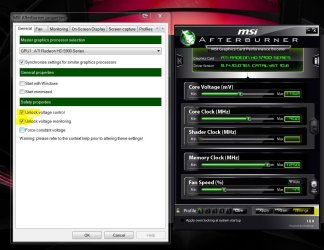
If the card has adjustable voltage - MSI Afterburner is a good tool.

Don't exceed 1.1625v and watch your temps.

You have to have to unlock the voltage option :

Settings > Unlock voltage Control

MSI AB.JPG


and Is Heaven Benchmark better than 3Dmark vantage?

Imo, no. But it is worthwhile having as part of the 'tool kit'.


In all seriousness you should be able to use autotune in CCC and it will tune it to the highest possible speed and stress it at the same time

The last time I tried autotune (on a 4850 Cat 9.? ) it set some ridiculously unsupportable and unstable clocks.

Maybe it's improved since then, but I personally prefer to test/adjust new clocks manually.
 

My Computer

Computer type
PC/Desktop
Computer Manufacturer/Model Number
Systems by SmartEyeball
OS
8 Pro x64
CPU
i7 3770K 4.6GHz
Motherboard
ASUS P8Z77 WS
Memory
16GB G.Skill Trident X 2666mhz
Graphics Card(s)
x2 EVGA 780 Ti Superclocked SLI
Sound Card
SB X-FI Surround 5.1 PRO USB / ATH-AD900 Headphones
Monitor(s) Displays
x3 Dell U2410 / 58" Samsung
Screen Resolution
5760*1200/ 1920*1200
Hard Drives
2x Intel 520 240GB (RAID 0) * 2x WD Caviar Blacks 2TB (RAID 0) * 2TB WD Caviar Black * Sony Optirac DVD
PSU
Silverstone Strider Evolution 1200W
Case
Thermaltake Level 10 GT Snow Edition
Cooling
Noctua NH-D14
Keyboard
Topre Realforce // Ducky Shine MX Black // Filco Ninja TKL
Mouse
Thermaltake Theron (Highly Recommended) + Razer Imperator
Antivirus
MSE
Browser
IE, FF, WaterFox
Other Info
GT Extreme V2 Sim Racing Cockpit + 40" LCD and K/B Mouse stand ▼
Fanatec CSR Elite Wheel + Clubsport V1 Pedals + CSR shifter/7G-H ▼Saitek X52 Pro ▼ TrackIR 5 Pro
Buttkicker v2 Seat Rumbler with Dedicated 5.1 and Sub Woofer attached to frame ▼
=
Bloody Big Grin
if youve got a reference 5770 (the one with that blows air out the back)
you will easily hit 960-1445 without no problem or added voltages.
Unless ure using 10.4 drivers that are crap for overclocking -crashtastic drivers
but 10.5 and 10.6 are worse:D
 

My Computer

OS
7 RTM 64bit
CPU
AMD Phenom 965 B3
Motherboard
ASUS M3A79-T DELUXE
Memory
Corsair 4GB (2x2GB) DDR2 800MHz/PC2-6400 XMS2 Memory Kit CL5
Graphics Card(s)
PowerColour HD 5770 CF 16x-16x
Monitor(s) Displays
32"
Screen Resolution
1920-1080
Hard Drives
Hitachi

1tb 7200rpm
PSU
Be Quiet Straight Power 650wat
Case
Asus TA-M series
Cooling
CoolIT Eco ALC Water Cooling System
Keyboard
Microsoft wireless Keyboard
Mouse
Microsoft wireless mouse
In all seriousness you should be able to use autotune in CCC and it will tune it to the highest possible speed and stress it at the same time, you need to hit escape to end the testing and your clock ill be adjusted to optimal settings, i.e. fps, no artifacts and use of CPU. Other than that using Unigine Sanctuary at 1024x768 Full Screen, 3DMark06 and Vantage will show how the card responds to the autotune from CCC.

autotune freezes my computer after awhile.
 

My Computer

Computer type
PC/Desktop
Computer Manufacturer/Model Number
Acer M802
OS
Win 7 & 10 x64
CPU
Intel(R) Core(TM)2 Quad CPU Q8400 @ 2.66GHz (4 CPUs), ~2.7GH
Motherboard
MB.SCQ07.002 MB KIT G43 ICH10R HMII EUPLOT6 ECS R
Memory
8GB DDR2
Graphics Card(s)
HD 6970 2 GB
Sound Card
Realtek ALC 888s
Monitor(s) Displays
AOC
Screen Resolution
1920x1080 60hz
Hard Drives
WD Black 1 TB

WD My Book Essential 1 TB external HDD
PSU
Corsair TX650m
Case
CM 690 II Advanced mid tower
Cooling
fan
In all seriousness you should be able to use autotune in CCC and it will tune it to the highest possible speed and stress it at the same time, you need to hit escape to end the testing and your clock ill be adjusted to optimal settings, i.e. fps, no artifacts and use of CPU. Other than that using Unigine Sanctuary at 1024x768 Full Screen, 3DMark06 and Vantage will show how the card responds to the autotune from CCC.

autotune freezes my computer after awhile.

That may be due to your drivers version, I have had good luck with CCC 10.3 and am testing CCC 10.6 in the next couple of days did not care for 10.4 and 10.5
 

My Computer

Computer Manufacturer/Model Number
DELL XPS Studio 435T
OS
Vista 64 Ultimate, Windows 7 64 Ultimate, Ubuntu 9.10
CPU
i7 975 3.3 GHz Extreme (Factory OC'd to 3.6 GHz)
Motherboard
DELL provided
Memory
18 Gb Tri-Channel 1066
Graphics Card(s)
ATI 5970 2048 Mb
Sound Card
X-Fi Extreme Gamer
Monitor(s) Displays
Vizio 37" HD-TV
Screen Resolution
1920 x 1080
Hard Drives
1.5 Tb HDD
1.5 Tb HDD
2.0 Tb Network Drive
512 Gb Crucial SSD
PSU
DELL Provided 475 watts
Case
DELL
Cooling
3 fans
Keyboard
Logitech Performance K350 Wireless
Mouse
Logitech Performance MX Wireless
Internet Speed
3 Mb up 750 Kb down
Other Info
Bamboo Fun Tablet, Belkin N+ Wireless router, Pioneer Dolby System Wireless Headphones, Bose 5.1 Dolby Surround Sound System, LifeCam VX 3000 Webcam, Blu-Ray/Hi Def DVD +RW combo and Blu-ray +RW,l 15 in 1 media card reader, Logitech Rumblepad 2, Hauppauge 2250 DTV Tuner with MS Media Center Remote

Laptop:Alienware M17x, Q9100 CPU, 8Gb RAM, 1920x1200 WUXGA LCD driven by 4870's in CrossFireX, Bl
Ok currently my HD 5770 is stable at 880 mhz and 1215 mhz with no lost of performance according to 3Dmark vantage and no artifacts when playing different games.. Should I continue increasing my memory clock (Can't increase gpu clock any further) and/or increase my voltage with msi afterburner as smarteyeball suggested?

Also is it good to test custom clock speed in CCC?
 

My Computer

Computer type
PC/Desktop
Computer Manufacturer/Model Number
Acer M802
OS
Win 7 & 10 x64
CPU
Intel(R) Core(TM)2 Quad CPU Q8400 @ 2.66GHz (4 CPUs), ~2.7GH
Motherboard
MB.SCQ07.002 MB KIT G43 ICH10R HMII EUPLOT6 ECS R
Memory
8GB DDR2
Graphics Card(s)
HD 6970 2 GB
Sound Card
Realtek ALC 888s
Monitor(s) Displays
AOC
Screen Resolution
1920x1080 60hz
Hard Drives
WD Black 1 TB

WD My Book Essential 1 TB external HDD
PSU
Corsair TX650m
Case
CM 690 II Advanced mid tower
Cooling
fan
In all seriousness you should be able to use autotune in CCC and it will tune it to the highest possible speed and stress it at the same time, you need to hit escape to end the testing and your clock ill be adjusted to optimal settings, i.e. fps, no artifacts and use of CPU. Other than that using Unigine Sanctuary at 1024x768 Full Screen, 3DMark06 and Vantage will show how the card responds to the autotune from CCC.

autotune freezes my computer after awhile.

That may be due to your drivers version, I have had good luck with CCC 10.3 and am testing CCC 10.6 in the next couple of days did not care for 10.4 and 10.5

I have driver version 10.6. It froze for me when I had 10.5 45 minutes into autotuning
 

My Computer

Computer type
PC/Desktop
Computer Manufacturer/Model Number
Acer M802
OS
Win 7 & 10 x64
CPU
Intel(R) Core(TM)2 Quad CPU Q8400 @ 2.66GHz (4 CPUs), ~2.7GH
Motherboard
MB.SCQ07.002 MB KIT G43 ICH10R HMII EUPLOT6 ECS R
Memory
8GB DDR2
Graphics Card(s)
HD 6970 2 GB
Sound Card
Realtek ALC 888s
Monitor(s) Displays
AOC
Screen Resolution
1920x1080 60hz
Hard Drives
WD Black 1 TB

WD My Book Essential 1 TB external HDD
PSU
Corsair TX650m
Case
CM 690 II Advanced mid tower
Cooling
fan
Ok currently my HD 5770 is stable at 880 mhz and 1215 mhz with no lost of performance according to 3Dmark vantage and no artifacts when playing different games.. Should I continue increasing my memory clock (Can't increase gpu clock any further) and/or increase my voltage with msi afterburner as smarteyeball suggested?

If you are happy with current speeds - then increasing the memory doesn't have as much impact as increasing the core itself.

Keep in mind that extra volts = extra heat and there is still no guarantee that you will 'break the barrier'. Each chip has a wall, regardless of voltage

Also is it good to test custom clock speed in CCC?

Personally, I've never bothered with it.

I have driver version 10.6. It froze for me when I had 10.5 45 minutes into autotuning

That's one of the reasons I don't use autotune. Clocks too high - insufficient voltage/wall = freeze.
 

My Computer

Computer type
PC/Desktop
Computer Manufacturer/Model Number
Systems by SmartEyeball
OS
8 Pro x64
CPU
i7 3770K 4.6GHz
Motherboard
ASUS P8Z77 WS
Memory
16GB G.Skill Trident X 2666mhz
Graphics Card(s)
x2 EVGA 780 Ti Superclocked SLI
Sound Card
SB X-FI Surround 5.1 PRO USB / ATH-AD900 Headphones
Monitor(s) Displays
x3 Dell U2410 / 58" Samsung
Screen Resolution
5760*1200/ 1920*1200
Hard Drives
2x Intel 520 240GB (RAID 0) * 2x WD Caviar Blacks 2TB (RAID 0) * 2TB WD Caviar Black * Sony Optirac DVD
PSU
Silverstone Strider Evolution 1200W
Case
Thermaltake Level 10 GT Snow Edition
Cooling
Noctua NH-D14
Keyboard
Topre Realforce // Ducky Shine MX Black // Filco Ninja TKL
Mouse
Thermaltake Theron (Highly Recommended) + Razer Imperator
Antivirus
MSE
Browser
IE, FF, WaterFox
Other Info
GT Extreme V2 Sim Racing Cockpit + 40" LCD and K/B Mouse stand ▼
Fanatec CSR Elite Wheel + Clubsport V1 Pedals + CSR shifter/7G-H ▼Saitek X52 Pro ▼ TrackIR 5 Pro
Buttkicker v2 Seat Rumbler with Dedicated 5.1 and Sub Woofer attached to frame ▼
=
Bloody Big Grin
Back
Top